D365 : SysObsolete and flighting

SysObsolete is an X++ attribute used to mark classes, methods, fields, or enums as deprecated. It signals to developers that an element should no longer be used and may be removed or replaced in a future release. When applied, the compiler emits warnings (or errors, depending on severity) whenever the obsolete element is referenced, guiding refactoring toward the recommended alternative. SysObsolete is a key mechanism for managing technical debt, ensuring forward compatibility, and enforcing controlled deprecation without breaking existing code immediately.

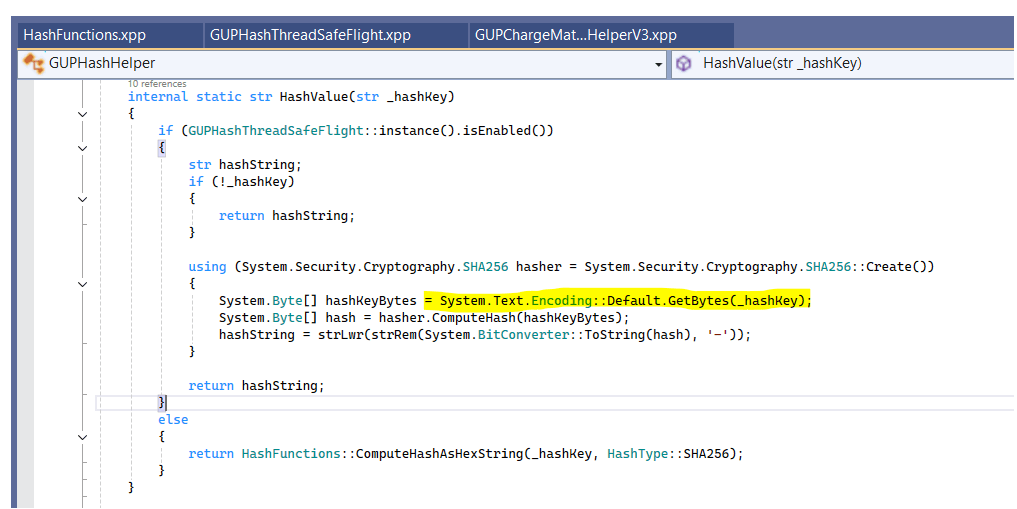
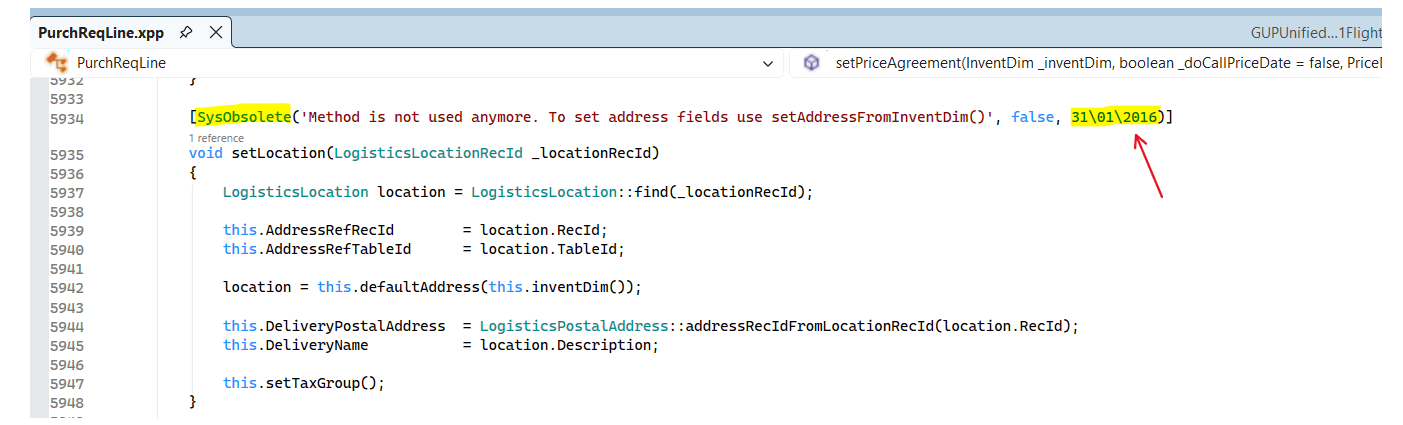
In the codebase, these attributes typically appear directly on the artifact itself, making their intent explicit at compile time.

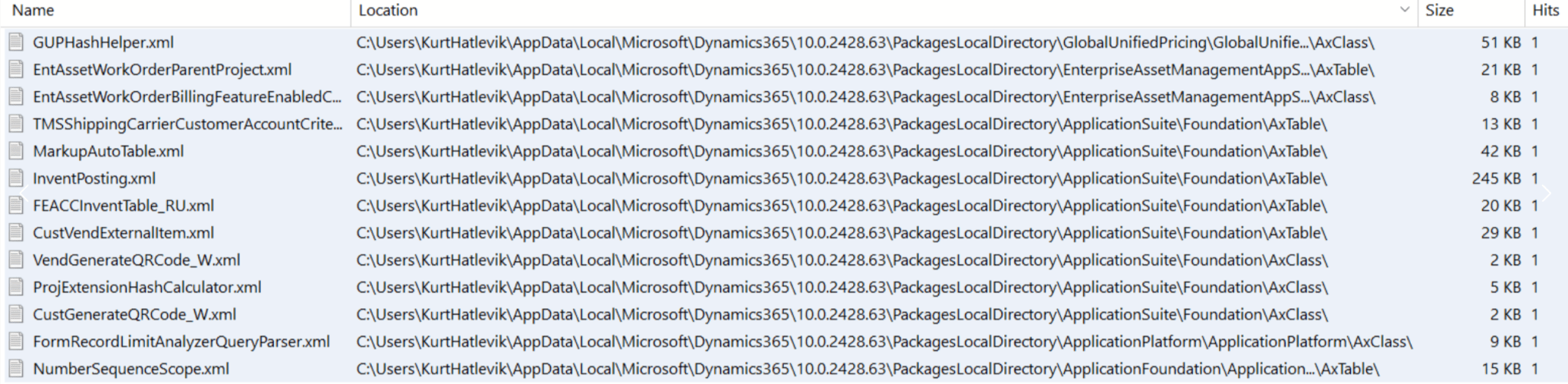
I did a small count using Agent Ransack and found 3,994 methods marked as obsolete. I fully understand that Microsoft must account for customers, partners, and ISVs that still rely on parts of this surface area. That said, the cleanup process is objectively slow. We still have code that has been obsolete for more than a decade, which indicates a systemic issue rather than a temporary compatibility concern.

According to Microsoft documentation, obsolete methods may be deleted unless telemetry shows that they are still being used. If telemetry indicates usage, Microsoft will not remove them in order to reduce the risk of breaking consumers. This is an important detail: the presence of obsolete code is not the real problem — continued usage is. As long as deprecated APIs are still invoked in customer or partner solutions, Microsoft is effectively blocked from removing them.

Microsoft therefore recommends compiling your codebase against the latest application and platform versions at least every 12 months. Any warnings caused by deprecated or obsolete artifacts should be addressed as soon as possible. In practice, these warnings should not be treated as background noise. They are an explicit signal that technical debt is being carried forward.

This leads to an uncomfortable but necessary conclusion: a significant reason obsolete code remains in the platform is that customers, partners, and ISVs are not acting on compile warnings. If obsolete APIs continue to show up in telemetry, Microsoft cannot safely remove them — regardless of how old or redundant they are.

As a community, we should take more responsibility here. Cleaning up our own code and removing dependencies on obsolete APIs makes the platform healthier for everyone. When telemetry no longer shows usage, Microsoft can finally complete the deprecation cycle. This is one of the few areas where individual discipline directly enables platform progress.

The same reasoning applies to flights and feature flags. A quick scan shows 8,914 classes ending with *Flight, many of which are enabled by default today. Flights serve an important purpose during controlled rollouts and experimentation, but once a flight is globally enabled and has proven stable, it has effectively completed its lifecycle.

At that point, it should enter a formal deprecation path. Permanently enabled flights that remain in the execution path add:

  • Cognitive overhead for developers
  • Runtime condition checks
  • Upgrade and refactoring complexity

In many cases, they have simply become technical debt. While each individual check may be cheap, the cumulative cost across the platform is not zero. Every conditional branch executed thousands or millions of times per day matters.

The same applies to features that are now considered part of the core behavior. If something must remain configurable for business reasons, it should be expressed as a parameter, not as a flight or feature flag. Flights are a rollout mechanism — not a permanent configuration model.

None of this ignores the realities of backward compatibility or long customer upgrade cycles. Microsoft is right to be cautious. Telemetry-based decisions are safer than forced breaking changes. But that caution only works if the ecosystem does its part.

AI and Copilot will help us write more code. They will not reduce the long-term cost of carrying unnecessary code forever. D365 will be delivered, extended, and maintained for many years to come. If we want it to remain performant, understandable, and evolvable, we need to treat deprecation as a process that actually completes — not as a warning we learn to ignore.

D365, DevOps and GIF-it

A picture can tell more than a 1000 words.” But a video can tell even more.(Unless it is fake AI generated).

When implementing Dynamics 365 we often use DevOps to document requirements, tasks and bugs. But did you know there is a very quick and easy way to attach a small video to you work items ?

I use the “Snipping Tool” a lot to take screenshots, but this can also record video’s within a specified area.

Start the process by clicking: Windows logokey + Shift + S

Then select the video tool:

The select the area you want to record, and start/stop recording. Also use Zoomit to make marks.

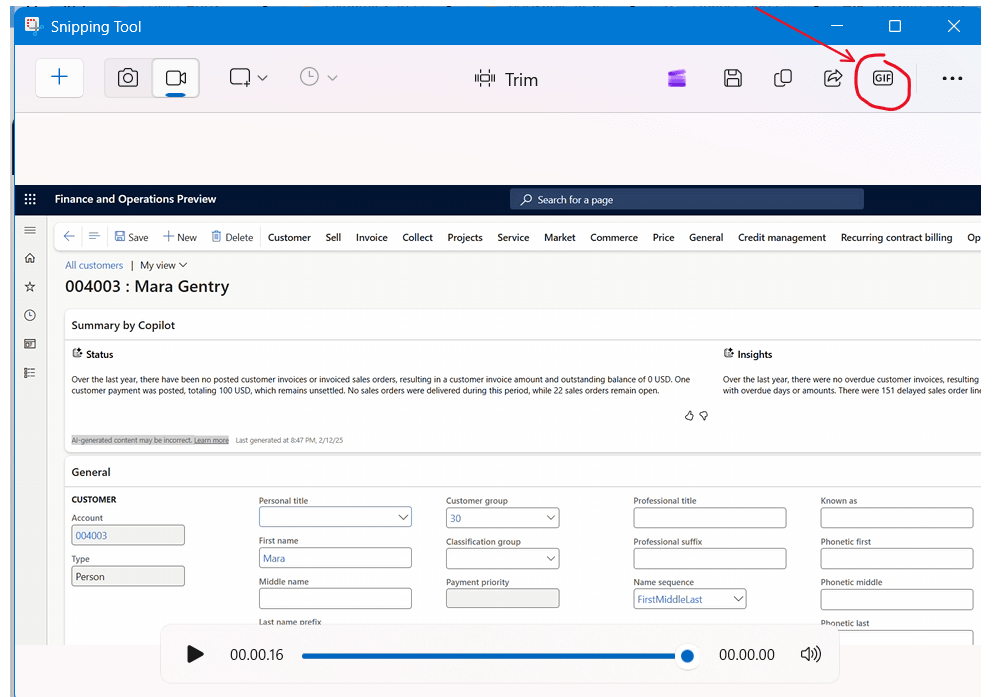
So far so good… But here are the super trick. In the Snipping Tool that pops up click on “GIF”:

And then select “Copy”:

This allows you to paste(CTRL-V) a video into DevOps, documents, emails etc. And even into blogs:

Small things matter also 🙂

D365 and the quick ‘ping’ performance test

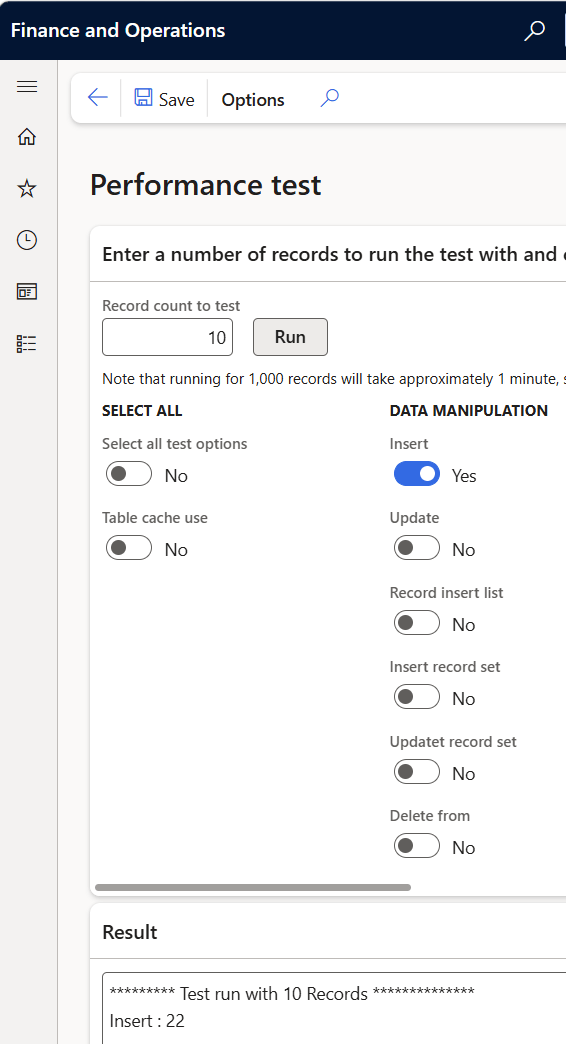
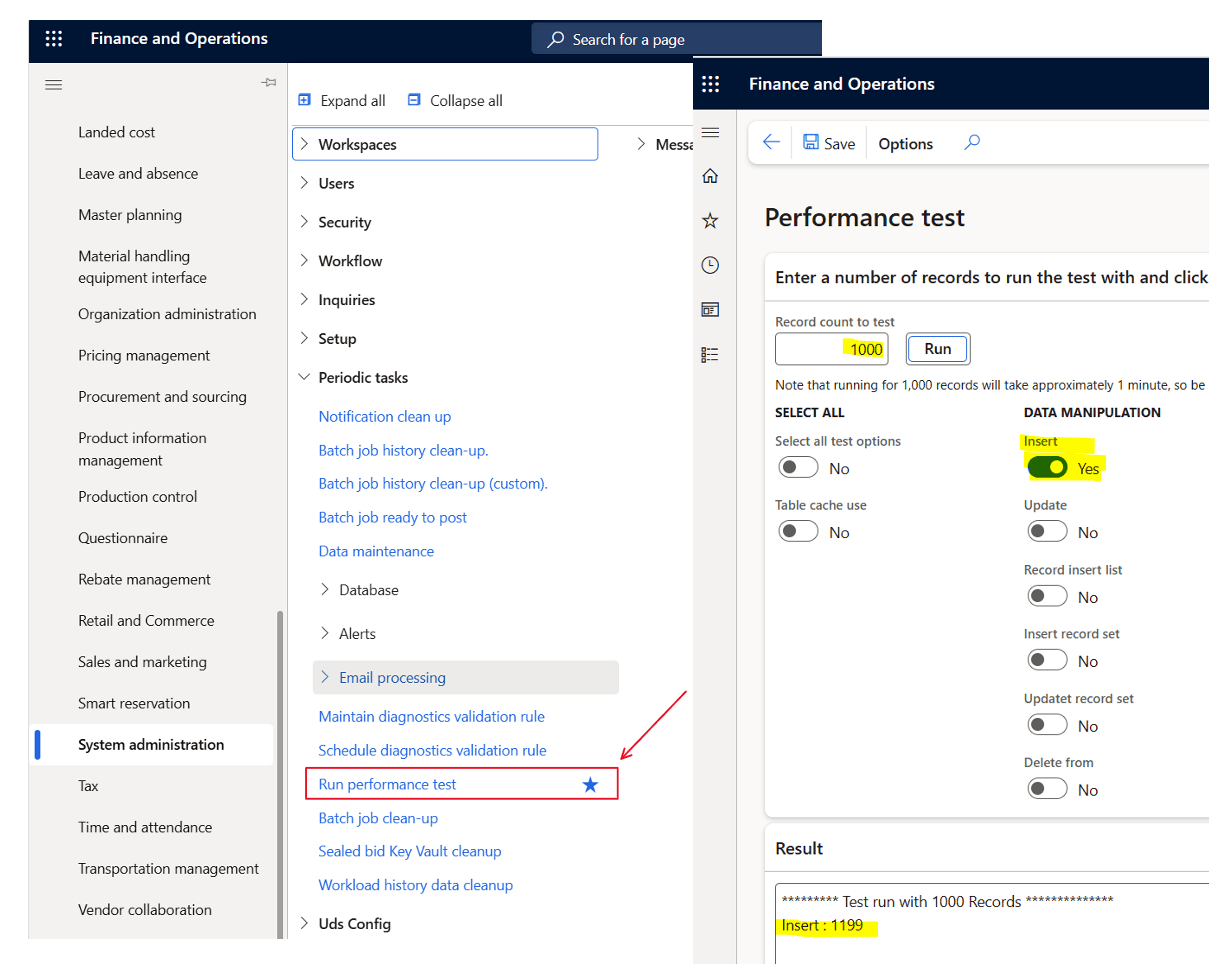
Did you know there is a very easy way to check if your core D365 database are performing OK. Use the tool ‘Run performance test‘.

There are no need to enable every test. Just focus on the insert of 1000 records.

What is shown is the number of milliseconds it takes to insert 1000 records. (You can go higher or lower to get better average). And remember to run it a few times to get a feeling of the average.

If your PROD performance on 1000 records is

less than 2000ms – You are good, and have great Azure SQL performance. I prefer to see 1000ms, but depending on load on your system

2000ms-3000ms – OK performance, but you should check that you don’t have AOS crashes resulting in SQL failovers. This is also the typical performance of a Tier-2 environment.

Above 3000ms – If it remains steadily above 3000, then something is probably wrong, and you should open a support case to have telemetry looked at.

You can also see the performance test in trace parser, and here is how it looks when doing 10.000 inserts in a OK performing PROD environment. exclusive average and 0.78ms/insert is quite ok.

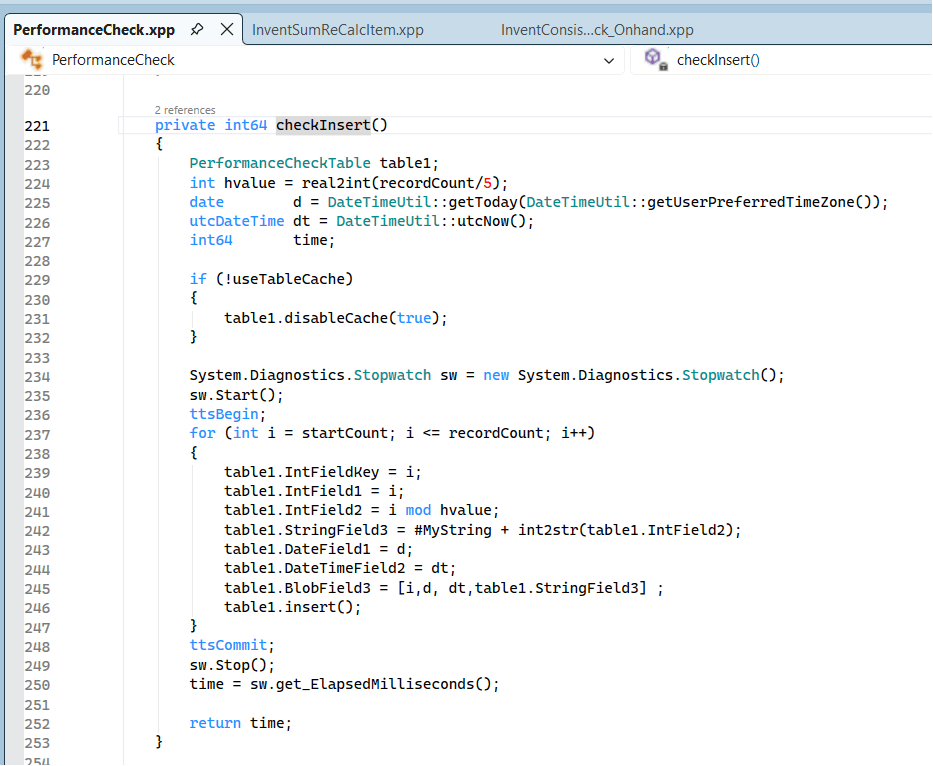
The code executed is basically just a loop inserting some fields in a table named PerformenceCheckTable.

The reason why this test is OK, is because it is only measuring the core performance of the Azure SQL. There are no additional code, complex queries, index problems etc.

When I performance test, I first do this validation to check that the base performance is stable, and that I have a well functioning platform. If this is OK, then I can do deeper and analyse performance on specific functionality covering queries, indexes and algorithms.

One reason I have seen of why the core SQL performance is below “good-performance”, is when there are customized code or ISV that actually crash the AOS. If the crashes happens too often, it seams to me that some disaster recovery mechanism is kicking in and this results in a different Azure SQL SKU or in a different cluster, that may have a lower performance. (We don’t have full insights to this)

So “ping” test your inserts if you wonder if the underlying SQL platform is acting a bit slow.

D365 and the performance of app.css

Each time you load a D365 form som scratch, and you take a view in F12, you will see that there are a lot of calls happening, but one of them, that often stands out are App.Css.

app.css may look like “just a stylesheet,” but it’s a foundational part of the Dynamics 365 F&O web client. Because it is render-blocking and downloaded at the start of each user session, any issue with its size, compression, or caching has a direct impact on the speed and responsiveness of the entire system.

At live customers where we see download time of vary from 3s to 12s, and it’s size is approx. 15.9 MB. My experience is that if this file is downloaded slow, then users complain about performance issues, and that the F&O feels “sluggish”.

You can try it out on your own environment by going to :
[Your F&O URL]/WebContent/ApplicationSuite/less/21/0/app.css

I often see user using favorites or pressing F5. This ALWAYS downloads the file. But if I navigate nicely through menus and forms, it uses the the existing downloaded APP.CSS file. I don’t know why there are not better caching on this file, because it it directly related to the user experienced performance.

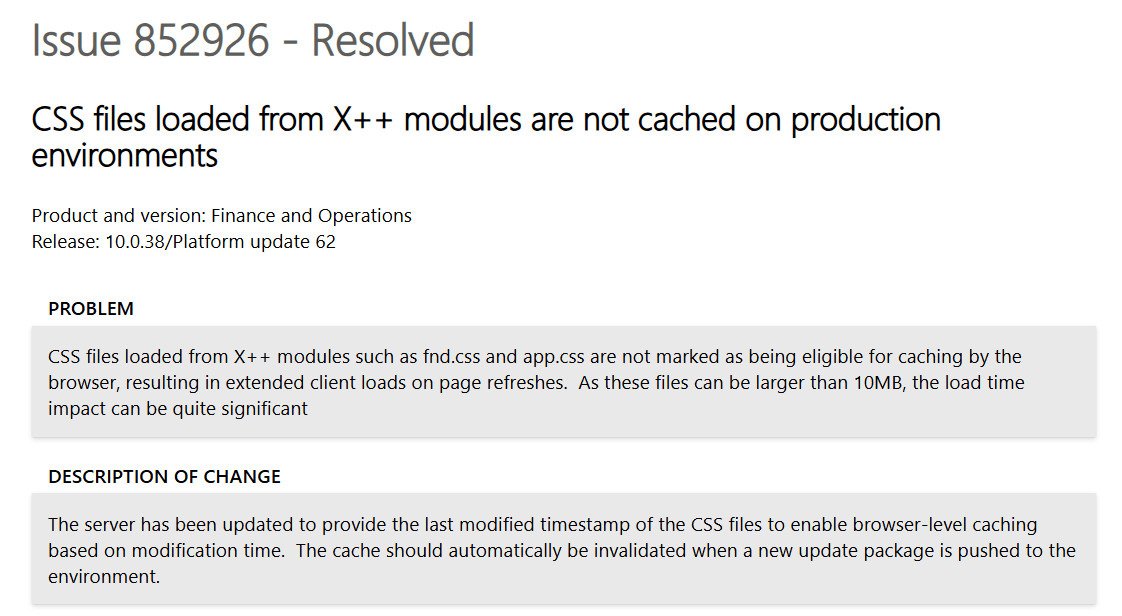
I did find the following resolved issue on the matter, but I cannot see that it works :

But this fix does not seam to work when doing a hard reload, browsers bypass the cache and pull the file again.

The request header is :
Cache-Control: no-cache
Pragma: no-cache
Accept-Encoding: gzip, deflate, br, zstd

The response header is:

Cache-Control: must-revalidate, private
Content-Length: 15864379 (≈ 15.8 MB)
Date: Sun, 23 Nov 2025 11:12:13 GMT
Expires: Sat, 22 Nov 2025 11:12:14 GMT
Last-Modified: Mon, 06 Oct 2025 14:47:48 GMT


Some questions I have is:


No compression. Why ?

  • With gzip/Brotli, you’d probably be in the 1–3 MB range instead of 15.8 MB.
  • Browser advertises Accept-Encoding: gzip, deflate, br, zstd.
  • Server returns no Content-Encoding → raw 15.8 MB.

Cache semantics are conservative.

  • Cache-Control: must-revalidate, private
  • Expires is already in the past
  • This is cacheable by the browser, but:
    • It will tend to revalidate more often.
    • It will never be shared via proxies/CDNs.

I asked ChatGPT to explain what we could experience if we had some serious improvements on how app.css is handed :

The current implementation of app.css in Dynamics 365 Finance & Operations represents a significant and unnecessary performance bottleneck. In multiple production environments, this single stylesheet is delivered as a 15.8 MB monolithic file, served without HTTP compression, and marked with conservative caching headers that force frequent revalidation. This design means every cold session—and far too many warm sessions—incurs several seconds of render-blocking download time before the UI can even appear. This contradicts modern web performance standards and is fundamentally out of alignment with best practices used across Microsoft’s own cloud products.

Even worse: the bundle includes CSS for dozens of feature areas the user will never open, yet all that styling is shipped up front in a single blocking request. A sensible architecture would split critical UI styling into a small, cache-friendly core bundle and load feature/workspace CSS asynchronously. Combined with proper Cache-Control headers and gzip/Brotli compression—both trivial to implement—first-paint latency would drop from multiple seconds to well under a second, and warm loads would be effectively instantaneous.

Put bluntly: no enterprise web application in 2025 should ship a 15 MB uncompressed render-blocking CSS file, and F&O is long overdue for a cleanup here. Microsoft can dramatically improve perceived performance across all customers by modernizing static asset delivery for these core UI bundles.

To put the impact into perspective: today a 15.8 MB uncompressed app.css over a typical 15–30 Mbit/s corporate connection costs roughly 4–9 seconds of pure transfer time on every cold load — and that’s before the browser even starts rendering the UI. The same stylesheet, if split and compressed down to ~2 MB of critical CSS, would load in well under a second on the same line speed. With proper client caching on top, most users would pay this cost once per update, not once per session. In other words, a trivial change in how static assets are packaged and cached would turn “wait 5–10 seconds for the client to wake up” into “page is ready almost immediately” for every F&O customer on the planet. “

Hmmm…. Chatty agrees with me 🙂 This should be fixed.

Here is the “idea” for votes : https://experience.dynamics.com/ideas/idea/?ideaid=de4f0ff0-dac9-f011-ad8e-7c1e52cc5c16

D365 : Why is SysDA uptake so slow ?

SysDA is a data access abstraction layer. Instead of writing raw SQL or direct select statements, SysDA lets developers build queries through objects (SysDaQuery, SysDaSelect, SysDaWhere, etc.).

Some benefits are:

  • Safer SQL generation
  • Better performance optimizations by the platform
  • Database-agnostic query logic
  • Protection against SQL injection

It essentially converts X++ query intent into SQL at runtime, while the platform can optimize or change behavior without code rewrites.

The SysDA framework was made available 2019 and there are a few blogposts and docs relevant to read to understand the benefits:

2019 – Michael Fruergaard Pontoppidan – SysDa – a new X++ query API

2021 – Peter Villadsen – The SysDA framework

Docs – Access data by using the SysDa classes

But when I look at both Microsoft code, ISV code and Partner code, I see a very low uptake on using this framework.  Why ?  The benefits are huge.  Especially on performance.  Nathan Clouse did perform tests in 2023 on Database Inserts and Performance and did show in the comparison blog post show real performance gains. As Nathan writes:

for inserting records makes SysDA appear to be a no-brainer for workloads that demand high performance

Despite the clear technical advantages, community adoption of SysDA has remained relatively low because most developers are already deeply invested in classic select statements and QueryBuild classes, which have worked reliably for decades. SysDA arrived late in the F&O lifecycle, shipped with limited documentation, minimal samples, and almost no public benchmarks showing real performance gains.

Without strong Microsoft advocacy, training, or tooling support, many assume SysDA adds complexity without offering tangible benefits. In addition, it is harder to debug, unfamiliar to consultants who are not pure developers, and optional rather than mandated.

The result is a technology that solves real performance problems, but sits under-used because the learning curve appears high, the payoff isn’t visible, and most customers don’t know it exists.

Dear community and Microsoft;  Please use SysDA more!  We need more power.

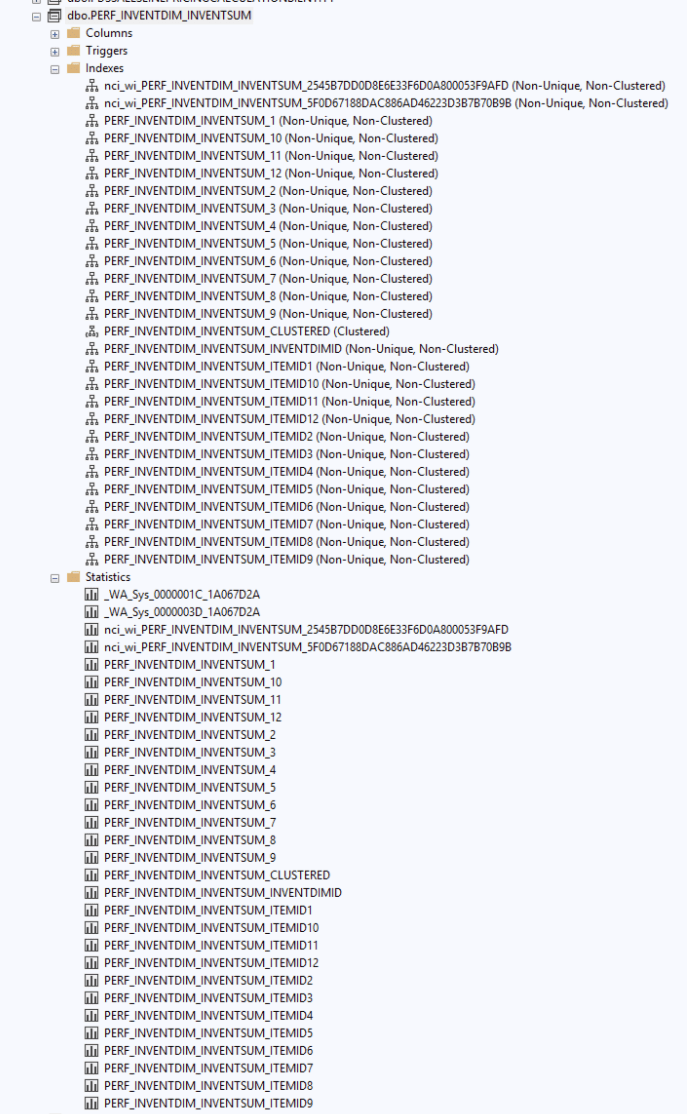
D365 : PERF_INVENTDIM_INVENTSUM, and PERF_INVENTDIM_WHSINVENTRESERVE

If you look into where your DB is going, then in some cases the following two views pop’s up as occupying quite a lot of space:

PERF_INVENTDIM_INVENTSUM, and PERF_INVENTDIM_WHSINVENTRESERVE

At one customer they took :
AXDB.PERF_INVENTDIM_INVENTSUM 106.74 GB
AXDB.PERF_INVENTDIM_WHSINVENTRESERVE 96.33 GB

In 2021 -> 2022 Dynamics 365 went trough some major inventory performance redesign introduced around version 10.0.25–10.0.27. Eliminating the need to join InventSumInventDim for most queries Improved on-hand calculation performance, especially for:

  • Reservation hierarchy queries (WHSInventReserve)
  • Recalculation jobs (InventSumRecalcItem)
  • On-hand queries via InventOnHand* views
  • Simplified indexes: Each denormalized InventSum row now carries its own dimension attributes.

But in the process of improvements, there where some workflows that created these tables. But they are of no use any more.

Just create a support case, and Microsoft will remove them, and you regain your Gig’s 🙂

Hopefully Microsoft will also flush out these views in a future update.

From Consensus to Consent – Speed Things Up

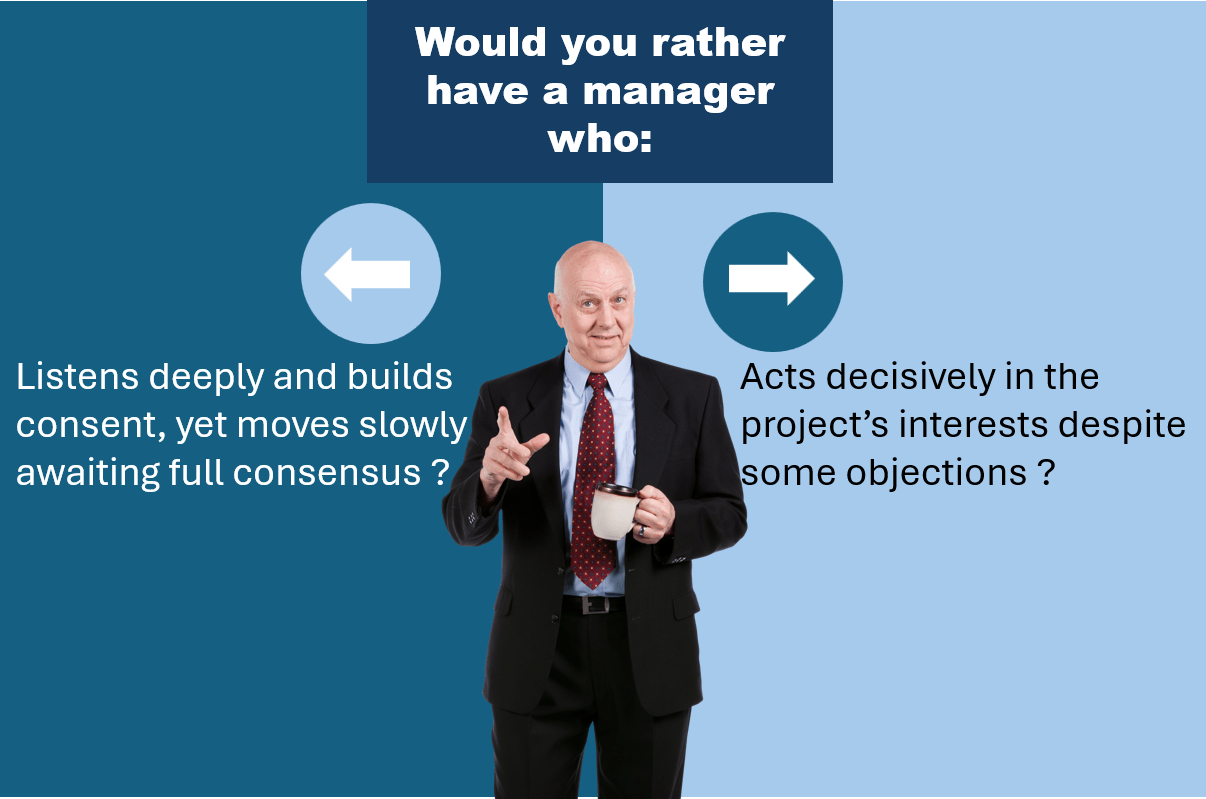
In many projects, we lose momentum not because people resist change — but because we wait too long for consensus. We keep discussing until everyone agrees. And then time flies by, costs accelerate and we fail on success criteria’s. Chasing the perfect decision means often results in winning the fight, but loosing the war. Project resources are not endless and most often have constrains we commercially must respect.

But real progress often starts when we shift our goal from consensus to consent, where we move from “everyone says yes” to “no-one says no“.

In any projects, there are a lot to clarify, but we cannot wait for everybody to agree. We need to speed up, and on some cases take a chance on direction. Things get more clear as we move on one direction. Doing something is most often better (and cheaper), than doing nothing. (playing the costly waiting game)

So how do we implement a consent model ?

  1. Start with a proposal
  2. Establish ownership
  3. Set a due date
  4. Ask for input
  5. Resolve objections
  6. Decide and document
  7. Revisit if necessary

What you will experience is that decisions accelerate, and the projects starts getting momentum and speed. Try it 🙂

D365 Commerce – Clean up your 9999

If you use D365 Commerce, then you are most likely also have some CSU (Commerce Scale Units). Sending and receiving data frequently can quickly take a lot of preciouses GB of storage, that you want to use for other purposed.

To see if you need to clean up, go into download sessions in the “Retail and Commerce” module, and see if you have a lot of old stuff like this:

If you do, then setup go into Commerce Scheduler parameters, and specify your retention period and then click on the “Purge history data”:

This will purge upload session, download sessions and a few other elements. You do not need to run his on a high frequency, and typically set it up for weekly or monthly.

Every ‘bit’ removed becomes savings down the road.

Where are the implementation cost-reductions ?

I’ve been implementing D365 since it first became available. Over the years, the improvements have been both incremental in the short term and fundamental in the long run. Cloud, AI, and modern architecture have reshaped what’s possible.

But what puzzles me is this: the costs of implementing D365 and transforming business operations haven’t changed in any dramatic way. In short—it’s still as expensive as before. D365 projects remain a significant investment. I haven’t seen groundbreaking cost reductions nor revolutionary improvements in project timelines.

Is it the complexity of the businesses we serve that keeps costs high?
Or is it the way we implement?

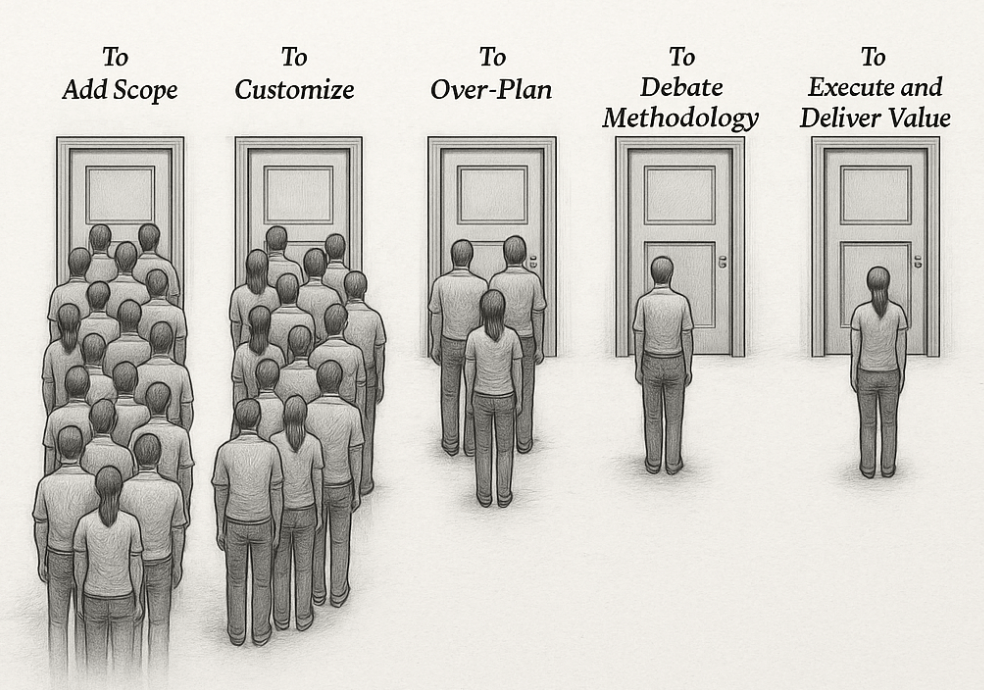
We now have more tools than ever before: preconfigured templates, industry accelerators, AI-assisted data migration, automated testing, low-code/no-code extensibility. But has any of this translated into faster, leaner projects? Or do these same tools just create space for more scope, more configuration, and more “what if we also…” discussions?

Maybe the real challenge isn’t the technology at all, but people. Business transformation has always been more about change management than software deployment. Even with better platforms, organizations still struggle to align processes, culture, and governance. Could these softer elements be the real bottleneck—and no technology ever deliver the cost reductions we expect?

Or is it us—the implementers?
Do we hold on to project models that worked in the past instead of fully embracing new approaches? Are we overcomplicating, or simply responding to inherent complexity?

And perhaps there’s another angle: the way projects are guided from the top. Do managers at implementation partners truly understand the realities of modern D365 projects? Or are decisions sometimes made with outdated assumptions about effort, scope, and methodology? It’s a delicate question—but if the leadership guiding these projects hasn’t evolved as quickly as the technology, could that also explain why costs remain stubbornly high?

And what about the customers?
Do they sometimes expect D365 to be a silver bullet, expanding scope beyond what’s realistic? Does the push for customization and perfection undermine the potential for a lean, standard-first approach?

If costs haven’t dropped, maybe the question shouldn’t stop at cost. Perhaps the value and revenues for companies implementing D365 have increased—making the same (or even higher) implementation spend worthwhile. Have organizations gained agility, sharper insights, or stronger customer engagement that offset the cost? If so, maybe the calculation has shifted from cost reduction to value creation. If not, then the cost question becomes even more urgent.

Looking back, I see remarkable progress in the platform itself. Yet when I look at implementation costs, I can’t shake the question: have we really moved forward in how we implement?

So the question remains: Have you actually seen D365 implementation costs go down—or is the real story in the value delivered?


Some facts to reflect on

  • Implementation still costs 2–5× license fees — $50K in licenses often means $150K–$250K first-year total (source).
  • Timelines haven’t collapsed — large D365 projects still average around 14 months (source).
  • Value is real — IDC found organizations gained an average of $20.6M in annual benefits after D365 implementations (source).

Chatty have helped with this post, but all content is mine.

Microsoft publishes Sales Order Agent use case in FastTrack-Implementation-Assets

Microsoft has now published a new FastTrack use case for the Sales Order Agent in D365 . This shows how AI is becoming an integrated part of ERP—automating order intake and reducing manual effort.

What is the Sales Order Agent?

The Sales Order Agent acts as a virtual assistant. It can read customer emails, create sales quotes, check stock availability, and convert quotes to sales orders. The agent can also handle follow-up questions if the request is unclear.

The goal is simple: reduce repetitive data entry, speed up processing, and let people spend more time on value-adding tasks.

See the use case here

If you are working with D365, the Sales Order Agent is worth exploring. It shows where ERP is going—towards more automation, more intelligence, and less manual work.

(Chatty helped with writing these complex sentences, but the Sales Order Agent does still seem cool)

D365 : Is AI fast enough ?

The short answer is no!  It is and will be too slow for a long time!  But slow does not necessarily mean useless. We must set realistic expectations and create use cases where it is OK to be slow.  I work a lot with performance enhancements and tuning Dynamics 365.  I understand the underlying platform and architecture, how data is stored and fetched from Azure SQL and computed on.  I see the latency and most importantly see the effect of tuning algorithms. 

For “close-to-real time” scenario’s, AI/Copilot does not even come close to what we see in algorithmic performance.  Let’s say you have an eCommerce site, or a POS.  The user selects the products, and we need to present a price within a few milliseconds.  Algorithms can do that.  AI cannot.  But AI solutions are excellent to build and adjust the business data and rules used for a pricing engine, when done in the background by AI agents.

This means that at the AI can set up and feed Dynamics 365 with the right data/setup to fulfill defined goals and scenarios. In the future I expect we can have AI Agents connected through MCP that monitor current sales data, cost changes, competitor pricing,  and availability.  We can have AI Agents that adjust and review current pricing and come up with recommendations on what to change.  Price adjustments are then a logical business decision based on actual data to optimize revenues.

Today I see that the algorithmic performance is very fast, but the human reaction time/processes to adjust pricing and related data is slow.  In the future pricing will be based on defined goals given to your Dynamics 365 agent.  This agent will then perform analysis, run simulations, ensure approvals, monitor effect and adjust with optimalizations.  But also communicate the price change effects to those responsible.  The agents will enter the data into the forms and tables, making it ready to be used fast algorithmic applications.

We then get the best of two worlds;  Fast algorithmic real time performance, mixed with the slow asynchronous AI that analyze and to all the heavy lifting to find better pricing and ensure better profitability.

So don’t fire your traditional developers yet.  They are still needed to create lightning-fast real-time algorithms.   

(This article was written without the use of any slow AI’s)

D365 – Play with Headless Commerce

Headless Commerce is a set of API’s, that allows you to interact with the Commerce Scale Unit, that is the main component when working with POS and eCommerce.  But as shown by Patrick Mouwen’s blog, it can be used for so much more.

But the purpose of this blogpost, is to give you a low-entry start on how you can play with it through a browser and using postman or insomnia.

First we need a site to play with.  Let’s use https://www.adventure-works.com/ and open a product, like this : https://www.adventure-works.com/cozmino-men-s-coat/68719519883.p

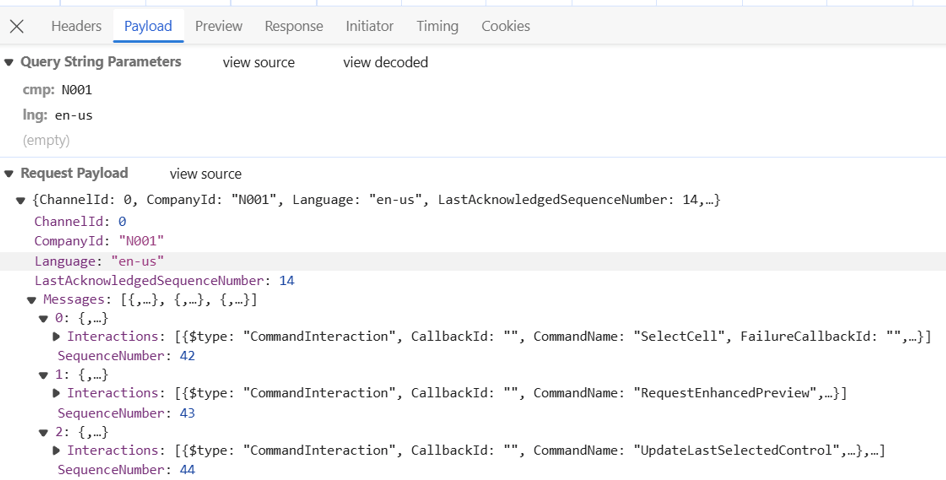
If you press “F12” you should be able to see a lot of calls towards the headless Commerce.  And got to the network tab, and then filter on the “Fetch/XHR”.  See if you can find the call “GetByIDs”, then take a look at the preview/payload and the response to see what you can get out of the API.

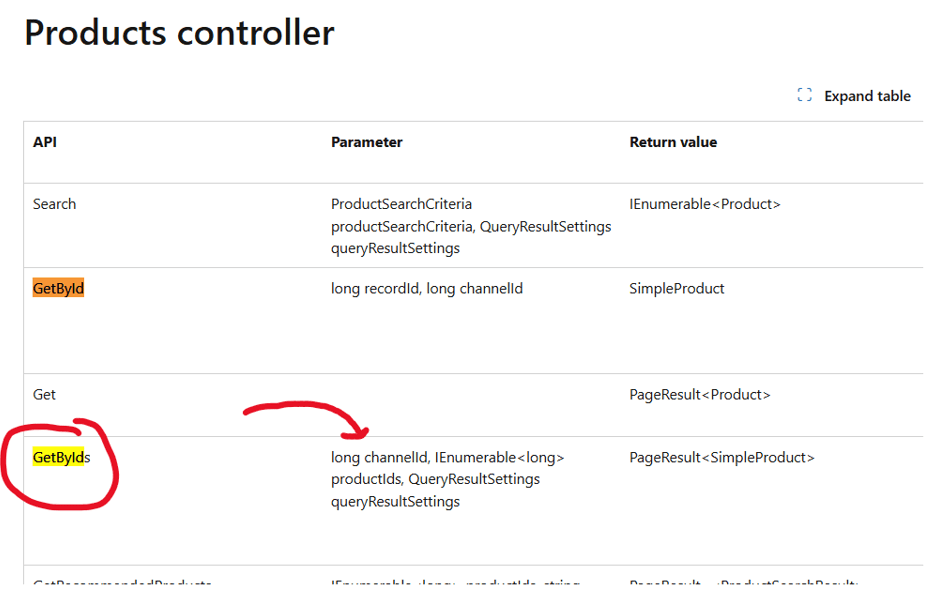
The GetByIDs is documented as a API here : https://learn.microsoft.com/en-us/dynamics365/commerce/dev-itpro/retail-server-customer-consumer-api, and you can find additional 493 distinct APIs.

Here we see that GetByIDs returns product information in the documentation.

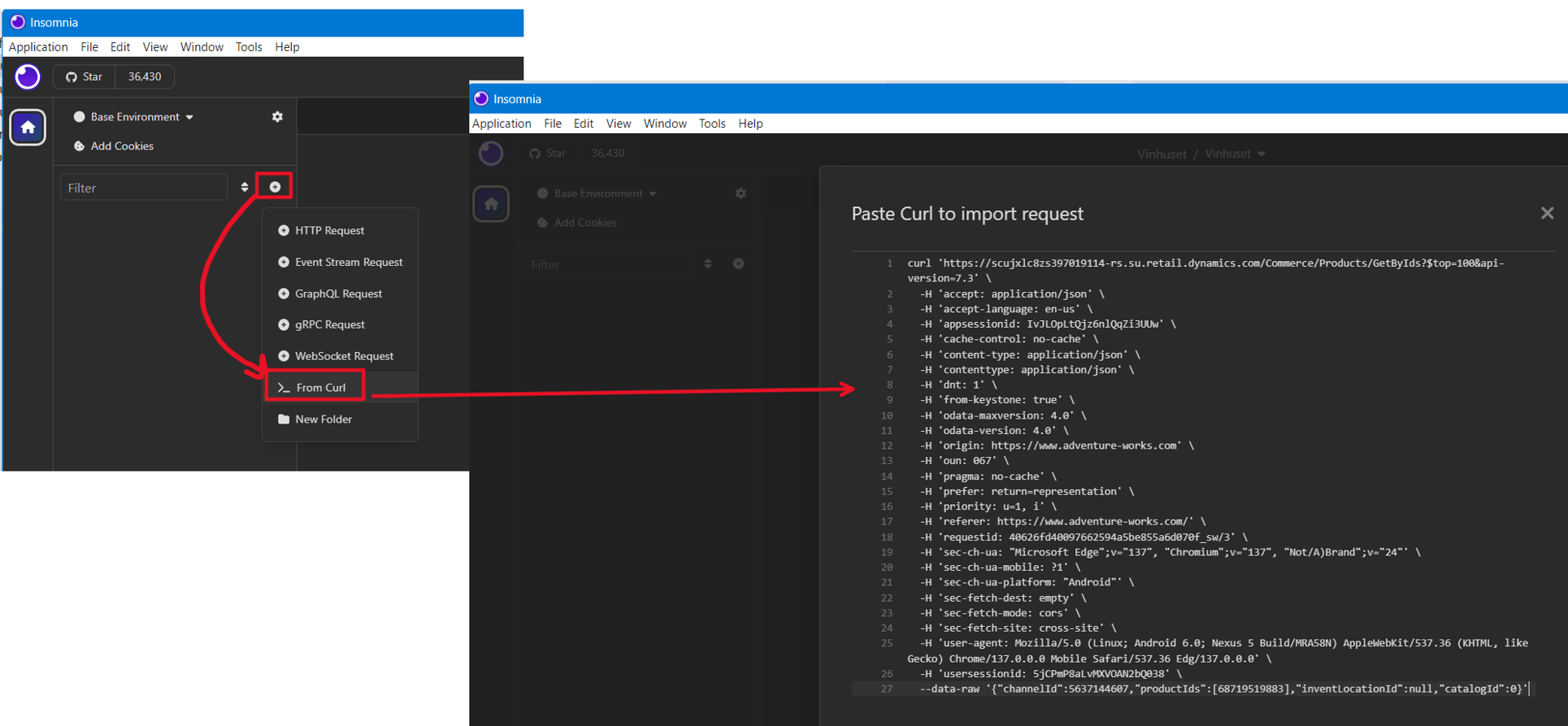
The next step, is to take this a bit further.  Right click on the name, and copy as cURL (bash)

Then you can paste the entire call with headers and authenication.  In this example, I’m using Insomnia, but it works just as great using Postman.

You now have an interface, where you can test out the results from the headless call, and see the returned data.

This is also great, because all headers and authentication is copied also, so you can get data associated with the login and the role when logged in.

So the quick summary : copy as cURL (bash), then paste into postman/insomnia.

Now you have learned the first step on how to play with headless commerce.

Your next step is to read Patrick Mouwen’s blog : https://patrickmouwen.com/ , and the start building 3’rd party apps that can use more of the API’s provided by the Dynamics 365 eCommerce.

And if you want a complete set of documentation you can ask Microsoft nicely through a support case to enable swagger for a non-prod environment.

D365 – Skip Transportation management and save 100ms

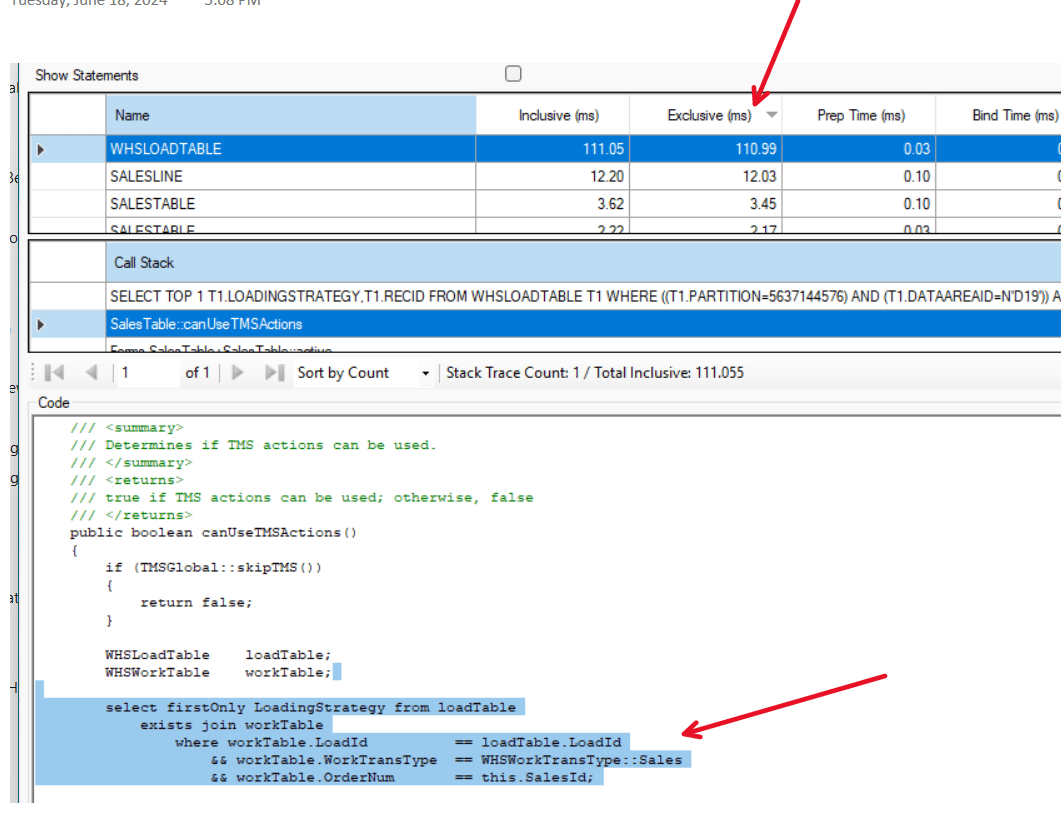
In my chase for millisecounds, here are a small one. If you are not using the TMS – Transportation Management module, but are using the WMS, then there are some costly validations on the sales order header. There is a hardcoded x++ parameter you can extend to prevent some heavy queries. The effect is that the following menu items is “deactivated”:

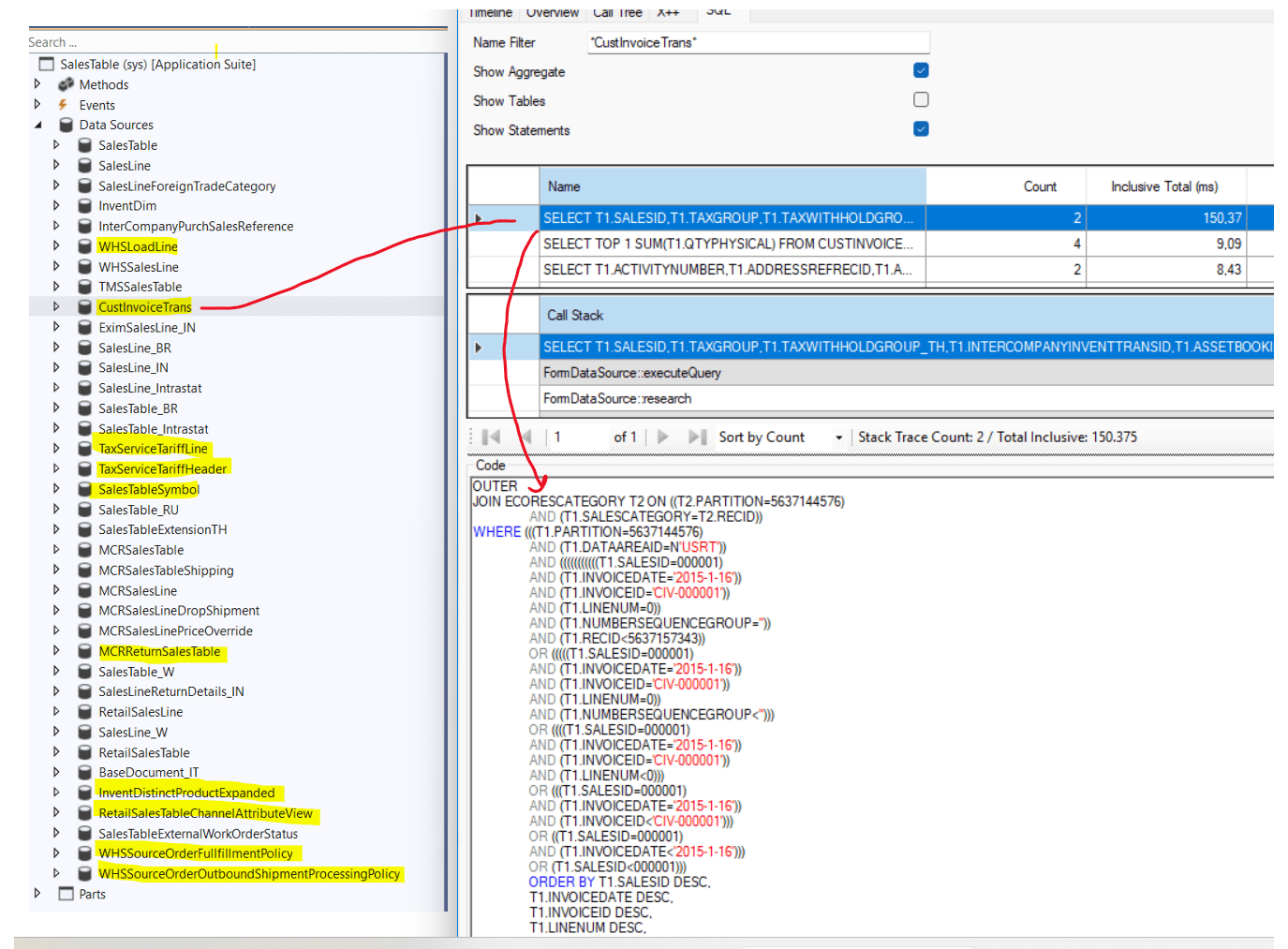
The query code you are skipping is a quite heavy 100 ms select with a join between WHSLoadTable and WHSWorkTable. In my world, 100ms is a lot for a query, and it is executed each time you select a sales order.

As seen, you need to create a small extension to the class TMSGlobal::skipTMS(). The forms/tables using this check is the following:

I would hope that instead of a hard-coded extension, Microsoft could make a parameter instead.

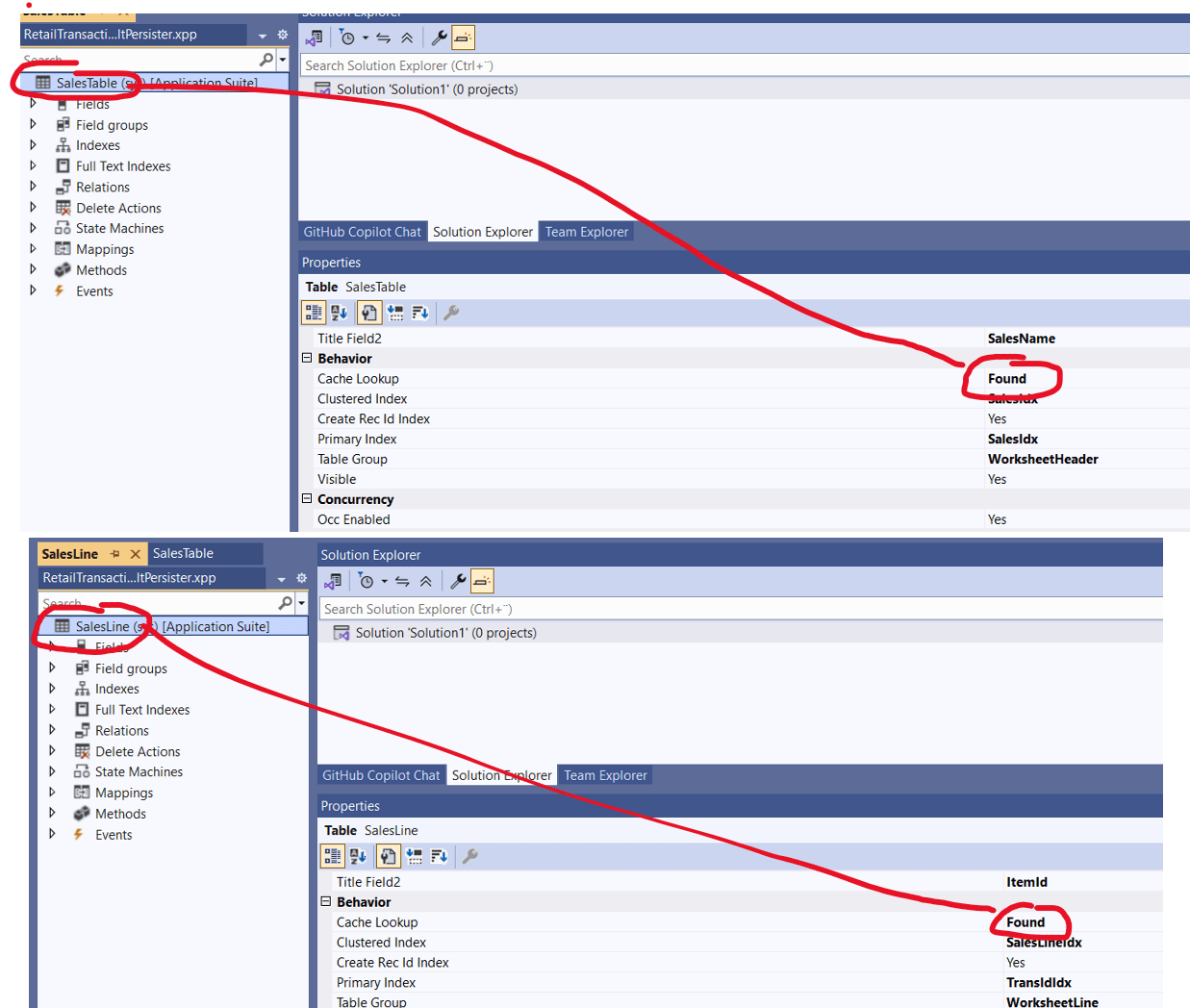
D365 10.0.44 Preview and the “Cache Lookup = found” fix

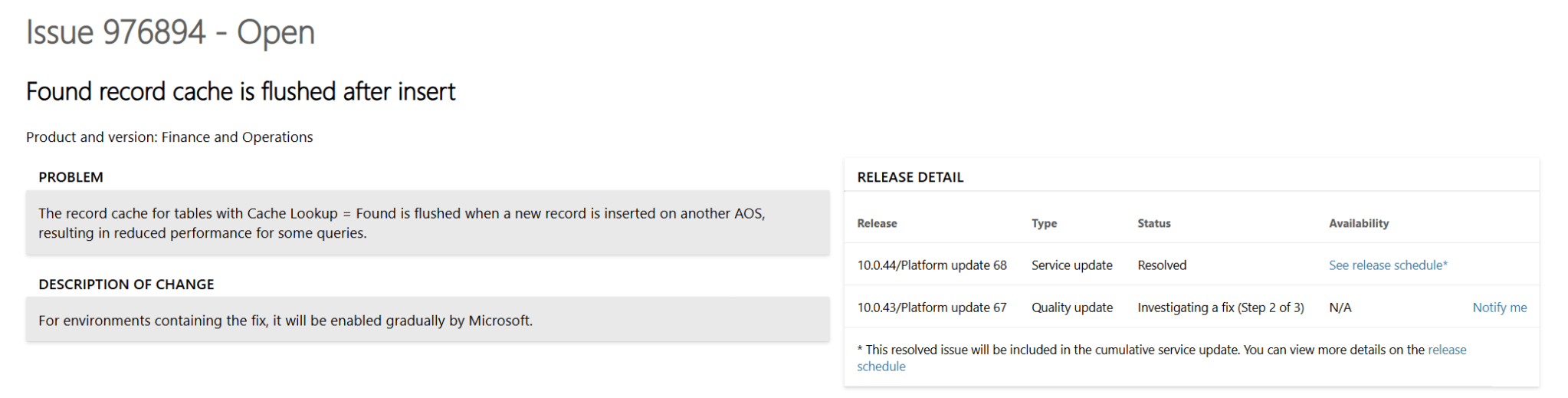
As others have written, the 10.0.44 preview is now made available, and it gives a glimpse of what is to come in June. A lot have already been shared in blogs and LinkedIn feeds. But I like to go deeper, and this time I found a jewel that I think will have a noticeable performance impact. See https://fix.lcs.dynamics.com/Issue/Details/?bugId=976894&dbType=3

What is issue are explaining is that when a record is inserted on another AOS, then the cache is flushed on the table in question. In essence, this means that each AOS have to recache the data. Two tables that are quite recognizable that have Cache Lookup = found is SalesTable and SalesLine.

So one of the issue I have seen, when looking for performance, is that data that should be cached, the kernel are performing queries towards the DB, while the expectation is that the data should be fetched from cache.

I don’t have any clear measurements on what the actual impact will be, but I know for sure that caching is one of the main mechanisms for improved performance and user experience.

Good catch Microsoft! We need more of these generic performance improvements.

D365 and BIINCREMENTALTABLEMODIFICATIONS

Some time ago, the export to datalake and was deprecated, and the it’s time to do some more house cleaning.  Also, the Power BI embedded reports seams to struggle keeping up in the latest version. Especially if you have played with the Entity store available as a Data Lake.

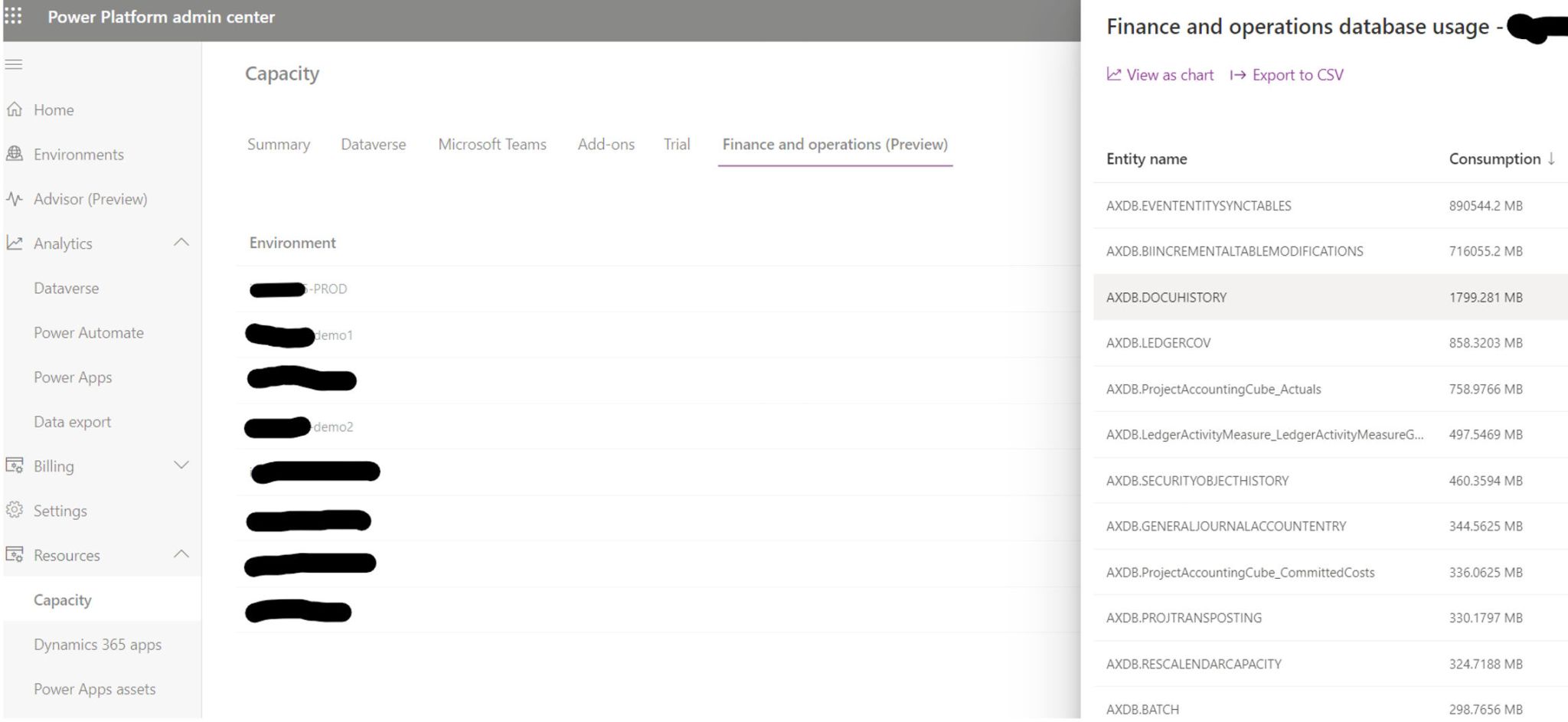
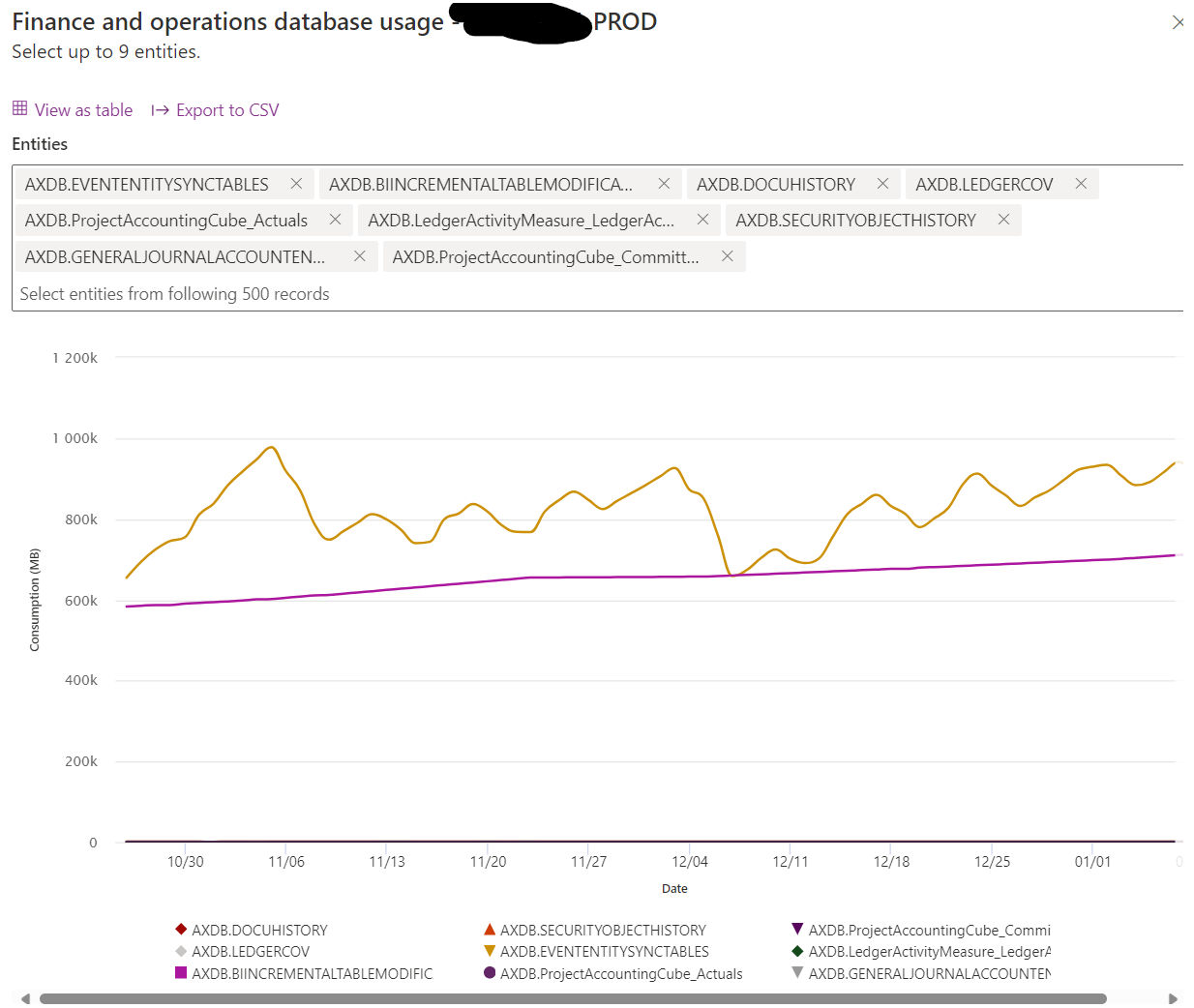
In our own PROD, the BIINCREMENTALTABLEMODIFICATIONS was 326 Gb.  Dataverse Database Capacity at 40 $ / GB would mean an additional cost of 156.480 $ per year for us, so we had to clean up.

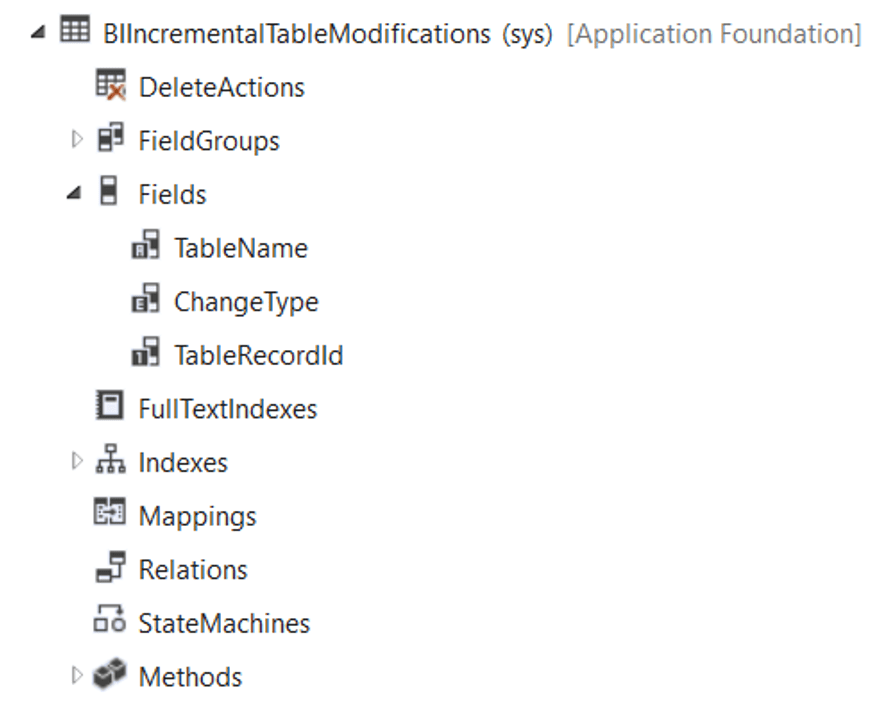
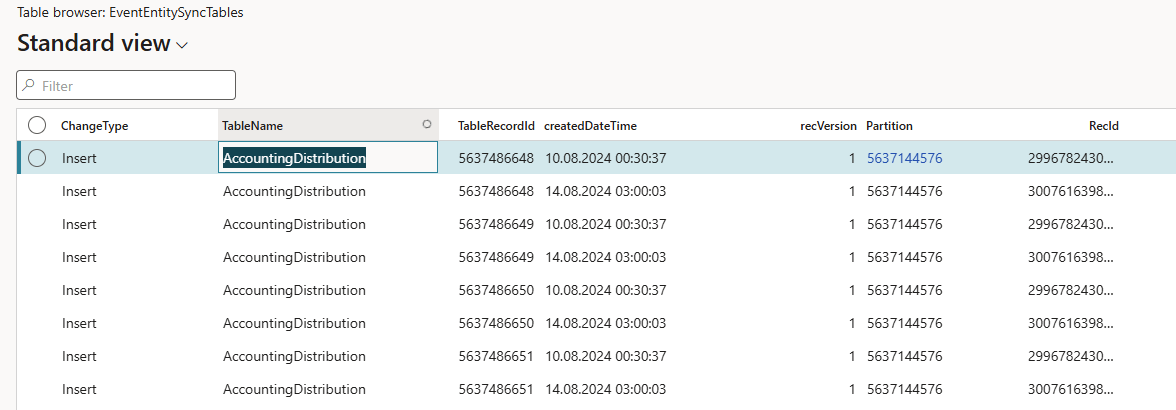
More specifically on the table BIINCREMENTALTABLEMODIFICATIONS, in contains 3 fields, and keeps track of incremental updates to entity store.

To see if you have a lot of data you may open in in F&O by using this URL: &mi=SysTableBrowser&Tablename=BIINCREMENTALTABLEMODIFICATIONS.

Or checkout your Capacity here, and see it your installation is affected https://admin.powerplatform.microsoft.com/resources/capacity#summary

If you see that the you are consuming a lot of DB capacity towards the table BIINCREMENTALTABLEMODIFICATIONS, I would suggest that you create a support ticked to get it flushed out. 

Keep your PROD “trimmed” and healthy, and you are rewarded with performance and reduced licensing costs.

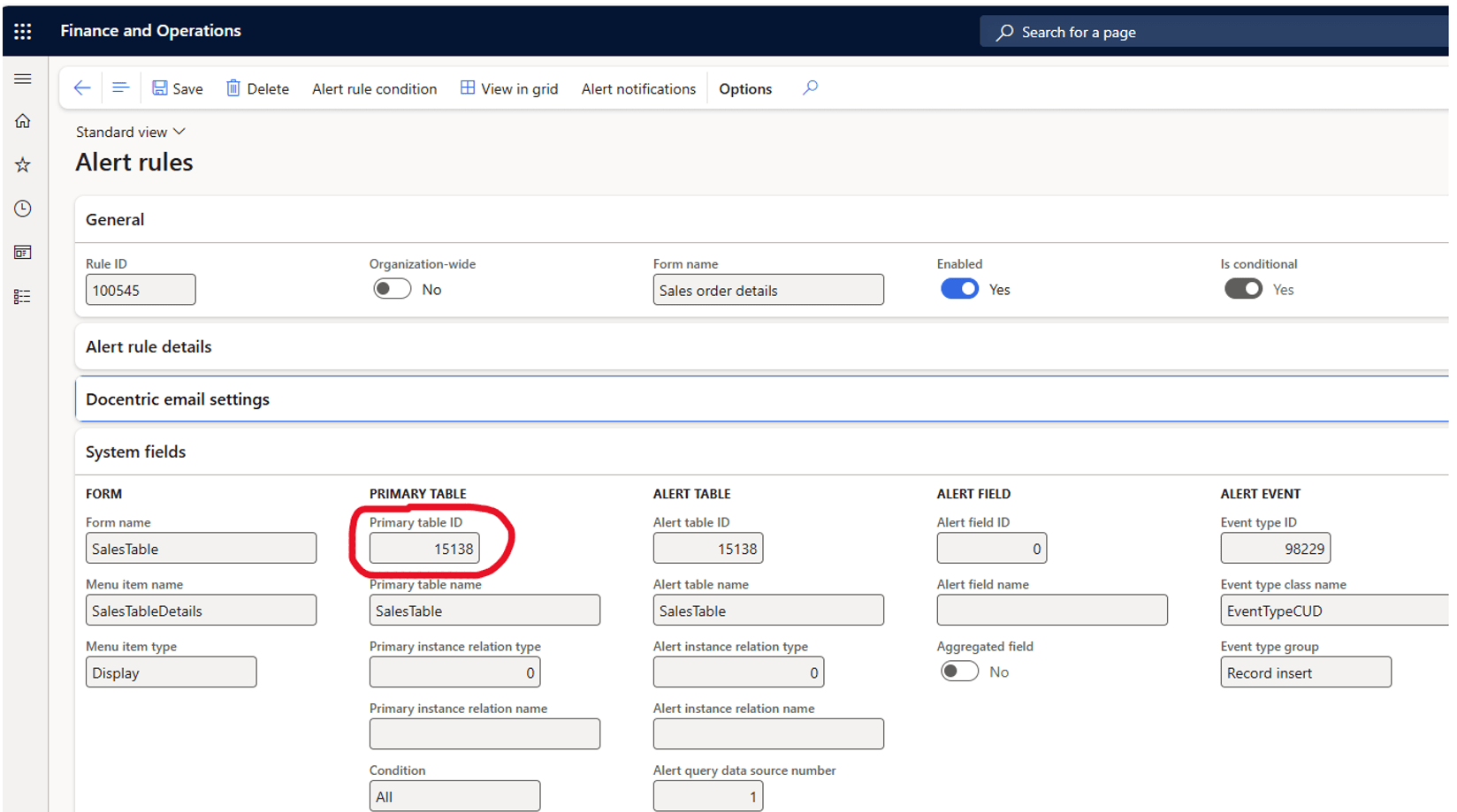
D365 EventCUD and “orphan triggers”

EventCUD is a table normally used for handling change based and due dates alerts in Dynamics 365 F&O.  The details of this process is available here : https://learn.microsoft.com/en-us/dynamics365/fin-ops-core/fin-ops/get-started/alerts-managing

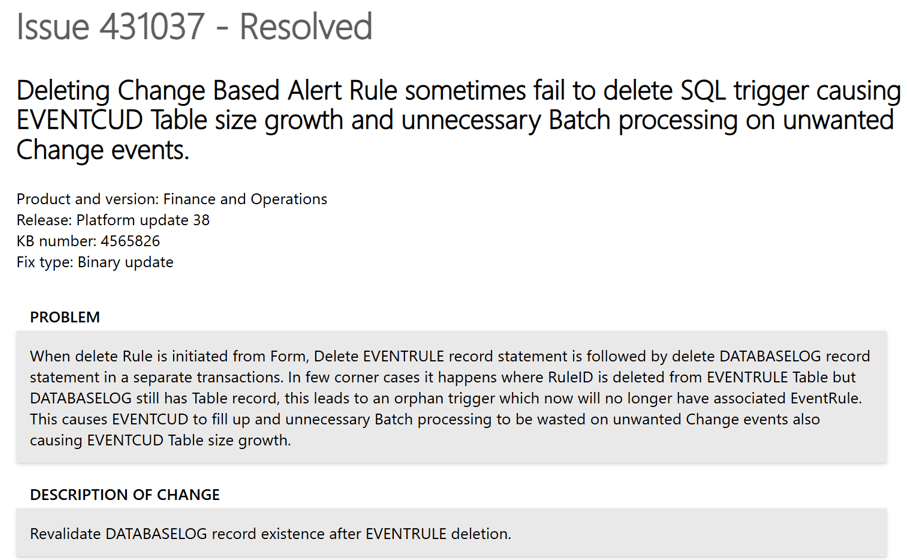
But up until 10.0.38, there was a bug, that could led to orphan “triggers”

The fix from Microsoft does not fix orphan triggers originating from before this fix, so you have to open a support ticket to get it fixed, and also to get the EventCUD table truncated

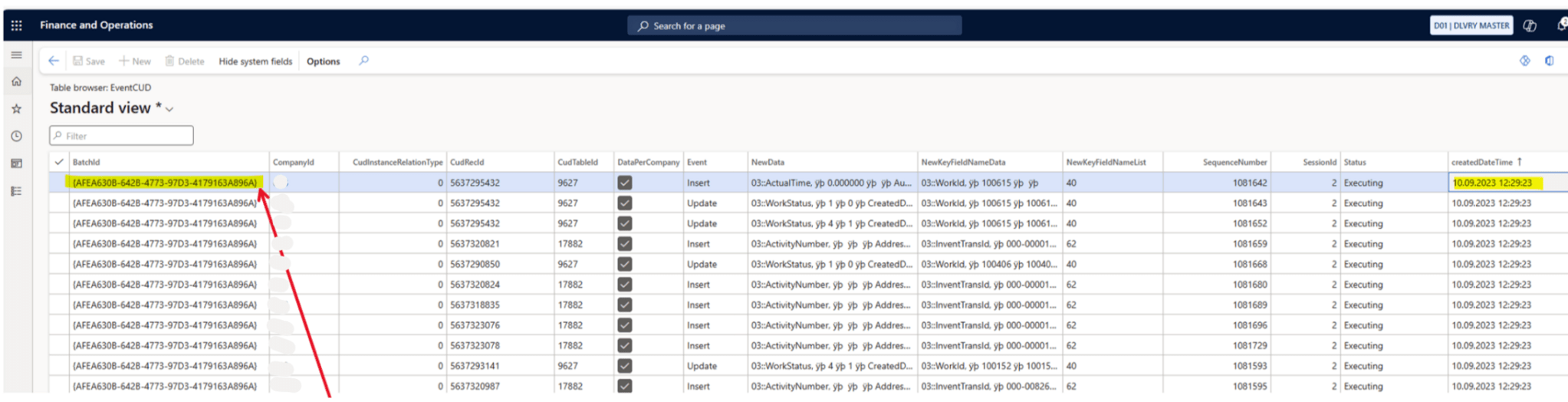
The way you can identify if you are affected by orphan triggers is to open the D365 with the following URL parameters &mi=SysTableBrowser&Tablename=EventCUD. Then look for lines with old created dates:

You should also look for CUDTableId’s not matching your table ID’s on the alerts and database logging.

If you have a “full “ EventCUD and “orphan triggers”, and clean them up, you should experience some performance gains.

And last comment.  Please avoid logging and alerting on high frequency transaction tables.  Take care 😊

D365 – Why you should monitor for deadlocks

A SQL deadlock in Dynamics 365 occurs when two or more processes block each other by holding locks on resources the other processes need, causing a circular dependency that SQL Server cannot resolve without intervention. In the D365 context this typically arises during high-concurrency scenarios like batch jobs or heavy data imports where multiple threads compete for the same database rows or tables. The SQL engine resolves deadlocks by automatically terminating one of the conflicting transactions (the “victim”), which results in an error. In some situations, this also lead to DB fail and where sessions are moved to the secondary DB (That may not be scaled up as the primary DB)

So when experiencing sudden slowness and “strange” errors, please check in LCS for deadlocks like this, and start analyzing the call-stack.

One scenario I experienced when importing large sales orders in parallel, and where the sales orders have the same items.   When having a lot of Commerce or EDI imports, it is common to place the entire sales order creation within the same transaction scope.  Making sure that either is entire order is imported correct. 

I would like to exemplify one specific instance that recently was identified together with Microsoft friends. 

  1. We experienced that frequently the D365 F&O started to be unstable and slow.  And there where no clear indications of why.  We could not repro. Customer reported sudden TTS errors, and that user get errors about losing connection to the DB.  Typically, towards SysClientSessions.
  2. Microsoft then carried out a deep analysis of telemetry, and the findings showed instances of frequent SQL failovers.  Basically the DB failed, and the recovery mechanism moved the database sessions to fail-over DB clusters. 
  3. While going deeper, we found traces of deadlocks.  It seems that DB architecture don’t like massive deadlocks, and when this happens, there are auto recovery mechanisms that kick-in to ensure up time and that users can continue to use the system.

In this specific instance the deadlock was caused by inserting a record table MCRPriceHistory, and the index RefRecIdIdx.  This table is used for recording pricing details on the sales order.  Finding deadlocks on insert are rare and a unicorn, and therefore I just had to write about is. 

In this specific situation, there are two options :

1. Disable the Price History feature.  (Unified pricing related), and wait for fix from Microsoft.

    2. Create a support case to Microsoft, and ask for a index change on MCRPriceHistory, adding recid to the index RefRecIdIdx.

    End note;

    My main message to the community is to be aware of database deadlocks, as deadlock-escallation can have major impact on performance and may also trigger fail-safe mechanism in the Dynamics 365 architecture.  And they are also very difficult to find and analyze.  If you have deadlocks, please create a support case. I’m so grateful we as a partner have invested in Microsoft Premier Support, as this has been crucial to find root cause and final fix.

    D365 A statistical analysis of Sales lines performance

    What I want to showcase in this blogpost is how to use results from the trace parser to analyze deeper, and see where the application is spending time, and to identify where there are optimizations in the application.

    As the application works as designed, there is no point in creating support cases towards this, as these findings are not bugs but optimalization opportunities, and how we from a statistical analysis can extract knowledge and identify R&D investment areas.

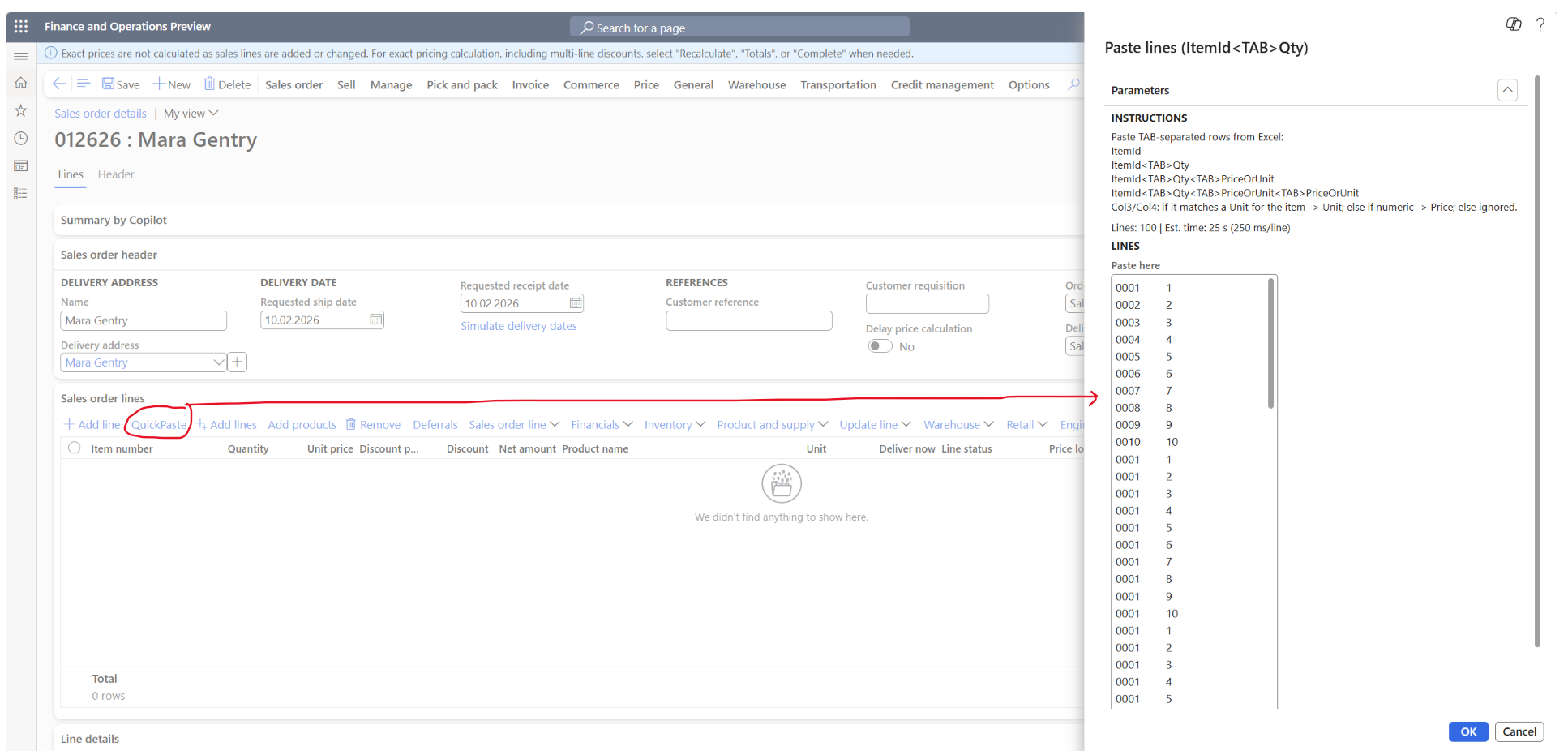
    My own conclusion on how to improve the paste-to-grid performance is:

    1. Reduction in number of DBcalls needed to create a sales order line. This involves reevaluating code and approach. Saving milliseconds on high frequency methods and reducing DB chattiness means saving mega seconds in the overall timing.
    2. Additional improvements are needed in the Global Unified Pricing code to further optimize calls and reduce the number of DB calls performed.  Also explore the possibility to reduce the need for TempDB joins and replace with SQL “IN” support in X++.
    3. Establish a goal/KPI for sales order line insert when copy/pasting into grid, where the acceptance criteria on a vanilla Contoso environment is minimum 1s per line.   

    Setup of the analysis

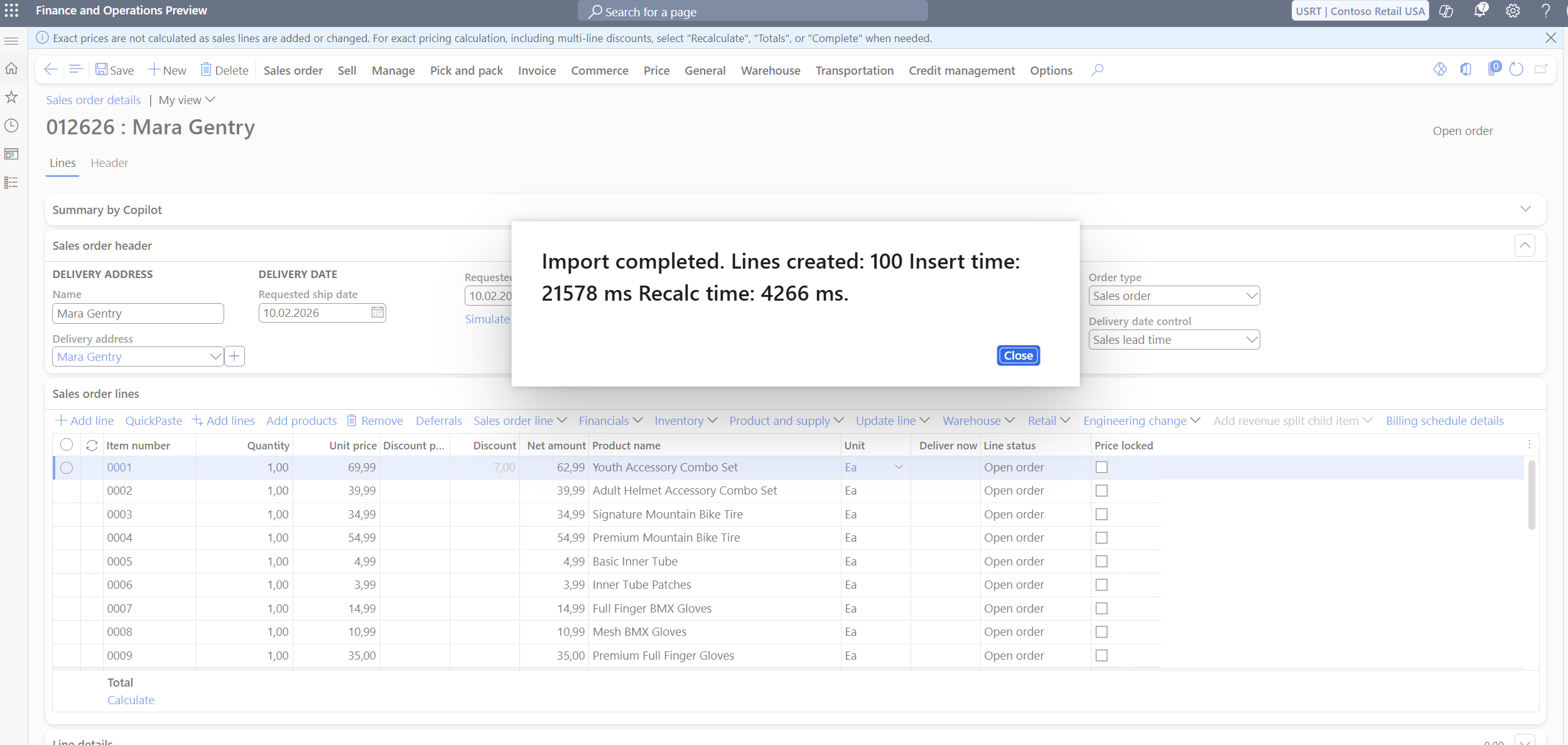
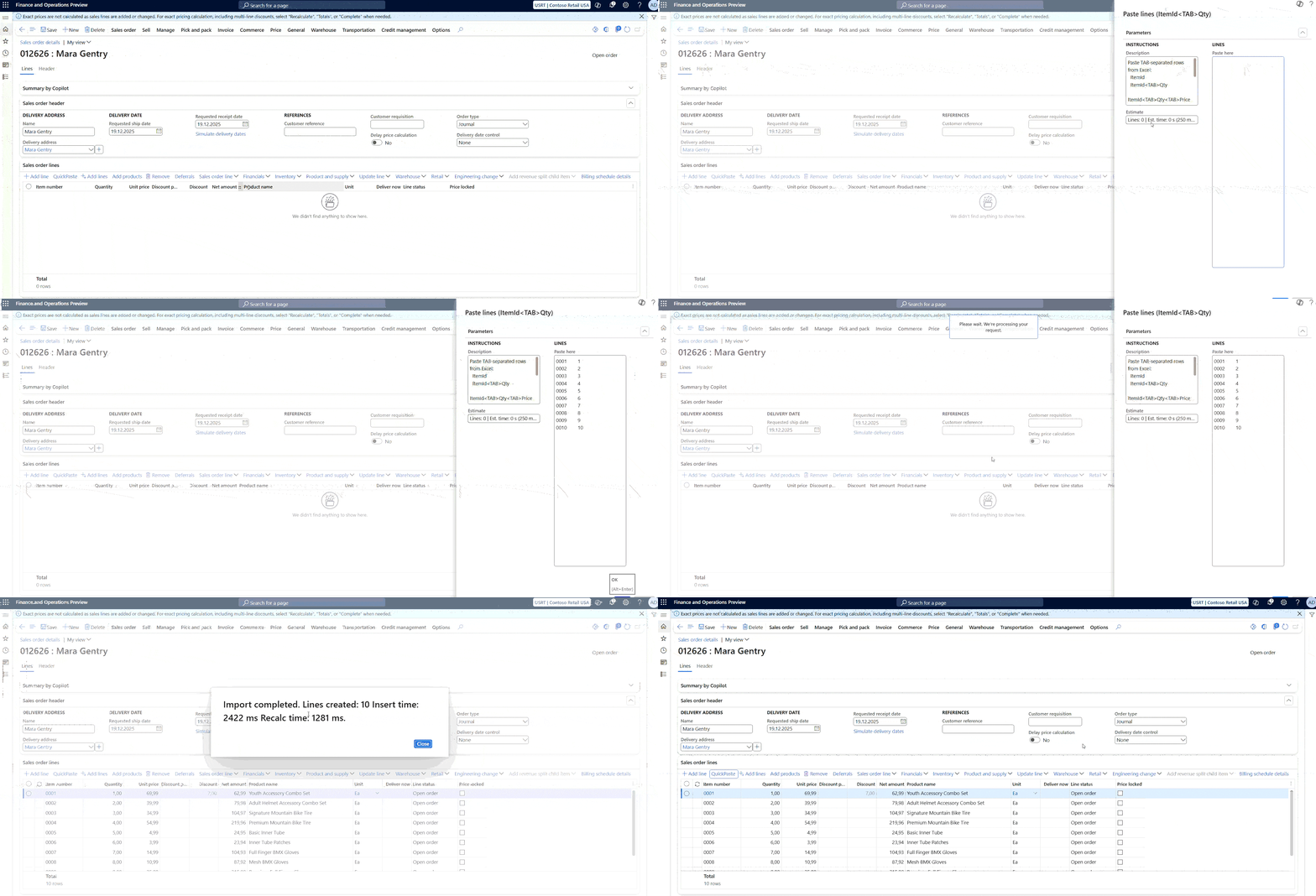
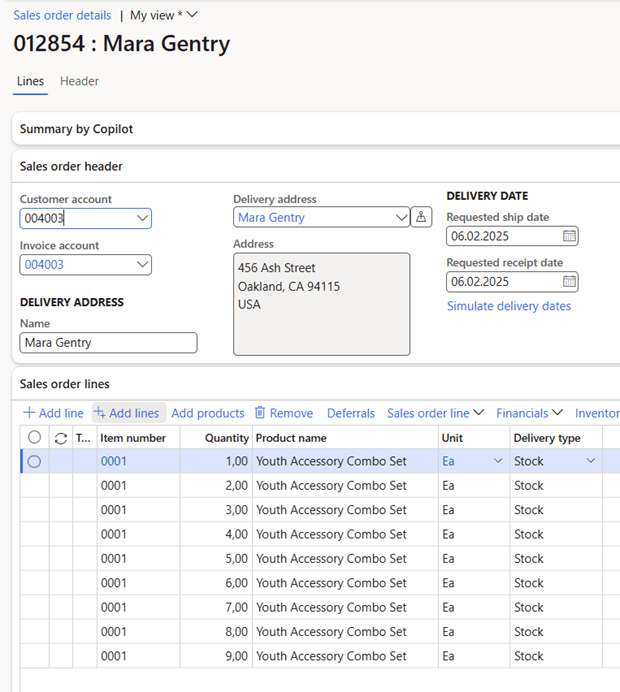
    The following analysis has been performed on Dynamics 365 SCM version 10.0.43 on a Tier-2 environment, and the analysis is quite simple to paste 9 sales order lines into the grid like this:

    Company USRT, and the product 0001 only have one base price setting the price per unit to 66 USD:

    The analysis was performed using Traceparser and then analyzing the results in Excel.

    Some overall facts

    To create 9 sales order lines took 36.823 ms of execution in total, where there were 5.794 database calls that took 15.771 ms. In total there were 655.025 X++ entries/method calls in the trace.  The average execution time for a SQL statement was 2,72 ms, and the average X++ methods execution time(exclusive) was 0,0321 ms.  The average time per sales order line is in total 4.091ms

    The Trace Summary indicates that 7% of the time was spent in the DB, and 93% was spent in the application(x++).

    This indicates that for this analysis, that the DB and caching is fast and warm.

    Analysis of code call frequency

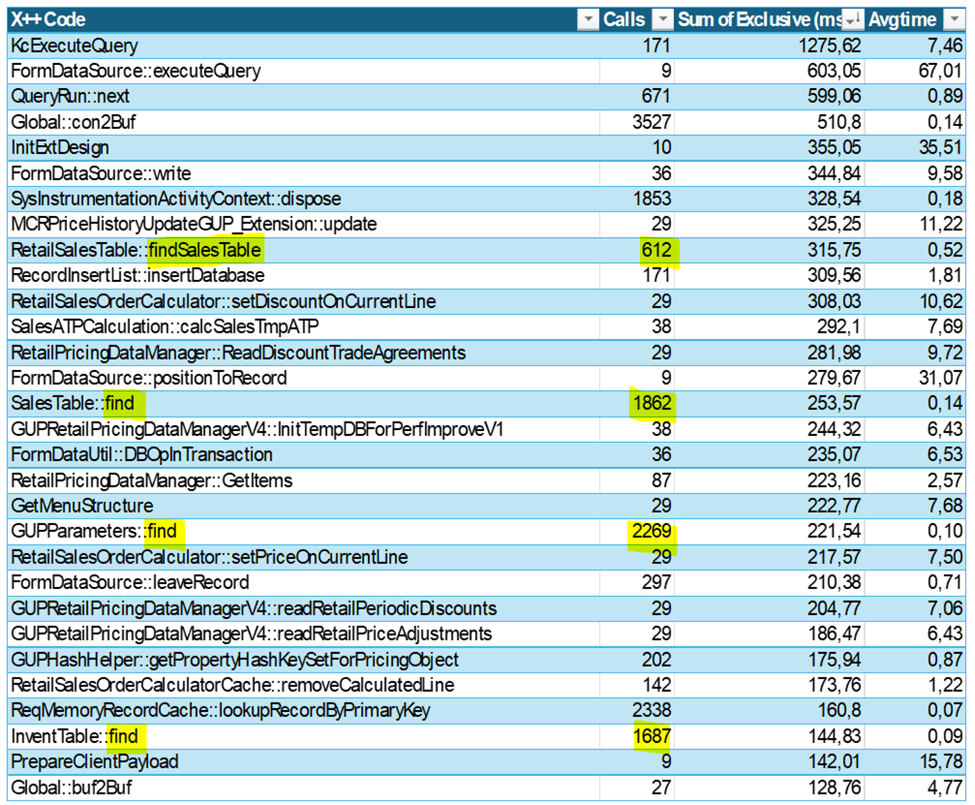
    Call frequency indicates how many times the same code is called.  If we look at the top 30 methods called, these account for 44% of the X++ execution time.

    We can observe that the method Global::con2Buf is called 3.527 times.  The main source of why this have a high frequency is associated with the SysExtensionSerializedMap that is related to  normalization instead of extending tables with lot of fields.

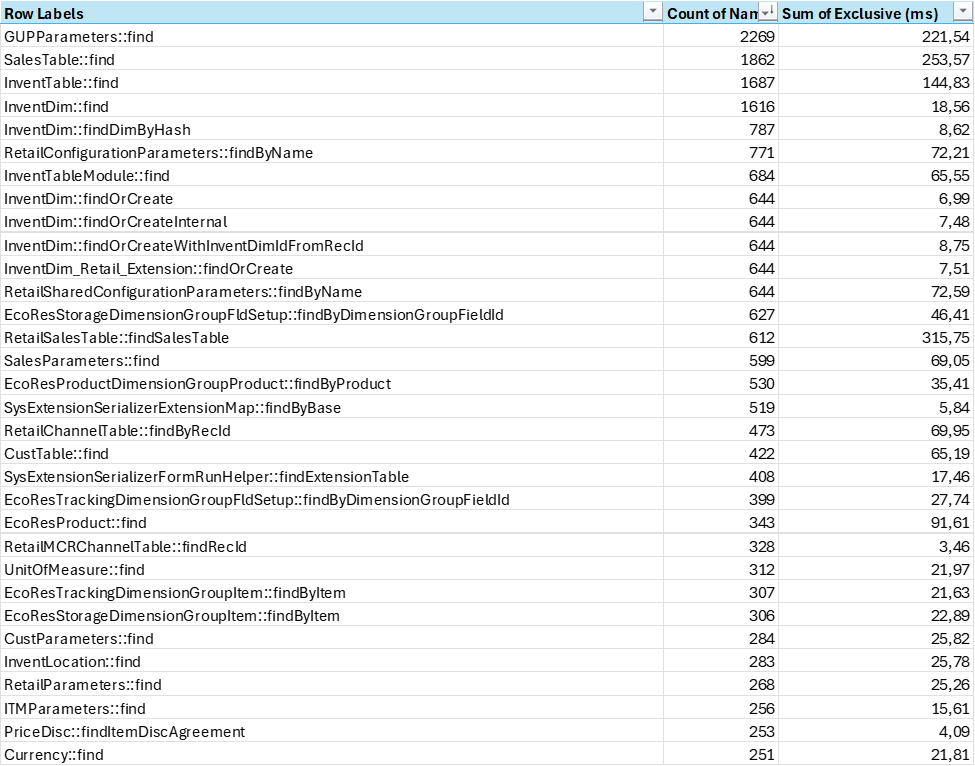
    One interesting observation is that if we see that the average execution time for methods containing the string “Find”, this is 29.624 calls(4,5% of total), and sum execution time accounts for 3.101 ms (14,7% of total).  As the number of calls to find() is so high, there are indications that there are an overhead of data transferred to maybe just find a single a value.  Reusing table variables within an execution could reduce time spent on finding a record (even though we are hitting the cache).

    Global Unified pricing and tempDB

    If we look at code that is related to the most time-consuming part of sales order line creation it is related to price calculation.  In total there are 36.564 calls (5,58% of total) towards methods associated with GUP, and this accounts for 2.844 ms (13,5% of total). 

    I see some improvements areas where there are high frequency calls, that could benefit from additional caching and keeping variables in scope.  If there were possibilities to keep variable values across TTS scopes, there could be some additional savings.

    If we look at the SQL calls that is related to Global Unified Pricing there are in total 1.138 calls (19,64% of total calls), and the DB execution time is 8.791 ms (55,74 % of total db execution time)

    The costliest calls (75ms each) are being made in GUPRetailPricingDataManagerV3::readPriceingAutoChargesLines() and are related to finding price componentCode, and match these with auto charges and attributes on the products.  The use of tempDB tables in these joins is causing some delays as the hash values need to be inserted into a temporary table, and after exiting each TTS scope they need to be recreated again.

    The use of tempDB for joins is something that have been increasingly used through the codebase the last few years.  If we look at the total number of SQL calls, involving tempDB, there are 1184 SQL statements( 20,61% of all) involving tempDB. Time spent on executing statements involving tempDB joins is 10.396,87 ms (65% of total)

    A 75 ms execution time for a query with this level of JOIN complexity is not unusual. It is unlikely that the temporary tables are the primary culprit. Instead, the overall join strategy and how the optimizer handles the multiple cross joins and filtering conditions are more likely to be the factors influencing the execution time.  But if able to avoid tempDB, there could be an additional 5-15% saving in execution time by using SQL “IN” or “NOT IN” statements.  But as X++ currently do not support SQL “IN” in X++, I guess the approach would be to restructure the statement, ensuring that the smallest tables are earlier in the statements.

    Feature management

    On interesting fact observed is that we see checks and validations towards feature and flights to have an effect on the performance.  In total, there are 19.561 method calls in the trace related to feature checks.  The checks are fast, but the frequency is very high.  This tells me that the code paths and feature management is very tightly integrated, and feature states highly influences execution paths. 

    A small fun fact, is that there are quite a few feature checks calls towards deprecated features, like the Scale unit capability for Supply Chain Management that was deprecated a few years ago.

    Last note

    In the world of performance tuning, tiny tweaks in code that runs thousands of times can add up to massive gains—think of it as the compound interest of optimization. A few milliseconds shaved off here and there may seem insignificant on their own, but they can quickly turn into a tidal wave of savings. So, remember: when it comes to high-frequency calls, every little improvement can make a big splash! And if you still try to find the needle in the haystack for the single code that improves everything, remember that there are no haystack;  Only needles.

    D365 and the Mode of delivery trap

    Within D365 SCM, the “Mode of Delivery” field plays a crucial role in specifying how goods move from you to your customers (or from your vendors to you). Despite its straightforward purpose, this field is frequently misused – often repurposed as a transportation route or itinerary scheduling tool. Putting different purposes to this field, and you will dump issues into other modules like eCommerce and Finance, causing a domino effect of issues and additional unnecessary costly extensions.

    In D365 SCM, the “Mode of Delivery” identifies the method by which an order will be delivered. It can represent various shipping or pickup methods, such as:

    • Standard shipping (e.g., ground shipping)
    • Expedited shipping (e.g., next-day air)
    • Customer pickup (e.g., in-store pickup)

    The primary purpose is to classify the delivery method and link any associated charges. This field then appears in key processes like sales orders, purchase orders, and other logistics-related transactions to help provide clarity and consistency across the supply chain. Here are the most common misuses:

    Using Mode of Delivery as a WMS or Route Planning Tool

    Some organizations attempt to store intricate WMS and transportation routes (e.g., multi-stop trucking routes or flight itineraries) in the “Mode of Delivery” field. This creates confusion, as the system is not designed for detailed route or shipment scheduling in this specific field.

    Storing Unrelated Carrier or Service Details

    Another misuse occurs when teams lump specific carrier service levels (UPS Ground, FedEx Priority, etc.) or internal steps into a single “Mode of Delivery.” This leads to an overloaded setup that becomes unwieldy to maintain and doesn’t reflect the actual purpose of the field.

    Overcomplicating the Setup

    Some users create a large number of “modes” to capture every nuance of logistics. This approach can lead to duplication, data chaos, and confusion across departments. Especially related to the eCommerce features within Dynamics 365, where you may have to create large customizations because of the misuse of the mode of delivery purpose.

    Proper Implementation

    • Keep It Simple
      Define each mode of delivery at a level that matches business needs—for instance, “Ground”, “Air”, “Sea”, or “Pickup.”
    • Associate the Mode of Delivery with Charges
      If certain modes carry different shipping costs, link them to delivery charges so the system automatically applies the correct fees. This is especially related to express fees etc.
    • Use Transportation Management for Complex Requirements
      For WMS or advanced route planning or load building, consider leveraging the Transportation Management module rather than storing those details in the “Mode of Delivery.”

    While it may be tempting to store every shipping detail in the “Mode of Delivery” field, keep in mind that this field’s strength lies in identifying how products are being shipped or picked up—not in detailing where or exactly when they travel. By maintaining a clear, concise setup, you avoid confusion, enhance data integrity, and help ensure your organization’s logistics run smoothly.

    When using D365 eCommerce, we see some more dramatic effects, where delivery options is calculated for each mode of delivery and for each product you have in you’re your sales basket.  So if you manage to have 100 modes of deliveries and 100 products in your sales basket, the eCommerce checkout modules will perform 10.000 charge calculations. 

    So, keep it simple, and do not try to use mode of delivery to other purposes than it is actually meant.

    D365 Behind the Scenes of X++ Code, Compilation, and Runtime

    These notes show my personal learning and interpretations, and they are not official documentation from Microsoft. The goal is to offer a deeper look into how X++ code, the compiler, and the runtime work in Dynamics 365.

    Where is the X++ code stored in the file system?
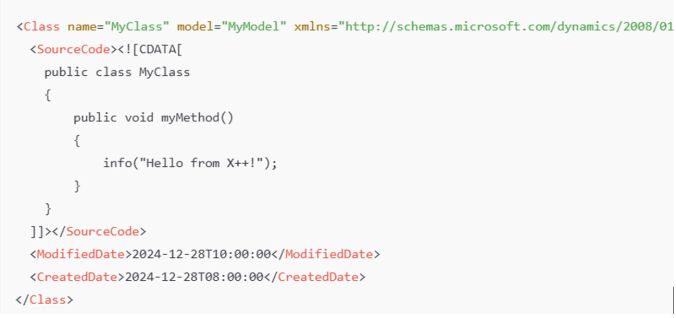
    X++ code resides in XML files that define classes, tables, forms, and other objects. These files are part of the application model’s metadata and appear in Visual Studio as X++ objects.

    Class Definition
    : Found as an XML file under \Classes\MyClass.xml.

    Table Definition: Found as an XML file under \Tables\MyTable.xml, listing fields, methods, etc.

    In a D365 10.0.42 codebase, the PackagesLocalDirectory contains approximately 542,091 files (about 17.69 GB). Of these, around 340,029 are XML files, representing the AOT (Application Object Tree).

    What are the relationship between Models and Packages ?
    All code is placed into a model, which is essentially a design-time logical grouping of metadata and source files. You can see them on disk in a path like:

    D:\AOSService\PackagesLocalDirectory\Application\Metadata\MyModel\Classes\MyClass.xml

    Here,

    • ModelName = MyModel
    • ObjectType = Classes
    • ObjectName = MyClass.xml

    There are 171 models in the standard Microsoft codebase. Each model belongs to a package, which serves as the compilation and deployment unit. You can combine one or more packages into a deployable package for runtime.

    Example
    The Application Suite model is the largest one, with 185,939 XML files, totaling 1.32 GB.

    Compilation Output and .NET Components

    Compiling X++ turns the application artifacts (X++ code, metadata, and resources) into deployable and executable components in .NET Intermediate Language (IL), which run under the CLR (Common Language Runtime). The compilation produces:

    1. .dll files (the main assemblies)
    2. .netmodule files (modules containing the IL code for X++ types)
    3. .pdb files (debugging symbols, used primarily in development environments)
    4. .md files (runtime metadata)

    .netmodule files hold the actual IL code for each X++ type. If you open a form like SalesTable, all the required .netmodule files for that form must also be loaded.

    .md files contain runtime metadata, classified by type (Class, Table, Form, etc.). They include only the essential metadata required at runtime (e.g., control hierarchies, table relationships), in contrast to the comprehensive XML files that exist only at design time. As a result, XML files are excluded when you deploy to sandbox or production.

    .pdb files are for debugging and are not typically deployed to production.

    How the Compilation Process Works

    X++ code is first compiled into .netmodule files. The .netmodule files are then linked together to produce the final .dll file for the package. The .pdb file is generated alongside the .dll and holds debugging metadata.

    The .netmodules also allows for incremental compilation, and you will thus often see multiple .netmodules files generated.  But when you compile the entire smaller module, you will see that the .netModules are typically returned to one file. But for larger modules, like the Application Suite you can see that there are 276 .netmodules files. I suspect there are a limitation or optimalization to have the Application Suite splitted into multiple files.

    Runtime Execution and Loading Behavior
    When the system needs to run code:

    1. The main .dll (e.g., Dynamics.AX.ApplicationSuite.dll) is loaded first.
    2. The .netmodule files containing the needed X++ types (classes, forms, etc.) load on demand.

    The runtime loads a specific .netmodule only when a type within it is first accessed. The first load includes overhead, such as initializing event handlers and chain-of-command (CoC). Subsequent calls to types in the same .netmodule do not incur the same cost.

    How does this affect runtime behavior in relation to Cold vs. Warm Start

    I guess most of us have experienced performance difference between cold and warm starts, and this is caused by runtime behaviors involving .netmodule files and object initialization.

    At cold start:

    When a class or object is accessed for the first time after an AOS restart, the runtime loads the .netmodule containing the class/object into memory. Static constructors and chain-of-command/event handlers are initialized and metadata required for the type is fetched and cached.

    This initialization process can take significant time, especially for larger .netmodule files or types with complex dependencies.

    To further explain, when opening the salesTable form can take up to 30s, as there are a lot of tables, classes, form elements that needs to be loaded also.  And each of these may have extensions event handlers and chain-of-command.  This results in an enormous amount of files to be accessed, loaded and initiated. In short, a domino effect of loading executable .netmodules happens. If you take a look at SalesTable, you realize the number of tables, extensions, modules and code that is packed together on a single form. I have not tried to understand or count the number of elements that go into loading this form, and here just showing number of extensions and tables you see in an extension of the Sales Table form.

    During runtime, the system also builds and populates various caches (e.g., metadata, plugin, and event handler caches). Cache population may traverse large amounts of metadata, contributing to the cold-start delay.

    At warm start:

    After the .netmodule and associated handlers are loaded into memory, subsequent references to types in the same .netmodule are faster because the .netmodule is already in memory and metadata and handlers have been initialized. Opening the salesTable drops from 30s to 3.5s.

    How about the Azure SQL?

    While some suspect Azure SQL for cold-start delays, the database typically performs very well and is not the main culprit for slow cold starts. For example, inserting 10,000 records via a SQL script might take only 143 ms, whereas inserting them through X++ can average 10,000 ms—largely due to latency and transactional overhead on the AOS side, not the database itself.

    So the conclusion is that it makes no sense to blame the SQL for cold start performance issues.  The actual reason is the object loading and initiation of assemblies and .netmodules just takes time.

    Word of advice

    1. Reduce AOS restarts/deployments: Every AOS restart triggers the same loading and initialization of .netmodules and IL.
    2. Test performance on a warm system: Always measure performance after the first load.
    3. Implement a warm-up script: Access your most-used forms (SalesTable, PurchTable, CustTable, etc.) automatically on each AOS to reduce cold-start delays.
    4. Avoid blaming Azure SQL: The real delay is in loading .netmodule files and initializing CoC/event handlers.
    5. Adding more AOS instances may not help. Each AOS must still load and cache everything. As a result, more AOS instances could increase overall warm-up demands, and more users will be affected by the cold system syndrome.

    References For official documentation on X++ and model architecture, consult Microsoft Learn: X++ Programming and other related Microsoft documentation.

    D365 Deprecation Wishlist

    Through the community, I’m constantly talking to and chatting with the very people who have shaped Dynamics 365 into what it is today. I see pride and passion, and I also recognize their personal investments in making Dynamics 365 better and implementing it for customers. They invest deep thought, teamwork, and long hours to create the best ERP offering on the market. I often hear comments like, “I created that feature many years ago.” This applies both to consultants and to past and present Microsoft employees.

    In many cases, I recognize that, for those working with Dynamics 365, it’s more than a job; it’s a lifestyle, a passion, and a community. We love to create!

    We can all agree that not everything is perfect, and more than 25 years of code have accumulated to form what we have today. Each new piece of code added value from an isolated perspective. But with each new feature introduced, the combinatory complexity has increased, making performance more challenging. Often, I see people searching for the proverbial needle in the haystack—a query, index, or loop that could improve performance. But the problem isn’t the “needle”—it’s the haystack. We have layer upon layer of code added over the years, plus numerous customer extensions.

    Microsoft does have a process for phasing out code, known as deprecation.

    It’s important to understand the definitions Microsoft uses:

    • Removed feature: No longer available in the product.
    • Deprecated feature: Not in active development and may be removed in a future update.

    When Microsoft deprecates features, they publish the information here (for Finance, Supply Chain Management, Commerce, Human Resources, Project Operations, and Platform features):

    We typically see a few elements per area per release, but the process of phasing out, replacing, and refactoring old code is slow. Microsoft also has guidelines for how deprecations are carried out. However, the amount of new code added is dramatically greater than the amount removed. More code means increased compute requirements and more pressure on performance. I understand that removing something is risky—there is always a customer who relies on a particular piece of code—making the deprecation process difficult and slow. We all have a closet filled with items we think might be valuable someday, but most often they aren’t and just occupy valuable space.

    Now, to the essence of this blog post: what I hope to see deprecated. I’m sure many will disagree with my opinions, but I believe I have a few valid points. Remember, these are my personal opinions.

    Record Templates
    A great idea, but with current limitations, you cannot change a template if a DirParty/AddressBook is part of the entity. Additionally, when inserting records, code checks whether a default record template is assigned. In reality, this means record templates for Customers, Vendors, and Workers cannot be easily maintained—you must always recreate the template from scratch. The code that checks for record templates consumes precious milliseconds. Let’s thank record templates for their service over the years and rethink how this should work.

    Database Log
    This feature is often for micromanagers who want to track every action and assign blame. Its value is low, as enabling database logging on transactions generally isn’t advisable. Why not remove it from the X++ stack and consider using SQL system-versioned temporal tables instead?

    Alerts
    I think there are other technical ways of notifying changes.

    Telex and Fax Numbers
    I doubt these will be missed in contact information. Maybe replace them with modern contact methods like Snapchat or TikTok. 😊

    Task Recorder
    Great for presales, but as scenarios grow more complex, its value diminishes. Perhaps this could be replaced or supplemented by a Copilot agent?

    Workflow
    It works and is widely used, but this area should embrace newer technologies like Power Automate. At the very least, a refactoring of the concept would help.

    Financial Reporting
    Thank you for your service. Hopefully, Business Performance Analytics can replace it in the future.

    Document Management
    This is required, but some refactoring would be nice.

    Attributes
    Desperately needed in eCommerce, Unified Pricing, and as metadata for Copilots. However, a complete refactoring would be best.

    Business Events
    They generate too much “chattiness.” The feature is needed, but are there better ways to notify event subscribers?

    If you have any opinions on what is ready for deprecation, please share them with the community. I hope I provoked some thought. 😊 Also, keep in mind that customers should evaluate their own extensions and deprecate those no longer needed to reduce system load.

    Dynamics 365 and the Ostrich algorithm

    Through my career, performance have been a returning topic, and I have tried to share as much of my knowledge as possible.  Today I would like to write about the .initValue() method, that is actually more costly than you think. Even if is empty.

    I did a traceparsing to better understand the performance of inserting 10 sales order lines, that I feel is far below acceptable performance.

    The Traceparser looked like this, and I was focusing on queries and statements that was unusual highly frequent for inserting 10 sales order lines. Specifically there where 548 calls towards a table named SysClientSessions.

    SELECT {fields}
    FROM SYSCLIENTSESSIONS T1
    WHERE (SESSIONID=61852)

    Why would inserting 10 salesorder lines result in 548 db calls on the session table? I looked at the callstack, and realized that the original source was from the .initValue() methods, that triggers a chain of events, and deep into the call stack I see that there is a call towards Global::isRunningOnBatch() to validate if my client is in a batch or in a GUI.

    The issue is that SYSCLIENTSESSIONS not cached. It is set to “none”, meaning that any queries will always hit the DB.

    But why are the .initValue() executed so many times?


    It seems that for misc charges a table is used as a search paramater table as shown here, and in this process, it starts with executing .initvalue()

    Code like this are stealing milliseconds from the execution, and this is just a very small example showcasing why deeper trace parsing in Dynamics 365 F&O are needed.

    To achieve better performance Microsoft must start looking for unneeded high frequent queries and take them seriously. Even though this small extra query is only 0,83 ms per execution, the total amount is close to 0.5s as it is executed 548 times. In addition there will be latency and AOS processing time throw-out the callstack for each query.

    I have encountered many similar situations, and I try to report them to Microsoft support. In most of the cases it returns back with “as designed” conclusion, and where support do not consider this as a bug. But if these minor details would get focus, the sum of such improvements would really speed up the Dynamics 365 F&O performance. Should I add them to the ideas site to die?

    We in the community want Dynamics 365 to be the best solution ever, and fixing the minor things can really make a major change. I hope that Ostrich algorithm is not becoming an official Microsoft approach to minor issues, as what is actually wanted is perfection and not excuses.

    This blogpost was written without any AI.

    Dynamics 365 eCommerce – Myths

    I want to tackle some myths I’ve encountered about Dynamics 365 eCommerce and give clarity on these misconceptions. The Dynamics 365 eCommerce technology stack offers immense value but often doesn’t get the attention it deserves. One reason is that eCommerce requires specialized technical knowledge distinct from traditional ERP systems. AI, low-code platforms, and tools like Copilot are advancing rapidly. They enhance certain aspects of business operations. Nevertheless, they can’t easily replace the foundational processes of traditional ERP and eCommerce systems.

    Myth 1: Dynamics 365 eCommerce will be drastically changed by Copilot/AI

    Traditional ERP and eCommerce platforms handle complex tasks. These include inventory management, supply chain logistics, financial transactions, and customer relationship management. Dynamics 365 eCommerce is built with intricate business logic and industry-specific practices that need deep understanding and skills. AI can augment these systems by offering insights, automation, and predictive analytics. Nonetheless, it doesn’t replace the need for strategic planning and operational control that these platforms offer.

    Selling products to customers involves more than just generating texts and automating tasks. It requires a nuanced approach to market trends. Understanding customer behaviors and creating personalized experiences are essential. These elements are deeply integrated into eCommerce platforms like Dynamics 365. AI can help in analyzing data and suggesting actions. Nevertheless, the core processes ensuring effective sales and customer satisfaction stay rooted in well-established processes and algorithms. Hence, it’s crucial to recognize the irreplaceable value of these traditional platforms even as we embrace new technologies.

    Myth 2: Dynamics 365 eCommerce is only for large enterprises

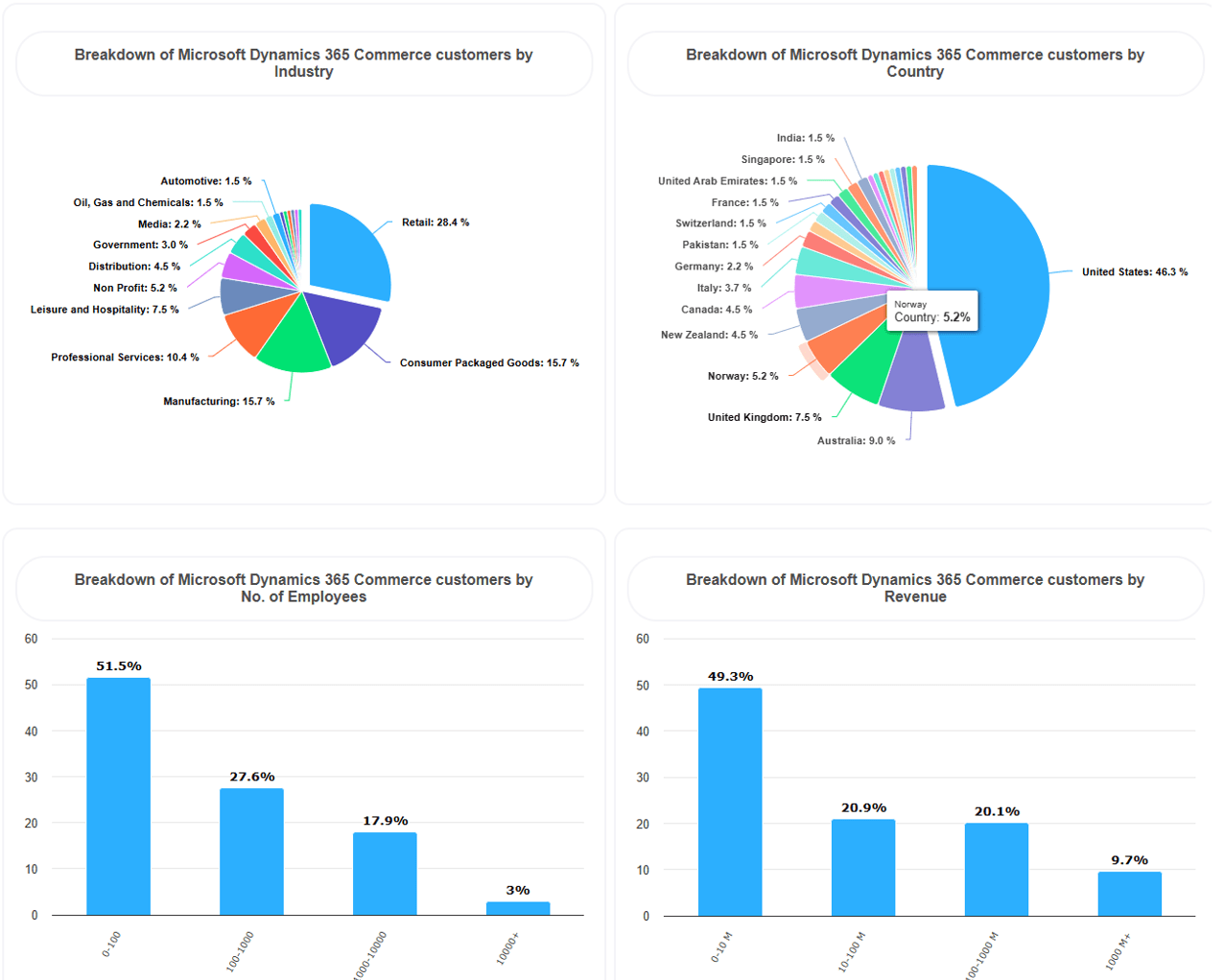
    This is not true! Most eCommerce implementations I’ve been part of are with small to medium-sized businesses. I have yet to be involved in multi-country eCommerce implementation. Dynamics 365 eCommerce is designed to be scalable and adaptable for businesses of all sizes. It offers flexible deployment options. Its modular features can be tailored to meet the needs of SMBs. They can also cater to large corporations. The platform allows SMBs to start with core functionalities and expand as their business growth.
    If you want a sneak peek to eCommerce customers, take a look at appsruntheworld. Here you can break down who is using eCommerce. By filtering a bit, you can even see the names.https://www.appsruntheworld.com/customers-database/products/view/microsoft-dynamics-365-commerce

    Myth 3: The platform lacks customization and flexibility

    In most eCommerce implementations, there’s a need to tailor the user experience according to the company and brand. Branding and marketing have become important aspects of eCommerce implementation. Businesses can change the user interface, create custom workflows, and develop personalized customer experiences.

    A mid-sized b2b oriented customer customized the platform to show their unique brand identity. They integrated it with their existing inventory management system. This customization led to improved operational efficiency and a more cohesive brand experience for customers.

    They used https://webflow.com/ to design a compelling eCommerce look that enhances branding and look-and feel. Dynamics 365 eCommerce supports extensions and integration’s with third-party applications, enabling companies to tailor it to their specific needs.

    Myth 4: Integration with existing systems is difficult

    Dynamics 365 eCommerce is built with interoperability in mind. It provides robust APIs, data connectors, and integration tools. These features help seamless integration with various systems such as CRM, ERP, payment gateways, and marketing platforms. This ensures that businesses can unify their operations without extensive redevelopment. I would encourage to take a look at the documentation and GitHub SDK samples to see how this is done.

    Myth 5: Limited advanced analytics and AI capabilities

    The platform includes advanced analytics and AI features that offer valuable insights into customer behavior, sales trends, and operational performance. Features like AI-driven product recommendations, customer segmentation, and predictive analytics help businesses make data-driven decisions and enhance customer engagement.  Also, the roadmap is packed with more to come.

    Myth 6: Dynamics 365 eCommerce is too expensive

    An investment is involved. Nonetheless, Dynamics 365 eCommerce offers flexible pricing models. These include subscription-based plans that can align with different budget levels. The platform can improve efficiency. It can also increase sales and enhance customer experiences. These capabilities often lead to a significant return on investment (ROI) over time.

    From my experience, customers choosing third-party eCommerce solutions often end up with limited and rigid integration’s. The irony is that if customers want to use Dynamics 365 Commerce together with a third-party eCommerce platform, they may end up paying double. If you’ve already invested in Dynamics 365 Commerce, you have the building blocks to use eCommerce as well. The eCommerce license is a strong offering when you delve deeper into it and evaluate the additional costs a third-party eCommerce solution would incur. See https://kurthatlevik.com/2023/05/02/d365-ecommerce-implementation-and-costs/ to get an idea of what to evaluate.

    Myth 7: It doesn’t support true omnichannel B2B Commerce.

    Dynamics 365 eCommerce is designed to offer a seamless omnichannel experience. It unifies online and physical channels. This setup allows customers to have consistent interactions across web stores, mobile apps, physical stores, and social media platforms. Features like unified pricing, wish lists, and customer profiles enhance the shopping experience regardless of the channel.

    Dynamics 365 eCommerce can be used to integrate their online store with physical locations. Customers can check product availability in-store. They can buy online and pick up in-store (BOPIS). This ensured a consistent shopping experience. This process increases customer loyalty and sales.

    Myth 8: Only IT experts can use and manage it

    The eCommerce sitebuilder features an intuitive user interface that is user-friendly for individuals without advanced technical skills. The platform includes drag-and-drop tools, configurable templates, and guided workflows. Additionally, Microsoft provides comprehensive training resources and support to help users to learn effectively.

    A small team with limited IT support can efficiently manage the Dynamics 365 eCommerce site. They can do this after a brief training period. This allows them to respond quickly to market changes and customer needs.

    Deeper skills is needed in the design of the site (CSS). It is also needed when creating and extending modules (TypeScript). For more advanced functionality, an experienced C#/CRT developer is required. However, this is mostly a cost during the implementation period.

    We also have customers that have implemented B2B eCommerce without any partner assistance.

    Myth 9: Upgrades and maintenance are disruptive

    Microsoft follows a continuous update model for Dynamics 365 eCommerce, delivering regular updates that include new features and security enhancements. These updates are designed to be non-disruptive. They reduce downtime. This ensures that businesses can gain from the latest advancements without significant interruptions.

    Our customers notice that updates are applied seamlessly during off-peak hours. These updates have no impact on their day-to-day operations. This allows them to focus on serving their customers. In short, Dynamics 365 eCommerce offers true 24/7 uptime. Updating and adding new features do not cause downtime. This is due to the micro services architecture.

    Along with the normal Dynamics 365 wave documentation and fixlists, eCommerce has a valuable GITHub. It provides eCommerce module enhancements and fixes.

    Myth 10: It’s not suitable for global operations

    Dynamics 365 eCommerce supports multiple languages and currencies and complies with various regional regulations and tax requirements. This makes it suitable for businesses looking to expand globally or run in multiple countries. We see international companies using Dynamics 365 eCommerce to launch localized websites for different regions. They accommodate local languages and payment options. This strategy helps them penetrate new markets effectively. The ability to distribute Commerce Scale Units (CSU) across multiple geographical data centers ensures excellent performance.

    Myth 11: Security Measures are Inadequate

    Security is a top priority for Dynamics 365 eCommerce. The platform includes advanced security features. These include data encryption and role-based access control. It also complies with international security standards like GDPR, ISO 27001, and PCI DSS. Regular security updates protect against emerging threats.

    Regarding the platform, I have only noticed that the eCommerce sites were down. This was related to global Entra ID issues from Microsoft.  The last few years, I think there have been less than 2 instances where our customers have been affected.  The rest of the time, it works and is stable.

    End note

    We can truly recognize the robust capabilities of Dynamics 365 eCommerce. It has the potential to transform businesses of all sizes, once we debunk these myths. Dynamics 365 partners must invest more in expanding their knowledge. They need to enhance their expertise in Dynamics 35 eCommerce. This investment is crucial to effectively support and guide their clients. Specifically, B2B Dynamics 365 customers have tremendous opportunities to enhance their digital operations. They can reach new markets. They also have the chance to provide superior customer experiences. By embracing this platform, companies can integrate comprehensive eCommerce functionalities. They combine these with the strength of traditional ERP systems. This integration leads to increased efficiency. It fosters growth and provides a competitive edge in the market.  And if you want to try it, go to https://commerce.trial.dynamics.com/welcome/index.html.

    D365 Performance Checklist: Troubleshooting and Resolving Performance Issues

    You often hear phrases like:

    • “The system is slower today.”
    • “Nothing is working!”

    Performance in Dynamics 365 is a critical aspect for both users and system owners. For end users, poor performance can lead to frustration, while system owners face challenges in identifying and resolving performance issues. To help streamline this process, I’ve created a practical checklist that outlines steps to quickly diagnose and discuss sudden performance issues.

    Below is a step-by-step guide to find the root cause of performance issues and take appropriate action.

    Step 1: Check Azure Status

    Even if you don’t fully understand what’s causing the slowdown, there are some quick first checks you can do:

    1. Microsoft health status: https://status.cloud.microsoft/ give a short summary status of Microsoft Cloud
    2. Azure speed test: https://azurespeedtest.azurewebsites.net/ let’s you see the current ping times to Microsoft data centers.
    3. Azure Status: Visit the Azure Status page to see if there are any global issues that affect performance.
    4. DownDetector: Use DownDetector for real-time reports of problems from users globally.
    5. Twitter: Check Azure Support on Twitter for any recent announcements of issues.
    6. Power Platform: Visit Power Platform Help and Support for service health reports and known issues.

    If these resources show global issues, it’s likely that the problem is already being addressed. Inform your users and take a short break, knowing Microsoft engineers are working to resolve the issue.

    Step 2: Use Lifecycle Services (LCS) for Telemetry Data

    Once you’ve ruled out Azure-wide issues, the next step is to analyze your environment’s performance data.

    1. Environment Monitoring: In LCS, navigate to environment monitoring to get an overview of your system’s status.
    2. Check SQL Utilization: Look for any long-lasting peaks in SQL utilization that show performance bottlenecks.
    3. Analyze AOS Performance: Check if any of the Application Object Servers (AOS) are struggling.

    If no clear issues are identified, proceed to:

    1. SQL Insights: Look for any heavy queries or blocks in the system. This will help you spot any ongoing processes causing delays.
    2. Review Activity Logs: Check for long-running queries or errors in the telemetry data.

    At this stage, you’re looking for general indicators of system stress or inefficiency.

    Step 3: Collect Detailed Information from Users

    If telemetry doesn’t reveal the problem, gather more specific details from the user experiencing the issue.

    Key questions to ask:

    • What were you doing when the performance issue occurred?
    • Are other users facing the same issue?
    • Is it related to a specific form or process?
    • Is the problem consistent or does it happen randomly?
    • Can you record a short video to demonstrate the issue?
    • Can you provide a copy/paste of session information (Activity ID, Session ID, AOS name)?

    This information will allow you to zero in on the problem and cross-check it with LCS environment monitoring.

    Step 4: Reproduce the Issue

    Once you’ve gathered preliminary information and checked system telemetry, it’s essential to try to reproduce the issue yourself. This is a critical step, as it lets you confirm the problem and analyze it in a controlled environment.

    Why Reproducing the Issue is Important:

    • Validation: Verifying that the issue can be recreated helps make sure that it’s not an isolated user-specific problem, but rather something systematic that can be investigated further.
    • Visibility: Being able to see the performance issue firsthand will give your insight into how the system behaves under the problematic conditions, enabling a deeper analysis.
    • Communication: If you plan to escalate the issue to developers or support, showing that the issue can be replicated provides a solid starting point for others to troubleshoot.

    Steps to Reproduce the Issue:

    1. Ask Access to the User’s System or Environment: If you don’t already have access, ask permission to log into the affected user’s environment. Make sure you are using the same permissions and roles as the user to avoid discrepancies.
    2. Follow the User’s Steps: Once logged in, replicate the exact actions the user took when the issue occurred. This include:
        • Navigating through specific forms.
        • Running reports or transactions.
        • Performing specific searches or filtering data.
      • Use Telemetry for Assistance: If the user provided session information (e.g., Activity ID, Session ID, AOS name), use that to find the timeframe of the issue and see if any telemetry logs or queries can help in reproducing it.
      • Consider Different Scenarios: Sometimes, performance issues only occur under certain conditions. Test a variety of scenarios to see if the problem persists:
        • Load Variation: Does the issue only occur when multiple users are logged in and performing heavy tasks at the same time?
        • Data-Specific Issues: Does the issue happen when working with certain records or larger datasets?
        • Time-Sensitive Issues: Are there specific times of day when the issue occurs (e.g., during peak hours)?
      • Simulate a Clean Environment: If you’re can’t reproduce the issue directly, try testing the same functionality in a non-production (e.g., test or sandbox) environment to see if it still occurs. Differences in performance between production and non-production environments can often point to configuration or data issues.

      What to Do If You Can’t Reproduce the Issue:

      • Ask for More Details: If you still can’t replicate the problem, circle back with the user and ask for more context or detailed steps. They may have missed providing key details that could help pinpoint the problem.
      • Collaborate with Other Users: Ask other users if they are experiencing the same issue. If the problem is user-specific, it could be related to personalization, permissions, network connections, or local device configurations.

      Document Your Findings:

      Whether you successfully reproduce the issue or not, it’s essential to document your findings. This documentation will be useful if you escalate the issue to another team, like:

      • A support ticket with Microsoft.
      • An internal report to the development or IT teams.
      • Communication with the affected user to manage expectations.

      By attempting to reproduce the issue yourself, you not only confirm the problem but also narrow down potential causes, making it easier to do with troubleshooting or escalate the issue with confidence.

      Step 5: Do a simple F12 Network analysis

      Using Chrome or Edge’s developer tools (F12), do a network analysis:

      1. Track Load Times: Analyze how long various UI elements take to load.
      2. Find Cryptic Delays: Look for traces that are taking an unusually long time.

      You can save the network data (like the header, payload, and response times) for deeper analysis or support cases with Microsoft.

      You can then record/save the header, payload and response times.  It will give hints and deeper insights.

      If you can “pinpoint” the exact menu item when the performance issue occur, also save a HAR-file, as this may be needed later if you need to create support case with Microsoft.

      Step 6: Perform a small Performance timer in D365 F&O

      After attempting to reproduce the issue and gathering more information, the next step is to utilize the Performance Timer in D365 F&O. This will help you pinpoint where performance bottlenecks may be occurring in the user interface.

      What is the Performance Timer?

      The Performance Timer tool lets you monitor the duration of specific actions within the system. This is a valuable tool for isolating whether performance issues are related to particular tasks, forms, or processes.

      Steps to Run the Performance Timer:

      1. Enable the Performance Timer: In D365 F&O, simply append &debug=develop to the URL you’re using. This will activate developer mode, which includes the Performance Timer. There should be an icon you can click on to see the timers.
      2. Run the Process: Now that the Performance Timer is enabled, carry out the process that is causing performance issues (e.g., navigating through forms, running reports, or completing a transaction).
      3. Analyze the Results: The Performance Timer will display detailed information about the time each step takes. Focus on processes that show unusually high times, as these may indicate where the issue lies.
      4. Save the Data: Save the timer output, which may include SQL query timings, network delays, and any computational lags. This data will be valuable if the issue needs to be escalated to developers or support teams.

      Why Use the Performance Timer?

      By using the Performance Timer, you can gain a clear understanding of the system’s behavior and identify specific steps or components that are underperforming. This allows you to target your troubleshooting efforts and avoid a “needle in a haystack” approach.

      Step 7: Trace Parsing for Deeper Analysis

      Once you have exhausted surface-level checks, it’s time to delve deeper using trace parsing. This step will give you a granular view of what is happening behind the scenes, such as which SQL queries or X++ code is contributing to performance degradation.

      What is Trace Parsing?

      Trace parsing involves generating and analyzing detailed logs of system activity, focusing on SQL execution times, compute times, and overall process flows. This is typically a task for experienced developers familiar with X++ and SQL.

      Steps for Effective Trace Parsing:

      1. Activate Tracing: Enable tracing within the specific environment where the performance issue occurs. Be mindful to limit the tracing to just a few seconds around the time when the issue happens, as traces can quickly become very large and difficult to manage.
      2. Analyze the Trace File: Once tracing is complete, you’ll receive a detailed log of system events, including:
        • SQL Execution Times: Pinpoint how long individual SQL calls are taking.
        • Compute Times: Understand how much CPU time is being consumed during specific processes.
        • Call Stack: See the entire process flow, showing which methods and queries are running.

      Example: A healthy SQL query might take less than 25 milliseconds, but a problematic query could take several seconds, indicating where optimization is needed.

      1. Identify Bottlenecks: Look at the Top 5 X++ Calls and Queries—these can often be related to the main contributors to performance issues. Look for patterns such as repeated heavy queries or inefficient code paths that might be slowing the system down.

      What to Do if the Trace is Inconclusive:

      If no obvious bottleneck is detected, you may be dealing with an aggregated performance issue caused by the cumulative effect of many small, efficient processes. This type of issue can be particularly challenging to resolve, as it requires rethinking broader architectural elements.

      For example, if performance issues arise from standard code, extensions or customizations, it could take weeks or even months to resolve fully, especially if multiple layers of custom code are involved.

      Step 8: Fixing the Issue

      Once you have identified the root cause of the performance issue through telemetry, reproduction, and trace parsing, the next step is to involve the appropriate resources to fix it.

      1. Determine Responsibility:
        • If the issue stems from Microsoft code, open a support case with Microsoft.
        • If the problem lies within an ISV solution, contact the ISV for support.
        • If custom partner extensions are responsible, reach out to the team that developed those extensions.
      2. Check Version and Patches:
        Ensure that your environment is running the latest version of the software, as many performance issues are resolved in later patches or hotfixes. Check LCS Hotfixes and the Release Planner for any upcoming features or fixes that could address the issue.
      3. Evaluate Parameters and Configurations:
        Performance can often be tied to configurations. Check the system’s parameters, as enabling too many features or processes can bog down performance. Disable unnecessary options to streamline the system’s operation.
      4. Optimize Data Management:
        Check if transactional or outdated data (such as completed sales orders or old inventor/WMS transactions) is accumulating in the system. Regularly archiving old data and keeping the system clean can significantly improve performance. Also take a look at the F&O capacity is some data is “exloding”.
      5. Community Support:
        Don’t hesitate to reach out to the broader Dynamics 365 community. Platforms such as Yammer, community forums, and even tools like CoPilot or ChatGPT often provide valuable insights and workarounds shared by other users who have encountered similar issues.
      6. Hire a 10X developer to fix it?  Sorry, but they are myths.  Just like unicorns and Bigfoot.

      Step 9: The blame game

      Hopefully you have now a deep insight into root cause if the performance issue, and now there is a feeling someone must “pay” because of the pain inflicted on the end-users.  A customer may start with their implementation partner, ISV’s and Microsoft.  But I’m not sure how advisable this would be, as the fundamental issue is not the bug/code/data that caused the performance problems. No developer, partner or Microsoft can deliver flawless code that handles every combination of complexity.  I’m arguing that in the project there should be more investments of quality procedures and customer testing of their used combinations of system, people and data. The implementation guide chapter 14 gives a very good overview of how to run the testing strategy. My recommendation is to allocate +50% of the implementation effort to testing and training

      • Unit testing and integration testing: 10-15%
      • User acceptance testing (UAT): 5-10%
      • Performance and security testing: 5% and 15% to training
      • End-user training: 5-10%
      • Administrator and power-user training: 3-5%
      • Training materials development: 2-3%

      Step 10: Reflections and adjusted expectations

      As I hope this blogpost reflects, is that the path of performance issues is complex, and does involve a lot of knowledge from many parties.  But the good thing is that we do have access to a lot of tools, processes and telemetry to pinpoint root case.  It may take time, but the more exact and detailed we are, the faster an issue can be resolved.

      Also keep in mind that ERP systems are complex. As Michael P posted in Linked in it is estimated that Dynamics 365 X++ codebase (Application Suite consists of 27,7 M code lines and 430K methods).  But if you take the entire codebase of all customers, we have crossed more than 1 billion lines of code.   That is a lot of complexity, and the result is that performance issues will be popping up now and then.

      Last comments:

      1. Sales Order processes and Price calculations are slow.  Get used to it!
      2. Dual Write can be a pain. Do you really need it ?
      3. Customizations are most likely the reason. Did you push the developers to be done by Monday?
      4. Scaling of the PROD-environment is tightly related to licensing. Lots of heavy transactional integrations and automations combined with a small 20 users licenses is a recipe for performance issues.
      5. Dynamics 365 is just making sure you enjoy some well-deserved coffee breaks. It’s not a bug, it’s a feature—designed to give you more time to reflect.
      6. Dynamics 365 is also teaching you the virtues of mindfulness and patience. It’s not slow, it’s just showing its respect for all the data you’re processing.

      D365 : Purge Incremental Changes History

      If you have looked into your D365 F&O capacity, you sometimes see a lot of data being stored in the tables EventEntitySyncTables and BIIncrementalTableModifications.

      I see in the code, that there are things in place to clean them up, but there be situations where this code for some reason is not executed.

      The contents of the EventEntitySyncTables are basically just a table that stores CRUD changes for incremental power BI/datalake updates. It is basically just storing change type, table and recid reference

      If you see that this table is exploding it would be worth to check and see if you have a batch job named Purge Incremental Changes History (Class BIIncrementalChangesHistoryPurgeJob) and if you don’t, you create it manually in the batch job screen. (I have not found a menu item for it)

      It deletes records in EventEntitySyncTables that is more than 3 days old in chunks of 1.000.000 records. (See class BIIncrementalChangesHistoryPurgeJob)

      About BIIncrementalTableModifications, I actually don’t see any clear code that cleans up this table. But there are some code in the class EventActionEntitySyncRefresh that cleans up. Maybe it is on the Microsoft backlog? But there are indications that a full refresh may clean things up, when you go to the entity store menu-item. (You have to do it for all)

      What is very important is that Export to Data Lake is announced deprecated, and you should transition to Synapse Link. So checkout this documentation : https://learn.microsoft.com/en-us/dynamics365/fin-ops-core/dev-itpro/data-entities/finance-data-azure-data-lake

      Power Platform Admin Center Known Issues: Simplifying Support and Workarounds

      The transition from LCS to Power Platform admin center is steaming ahead, and I would like to put a spotlight into the “known issues” that is available in PPAC.  If you go into the support menu in LCS, you are now directed to PPAC:

      Then you now have a known issues tab, where you can filter, search and look for status on known issues.

      This can help a lot, as running a support case can be time consuming. You can also click on the known issue to see if there are any workarounds:

      The known issues cover the entire D365 stack, and it is a highly welcomed new feature to further strengthen the support to our customers.

      D365 – Will 10.0.41 be the release where Copilot shows it value?

      For quite some time we have heard that AI and Copilot will revolutionize everything.  But I still feel I work in the same way as I have always done.  There are some clear benefits of correcting my spelling and language.  I also love the Copilot in Visual Studio when working.  But what it comes to Dynamics 365 and processes, I only see incremental improvements. But I was reading through the release planner, and I found a few topics that catches my interest.   

      Navigate and search using Copilot in finance and operations – Preview in July 2024, GA October 2024
      Users often encounter difficulties locating specific pages and data. Copilot addresses this challenge by offering a streamlined solution. This feature allows users to effortlessly query data and navigate to pages and records within the application. Copilot in F&O apps leverage natural language processing to facilitate navigation. Users can now use the intuitive Copilot chat interface to navigate to specific pages within the application and deep link to particular entity records. This enhancement significantly improves user efficiency and experience, making data retrieval and page navigation more straightforward and user-friendly.

      This is interesting, as the search bar in F&O, is basically just searching for menu items.  Could this mean that the copilot also can find filter and sort when searching?  I really look forward to seeing this, as it would make things a lot easier for new users.

      AI actions for finance and operations business logic – Preview in July 2024, GA September 2024

      We can soon make Copilot plugins. Based on the business logic of finance and operations apps for both in-app prompts or actions that can be used in any Copilot experience. These are copilot capabilities that use the business logic of the application without requiring any specific application context or user interface. This enables users to ask questions in Copilot that can be answered by directly invoking X++ business logic, dramatically expanding the capabilities and customization options, making it an invaluable tool for enhancing user experience and operational efficiency.

      If you would like to learn more join the Copilot F&O Yammer forum to see and learn more.  

      D365 Commerce versioning

      Have you ever wondered about the versioning numbering in the Dynamics 365 Commerce? Here is a small explanation.

      If you have a version like 9.49.24030.9, this means

      9 – Main release number
      .49 – This is the number that increments for each service release. Like 10.0.39, 10.0.40 etc.
      .24 – This is the year of the release
      030 – This is day number. 030 means 30 January
      .1 – Just an incremental counter

      So now you can understand the versioning of the CSU/Commerce 🙂

      PS! This also means that a quality update on the previous release can be further than a service release, and then the systems will complain about “downgrading not allowed”, even when selecting a newer Service update.

      Don’t be the Window Dressing Consultant

      Welcome to the world of Window Dressing Consulting, where the appearance of knowledge and success is always a layer thicker than the foundation it’s built on. It’s a glittering path for those enchanted by the allure of titles and high salaries, with little regard for the hard work of generating actual value or, heaven forbid, real results.

      First and foremost, a window dressing consultant is a master of the art of looking busy. Meetings? Scheduled back-to-back. Reports? Exquisitely formatted, yet beautifully devoid of substance. This isn’t just a job; it’s a performance art where the illusion of work is the masterpiece.

      Acrobatics and the Mirage of Success

      In the realm of Dynamics 365 implementations, some consultants play acrobats, twisting projections and bending budgets to present a facade of flawless execution. This performance, while mesmerizing, often masks the real challenges and true progress of system integration. The success of a Dynamics 365 project shouldn’t be measured by the dazzle of immediate results but by the solid, lasting value it delivers. Real expertise shines through in transparent practices and genuine achievements, not in the illusory spectacle of quick wins and inflated metrics.

      The Symbiotic Relationship with Buzzwords

      Ah, the ever-evolving lexicon of business buzzwords: synergy, paradigm shift, AI/Copilot. A window dressing consultant doesn’t just use them; they thrive on them. These words are the smoke and mirrors in their toolkit, a way to dazzle and bewilder, turning the absence of substance into a seemingly profound revelation.

      The High Road to Nowhere

      Embarking on the path of window dressing consulting might seem like a high road, paved with the gold of good intentions and grand titles. But beware, this road leads to nowhere. It’s a circular track that runs on the fuel of appearances, never reaching the destination of actual value.

      A Mismatch of Paths

      Let’s be clear: the essence of a consultant’s job is to unearth real value for their customers, their employer, and themselves. It’s about balance. When one becomes a purveyor of facades, selling advice that’s as hollow as a chocolate Easter bunny, they’re not consulting; they’re conning.

      In the grand scheme of things, the consulting path demands integrity, insight, and, above all, balance. If you find yourself drawn to the shimmering surface of window dressing, remember that it’s the depth that counts. The world of genuine consulting is about creating lasting value, not just a dazzling exterior. So, if you’re contemplating a career as a window dressing consultant, you might want to consider this: at the end of the day, it’s better to be a lighthouse of truth than a mirage in the desert of deception.

      Chatty 4.0 has helped me with this text, but the core essence remains my view;  Don’t be a Window Dressing Consultant.  Generate measurable value every day.  This means value for the customers, Value for your employer and value for yourself.  And if you wonder how I interpret value;  it’s cash! 

      Dynamics 365 – Power BI reporting – Do NOT

      Here is a super quick guide for what NOT to use as base line information when building reporting:

      Do NOT create reporting on data originating from Sales Table and Sales Lines.  These data change a lot, and are not permanent.  Think of Sales Table and Sales Lines as a “journal”, that have little value after the transactions have been posted.  Also, remember that Sales Table and Sales Lines can easily be deleted and archived to keep the Dynamics 365 lean and up to date.  Aim to do the reporting on CustInvoiceTable/line instead for invoiced orders.  For “faster” reporting to show what orders came in yesterday you can do some highly filtered reporting, but as soon as the sales orders are invoiced, think that the transactions are gone. Power BI is optimized for aggregated and summarized data, not for processing large volumes of transaction-level detail in real-time.

      The same applies to Purchase Table and Purchase Lines

      Do NOT create reporting on data originating from InventTrans.  Especially do not enable track changes on this table to get “delta” updates in BYOD or in Azure Synpase.  It just slows down the transactions, and you end up with a sluggish and slow system.  You will also experience a lot of blocking in the DB.  Also remember that Dynamics 365 will archive inventory transactions, so they are not permanent.

      Do NOT create reporting transactional on-hand tables.  Use inventory visibility instead.

      In short – really, really, really rethink on what data you are using for reporting.  You will thank yourself afterwards, and your “lessons learned” list will be shorter.

      D365 eCommerce : Let’s talk about WEBP

      In the architectural overview of Dynamics 365 eCommerce we can see that there are a few central components dealing with digital assets like images, videos and documents.

      A central component is image resizer service that automatically adjusts the size and quality of images according to the device and context of the user. This helps improve performance and user experience. In essence it is performing a LOT of caching of resized images.

      The format is :
      &w=WIDTH_NUMBER
      &h=HEIGHT_NUMBER
      &m=MODE_NUMBER
      &q=QUALITY
      &f=IMAGE_FORMAT

      WIDTH_NUMBER and HEIGHT_NUMBER specify the width and height values in pixels (0–3000), and MODE_NUMBER specifies the image resizer mode to use.

      The image resizer is quite compute intensive, so the end result is heavily cached end to end.  It also seems that the resizer is a shared service per geo.

      To better understand the image resizer I have performed some light weight test, by using the F12 developer tools, and here is a tip to test and find what parameters does fit your requirement.

      Let’s take the Microsoft demo site : https://www.adventure-works.com/duonovi-pro-men-s-coat/68719519871.p

      When I press F12 and filter on images, I can see the URL to both the CMS and the image resizer

      If I right click on one of the requests I can edit and resend:

      I can then test the performance and timing loading of the pictures, by changing the w, h,q, f and m:

      I can also just add additional parameters like I have done above, by adding “test=Test1”, as this will bypass the server side caching and allows me to test the performance of the resizer.  By clicking “send” I can then get a quite good ide of how long a “cold cache” image resize would behave.

      So to save you the time, I did a few tests so that you could see the difference in imnage sizew and resonse time. (The server here is in the US, while I’m in Norway)

      ScenarioImage sizeTime
      Fetching the “raw” image without cache (png)360 kb921 ms
      Fetching the “raw” image with cache (png)360 kb141 ms
      Testing with PNG uncached
      &w=0&h=772&q=80&m=6&f=png
      526 kb970 ms
      Testing with PNG cached
      &w=0&h=772&q=80&m=6&f=png
      526 kb135 ms
      Testing with jpg uncached
      &w=0&h=772&q=80&m=6&f=jpg
      66 kb527 ms
      Testing with jpg cached
      &w=0&h=772&q=80&m=6&f=jpg
      66 kb88 ms
      Testing with webp uncached
      &w=0&h=772&q=80&m=6&f=webp
      18 kb782 ms
      Testing with webp cached
      &w=0&h=772&q=80&m=6&f=webp
      18 kb45 ms

      So my unofficial conclusion is that fetching images uncached takes a long time.  The reason is that the resizer uses a lot of time, and I also see the larger the raw file is, the more time is uses to create the cached versions.

      But when the image is cached, the webp format is superior and also results in the fastest download time and image size.  As far as I see in the site builder, the current modules are fetching images in jpg format, and this gives a OK cached performance.

      What we have done in our projects is to switch to the webp url for better performance on loading images.  I specially see that on the PDP (Product Details Page), when looking at the zoomed image, the f= parameter is not present.  And if you have a large PNG raw, then the timing of resizing and fetching the image can be many seconds:  Like https://images-us-prod.cms.commerce.dynamics.com/cms/api/stpmsksxpr/imageFileData/search?fileName=/Products%2F61100_000_002.png&fallback=/Products/61100_000_002.png&m=6&q=80

      I also think it is a good idea to land on a standardized raw image size, and my recommendation is W=1280 and H=1972. When fetching the picture from the resizer, also try out q= in the range of 50-80 to balance between picture size and quality. On a server cached scenario you should look for a “waiting for server response” in the range of 40-60ms and content download around the same.

      Conclusion

      When working with pictures in Dynamics 365 eCommerce, be aware of the format and size in the URL to get good performance.  Start looking into if you want to try out the webp format to get even better performance. (Not supported in std modules yet, but the resizer seams to support it and will require that you clone a few modules to add support for this).  Also read the following page to better understand possibilities : https://learn.microsoft.com/en-us/dynamics365/commerce/e-commerce-extensibility/image-component

      Happy DAX’ing 🙂

      D365 new year.  Let’s take the trash out.

      Exciting news from Microsoft has just landed a new preview feature, and it’s all about making our Dynamics 365 environment cleaner, more efficient, and compliant.

      In a recent Yammer post, Microsoft announced a significant upgrade to the storage capacity experience in the Power Platform Admin Center (PPAC) for Finance and Operations. This new (preview) feature enables a deep dive into the storage consumption for each table within the Finance and Operations environment. Now, administrators can not only see the total storage used but also understand which tables are the heaviest. This level of detail was previously available only for Dataverse tables but is now extended to include Finance and Operations, bringing a new era of transparency and control.

      Why is this Important?

      1. Optimized Performance:

      Data clutter is not just a storage issue; it can significantly impact the performance of your Dynamics 365 system. By identifying and cleaning up large, outdated, or unnecessary tables, you can streamline processes and improve overall system efficiency.

      2. Cost-Effectiveness:

      With the clear visibility of data storage, you can manage your resources better. Cleaning up unnecessary data can help stay within your storage capacity entitlements, avoiding additional costs.

      3. Improved User Experience:

      A well-maintained system with relevant, up-to-date information enhances the user experience. It makes data retrieval faster and more accurate, aiding decision-making processes.

      How to Make the Most of This Feature?

      1. Regular Audits: Schedule regular audits of your Dynamics 365 data. Use the new feature to identify high-storage tables and assess whether the data within is current and necessary.
      2. Establish Data Cleanup Policies: Create policies for data retention and cleanup. Ensure these policies are in line with legal requirements and business needs.
      3. Involve Stakeholders: Engage with various departments to understand the relevance of data. Sometimes, what seems redundant in one context is critical in another.
      4. Leverage Automation: Consider automating the cleanup process where possible. For instance, set rules for archiving old records.
      5. Monitor and Adapt: Post-cleanup, monitor the performance improvements and storage savings. Use these insights to adapt and refine your data management strategies.

      And to understand how and what to clean up, then the following post is helpful :

      https://learn.microsoft.com/en-us/dynamics365/fin-ops-core/dev-itpro/sysadmin/cleanuproutines

      Happy DAX’ing !

      CoPilot in Dynamics 365 implementation portal

      Have you explored the Dynamics 365 implementation portal (https://experience.dynamics.com/FTimplementationportal )? You should! Lot’s of value and checklists available there.

      The Dynamics 365 Implementation Portal is designed to assist both customers and partners in guiding their Dynamics 365 projects to a successful completion. This portal offers detailed implementation advice and strategies to mitigate risks, tailored to various workloads and applications within a project. Initially, it was a key resource for the FastTrack for Dynamics 365 program, aimed at customer implementations. However, it has since expanded to offer a comprehensive, self-service experience for all users.

      When customers onboard their project with the Implementation Portal, they gain access to specialized guidance that is in line with the Success by Design framework. This approach is endorsed by both the FastTrack and the Dynamics 365 product engineering teams, ensuring that the advice provided is both relevant and effective.

      I just learned that Microsoft launched the Implementation CoPilot Public Preview.

      In the portal, check out the icon on the bottom right of the page, and feel free to ask the CoPilot for assistance.

      It will look for all the Dynamics 365 and Power Platform Documentation, as well as Success By Design and Implementation Guides.


      Happy DAX’ing

      D365 eCommerce and Relevance search – When life gives you lemons, make lemonade

      Dynamics 365 Commerce utilizes cloud-powered search to enhance product discoverability. This feature is crucial for customer interaction across various channels like e-commerce and point of sale (POS), ensuring customers can quickly find products. This search experience includes advanced capabilities like faceted navigation, immersive autosuggest, and sorting options for better product discovery and scalability required for e-commerce traffic​​.

      BM25 ranking

      It is not always easy to understand exactly how the current search is working, and I will try to explain. The core center of the search is based on the ranking system BM25, where ‘BM’ means “Best Match”. BM25 is a popular ranking function used by search engines to estimate the relevance of documents to a given search query. In simpler terms, it’s a formula that helps determine how well a document (like a webpage, article, or product description) matches a search query. Here’s a basic explanation of how it works, using a simple example:

      1. Term Frequency (TF): This refers to how many times a search term appears in a document. For instance, if you’re searching for “chocolate cake” and a recipe mentions “chocolate” 10 times and “cake” 5 times, these numbers contribute to the term frequency part of the BM25 calculation.
      2. Inverse Document Frequency (IDF): This measures how common or rare a term is across all documents. If every recipe on a site mentions “cake,” then “cake” is a common term and has a lower IDF. However, if only a few recipes mention “chocolate,” then “chocolate” is rarer and has a higher IDF.
      3. Document Length: This part of the formula adjusts for the length of the document. A longer document might naturally use a search term more often, so BM25 compensates for this. For instance, a long article that mentions “chocolate” 10 times might not be as relevant as a short article that mentions “chocolate” 5 times.
      4. Query Length: BM25 also considers the length of the search query. The relevance of each term in the query to the document is considered to determine the overall relevance of the document to the query.

      Example:

      Suppose you have two recipes on a cooking website:

      • Recipe A: A short recipe for “Chocolate Lava Cake” that mentions “chocolate” 3 times.
      • Recipe B: A long article about the history of cakes that mentions “chocolate” 10 times.

      If you search for “chocolate cake,” BM25 would calculate the relevance of both documents based on how often “chocolate” and “cake” appear in each (TF), how common these words are across all recipes (IDF), and the length of each document. Despite having fewer mentions of “chocolate,” Recipe A might be rated more relevant than Recipe B because it’s more focused and shorter, making its use of the term “chocolate” more significant.

      In essence, BM25 helps search engines prioritize documents that are more likely to be what the user is looking for, based on how terms are used within them and how those terms are distributed across all documents.

      Azure Search

      In D365 eCommerce Azure search ranking is determined by underlying search engine algorithm BM25. You can refer to this document to understand how it works https://learn.microsoft.com/en-us/azure/search/index-similarity-and-scoring . It is basically a variant of the TF/IDF algorithm. The algorithm also takes corresponding language index (Like for nb-no locale is using “nb.microsoft” – Norwegian language analyzer) for all language fields like Name, Description, Keywords, Attributes etc. I asked Microsoft to explain one specific scenario we have been struggling on, and that is when searching for lemons (Sitron in Norwegian), and why we could not make this the highest ranking on the list. Instead, it came ranked as number 2. It is important to mention that the product name in this case is “SITRON KG”. If I rename the product is “SITRON” it will be ranked as number 1.

      The reason why product sitrongele is returned as highest ranked product is because, with nb.microsoft analyzer, the word sitrongele is split into below tokens in search engine inverted index:

       “tokens”: [

             {

                 “token”: “sitrongelé”,

                 “startOffset”: 0,

                 “endOffset”: 10,

                 “position”: 0

             },

             {

                 “token”: “sitrongele”,

                 “startOffset”: 0,

                 “endOffset”: 10,

                 “position”: 0

             },

             {

                 “token”: “sitron”,

                 “startOffset”: 0,

                 “endOffset”: 6,

                 “position”: 0

             },

             {

                 “token”: “gelé”,

                 “startOffset”: 6,

                 “endOffset”: 10,

                 “position”: 0

             },

             {

                 “token”: “gele”,

                 “startOffset”: 6,

                 “endOffset”: 10,

                 “position”: 0

             }

         ]

       The SITRONGELE is compound word in Norwegian which combined by sitron and gele, so that it is split into tokens including both sitron and gele. That is why sitrongele is also returned when searching for “SITRON“.

      Although both “SITRONGELE” and “SITRON KG” contains the token SITRON, the document for SITRONGELE product contains more matched token than document for “SITRON KG“:

      From the above table, we can see that there are 6 matched tokens in “SITRONGELE” document, but 4 matched tokens in “SITRON KG” document. The more matched tokens, the higher rank of the document. That is why SITRONGELE product is in front of SITRON KG product in search results.

      The BM25 algorithm adjusts its rankings based on term distribution within the available data. It tends to perform well with longer queries due to its handling of term saturation and information length consideration. Despite its effectiveness, BM25 has some limitations. It does not understand the semantic meaning of query terms or documents, which means it might not fully capture the search context. Additionally, BM25 treats all user queries equally, lacking a personalized approach to search results. Moreover, BM25 is subject to the limitations of the terms and data it is applied to, and its effectiveness can be influenced by the nature of the available information and the queries.

      Based on this understanding we can see the importance of having the right searchable product name, search name, description, and attributes. What I further would like to have is a way to better control the ranking by having the ability to boost certain products based on campaigns, pricing, availability, and also to easier control with per site/legal entity. I also in the future hope to see search features that are self-improving and learn what customers are searching for and improve the search results accordingly.

      There are extensibility options that developers can do to adjust the search algorithms, and it is advisable to involve Microsoft if there are specific needs, and there are also ISV solutions available in the marked place, and one of them being recommended are the unbxd.com. I have not yet talked to them or understood their offering, but it is a path to investigate if even more advanced search capabilities are required.

      I would also like to thank the community for 2023. It has been a very productive year with lots of learning and new features. 2024 will be the year we see more F&O/eCommerce deliverables in the AI/CoPilot area, and that will be super interesting.

      Happy Dax’ing


      Dynamics 365 eCommerce, search and no hype

      Hey there, eCommerce enthusiasts! Get ready for some exciting news from the Dynamics 365 universe. Microsoft’s hitting pause on Product recommendations for newbies, but hey, who says we can’t have a little fun in the meantime?

      Enter the world of ChatGPT for Excel – think of it as your personal eCommerce wizard! This nifty tool is like having a magic wand to conjure up snazzy search terms for products on your eCommerce site. Just line up your products, wave the formula wand, and voila – five awesome search terms for each item, in as many languages as you need. Abracadabra!

      Here’s the secret sauce:

      • List your products (the more, the merrier!).
      • Apply this cool formula for instant, catchy search terms.
      • Mix these into your search attributes and watch the magic happen.

      The great thing is that the AI understands the product and will result in better search terms.

      And because we love to experiment – I played around with ChatGPT for Excel to juggle the product display order. Check out this spell:

      =AI.ASK(“Rank between 1 and 1000 on expected popularity. Only reply with the number. No text. It’s OK to randomly choose a number. Low number is a popular product, and 1000 is less popular”;B2)

      A little more tweaking and we could be onto something epic. And guess what? This is just the tip of the AI iceberg in Excel! Just imagine the fun when Microsoft CoPilot jumps into Excel – it’s going to be like having your own AI sidekick! So, stay tuned, keep experimenting, and happy DAX’ing! Let’s make your eCommerce journey an adventure to remember.

      D365 – Overriding code with a hack(100% meaningless)

      The following blogpost is 100% meaningless and can in no circumstances be used for anything other than better understanding Dynamics 365 code and playing around. What I’m about to show will NOT help you in any way, or make you more happy.

      When developing in Visual Studio you are restricted to make overrides to any Microsoft code. We are currently ONLY using extensions. You can read more about the concept here.

      But in rare occasions when working with analyzing standard code, it could be interesting to make a change to the standard code, compile and execute to see the effect. It could be scenario’s where we want to inform Microsoft of improvements or issues. It could also be related to cooperation with Microsoft on the CDE (Community Driven Development).

      When trying to make changes to an existing (SYS) object you will get the following error informing you that you are not allowed to make any changes to the ‘Application Suite model.

      But there is a way to “hack” your way around it. You can change the Layer in the model descriptor file. For the application suite you can find the model here:

      In the descriptor file you can make changes to the Layer, moving it from SYS and upwards, like into the ISV layer:

      If I select “8” as layer, then the model is moved to the ISV layer.(You also need to do this to some more descriptor files)

      Then the code can overridden, and you can play, test and learn.

      And before you pump me full of “We don’t do this” replies, remember I titled this as 100% meaningless

      Now, do this the RIGHT way and build your solutions using extensions, and come to terms with the fact that the application is sealed, and we have a “One-Version” approach!


      Happy DAX’ing


      Dynamics 365 : Performance benefits of Omnichannel media management

      Scheduled for release on Monday, October 23, 2023, Microsoft’s Omnichannel Media Management feature promises significant performance gains, particularly in eCommerce and POS. Beyond merely optimizing digital asset performance, this feature offers a range of functionalities:

      Key Features:

      1. Integrated Product Image Management: Dynamics 365 now includes an iframe that links directly to the site builder. This seamless integration offers granular control over the presentation of product images.
      2. Optimized Load Times and Caching: The new feature ensures quicker image loading and more effective caching. Upcoming support for the webp image format is expected to further accelerate load times.
      3. Reusable Media Assets: No longer are unique filenames required for each product. Media assets can be reused across different products. Several layers of fallback.
      4. Dimension-Specific Assignment: Media can be allocated to particular product dimensions, allowing for the omission of irrelevant dimensions.
      5. Bulk Media Management: Tab-separated .tsv manifest files facilitate the bulk export and import of media assignments and metadata.

      Performance benefits

      The Omnichannel Media Management significantly enhances user experience. For instance, where the previous approach took over 400ms to load an uncached image, the new feature reduces this time to just 21ms.

      Current way of loading pictures was a “search” with a 401ms server response time and only a 15 minutes cache.

      New way of loading pictures is fetching the pictures directly with a 21 ms server response time and is also adding 120 hours of caching.

      Additionally, with effective caching, content download time is virtually eliminated, leaving only a 19ms server response time. This is close to the theoretical minimum, constrained only by datacenter latency.

      Given these advantages, there’s a compelling case for starting to use the new Omnichannel Media Management solution. It adds a new dimension of performance and usability to the Dynamics 365 Commerce suite, making it a crucial update for those invested in performance optimization.

      So, try it out if you are using eCommerce or POS, and want pictures to become lightning fast!

      Setting the correct time zone for service accounts in Microsoft Dynamics 365

      The setting of the correct time zone for service accounts in Microsoft Dynamics 365 is crucial for accurate business logic execution, particularly when dealing with time-sensitive functionalities like order deadlines. Given your interest in Dynamics 365, eCommerce, and Supply Chain, this topic is indeed pertinent.

      Hidden within the user accounts in Dynamics 365, you’ll find service accounts like RetailServiceAccount, which is vital for real-time calls between the Cloud Scale Unit (CSU) and Finance & Operations (F&O). To locate these accounts, navigate to the user section and apply the isMicrosoftAccount = true filter.

      Then you get the following list:

      Each service account has a default preferred time zone, sometimes set to GMT-8 for RetailServiceAccount. This becomes crucial when you’re building features that rely on date and time calculations. For example, order deadlines for same-day or next-day deliveries are often determined based on the time zone. Within the code, you may encounter instances where DateTimeUtil::getUserPreferredTimeZone() is used, as in the SalesCalcAvailableDlvDate class. This function fetches the time zone from the user executing the code, which for retail calls is typically RetailServiceAccount.

      If the time zone isn’t set correctly for service accounts, time-sensitive calculations like order deadlines could be inaccurate. This method appears 430 times in the standard codebase, making its impact substantial. To modify these settings, you can simply add the preferred time zone column to the user account, click ‘Edit,’ and make the necessary adjustments. This is also applicable to other settings like language and number format.

      It’s imperative to set the correct time zone for service accounts executing system jobs or batches in Dynamics 365. This ensures that your business logic related to date and time operates as intended. Given the relevance of this topic to your work in eCommerce, Supply Chain, and management consulting, it’s a detail that warrants careful attention.

      And then to a question: What should we do if we operate in multiple time zones? Then I think there are more improvements to be made to ensure that time zone calculations are better handled, and is not originating from the preferred time zone on a service account.

      Dynamics 365 CSU – Cache is king

      In the Dynamics 365 eCommerce project we where implementing a pricing logic that was quite complex and required many steps to calculate a price. The prices are unique for each customer, product, and other aspects, and the prices had to be calculated each time and in real-time. But calculating prices are a time- and compute intensive operation and is not always aligned with how today’s customers expect eCommerce sites to work. The expectation is that when browsing a site, the prices are there instantly, and that it is easy to search, filter, refine and ‘order by’. In traditional eCommerce sites, the prices are most often a flat table of precalculated prices, and often in the millions of records. But we did not want this. We wanted a pricing logic that was dynamic and real-time contextualized, but still fast.

      The way we then first designed it was to create a price caching logic in the CSU (Cloud-Scale-Unit), where the prices were stored in a memory cache for up to 24 hours. We tested this approach in a Tier-2 environment, and we were amazed by the performance we archived. Then we decided to deploy to production, and quite soon we realized that we did not get the expected performance. Somehow it seemed like the cache we built was sometimes hit and sometimes not. The production systems behaved differently than what we tested in test/UAT systems. In essence it was sometimes fast, and sometimes slow.

      I then went deeper into telemetry of the CSU, that have become very good in later releases, and where Samuel Ardila Carreño have also have provided some excellent CSU/Azure Data Explorer dashboard as exemplified under. Here we can see the exact timing of each API call, frequency, and average. A very nice way to understand performance of API’s.

      But back to the story, where the caching failed. In this case we had one CSU for eCommerce, and we see that caching results is not what we expected. By deeper analyzing through the Azure Data Explorer, we realized that One CSU is NOT one machine. Is it multiple stateless services. In the environment we have, we could trace it down to 15 CSU microservices that seem to be load balanced. This is why our new memory cache is failing. The load was under the hood shifting from one microservice to another. The probable reason for this is scalability. We have also realized we can update CSU’s and eCommerce packages in prod without seeing any downtime. This is probably because updates and traffic are just being switched from one stateless microservice to another. And this was the main reason why our memory caching was not working.

      When we learned this, we decided to not only have cache in memory, but also to create a shared cache table in the CSU. So, when a price was calculated we stored the price in both the memory cache, but also on a cache table that all 15 microservices read from. This gave us a much better performance that is closer to eCommerce customers’ expectations.

      I have always wondered why the eCommerce SCU’s come in Tier-1, Tier-2 and Tier-3 levels, and it have never been clearly explained to me the technical differences. But I think I see it now. It is probably the number of stateless micro services under each CSU.

      So the lessons are; 1. Understanding the underlying architecture is essential for achieving the expected outcome. 2. Cache is king, when done correctly.


      4 Commerce hypes from Gartner

      At the inspirit365 Vision Summit in Paris, I got to present details from the latest Gartner report, Hype Cycle for Retail Technologies, 2023. There are 4 areas I would like to relate to the Dynamics 365 Commerce offerings, where I think Microsoft have a very strong offering. I cannot share the Gartner report, but I highly recommend you to seek it to get the full report.

      I will try to link these 4 technologies towards what we have in Dynamics 365, and what Microsoft have in their short upcoming roadmap.

      1. Retail Media Technology Platforms

      The definition of this hype is technology platforms for retail that supports media networks. This allows stores to display products from third parties, such as brands, while the customer is shopping. Most often used online, it can also be used in physical stores for a comprehensive retail strategy. The upcoming Omni-channel media management features fit’s into this this hype.

      In the complex ecosystem of retail, efficiency and simplicity are paramount. Microsoft Dynamics 365 Commerce addresses this by offering native media management features that are seamlessly integrated between the Commerce headquarters and site builder. This integration streamlines the media asset management workflow by centralizing it in the Commerce headquarters, the very locus where merchandising decisions are made. This strategic enhancement reduces complexity and operational friction for both system integrators and merchandisers. By offering an omnichannel media management solution that is immediately functional ‘out-of-the-box’, Dynamics 365 Commerce substantially elevates the efficacy of retail operations. You can see the solution in action on YouTube.

      2. Unified Commerce Platform

      Dynamics 365 have been fortunate to be in this space for a long time. The definition of this hype is having a comprehensive trading platform simplifies commerce across all touchpoints, allowing customers to see, purchase, and engage. It connects stores, kiosks, websites, mobile, social media, and smart devices, regardless of how they are used. I cannot emphasize enough the importance of have a out-of-the-box architecture to support this. I know that more is wanted, but I also see ongoing investments like micro services for Inventory Visibility, and more coming. It may be a hype for Gartner, but for Dynamics 365 it is an reality.

      3. Contextualized Real-Time Pricing

      The definition of this hype is having real-time pricing based on attributes and relationships allows for immediate price adjustments across all touchpoints. Prices can be influenced by factors such as competitor pricing, special offers, customer loyalty, and immediate demand. This dynamic pricing model enables businesses to respond swiftly to market changes, optimizing revenue and enhancing customer satisfaction. It’s a modern approach that aligns perfectly with the imperatives of omnichannel retail.

      The feature from Microsoft that supports this, is the Manage attribute-based omnichannel sales pricing. The full documentation is available here, but I wanted to show my interpretation of this solution. Prices are a sequence of steps, and triggers/attributes explaining when the different components should be active.

      Attributes are properties that can be placed on not only customers and products, but also on more transactional properties like sales order header and line. When a price component is activated are the union of them.

      As each component can be activated it means we can have a price tree, that controls the sequence and enablement of the components according to attributes. Microsoft uses the following diagram to show how different calculations approaches can be built.

      Performing real time calculations are a compute intensive achievement, and if you have been in the field of combinatoric and permutation complexity we know that calculating the best and perfect price is difficult. And I know that this have a special focus at Microsoft. The solution is still in preview, and I expect that we will see performance improvements in the near future.

      4. AI in retail

      The definition of AI in commerce is about technology that adapts without specific programming, based on data and usage. These systems recognize patterns, predict events, and operate autonomously. AI is critical for algorithmic trading and is often a part of business applications provided by vendors. Indeed, the integration of AI capabilities can transform retail operations by automating complex tasks, offering predictive analytics, and personalizing the customer experience. In a marketplace increasingly driven by data, AI’s role in enabling intelligent decision-making is invaluable. The first step on this journey are Co-Pilots, that we gradually see is lighting up in the Dynamics 365 stack. Most merchandisers with large product catalogs want a more efficient way to enrich products, and one of the area I look forward to is the use of CoPilots to generate product enrichment content for e-commerce sites/sitebuilder. To see it in action, take a look at the following YouTube video.

      Conclusion

      The future of commerce is not a distant horizon; it’s unfolding right here, right now. The latest advancements captured in Gartner’s Hype Cycle for Retail Technologies, 2023, echo strikingly well with the functionalities and roadmaps of Microsoft’s Dynamics 365 Commerce. From leveraging omnipresent media platforms and unifying commerce across various touchpoints to real-time, attribute-based pricing, and the game-changing role of AI, Dynamics 365 is not merely keeping pace—it’s setting the pace. These aren’t just technological ‘hypes’; they are tangible solutions shaping the next chapter of retail. I invite you to not just read the report but to experience these innovations firsthand. Remember, we’re not talking about the future in abstract terms; with Dynamics 365 Commerce, the future is an executable file. Stay tuned for more insights, and as always, let’s continue to bridge the gap between technology and real-world retail solutions.

      It’s Time to Increment Dynamics 365 to Version 11: A Focus on Dataverse and CoPilot Innovations

      In the evolving world of business applications, Microsoft Dynamics 365 has consistently played a pivotal role in empowering organizations to drive digital transformation. With a rich history of releases, each version of Dynamics 365 has brought about significant enhancements and introduced innovative features to streamline operations, improve customer engagements, and accelerate business growth.

      As we observe the continuous enhancements in Dynamics 365, it’s imperative to focus on the newest developments that have spurred the dialogue around moving to the next version – Dynamics 365 Version 11. The key catalysts for this conversation are the advancements in Microsoft Dataverse and CoPilot

      The Dataverse Revolution

      Microsoft Dataverse, formerly known as the Common Data Service (CDS), is an integral part of the Dynamics 365 ecosystem. It’s a robust, scalable data platform that securely stores and manages data used by business applications. Its seamless integration with Dynamics 365, Power Apps, Power Automate, and Power BI provides an unrivaled foundation for building and deploying applications that meet complex business requirements.

      The latest innovations in Dataverse have truly redefined its capabilities, making it a cornerstone of Microsoft’s business applications strategy. With enhanced security features, improved data management capabilities, and new integration points, Dataverse has become more powerful than ever before. It is poised to revolutionize how businesses manage, use, and derive insights from their data. This dramatic shift in the data landscape is a compelling argument for incrementing Dynamics 365 to version 11.

      The Emergence of CoPilot

      Alongside Dataverse, another innovation that warrants the move to Dynamics 365 Version 11 is Microsoft CoPilot. CoPilot, a new feature of Dynamics 365, utilizes advanced AI to assist users in navigating the system, understanding data, and making informed decisions. It has the potential to greatly improve user productivity and efficiency by offering personalized guidance and insights.

      The cutting-edge capabilities of CoPilot, ranging from its ability to provide contextual insights, to its ability to guide users in accomplishing tasks, are truly transformative. CoPilot’s sophisticated AI capabilities not only enhance the user experience but also elevate Dynamics 365’s potential as a holistic business solution.

      The addition of CoPilot to the Dynamics 365 family marks a significant step forward in Microsoft’s commitment to leveraging AI for business optimization. This evolution in Dynamics 365’s AI capabilities further underlines the need for a move to version 11.

      Time for Dynamics 365 Version 11

      Given these advances in Dataverse and CoPilot, it’s clear that Dynamics 365 is heading towards a new era of innovation and progress. The extent of the changes brought about by these enhancements signifies a new phase in the evolution of Dynamics 365. This phase warrants a new version number – Version 11.

      Moving to Dynamics 365 Version 11 is not just about acknowledging the impressive innovations in Dataverse and CoPilot. It’s about recognizing the strides Microsoft is making in using technology to transform how businesses operate. It’s about acknowledging the continual evolution of Dynamics 365 and its increasing impact on digital transformation strategies worldwide.

      In conclusion, the time for Dynamics 365 Version 11 is now. As we embrace the remarkable advancements in Dataverse and CoPilot, let’s look forward to a new chapter in Dynamics 365’s story – a chapter defined by innovation, adaptability, and the relentless pursuit of empowering businesses to achieve more.

      A Million Moments of Gratitude: Celebrating Our Milestone Together

      As I sit down to pen this message today, my heart brims with a sense of joy and humility. Why, you may wonder? I’ve just crossed an incredible milestone that I scarcely dared to dream of when we embarked on this journey. My blog, my shared space of learning and exchange, is right now surpassing the monumental mark of 1 million hits! A figure so vast, it’s almost daunting. Yet, each digit in this number represents a moment of connection, a spark of learning, a shared slice of life. It’s a testament to the power of the Dynamics 365 community we’ve built together – a community that pulsates with vibrancy and engagement. To you, my cherished community, I owe an ocean of gratitude. 🙏

      A heartfelt thank you to my community friends, inspirit365 colleagues, and our cherished customers. Your unwavering support, creativity, and dedication are the pillars on which this blog stands. Your commitment to preserving the quality and integrity of our content is why we have been successful in nurturing such a robust and engaged readership. This journey is as much yours as it is mine, and I’m profoundly grateful to be traversing this path with you.

      I would be remiss if I didn’t extend a special word of thanks to my fellow Dynamics 365 bloggers and other community sites. Your work is a constant source of inspiration, and together, we’re making this community stronger and more vibrant. Looking to the future, I pledge to keep pushing the boundaries, to continue to evolve and strive for better. In this Dynamics 365 community, we grow, learn, and form lasting friendships together, united by our shared Dynamics 365 passion and curiosity.

      From the deepest recesses of my heart, I say once again, thank you. Here’s to the next million!


      //Kurt

      D365 eCommerce implementation and costs

      I’ve received several inquiries about implementing Dynamics 365 eCommerce in a B2B context, with a recurring concern being the associated costs and efforts. In this post, I will share my experiences and recommendations for creating a B2B eCommerce site catering to both local and regional markets. The example presented here represents a medium-sized eCommerce implementation. Keep in mind that there are possibilities for smaller B2B implementations with fewer requirements and greater reliance on “out-of-the-box” solutions based on Adventureworks or Fabricam.

      Super-duper executive summary:

      Under many assumptions, and with an eCommerce site handling 5,500 orders/month and eCommerce revenue of $2,750,000/month, you should budget approximately $14,500/month for licenses and an implementation cost of around $500,000 over six months. Averaging this cost per month across 36 months results in approximately $35,000/month. While the price may seem steep, it is essential to consider the alternatives and the additional efforts required to integrate third-party eCommerce sites with F&O. Dynamics 365 pricing aligns with what is commonly observed in the market. Integrating with third-party eCommerce systems might appear attractive in a PowerPoint presentation, but often leads to a complicated web of integrations, workarounds, and issues entirely detached from Microsoft’s innovation. Don’t deceive yourself. It is also crucial to maintain a close relationship with your implementation partner, as they can offer valuable insights on how to keep licensing costs within a reasonable range.

      Licenses

      The go-to resource for licensing questions is the Dynamics 365 Licensing Guide, which is updated regularly. In a nutshell, here’s what you need:

      1. Dynamics 365 Commerce HQ users (usually attach licenses to other F&O users).
      2. Select a Tier level, which determines the scalability and boundaries regarding the number of orders per month you can have.
      3. Add overage Tiers if your order count exceeds the limits of Tier SKU.

      Additionally, Microsoft has introduced the concept of “bands” that regulate the number of transactions allowed based on average order value. A sweet spot for B2B is typically Band 3/4, which grants the following number of orders per month:

      For example, a B2B customer with 5,500 eCommerce orders and an average value of $500/order would generate $2,750,000 in monthly revenue. The expected eCommerce licensing cost for such a scenario would be around $14,500/month. In this example, it would correspond to 0.51% of the sales basket value or $2.6/order in eCommerce licensing costs.

      Implementing Dynamics 365 eCommerce offers a seamless and integrated online shopping experience for your customers. While there may be cheaper solutions available, they will require you to tackle integration challenges yourself, often leading to limitations, issues, and a siloed approach. The implementation process involves planning, design, configuration, customization, testing, deployment, staff training, and support. For B2B, specific requirements may necessitate extensions, as they are often not covered by the standard solution.

      Resource plan

      A minimum of 6 months project is my recommendation, and the following resource plan:

      1. Project Manager (1 FTE)
        Responsible for overall project management, communication, and coordination.
      2. Business Analyst/Functional architect (1 FTE)
        Responsible for gathering requirements, analyzing business processes, and developing functional specifications.
      3. Commerce/eCommerce Technical Architect (1 FTE)
        Responsible for designing and configuring the Dynamics 365 eCommerce solution, Site builder and setup in Azure B2C.
      4. Senior/Expert Developer(s) (4 FTEs)
        (X++) Responsible for customizing and integrating further and to handle extensions in F&O
        (C#) Back-end developer that deeply understands the Commerce SDK and CRT(Commerce runtime), and can create B2B extensions packages.
        (JavaScript/TypeScript) Back-end developer that can create and clone eCommerce modules.
        (CSS) Front-end developer that works in the front-end design
      5. Quality Assurance Specialist (1 FTE)
        Responsible for testing and ensuring the quality of the solution.
      6. Training Specialist (0.5 FTE)
        Responsible for staff training and creating user guides and documentation.
      7. Support Staff (1 FTEs)
        Responsible for ongoing support and maintenance.

      Project Phases:

      Discovery/Initiation (1 month)
      • Define project objectives, scope, and requirements.
      • Assemble project team.
      • Develop project schedule and milestones.
      • Identify key stakeholders and establish communication plan.
      • Perform risk assessment and develop risk mitigation strategies.

      Solution modeling (1.5 months)

      • Analyze current business processes and identify areas for improvement.
      • Design eCommerce site layout, navigation, and user interface.
      • Configure Dynamics 365 eCommerce modules and settings.
      • Set up product catalog, pricing, promotions, and inventory management.
      • Configure payment gateways and shipping options.
      Build (1.5 months)
      • Develop custom functionality and extensions as needed.
      • Further integrate Dynamics 365 eCommerce with existing extensions.
      • Configure customer segmentation and personalization features.
      • Implement advanced analytics and reporting capabilities.
      Test (1 month)
      • Perform unit, integration, and system testing.
      • Conduct user acceptance testing (UAT).
      • Address and resolve any identified issues or bugs.
      • Perform performance and security testing.

      Deploy/Go-Live (1 month)

      • Plan and execute data migration strategy.
      • Deploy Dynamics 365 eCommerce solution to production environment.
      • Train staff on using and managing the eCommerce platform.
      • Create user guides and documentation.
      Support and Continuous Improvement (ongoing)
      • Monitor system performance and address any issues.
      • Gather user feedback and implement continuous improvements.
      • Provide ongoing support and maintenance for the eCommerce solution.

      Scope of an eCommerce site

      Dynamics 365 eCommerce consists of several modules and components that need to be included in the scope. To keep track of this, I recommend building a WBS structure in DevOps that allows for following of each aspect of the implementation. The main aspects I recommend are:

      1. Processes
        Create a list of all processes associated with eCommerce, that includes steps of what is needed to be done in Dynamics 365 F&O/HQ. Like creating products, prices, customers on hand etc. In a typical implementation you will have 50+ processes, that also cover processes that your customers will do in the eCommerce site.
      2. Azure B2C and Azure frontend
        Authentication and access control are essential elements and expect to have 20+ work items related to this topic.
      3. Modules
        Create a list of all D365 eCommerce modules. In total there are 71 main modules, and several sub-modules. The reason why you want to create a WBS on these, is because you will have to evaluate if you should clone some of them, and if you should create a theme/design around them. You also need to be ready to create subtasks to handle languages/translations and to further create local regulatory features. The developers will mainly work on these.
      4. Fragments
        Create DevOps work items on components that can be reused across the site. These are fragments like headers, footers, breadcrumbs, common metatags, and internal/external scripts. Also keep in mind that you may need to create channel and language specific versions of each fragment. In the projects I have been with there will be 16+ fragments multiplied with number of channels and languages.
      5. Templates
        Create work items on templates that will be reused. In a normal project there will be 12+ fragments.
      6. Pages
        Create a work item per page. Normally this will be approx. 40 pages multiplied with the number of channels and languages. The pages you should invest in are PDP (Product Details Page), Search and Category pages, Cart and Checkout pages. They need to be flawless!
      7. Theme
        You may start out with cloning the standard Adventureworks/Fabricam theme, and then extend from there. We often see that we want elements from both the themes, and we then need to do a lot of work on the themes to get the right look and feel. DO NOT UNDERESTIMATE the work required on design and theme and be prepared to invest heavily in this area. This is more than selecting colors but is directly linked to how eCommerce users will interact with the site. Expect to have 50+ work items in this, and you must go deep to the design you require.
      8. Media library
        eCommerce is a very visual delivery. Good pictures are essential. Not only for products, but also to create visual elements in the site.
      9. Microsoft support cases
        In the project you need a very tight relationship with Microsoft Support for clarifications. Not everything is available as documentation, and sometimes you need to have expert help to push things forward. Especially since there are new features and improvements quite frequently. I recommend adding all communications and SR numbers in your DevOps, so that you bring visibility and tractability of all support. Also, very often you may have feature requirements that is not part of standard, and you may need to find workarounds to ensure progress. Waiting for the next release may not always be an option. It is not uncommon to have 50+ support cases through implementation.

      Conclusion

      Implementing Dynamics 365 eCommerce in a B2B context may seem like a Herculean task, but with the right planning, resources, and a sprinkle of determination, you can make your eCommerce platform the talk of the town. Remember, Rome wasn’t built in a day, and neither will your eCommerce site, but if you follow the steps laid out in this guide, you’ll have a platform that even Julius Caesar would approve of. So, gear up and embark on this eCommerce odyssey, and who knows – you might just become the “Amazon” of B2B commerce. Good luck, and may the Dynamics be with you!

      D365 eCommerce – My personal copy-paste blog

      This blogpost is meant for myself as a copy-paste of stuff I often use when working with Dynamics 365 eCommerce. If others can benefit from it just makes me happy.

      URL’s when working with D365 eCommerce sites:

      Depending on the URL, you need to add the prefix ‘?’ for the first parameter, and ‘&’ for the next etc.

      preview=inprogres Preview pages that is not published in sitebuilder

      source

      debug=true Turns on debug mode and displays module errors

      source

      theme=fabrikam

      theme=starter

      theme= adventureworks

      Change the theme of the site to check if there could be issues with your own theme.
      domain=xxx.yyy.com Set the domain. Only relevant on dev/test environments
      cachebypass=get Bypasses any cache

      To sign-out

      [URL]/_msdyn365/signout

      Also when looking for page source code, search for “SDK” to see version of the site.

      Robot.txt

      When working with eCommerce sites, I don’t want the search indexer to pick-up development stuff. Here are the Robots.txt that prevents search engine to crawl the site. As realized in practice, search engines REALLY want to sell our stuff, and you may get unwanted traffic into your development site.

      User-agent: *

      Disallow: /

      Yarn commands

      When working in visual studio code the following commands are used a lot.

      Yarn
      yarn --force
      Installing all the dependencies specified in the package.json

      source

      yarn cache clean
      Clean any cache
      yarn start
      Build and launch the Node server using the port defined in the .env file
      yarn msdyn365 pack
      Creates a package (modules, data actions, themes, and so on). This package will then be uploaded to LCS.
      yarn msdyn365 pack --preview
      Get the good stuff. Creates a package with the latest SDK preview version
      yarn msdyn365 update-versions module-library
      
      yarn msdyn365 update-versions retail-proxy
      
      yarn msdyn365 update-versions sdk
      Updates the entity (SDK, module library, or retail proxy) versions to the latest release.

      and add –preview to get preview versions

      remove-item .\yarn.lock
      Remove the lock
      Remove-Item -path .\build\ -recurse -force

      Remove-Item -path .\lib\ -recurse -force

      Remove-Item -path .\node_modules\ -recurse -force

      Remove-Item -path .\submission\ -recurse -force

      Remove stuff

      CSU URL’s:

      https://%5BCSU-URL%5D/commerce/GetEnvironmentConfiguration Get a lot of metadata of version, .NET etc
      https://%5BCSU-URL%5D/commerce/Swagger Yupp, but not yet

      URL’s when working with D365 F&O:

      Depending on the URL, you need to add the prefix ‘?’ for the first parameter, and ‘&’ for the next etc:
      https://site.domain.com/page.format?parameter1=value&parameter2=value…

      lng=nb-no

      lng=en-us

      Quick switching between languages
      theme=0..4 session color

      density=30

      density=21

      &density=30 on a tablet and use &density=21 on your PC
      Cmp=USFM Company
      limitednav=true Reduce navigation
      embedded=true Remove any fancy many/banner stuff
      hidesplash=true Hide startup splash screen, and save 0.000001 secound in startup time
      debug=true Debug mode of Dynamics 365, so see timings
      Info=true
      mi=xxx Menu item
      mi=SysClassRunner&cls=xxx Runnable class name, try SysFlushAOD and enjoy the slowly crawling experience of rebuilding any caching (This is a joke!!!)
      mode=trial Funny one to guide new users around. I think this is meant for trials


      D365 Understanding limitations

      As we know, the Dynamics 365 portfolio of apps and functionally is extremely rich and have vertical features for most industries. We also know that driving the Microsoft R&D with a tight coordination between the apps is difficult, and I also understand Microsoft want to provide new highly requested features and innovation quickly to the market. In the highly agile and innovative domain we are in, this can be seen as an accelerated delivery of MVP’s (Minimum Viable Products). The nature of MVP is more quickly get feedback from the marked to better understanding on where the next innovation cycle/wave should take the feature.

      Understandable this can result in release of features that have limitations and workarounds. Microsoft is quite good in documenting limitations, but I would say we see an increase in limitations where apps and feature combinations that are not supported, colliding or limiting each other. I did a small search in learn.microsoft.com, and there are more than 186 documentation pages describing limitations that you should be aware out. Click
      here for the a list of limitations. Also be aware that there are also many undocumented limitations when you try to combine features from different areas like SCM, Commerce, Process industry, Dual Write++.

      Understanding limitations can save you for a lot of time in project and prevent implementing scenarios that is not working or supported. My recommendation is to search for limitations as an important step in any implementation, to ensure that you don’t hit into a hard documented limitation. Very often you realized the consequences of the limitations until you actual test.

      Here is just a very small example subset of some limitations Microsoft have described to give you an idea:

      Demand forecasting Demand forecasting might not be the best fit for customers in industries such as commerce, wholesale, warehousing, transportation, or other professional services.
      Cross-company data sharing
      • Sharing can’t be used with dual-write.
      • Deletion of shared records isn’t yet fully supported and shouldn’t be used.
      • Ledger or default dimension can’t be shared
      • Sharing can’t be used in combination with Retail Channel Databases.
      Cross-company product sharing Not released yet, but it is very restricted to what can be shared. Do not assume anything, and keep in mind that it is very painful to reverse after you have enabled it. READ THE DOCUMENTATION!
      Infinite capacity scheduling for Planning Optimization
      • Supports only infinite capacity.
      • Doesn’t support resource load functionality.
      • Doesn’t consider route scrap.
      • Supports Duration only as the primary resource selection.
      BYOD scheduled batch jobs
      • There should be no active locks on your database during synchronization. Active locks can cause slow writes or even failure to export data to your Azure SQL database.
      • You can’t export composite entities into your own database. Currently, composite entities aren’t supported. You must export individual entities that make up the composite entity. However, you can export both entities in the same data project.
      • Entities that don’t have unique keys can’t be exported by using incremental push. You might face this limitation especially when you try to incrementally export records from a few ready-made entities. Because these entities were designed to enable the import of data, they don’t have a unique key.
      Data import/export String sizes are limited to 32,768 characters.
      Product change management If you have a distinct product, you can change it only to an engineering product that doesn’t track the product dimension in transactions
      Active Directory security groups Several of the limitations affect internal control and auditing
      Cross-company behavior of data entities
      • Company or legal entity fields other than the system dataAreaId field can’t be recognized or treated automatically in the that way dataAreaId can.
      • The cross-company behavior for views is too restricted to the properties of the root data source, even when non-root data sources have a dataAreaId field.
      Asynchronous customer creation mode
      • Loyalty cards can’t be issued to async customers unless the new customer account ID has been synced back to the channel.
      Dual Write : Sync on-demand with the Supply Chain Management pricing engine
      • The setup of charges and charge allocations in Supply Chain Management isn’t replicated in Sales.
      • Pricing doesn’t consider special retail pricing that is specified in the Retail Channel column on the sales order line page in Supply Chain Management.
      • Discounts that are defined in the Trade Allowance Management section of Supply Chain Management aren’t considered.
      • Pricing doesn’t consider sales agreements.
      You can’t add the Price unit field to the Purchase agreement page
      • Some shared fields in the agreement framework can’t be included in personalizations. This limitation occurs because of the data model that is implemented. Therefore, you can’t personalize the Price unit field.
      Movement of inventory with associated work in Warehouse management
      • Only the ad hoc movement is currently supported. That means that you will not be able to move reserved inventory through the movement by template mobile device menu items.

      If I’m not limited on time, I can try to add more limitations later. Take care, and remember the future have no limitations

      D365 eCommerce : Image it !

      In March 2023 the public preview of integrated omnichannel media management features are planned, and I’m really looking forward implementing this feature at customers. In simpler terms, the new feature makes it easier for you to manage all the media assets (like product images, videos, and other documents) related to your online and in-store sales. You can now upload, organize, and keep track of all these assets directly from within Dynamics 365. This way, you don’t have to worry about any complicated setup or struggling with separate systems. With these improvements, managing your media assets will be much smoother and more efficient.

      But while we wait for this, we must use what we got. I want to share a small experience that was resolved together with Microsoft support. In essence I was expecting that when using the Adventure Works theme, that I should be able to see 4 pictures of a product like this:

      But when trying things out on my own environment I only got the eCommerce to show 1 picture. I double checked that I really had multiple pictures in the, and also checked that the naming of products was set up correctly. Basically, product images should be named “/Products/{ProductNumber}_000_001.png”. 001 is the sequence of the image and it can be 001, 002, 003, 004 or 005.


      But what as strange, is that I could not even see that the eCommerce site even did a call to fetch picture 002 .. 005 from the media library. After some deeper analysis, it was clear that the main reason why eCommerce was not fetching pictures was that we need to generate picture URLs from the following screens:

      Here you can work more specifically assigning the filenames towards the products. You can also edit the list in excel and use different formats. Like using jpeg instead of PNG. I also think it could be possible to add URL’s towards pdf or any other filetypes.


      So the essence here is that the link between products and media assets can be maintained and controlled from within Dynamics 365. It also means that if you don’t have multiple pictures of a product, you can delete those media URL’s you are not using. This can improve eCommerce performance, as it then will not try look for media assets that don’t exists.


      I would also recommend to take a look at the Youtube video (How to upload images to Point of Sale using Media Library in Dynamics 365 Commerce) from Eugene Shamshurin for additional details.


      Take care friends


      D365 – This blogpost is not written by ChatGPT

      I have played with ChatGPT, and when looking through social media, blogpost and videos, it seems we have now entered the early ages of AI and we can ask ChatGPT to generate almost anything we are asking for. I have started to start ask myself philosophical questions and what will be replaced by these systems. There seems to be no limitations, and the entire community is in the “hype”. We get the feeling that ‘This would change everything’.

      But, when I do a deeper reflection and get a deeper understanding of what this could bring, I see that we are still in the very early stages. My impression is that there will take long time before we see drastic changes to the Dynamics 365 community and ecosystem.

      • We will still go to work.
      • Customer will continue to purchase our services.
      • Competence and experience are not easily replaced.

      In short; the hype is here, and keep in mind that we have had chatbots since the 1966, and the first was Eliza. Through the 90’s there was also countless others that made us think that ‘the future is here’. Also there are also alternatives like Chatsonic and the google LaMDA that is trying to do the same.

      After playing around, I see is:

      • Facts are very often just wrong. I would say the correctness to be like a highschooler with a ‘B-‘ grade.
      • There is no accountability.
      • Missing references to the results.
      • There is a lot of text-predictions, but there is limited creativity.

      It is fantastic fun to play around with, and I will use it going forward. This most significant change is that there will be a few new billionaires in the industry. But ChatGPT will not ‘Change everything’ currently, and I hope this blogpost will age well the next 5-10 years.

      PS! I asked ChatGPT to grade this blog post, and it gave me a B

      D365: BarTender and label integration using REST API

      Do you feel that the of printing labels in Dynamics 365 is a bit difficult? The options we have in standard D365 is to learn Wave label printing. Or you can look into ISV’s as ISV Docentric.

      Labeling connects the transactional world with the physical world. We meet customer labels requirements for identifying products, pricing labels, locations, receiving labels, shipping labels, units, boxes, pallets/license plates. In addition to just labeling, there are also the requirements for RFID marking products, and some cases to print out plastic badges or tickets. The possibilities are enormous for automating and improving data quality and process automation.

      From my personal experience I have preferred the BarTender solution from Seagull Scientific, and they have now also launched a cloud edition of their labeling system. In Wave 2020 Wave 1, there was in the roadmap an integration to BarTender, but this was moved to a future release. Since then, it has been silent. In short, I have not found a good BarTender integration for Dynamics 365.

      So, I decided to just create a new one . But this time using a REST based cloud-integration, that could be generic, and that could also be used for all kinds of integrations. My first step was to deeply understand how such a integration should be working. Then I found the following video on how to set it up by accessing a web service where I just had to post a JSON towards a URL. I will try to explain how I did this in Dynamics 365, and exemplifying it by creating an customer address label.

      Step 1: Create the label design in BarTender

      My first step is to use the BarTender and design the label. I create the Named Data Sources and populate it with data. Here I have 3 data elements like AccountNum as a QR code, CustomerName and CustomerAddress, and have just added some sample data to each of the named data sources.

      Now I have a label design, and I next need to populate this design with some data through a web-service.

      Step 2. Use the BarTender integration builder to create a WEB-Service.

      The BarTender integration builder is a fantastic tool, that makes building a REST-based integration service easy to build. Just import the already created label design, and create a variable for each named data source as demonstrated in the following video. Here you see that I have created a variable for each named data source.

      Step 3. Test the WEB-Service.

      For testing the label printing, my preferred tool is insomnia. Here I very easily can test my new web-service. I create a Post where a JSON looks like the following: Here I add value to the variables.

      I then click “Send”, and in the insomnia, it is reporting back that the label is printed. I did specify that I wanted a PDF version of the label, and here is what I got:

      Step 4. Deploy the WEB-Service

      The next step is to deploy the service, and how to do this is available in the BarTender documentation.

      Preliminary Summary:

      At this time, we have a working REST service that will send labels to a printer, by posting a JSON file towards a URL. Our next step is to have Dynamics 365 F&O to generate such a JSON from data and to send it to the webservice.

      Chapter 2 : Collect and send data from Dynamics 365 to the webservice

      To make this happen, I decided to create a very small extension with the purpose to build the JSON from any data within Dynamics 365. I will show this extension from a user perspective.

      Screen 1: Label Types

      The first screen created was a place where you could define label types. Each label type have a ID and a name. You can also choose to connect the label towards a Main table identifier or a source class for special cases. In addition, you may further connect to joined tables through a query relation. Then the user us adding named data sources, and each can be a field, display method, class method or a free text. You may also add default values.

      In the header you will also have the option to log the label and to create some notes about the label.

      Screen 2: Enable the ability to print label from any screen.

      The next thing I did was to create an extension to SysSystemDefinedButtons. This allowed me to dynamically add a generic menu on ALL forms, and only if there was a label defined on any of the data sources in the form, a View and print menu will show. I can multiselect records and send them to be printed or logged.

      Screen 3: Printed labels

      As each print can be logged, each label generated will get a unique label ID, and where all named data source values will be filled based on the label type

      If I look at the “header” view I will also see the JSON created.

      And this gives me the following label.

      Final Summary:

      This very small extension gives us the ability to generate the necessary data that can be sent to the label printing webservice. It can also be a candidate to completely replace the standard label printing made available in in WMS module, and further enhance the ability to generate labels all over Dynamics 365. There is also a very simplified API, that allows for label printing to be automatically executed at certain steps. Like in WMS Wave Steps, so that when an action in the WMS mobile is performed, then the label is printed. This way of dealing with labels could also easily to extended to other scenario’s like commerce/POS. Or to generate customer return labels in eCommerce. The possibilities are endless. And as the F&O code basically just are building a JSON to be sent to a web-service the tool can also be used for other labeling software or other 3’rd party tools.

      Will the ideas and X++ code be shared with the community?

      There is only one way that this would be shared with the community, and that is if Microsoft takes ownership to the solution and makes sure that we in standard very easily can design and create new labeling concepts in external tools like BarTender. If you as a reader have reached to this section in the blogpost, then you can influence this by voting on a Microsoft idea made available here. If accepted by Microsoft they will get the code for free and must ensure that we as a community get a long-lasting best-of-breed solution for label printing.

      Dynamics 365 – 90% of everything is crap

      Your have surely heard about Sturgeon’s law that “90% of everything is crap”. Dynamics 365 is one of the most comprehensive and feature rich business application in the marked and trying to learn or use all the features would be lifelong study effort beyond the capacity of any person. I can say with 100% certainty that nobody in the world deeply knows about all the available features and functions. When implementing Dynamics 365 at a customer, we often see that only a fraction (10%?) of the available features is being implemented. Does this mean that 90% of what we have in Dynamics 365 is “crap”?

      The definition of “crap” is subjective and sometimes controversial, so it’s not always obvious whether something should be viewed as “crap”. But for one person involved and looking at the entirety it could get this impression. The other element is that “crap” is a retrospective experience. You don’t know if something is “crap” unless you understand what is not “crap”. Like Thomas Edison had to evaluate 10.000 prototypes for a lightbulb before he cracked the solution(myth). Did he have 9999 crap’s and one success?

      To identify the “crap”, there are one VERY important activity in any implementation that becomes a critical prerequisite to succeed within a constrained availability of resources (time, money, people).

      Scoping!

      I wanted to share with you some of my best practices on how to address scoping on a very early stage in an implementation project, to identify more quickly what to spend time and focus on. For this there are 3 major pillars of focus in any implementation project: Processes and Responsibilities, People and Planning, Systems and Data

      When we are running projects, we therefore always start with a discovery phase where we try to find the right direction and what the implementation project should focus on. The main deliverables are a Project Blueprint/SOW, Process Scope Definition and a Draft Solution Design. This allows the main project to be focused on the 3 pillars from a strategic perspective. Too often I have seen projects jumping into actions and details too early, and skipped scoping (aka “Cut the crap”)

      Processes and responsibilities

      Doing things in a new way with some degree of business process reengineering can have a positive effect on organization. New cloud technology and new ways of handling responsibilities are key enablers. At inspirit365 we have a process library that consists of 850 processes that is organized into 3 levels and are End-to-End focused. The processes describe responsibilities and are tailored towards how out-of-the-box Dynamics 365 functionality and features are supporting the most common processes. The Level 1 and level 2 processes are for classification, while level 3 is how to perform the processes in the system. As the processes organized around standard features there is a very good way of understanding the end-to-end flow.

      To ensure we end up with a relevant list of processes we are running a MoSCoW process, to scope out “the crap”, and will classify the processes in scope according to the following classifications

      In an implementation project we will prioritize the “Must have” processes and define the implementation of these processes as the critical path. The other classifications are improvements. What we also try to scope is we should aim for creating a “test script” that will be typically used in UAT and for training purposes.

      In essence, we quite quickly get an actionable WBS structure we can divide among the project team, and that can better ensure that the processes are successfully implemented. When we run this scoping classification, we often see that we and up with a fraction of the 850 processes we have in our model. But the important takeaway is that processes vary for each customer based on what they need.

      System and Data

      To support the processes, we want to quite quickly setup a “baseline” of Dynamics 365. A baseline is a system that is not empty but is populated with as much fundamental setup as possible. Here I like to use what already exists in Dynamics 365; Data Management Templates and build a DevOps hierarchy list of all essential elements that needs to be considered and in what sequence you should set them up on. You can find these standard templates here:

      Then you just “load default templates” to create lists of what you should consider and in what sequence you should set them up in.

      After you have created this, then just copy the lines into excel and import them into DevOps. We then have a WBS “checklist” of most of the elements that we should consider setting up in the baseline system. When working on this list, we can very quickly see the status of setting up and for scoping what needs to be set up. I also suggest adding the URL to the setup and taking a screenshot of the setup as a documentation of the setup.

      This gives a fantastic transparency, and we very quickly can identify what have been setup, and what is identified as “crap”. We also get a fantastic insight of the status of the implementation project. We know exactly what have been done, and what remains to be concluded. Processing through these work items does not take too long, and after a few days of setting up the baseline we are ready to model the processes in Dynamics 365.

      People and planning

      We have a model that guides the project successfully through an implementation from Discovery/Strategy, Initiation, Implement, Prepare and Operate and as a reference I recommend to use the Microsoft Implementation guide “Succeess by Design”. What we have done is to create our own WBS structure based on main deliverables, that allows to create a clear visibility of the scope, estimates and effort from a commercial perspective. To give a peek into how this looks from a DevOps WBS perspective we have codified all deliverables. And in DevOps we can then follow up the progress all through the project. As we have structures, we can also assign and scope the deliverables down to the essential elements. This allow us to be focused and scope down as much as possible.

      Summary

      Scoping is an essential. It sets more realistic project objectives and straighten the priorities. The more “crap” you can remove from the initial scope the higher chance you will have to have a successful go-live. My experience is that “scoping down” give a more controllable implementation than “scoping up”. If you have not created your own process-model a good starting point would be to collect as much as possible from Microsoft Learn or from Microsoft docs. From there you can build WBS structures that allows for repeatable scoping with customers. And remember that 90% of everything is crap.

      D365 eCommerce : Invalidate the cache

      I often work in an WYSIWYG pattern, where I do a change, and then look at the change when working with D365 eCommerce. I’m changing products, attributes, categories, customer hierarchies, forms. One thing that had me irritated, is the extensive caching being done in D365 eCommerce, and you can read more about data action cache settings here. OOB some cache settings have a TTL(Time to Live) of 43200s (That is 12 hours). Also take into consideration that D365 Commerce Distribution jobs needs to be executed. So in worst case scenario’s you have to wait for some time to see some of the changes.

      But here is a tip of what I do to speed things up. In sitebuilder, change the cache key suffix.

      This invalidates the cache, and in most cases the site is updated.

      But!!! It is not recommended to do this extensively in a production environment.

      If you also have some additional information or tips, please share