D365 Deprecation Wishlist

Through the community, I’m constantly talking to and chatting with the very people who have shaped Dynamics 365 into what it is today. I see pride and passion, and I also recognize their personal investments in making Dynamics 365 better and implementing it for customers. They invest deep thought, teamwork, and long hours to create the best ERP offering on the market. I often hear comments like, “I created that feature many years ago.” This applies both to consultants and to past and present Microsoft employees.

In many cases, I recognize that, for those working with Dynamics 365, it’s more than a job; it’s a lifestyle, a passion, and a community. We love to create!

We can all agree that not everything is perfect, and more than 25 years of code have accumulated to form what we have today. Each new piece of code added value from an isolated perspective. But with each new feature introduced, the combinatory complexity has increased, making performance more challenging. Often, I see people searching for the proverbial needle in the haystack—a query, index, or loop that could improve performance. But the problem isn’t the “needle”—it’s the haystack. We have layer upon layer of code added over the years, plus numerous customer extensions.

Microsoft does have a process for phasing out code, known as deprecation.

It’s important to understand the definitions Microsoft uses:

  • Removed feature: No longer available in the product.
  • Deprecated feature: Not in active development and may be removed in a future update.

When Microsoft deprecates features, they publish the information here (for Finance, Supply Chain Management, Commerce, Human Resources, Project Operations, and Platform features):

We typically see a few elements per area per release, but the process of phasing out, replacing, and refactoring old code is slow. Microsoft also has guidelines for how deprecations are carried out. However, the amount of new code added is dramatically greater than the amount removed. More code means increased compute requirements and more pressure on performance. I understand that removing something is risky—there is always a customer who relies on a particular piece of code—making the deprecation process difficult and slow. We all have a closet filled with items we think might be valuable someday, but most often they aren’t and just occupy valuable space.

Now, to the essence of this blog post: what I hope to see deprecated. I’m sure many will disagree with my opinions, but I believe I have a few valid points. Remember, these are my personal opinions.

Record Templates
A great idea, but with current limitations, you cannot change a template if a DirParty/AddressBook is part of the entity. Additionally, when inserting records, code checks whether a default record template is assigned. In reality, this means record templates for Customers, Vendors, and Workers cannot be easily maintained—you must always recreate the template from scratch. The code that checks for record templates consumes precious milliseconds. Let’s thank record templates for their service over the years and rethink how this should work.

Database Log
This feature is often for micromanagers who want to track every action and assign blame. Its value is low, as enabling database logging on transactions generally isn’t advisable. Why not remove it from the X++ stack and consider using SQL system-versioned temporal tables instead?

Alerts
I think there are other technical ways of notifying changes.

Telex and Fax Numbers
I doubt these will be missed in contact information. Maybe replace them with modern contact methods like Snapchat or TikTok. 😊

Task Recorder
Great for presales, but as scenarios grow more complex, its value diminishes. Perhaps this could be replaced or supplemented by a Copilot agent?

Workflow
It works and is widely used, but this area should embrace newer technologies like Power Automate. At the very least, a refactoring of the concept would help.

Financial Reporting
Thank you for your service. Hopefully, Business Performance Analytics can replace it in the future.

Document Management
This is required, but some refactoring would be nice.

Attributes
Desperately needed in eCommerce, Unified Pricing, and as metadata for Copilots. However, a complete refactoring would be best.

Business Events
They generate too much “chattiness.” The feature is needed, but are there better ways to notify event subscribers?

If you have any opinions on what is ready for deprecation, please share them with the community. I hope I provoked some thought. 😊 Also, keep in mind that customers should evaluate their own extensions and deprecate those no longer needed to reduce system load.

Dynamics 365 and the Ostrich algorithm

Through my career, performance have been a returning topic, and I have tried to share as much of my knowledge as possible.  Today I would like to write about the .initValue() method, that is actually more costly than you think. Even if is empty.

I did a traceparsing to better understand the performance of inserting 10 sales order lines, that I feel is far below acceptable performance.

The Traceparser looked like this, and I was focusing on queries and statements that was unusual highly frequent for inserting 10 sales order lines. Specifically there where 548 calls towards a table named SysClientSessions.

SELECT {fields}
FROM SYSCLIENTSESSIONS T1
WHERE (SESSIONID=61852)

Why would inserting 10 salesorder lines result in 548 db calls on the session table? I looked at the callstack, and realized that the original source was from the .initValue() methods, that triggers a chain of events, and deep into the call stack I see that there is a call towards Global::isRunningOnBatch() to validate if my client is in a batch or in a GUI.

The issue is that SYSCLIENTSESSIONS not cached. It is set to “none”, meaning that any queries will always hit the DB.

But why are the .initValue() executed so many times?


It seems that for misc charges a table is used as a search paramater table as shown here, and in this process, it starts with executing .initvalue()

Code like this are stealing milliseconds from the execution, and this is just a very small example showcasing why deeper trace parsing in Dynamics 365 F&O are needed.

To achieve better performance Microsoft must start looking for unneeded high frequent queries and take them seriously. Even though this small extra query is only 0,83 ms per execution, the total amount is close to 0.5s as it is executed 548 times. In addition there will be latency and AOS processing time throw-out the callstack for each query.

I have encountered many similar situations, and I try to report them to Microsoft support. In most of the cases it returns back with “as designed” conclusion, and where support do not consider this as a bug. But if these minor details would get focus, the sum of such improvements would really speed up the Dynamics 365 F&O performance. Should I add them to the ideas site to die?

We in the community want Dynamics 365 to be the best solution ever, and fixing the minor things can really make a major change. I hope that Ostrich algorithm is not becoming an official Microsoft approach to minor issues, as what is actually wanted is perfection and not excuses.

This blogpost was written without any AI.

Dynamics 365 – Power BI reporting – Do NOT

Here is a super quick guide for what NOT to use as base line information when building reporting:

Do NOT create reporting on data originating from Sales Table and Sales Lines.  These data change a lot, and are not permanent.  Think of Sales Table and Sales Lines as a “journal”, that have little value after the transactions have been posted.  Also, remember that Sales Table and Sales Lines can easily be deleted and archived to keep the Dynamics 365 lean and up to date.  Aim to do the reporting on CustInvoiceTable/line instead for invoiced orders.  For “faster” reporting to show what orders came in yesterday you can do some highly filtered reporting, but as soon as the sales orders are invoiced, think that the transactions are gone. Power BI is optimized for aggregated and summarized data, not for processing large volumes of transaction-level detail in real-time.

The same applies to Purchase Table and Purchase Lines

Do NOT create reporting on data originating from InventTrans.  Especially do not enable track changes on this table to get “delta” updates in BYOD or in Azure Synpase.  It just slows down the transactions, and you end up with a sluggish and slow system.  You will also experience a lot of blocking in the DB.  Also remember that Dynamics 365 will archive inventory transactions, so they are not permanent.

Do NOT create reporting transactional on-hand tables.  Use inventory visibility instead.

In short – really, really, really rethink on what data you are using for reporting.  You will thank yourself afterwards, and your “lessons learned” list will be shorter.

D365 new year.  Let’s take the trash out.

Exciting news from Microsoft has just landed a new preview feature, and it’s all about making our Dynamics 365 environment cleaner, more efficient, and compliant.

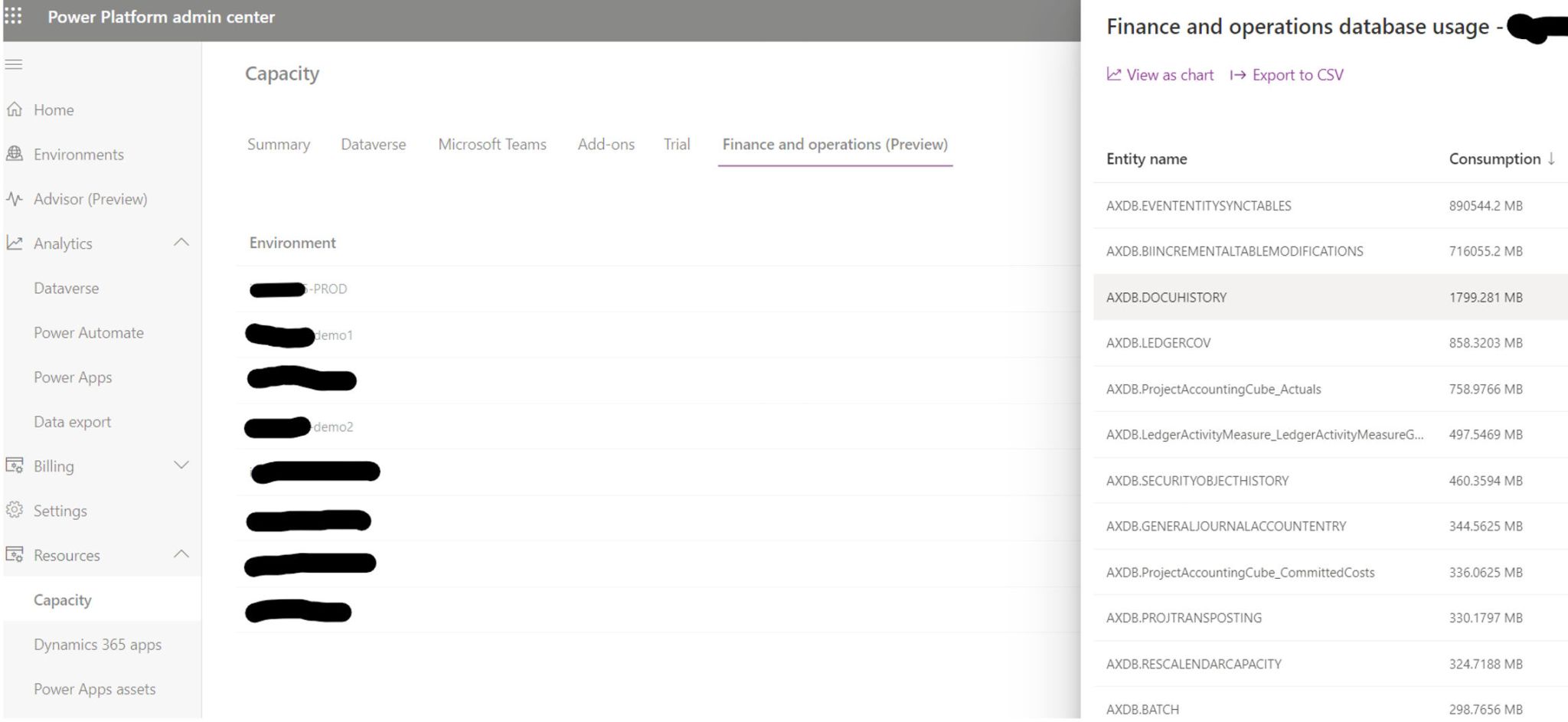
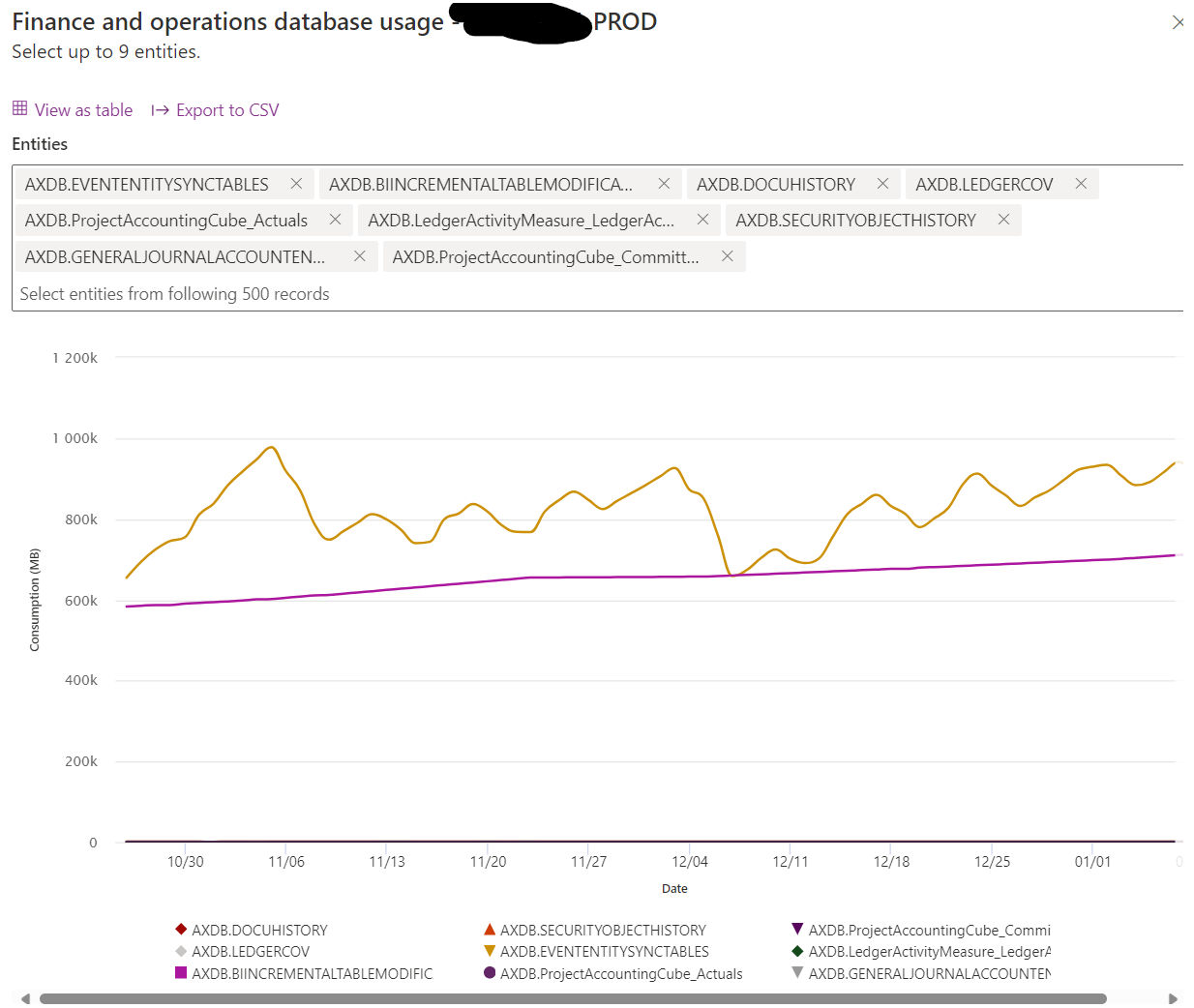
In a recent Yammer post, Microsoft announced a significant upgrade to the storage capacity experience in the Power Platform Admin Center (PPAC) for Finance and Operations. This new (preview) feature enables a deep dive into the storage consumption for each table within the Finance and Operations environment. Now, administrators can not only see the total storage used but also understand which tables are the heaviest. This level of detail was previously available only for Dataverse tables but is now extended to include Finance and Operations, bringing a new era of transparency and control.

Why is this Important?

1. Optimized Performance:

Data clutter is not just a storage issue; it can significantly impact the performance of your Dynamics 365 system. By identifying and cleaning up large, outdated, or unnecessary tables, you can streamline processes and improve overall system efficiency.

2. Cost-Effectiveness:

With the clear visibility of data storage, you can manage your resources better. Cleaning up unnecessary data can help stay within your storage capacity entitlements, avoiding additional costs.

3. Improved User Experience:

A well-maintained system with relevant, up-to-date information enhances the user experience. It makes data retrieval faster and more accurate, aiding decision-making processes.

How to Make the Most of This Feature?

  1. Regular Audits: Schedule regular audits of your Dynamics 365 data. Use the new feature to identify high-storage tables and assess whether the data within is current and necessary.
  2. Establish Data Cleanup Policies: Create policies for data retention and cleanup. Ensure these policies are in line with legal requirements and business needs.
  3. Involve Stakeholders: Engage with various departments to understand the relevance of data. Sometimes, what seems redundant in one context is critical in another.
  4. Leverage Automation: Consider automating the cleanup process where possible. For instance, set rules for archiving old records.
  5. Monitor and Adapt: Post-cleanup, monitor the performance improvements and storage savings. Use these insights to adapt and refine your data management strategies.

And to understand how and what to clean up, then the following post is helpful :

https://learn.microsoft.com/en-us/dynamics365/fin-ops-core/dev-itpro/sysadmin/cleanuproutines

Happy DAX’ing !