Each time you load a D365 form som scratch, and you take a view in F12, you will see that there are a lot of calls happening, but one of them, that often stands out are App.Css.
app.css may look like “just a stylesheet,” but it’s a foundational part of the Dynamics 365 F&O web client. Because it is render-blocking and downloaded at the start of each user session, any issue with its size, compression, or caching has a direct impact on the speed and responsiveness of the entire system.

At live customers where we see download time of vary from 3s to 12s, and it’s size is approx. 15.9 MB. My experience is that if this file is downloaded slow, then users complain about performance issues, and that the F&O feels “sluggish”.
You can try it out on your own environment by going to :
[Your F&O URL]/WebContent/ApplicationSuite/less/21/0/app.css
I often see user using favorites or pressing F5. This ALWAYS downloads the file. But if I navigate nicely through menus and forms, it uses the the existing downloaded APP.CSS file. I don’t know why there are not better caching on this file, because it it directly related to the user experienced performance.
I did find the following resolved issue on the matter, but I cannot see that it works :
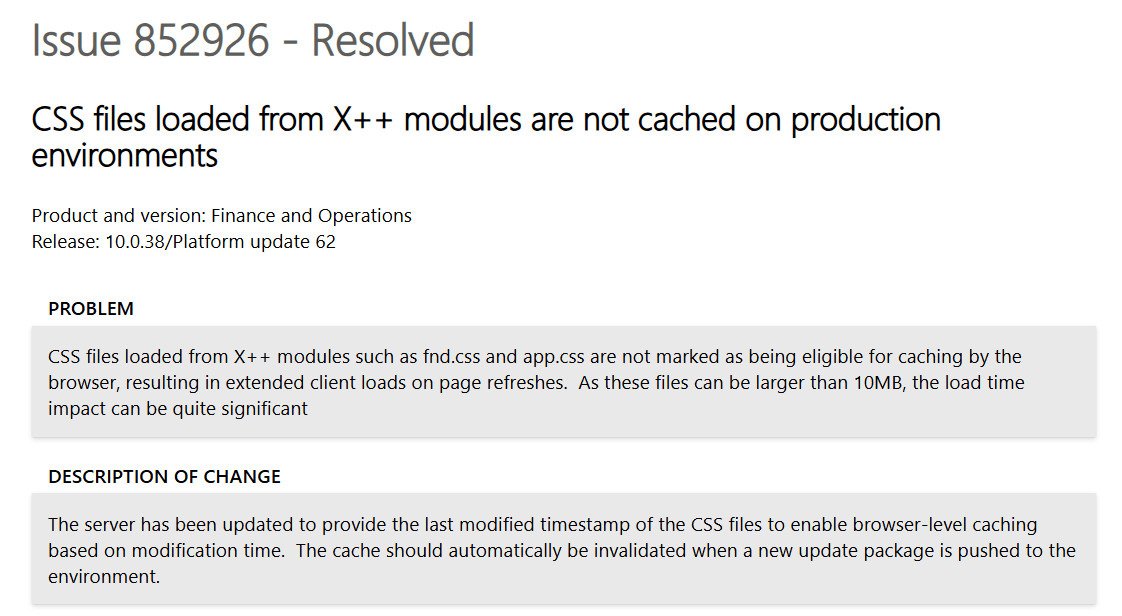
But this fix does not seam to work when doing a hard reload, browsers bypass the cache and pull the file again.
The request header is :
Cache-Control: no-cache
Pragma: no-cache
Accept-Encoding: gzip, deflate, br, zstd
The response header is:
Cache-Control: must-revalidate, private
Content-Length: 15864379 (≈ 15.8 MB)
Date: Sun, 23 Nov 2025 11:12:13 GMT
Expires: Sat, 22 Nov 2025 11:12:14 GMT
Last-Modified: Mon, 06 Oct 2025 14:47:48 GMT
Some questions I have is:
No compression. Why ?
- With gzip/Brotli, you’d probably be in the 1–3 MB range instead of 15.8 MB.
- Browser advertises
Accept-Encoding: gzip, deflate, br, zstd. - Server returns no
Content-Encoding→ raw 15.8 MB.
Cache semantics are conservative.
- Cache-Control: must-revalidate, private
- Expires is already in the past
- This is cacheable by the browser, but:
- It will tend to revalidate more often.
- It will never be shared via proxies/CDNs.
I asked ChatGPT to explain what we could experience if we had some serious improvements on how app.css is handed :
“The current implementation of app.css in Dynamics 365 Finance & Operations represents a significant and unnecessary performance bottleneck. In multiple production environments, this single stylesheet is delivered as a 15.8 MB monolithic file, served without HTTP compression, and marked with conservative caching headers that force frequent revalidation. This design means every cold session—and far too many warm sessions—incurs several seconds of render-blocking download time before the UI can even appear. This contradicts modern web performance standards and is fundamentally out of alignment with best practices used across Microsoft’s own cloud products.
Even worse: the bundle includes CSS for dozens of feature areas the user will never open, yet all that styling is shipped up front in a single blocking request. A sensible architecture would split critical UI styling into a small, cache-friendly core bundle and load feature/workspace CSS asynchronously. Combined with proper Cache-Control headers and gzip/Brotli compression—both trivial to implement—first-paint latency would drop from multiple seconds to well under a second, and warm loads would be effectively instantaneous.
Put bluntly: no enterprise web application in 2025 should ship a 15 MB uncompressed render-blocking CSS file, and F&O is long overdue for a cleanup here. Microsoft can dramatically improve perceived performance across all customers by modernizing static asset delivery for these core UI bundles.
To put the impact into perspective: today a 15.8 MB uncompressed app.css over a typical 15–30 Mbit/s corporate connection costs roughly 4–9 seconds of pure transfer time on every cold load — and that’s before the browser even starts rendering the UI. The same stylesheet, if split and compressed down to ~2 MB of critical CSS, would load in well under a second on the same line speed. With proper client caching on top, most users would pay this cost once per update, not once per session. In other words, a trivial change in how static assets are packaged and cached would turn “wait 5–10 seconds for the client to wake up” into “page is ready almost immediately” for every F&O customer on the planet. “
Hmmm…. Chatty agrees with me 🙂 This should be fixed.
Here is the “idea” for votes : https://experience.dynamics.com/ideas/idea/?ideaid=de4f0ff0-dac9-f011-ad8e-7c1e52cc5c16


 Kurt Hatlevik - Dynamics 365 Blog