One of the most common frustrations in D365 Commerce sounds deceptively simple:
“I updated a product (or image). Why isn’t it visible in eCommerce?”
The short answer:
Because D365 Commerce is not a real-time system.
The slightly longer (and more honest) answer:
Because your “simple update” now has to travel through a small obstacle course of jobs, sync processes, caches, and services—spread nicely across multiple systems—before it earns the right to appear on the storefront.
This post walks through what actually happens, what you need to do, and—most importantly—what you should realistically expect in terms of timing.
At a high level, updates flow through three layers:
- Authoring layer
- D365 F&O (product data)
- Site Builder (content, images, CMS)
- Distribution layer
- Commerce Scale Unit (CSU)
- CDX jobs
- Presentation layer
- E-commerce frontend (cached, CDN-backed)
Step 1: Product updates in F&O
In F&O, you typically:
- Update product name, attributes, price
- Assign category
I’ll assume your category is already connected to an assortment (if not, that’s your first problem).
Also worth noting:
From a technical perspective, D365 Commerce mostly operates on products, not “released products” as you think about them in F&O. The data originates there—but Commerce consumes it differently. So “it looks correct in F&O” is not a guarantee of anything.
Before doing anything else, verify:
- Product is released and assigned to a category
- Product/category is included in an assortment
- Assortment is linked to the correct eCommerce channel
- Required attributes are populated
Then run your distribution jobs:
- 1040 – Products
- 1150 – Catalog
- 1070 – Channel configuration (sometimes required)
Or, if you’re feeling efficient:
- 9999 – Full sync (delta)
This pushes data from F&O → CSU.
Timing:
- Manual run: ~1–3 minutes
- Batch (recurring): typically 5–15 minutes
So no, it won’t show up “immediately”.
Step 2: Images and Site Builder (where things feel real-time… until they aren’t)
Next stop: Site Builder. I’ll assume you’re using Omnichannel media management—because anything else in 2026 is just self-inflicted pain.
Here you:
- Upload images
- Map images to products
And yes—this part is important:
You must publish both:
- The media assets
- The product-media mappings
Saving is not publishing. Preview is not live. We’ve all learned this the hard way.
Step 3: The hidden roundtrip (CMS → F&O)
Here’s the part most people don’t expect:
Before anything becomes visible in eCommerce, a batch job in F&O must run:
- CMS to HQ omnichannel media sync
This job:
- Pulls media mappings from CMS
- Stores references in F&O
Yes—correct:
Your product images are effectively registered in F&O before eCommerce can use them.
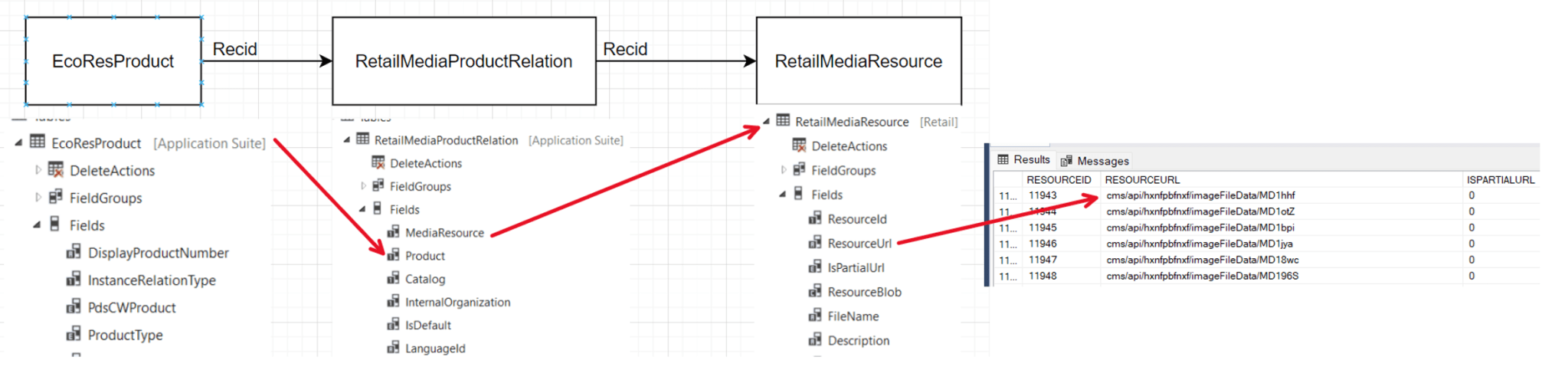
Which also explains why:
- You can (with extensions) surface eCommerce images inside F&O
- And why missing this job results in… nothing showing up
Typical setup:
- Runs every ~5 minutes as a batch job
Step 4: And back again (F&O → CSU… again)
At this point, you might reasonably think you’re done.
You are not.
Now that F&O has received the media mappings, you must send them back out again:
- Run 1040 (or 9999)
Why?
Because eCommerce does not read directly from CMS.
It reads from CSU, which reads from F&O.
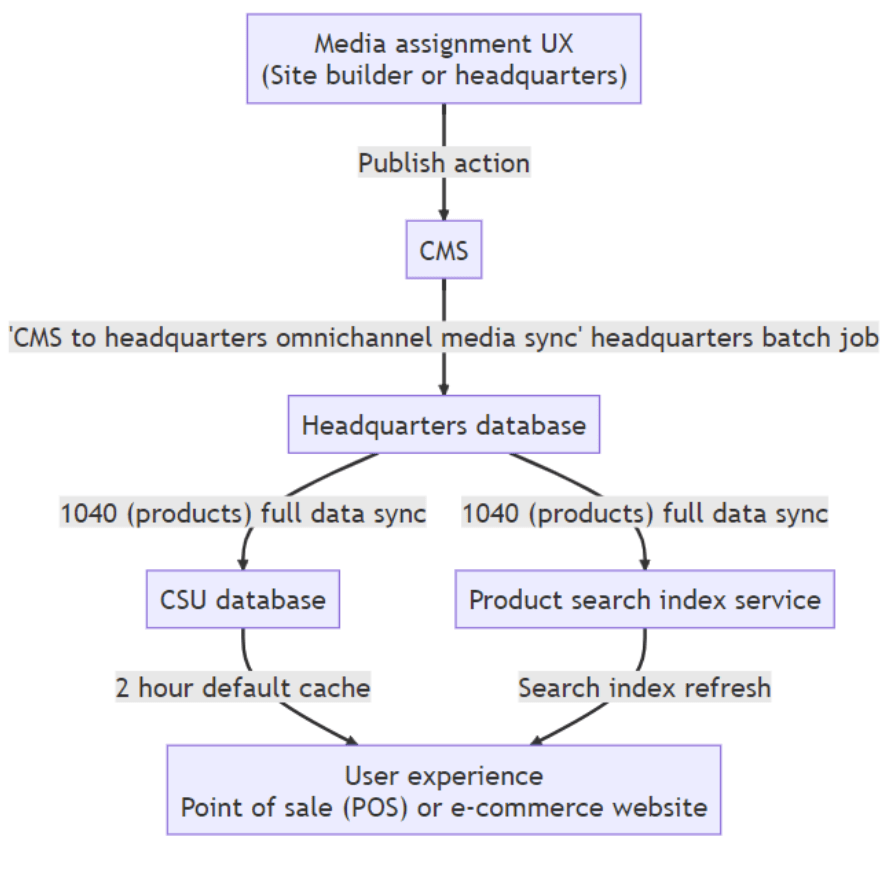
So the flow is:
CMS → F&O → CSU → eCommerce
Not exactly intuitive, but very consistent.
Step 5: Search indexing and cache (the final boss)
Running 1040 does two important things:
- Updates CSU with product + media references
- Triggers product search indexing
That indexing feeds Azure AI Search, which powers product search results.
So:
- Direct product URLs may work before search does
- Search results may lag behind
And then there’s caching.
From Microsoft’s own flow:
- Product data can have up to 2-hour cache TTL
- Azure AI Search indexing can take significant time
Real-world observation:
- ~10,000 products → indexing can take 1+ hour per channel
Yes, per channel.
The important takeaway
After you:
- Upload and publish media
- Sync CMS → F&O
- Run CDX (again)
- Wait for search indexing
- And let caching expire
…then your product might show up exactly where you expected it.
Final reality check
D365 Commerce is eventually consistent.
Not “slightly delayed.”
Not “near real-time.”
Eventually.
If you treat it like a real-time system, you will spend your time:
- re-running jobs
- second-guessing configurations
- and refreshing the browser aggressively
Instead of just understanding where in the pipeline you are.
That’s the difference between guessing—and knowing exactly why nothing is showing up (yet).
So the final conclusion is that if you have done everything correctly; Check your eCommerce site again tomorrow.
 Kurt Hatlevik - Dynamics 365 Blog