Hey there, eCommerce enthusiasts! Get ready for some exciting news from the Dynamics 365 universe. Microsoft’s hitting pause on Product recommendations for newbies, but hey, who says we can’t have a little fun in the meantime?
Enter the world of ChatGPT for Excel – think of it as your personal eCommerce wizard! This nifty tool is like having a magic wand to conjure up snazzy search terms for products on your eCommerce site. Just line up your products, wave the formula wand, and voila – five awesome search terms for each item, in as many languages as you need. Abracadabra!

Here’s the secret sauce:
- List your products (the more, the merrier!).
- Apply this cool formula for instant, catchy search terms.
- Mix these into your search attributes and watch the magic happen.
The great thing is that the AI understands the product and will result in better search terms.
And because we love to experiment – I played around with ChatGPT for Excel to juggle the product display order. Check out this spell:
=AI.ASK(“Rank between 1 and 1000 on expected popularity. Only reply with the number. No text. It’s OK to randomly choose a number. Low number is a popular product, and 1000 is less popular”;B2)
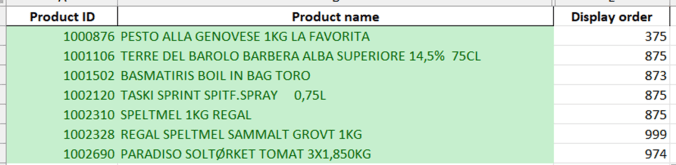
A little more tweaking and we could be onto something epic. And guess what? This is just the tip of the AI iceberg in Excel! Just imagine the fun when Microsoft CoPilot jumps into Excel – it’s going to be like having your own AI sidekick! So, stay tuned, keep experimenting, and happy DAX’ing! Let’s make your eCommerce journey an adventure to remember.
 Kurt Hatlevik - Dynamics 365 Blog