As a consultant I’m used to having a lot of “back-to-back” meetings, and when the next meeting is near, I typically get an outlook reminder 15 minutes prior to the meeting.
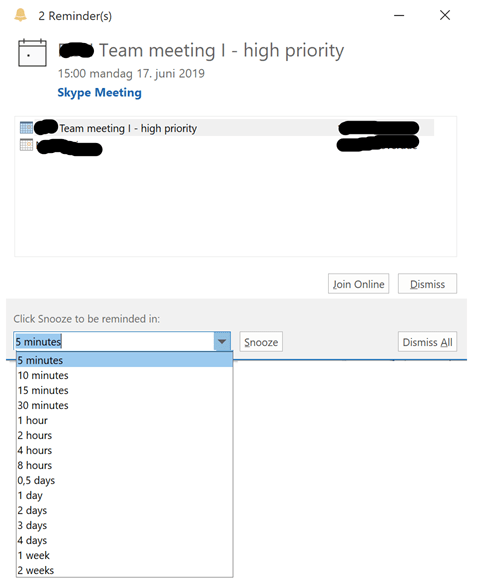
Then using the “Snooze” button is good. If I snooze until 5 minutes before I am too early. 0 minutes before and I am too late. You know that in the drop-down, the minimum selection is 5 minutes? That is too much for me. I would like to have a new reminder when it is 1 minute before the meeting start. But did you also know that you can type into the field? You can actually write “1 minute”, and this will then remind you when it is 1 minute to the meeting start.
A smaller more advanced way is to set the default reminder to 16 minutes, prior to the meeting
And then when the reminder “pop’s” up, to can select to “Snooze” and select to be reminded in 15 minutes. That is exactly 1 minute before the meeting starts.
Now I have just “earned” 4 more minutes where I can create D365 customer value before the meetings starts
 Kurt Hatlevik - Dynamics 365 Blog
I have Outlook 2016, and the snooze dialog does not let me type “1 minute” or “2 minutes”. It says “is not a valid snooze time.” (I have not tried the abbreviations 1m or 2m yet.)
LikeLike
If only this worked on MacOS……… Sigh
LikeLike
It’s a lot easier for me to simply type “1m” on the Snooze combo field or whatever time I need the reminder to be popped up before meeting starts. You can also use “1min” or “1 minute” syntax but, of course, the quickest one is “Xm” (being X the amount of minutes before the alert pops up). You can also do this with hours (“Xh”) and days (“Xd”)… not sure if you can mix them, though. If someone can give it a try and let us know the outcome, that would be great!… 😁👍
LikeLike
CORRECTION:
The “Xm/h/d” time on the Snooze combo box will be the time Outlook will wait before displaying the pop-up alert for the same reminder, not the “time before the alert pops up”, as I mistakenly wrote. My apologies about that!
LikeLike
Thank you very much. I had an Auto-it Script with hotstring to fill in that “1 Minute”, which I found too long to type. Now I’m absolutely happy with this solution.
LikeLike
Thanx!!! Nice one
LikeLike
Does that imply that meetings create no value ? 😉
LikeLike
…survived another meeting… should have been an email 🙂
LikeLike
That gives me four spare minutes to say: Awesome post!
LikeLike