A Practical Guide for Dynamics 365 Iterative Implementation

With the introduction of Dynamics 365 and cloud enabled tools like Office and VSTS(Visual Studio Team Services) we have accelerators towards iterative ways of performing an implementation.

Digitalization also enables the ability to go from a document and template approach to a committed task driven implementation with a sprint based sub-deliveries, where all parties are involved. This also increases visibility, removes lead-times and results in faster deliveries. Adapting digitalization and going iterative in a project it not only about using new tools and processes like VSTS, but also covering Practices, Principles, Values and Mindsets of the project participants.

The iterative preparation

As described in earlier blogposts it is vital to have a clear concept of process modeling where processes are broken down to sub-processes and requirements. Having WBS (Work-Breakdown-Structures) is the tool to plan and execute on deliverables. The traditionally solution analysis is transforming into a iterative preparation phase that can let us define clear work packages that can be solved in sprint executions.

The Iterative preparation should have a formalized set of workshops, and the main purpose is to generate an approved solution backlog. It is normally recommended to complete the preparation phase before going into the execution phase. But in larger projects the preparation phase could be a parallel phase to the execution phase, and where customer approved solution backlogs can be planned into sprints and started upon before the phase is ended.

Please remember that iterative implementation models do not give a detailed picture of scope or costs! The actual deliveries are defined by the customer approved solution backlog.

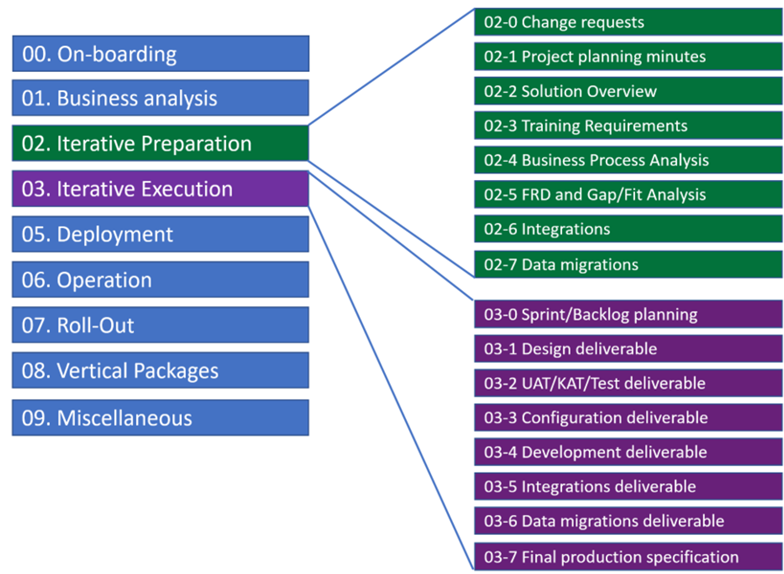
The following flow chart shows the main activities in the preparation phase.
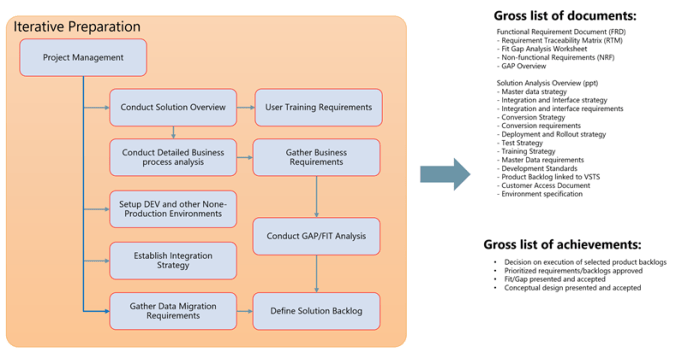
The granularity and level of details needed in the deliverable documents is agreed on in the project. A middle and practical way is to create the deliverable documents with a minimum set of information and a final conclusion, and then URL link the content in documents towards a VSTS site for further information and process.

The preparation phase is highly customer intensive and require a detailed plan, invitations, workshops and time to document the findings. Before is participating in preparation workshops it is recommended that the participants have completed a “Learn, Try, Buy” phase. An example project plan for the preparation phase can look like this for a retail customer.

As seen in the example plan, the preparation can have dedicated tracks for the functional areas, and these will vary based on the vertical models that is being used. The level of granularity of the sub topics is recommended to be according to the first and second level in the process models.

Use process models to define scope and topics.

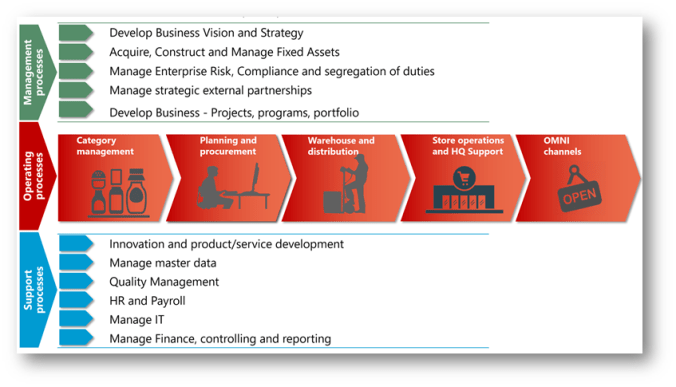
The contents of the preparation workshops should be organized based on the process models. This makes sure that best practices are discussed and taken into account for the execution phase. The value chain shown here is the divided into 3 main epic tracks; Management processes, Operational processes and Support processes. There are different models for each vertical. As seen in the following figure I typical use to illustrate the EG retail value chain model.
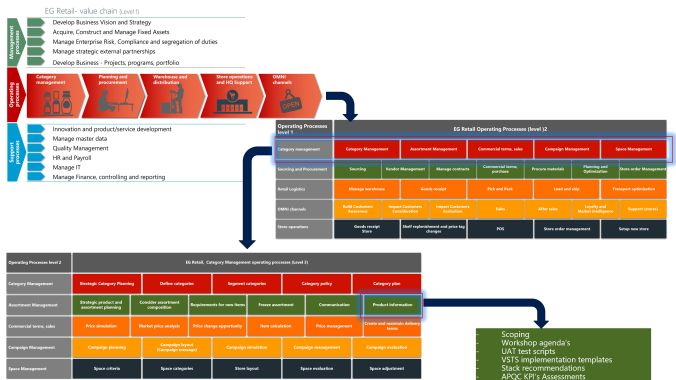
ProcessModels

For each of the “boxes” in the model represents a topic, where business processes is discussed and defined. The model will provide:

  • Workshop Agenda’s templates
  • UAT test scripts templates and recommended process recordings
  • Stack/technology recommendations
  • Process flows (visio or BPM in LCS)
  • Solution Backlog templates.
  • KPI assessment recommendations (APQC)

From Model to solution backlog

Based on the findings from the preparation phase a solution backlog is created. The most efficient tool to do this in, is the VSTS (Visual Studio Team Services), setup using the CMMI definitions. Here all backlogs are organized in a hierarchy of Epic’s, Features, Backlogs, tasks and Impediments.

The general consensus of these definitions are:

Level Description
Epics Something that transcends projects/releases/versions.
Features Something that cannot be delivered in a single sprint, but can be delivered in a single release.
Requirement(CMMI)
Product Backlog (SCRUM)
Something that can be delivered in a sprint, and have an estimation.
Bug Something that that is not working and can be solved in a sprint, and have an estimation.
Task Assigned work elements with remaining effort.

To relate the structures to CMMI, the following guideline can also be followed.
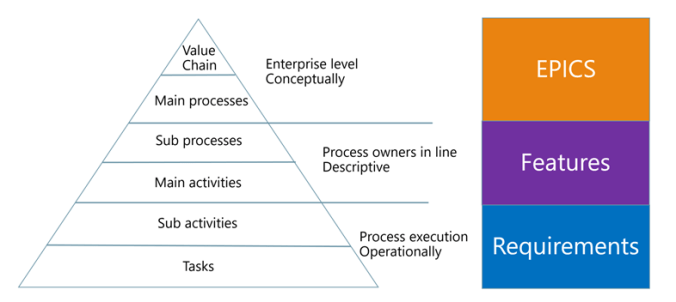
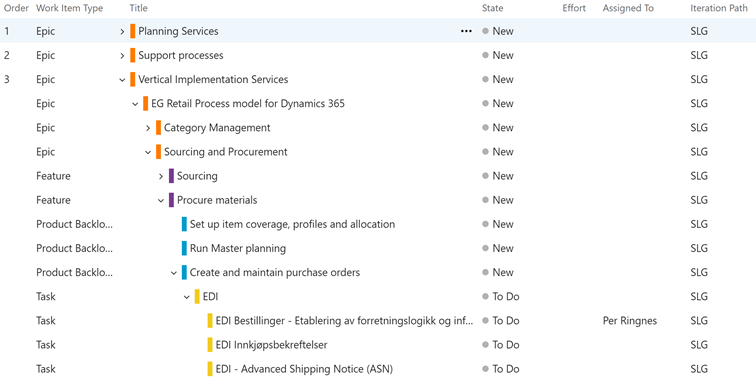
More details in how to create a backlog in VSTS can be found here. Best practice is that the VSTS site is located on the customers tendant, and that external project participants are invited. The VSTS backlog can also be regarded as a WBS (Work Breakdown Structure). In the following example you can see how the backlog is structured according to a business process model.

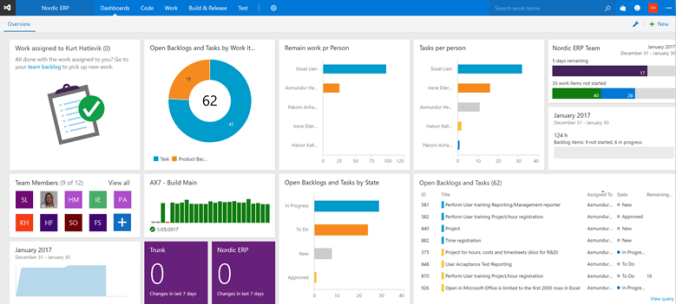
The VSTS will also provide dashboards where a complete status can be seen and monitored. Setting up these Dashboards is based on defined queries towards tasks and backlogs, and are easy to tailor to the needs.
How to fill in a backlog item

The product backlog (and other elements) contains a small set of fields needed.

What should be regarded as a minimum set of information defined on a backlog is:

  • Name
  • Description
  • Acceptance Criteria
  • Effort estimated.

If additional fields are needed, they are quite easy to add and also easy to extend with new statuses.

If additional fields are needed, like APQC ID, planning dates, additional names etc, they can very easily be added to the form. See https://www.visualstudio.com/en-us/docs/work/customize/customize-work for more information.

In the preparation phase perform these activities:

  • Right-size backlog items by splitting larger items into smaller items. No backlog item should be larger than it will take to complete in a single sprint.
  • Identify and fill in gaps in the product backlog. Capture new ideas and stories, architecture and design requirements, and other spikes.
  • Reorder the backlog to represent today’s priorities and business value focus.
  • Ensure well defined acceptance criteria has been added to each item.
  • Revisit estimates made to backlog items and adjust upwards or downwards based on recent understanding about scope and acceptance criteria.
  • Review all potential backlog items to consider for the upcoming sprint to make sure they are well understood and that any additional work required to support their development is well understood by both product owner and the team.

Mapping a VSTS product backlog to the functional requirement documentation

Most often it is mandatory to also deliver a Functional Requirement Document. This document is delivered as in the end of the preparation phase. The reason why this document is important, is that it explicitly defines all requirements, and is a commercial document. But instead of writing a hundreds of page document, try to link the requirements using URL-links to the document. Then the FRD only contains the vital and important information that regulates responsibilities and commercial conditions.

The preparation phase ends when the deliverables from the phase is approved and signed by the customer. After the phase is approved, all information on the VSTS site can be copied into Excel backup sheets, that represents a snapshot of the status at the end of the prep phase.

Roles involved in an iterative preparation phase

The roles running an iterative preparation phase depends on project size and complexity. As a minimum, it is recommended that the following defined roles are present in this phase:

  • Project manager (Planning and facilitating)
  • Solution architect (Overall approval of solution)
  • Technical lead (Integrations and migration)
  • Functional Consultants (Covering training, functional area’s)
  • Junior Business consultants (Assisting writing and maintaining the solution backlog)

Customer project participants need to match this roles.

Iterative Execution phase

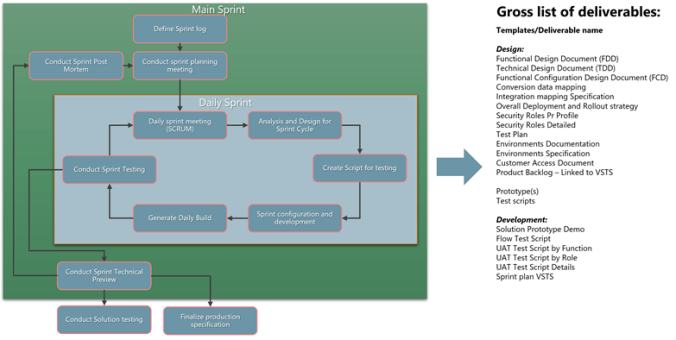
As the solution backlog is filled, sprints may be filled with approved backlog items. The overall process of the sprint is to deliver at set of backlog items, that have been broken down to specific tasks. The duration of a sprint is determined by the scrum master, the team’s facilitator. Once the team reaches a consensus for how many days a sprint should last, all future sprints should be the same. Normally, a sprint lasts between 2 to 4 weeks. During the sprint, the team holds daily stand up meeting to discuss progress and brainstorm solutions to challenges. The customer may not make requests for changes during a sprint and only the scrum master or project manager has the power to interrupt or stop the sprint. At the end of the sprint, the team presents its completed work to the customer and the customer uses the criteria established at the sprint planning meeting to either accept or reject the work.

The following diagram shows the activities involved, and the expected deliverables from a sprint.
Define the Sprint log

To solve a backlog, then several resources may be required to be involved. When defining the sprint log, each backlog is split into tasks, that defines the sequence, remaining work and the assigned to. This means having tasks for analysis and design of the backlog, creating scripts for testing, tasks for developing and tasks for performing the test of the backlog item. As seen in the following figure a backlog is divided into tasks, and each task is must have a clear description and a “remaining work” estimate. If essential resources are needed to solve the task, then the task also should be assigned to this person.

When a task have been assigned to a person the person is committing to the task, and agrees on delivering the task within the defined sprint.

Conducting a sprint planning meeting

The customer, project manager and the Scrum Master will start a sprint by selecting the backlogs that should be solved in the current print. This is done in VSTS, and the backlogs are “dragged-and-dropped” to the selected sprint, or marked to specific iteration.
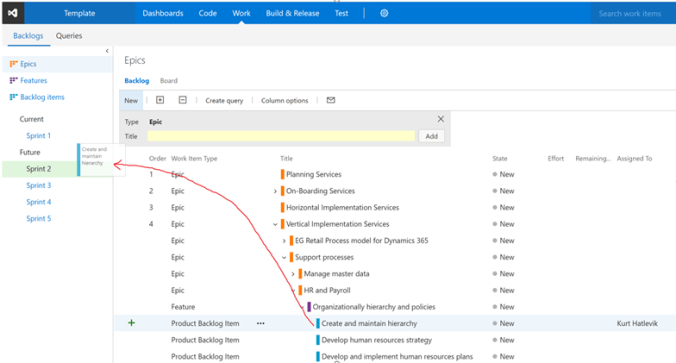
When planning a sprint, also identify what resources are needed in the sprint. In the sprint overview, then define the capacity and the resources required in the sprint. This makes planning easier and resource/capacity constraints can be identified by project manager/scrum master.

The daily sprint meeting

This meeting is the most important meeting each day. It should only last for 15 minutes, starts at the same time every day and is located on the same place every day. The SCRUM master is responsible to make sure that the meeting is as efficient as possible. It is a team meeting, where each team member explains what he is working on, and if there are any issues. Do NOT use the sprint meeting to try to solve issues. Just identify and share. Use other meetings to solve and to go deeper into each topic. Any notes that is important and identified in the CMMI can be described in the discussion field on the task/backlog.
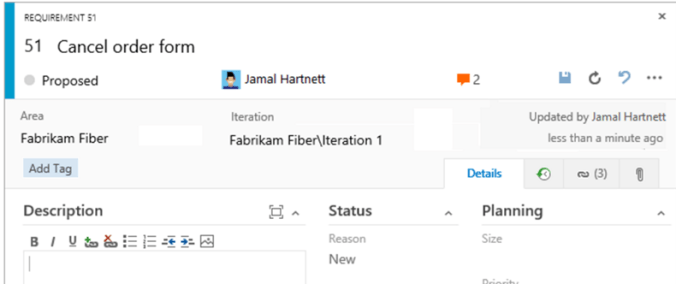
Also use the “Add Tag” to mark tasks and backlogs that need special attention and follow-up.

Reporting status and completion

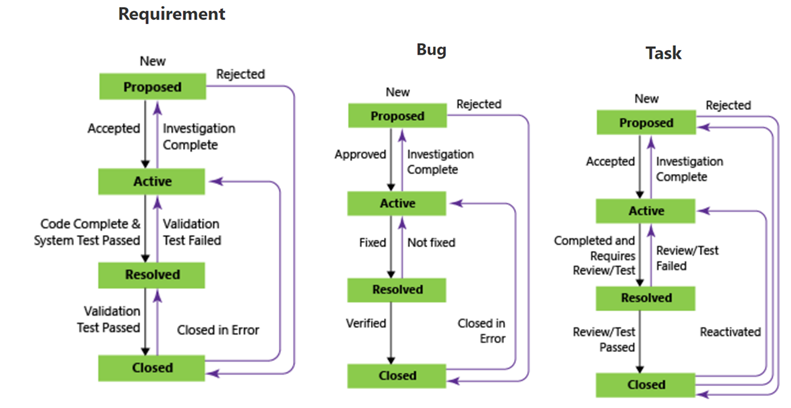
All backlog items have a state. The meaning of these states can be seen in the following flow charts:

Teams can use the Kanban board to update the status of backlogs, and the sprint task board to update the status of tasks. Dragging items to a new state column updates both the State and Reason fields. If additional intermediate steps and stages are needed, this can be customized in the settings of the VSTS.

Documentation

One of the disadvantages of an iterative implementations is that there are no clear and sharp end-phases, and this often does not fit good with commercial contracts. It is therefore important to make sure the deliverable documents are created/updated according to the progress. But remember to be active in documenting as much as possible in VSTS, and define the creation of deliverable documents as defined backlogs in the sprint. Expect to use at least 10% of you time in VSTS to give visibility to others.

Conduct Solution testing

Quality is a vital aspect of and everybody in the team owns quality – including developers, managers, product owners, user experience advocates, and customer project members. It is vital that the solution testing is a customer responsibility and that the testing is structures and planned accordingly.

VSTS provide rich and powerful tools everyone in the team can use to drive quality and collaboration throughout the implementation process. The easy-to-use, browser-based test management solution provides all the capabilities required for planned manual testing, user acceptance testing, exploratory testing, and gathering feedback from stakeholders.

Creating test plans and performing test are one of the most vital elements in the iterative implementation. Please read the following URL for UAT testing https://www.visualstudio.com/en-us/docs/test/manual-exploratory-testing/getting-started/user-acceptance-testing . Building a test plan is therefore a mandatory step and this ensures that defined accept criteria have been met.

The following documents are the input to the solution testing:

Flow Test Script
UAT Test Script by Function
UAT Test Script by Role
UAT Test Script Details

Test & Feedback

Visual Studio Team Services Marketplace contains a ton of jewels, and one add-in that can accelerate testing and feedback is the Test & Feedback extension to VSTS.

When installing it, you get a small icon in Chrome, where test and feedback can be given.

When setting it up, you just point to the VSTS site. And then you are ready to start giving feedback, and to collect backorders, bugs or tests, just click on the play button.

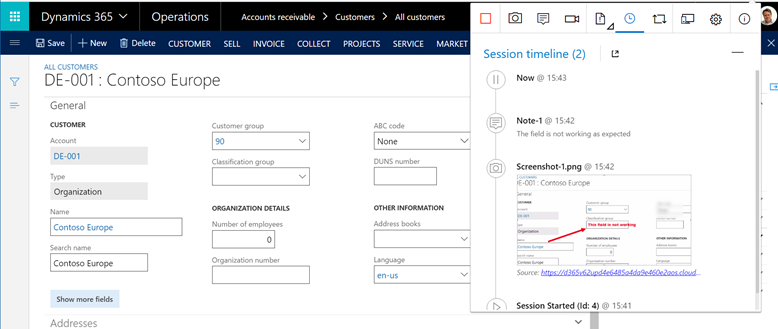
While navigating and taking screenshots, notes and video, it all gets recorded, with URL, time etc.
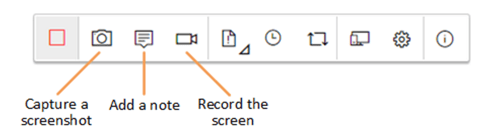
When done with the recording then create a bug, test or create a test case:

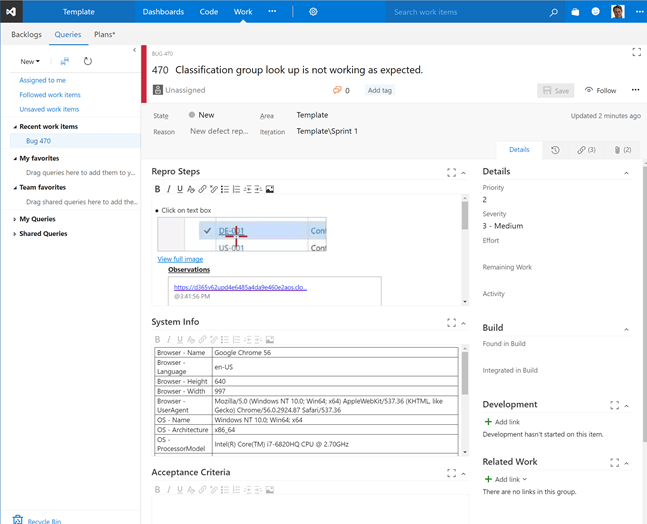
After saving the bug. I see that a bug have been created in VSTS:

I now have a complete bug report in VSTS, that the consultants can start to process and to identify if this is a bug or an “as designed” feature.
Microsoft Tools available for a Dynamics 365 project.

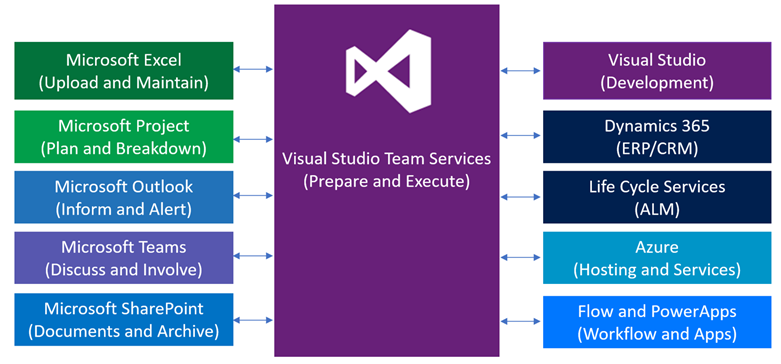
When working in a project, it is important to know that Microsoft tools and services are tightly connected and that each tool can simplify and enrich the user experience and efficiency. In the following figure the different most common tools can be seen. Also pay attention to that there are powerful integrations between these tools, and this section will provide some small tips on how to make these tools work together.

Having a clear understanding of the tools available can speed up implementations, and also give better visibility to all stakeholders. In the following topics, some of these benefits are discussed.

Microsoft VSTS: Visual Studio Team Services

Create a VSTS site at http://VisualStudio.com. For internal projects, create using your domain account. For customer project, it is recommended to create the site on a customer controlled domain, and then add the domain users as guest users. Other elements in relation to VSTS have been covered earlier in this document.

Who uses it? All implementation project members both from EG, Customer and 3’rd party vendors.
When to use it? Everyday and in all SCUM meetings.
Pricing 5 users free, stakeholders free. Paid user is 6$/month.
Members with Visual Studio subscriptions don’t need licenses. https://www.visualstudio.com/team-services/pricing/

Microsoft Excel: Upload and Maintain

Microsoft Excel can be used to import and publish the structure into VSTS, when the Visual Studio Community edition is locally installed on your PC. This makes it possible to extract all fields and values by using VSTS defined query.
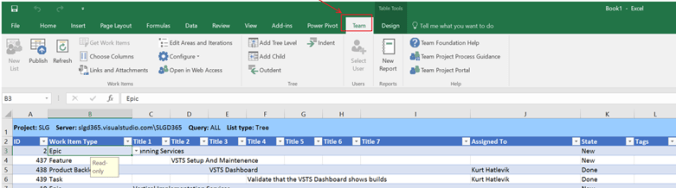
Then a process model may be imported and a best practice product backlog is ready to be processed. Step-by-Step instruction on how to use Excel with VSTS, take a look at https://www.visualstudio.com/en-us/docs/work/office/bulk-add-modify-work-items-excel

Who uses it? Solution Architects and vertical responsible.
When to use it? In the start, when uploading process models and WBS’s as a start.
When mass updating backlog items and tasks.
Pricing Office 365 prices. https://products.office.com/en-us/compare-all-microsoft-office-products
Visual Studio Community edition is free.

Microsoft Project: Plan and Breakdown

Microsoft Project is a vital tool for streamlining quotations, WBS and resource planning. Built-in vertical templates, familiar scheduling tools, and access across devices help project managers and teams stay productive and on target. Microsoft Project is also directly integrated with VSTS, and exporting created backlogs and tasks/activities to Dynamics 365 for Operations can be done, and create a complete end-to-end process covering “from quote to cash”.

“Plan-the-work”, and “Work-the-plan” are essential activities and where all stakeholders can participate and cooperate, and that we deliver what is planned, and the invoice the customer receives corresponds to the agreement and contract. Having predefined WBS structures in Microsoft Project simplifies project planning, and the VSTS is auto updated accordingly to how the planning is performed.


Who uses it? Presales, Sales and Project management.
When to use it? Microsoft Project is excellent to handle WBS structures when planning and quoting a project. Microsoft Project is also used for planning resources, and to reach project deadlines. For more information on how connect VSTS and Microsoft Project, take a look at https://www.youtube.com/watch?v=GjYu5WmcQXo
Pricing 30$/user/month for Project Online Professional
https://products.office.com/en-us/project/compare-microsoft-project-management-software?tab=tabs-1

Microsoft Outlook: Inform and Alert

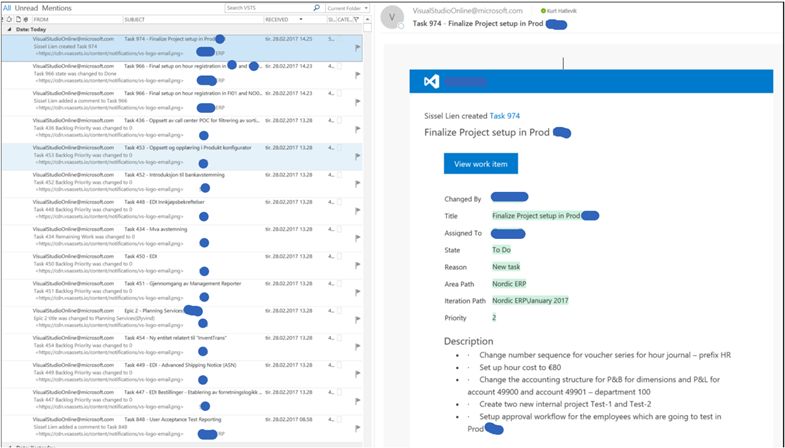
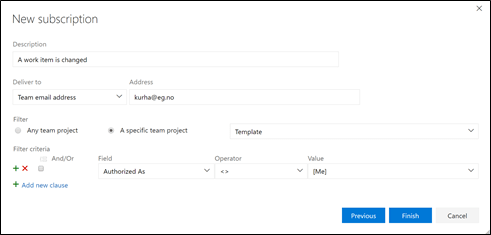
Some stakeholders do not want to go deep into VSTS, or to extract information from Excel/Projects. Also when tasks are being assigned they want to be informed and when issues are resolved, they want to notified. Setting up notifications in VSTS solves this requirement, and will keep project participants informed of any changes. The email also contains a URL directly to the task/backlog.

Setting up notifications are done in VSTS, and individual filtering can be defined.
Who uses it? All project participants receive assigned notifications. Project managers and solution architect receive all notifications.
When to use it? When Outlook is used to keep participants informed.
Pricing Outlook included with Office 365 prices. No additional costs.

Microsoft Teams: Discuss and Involve

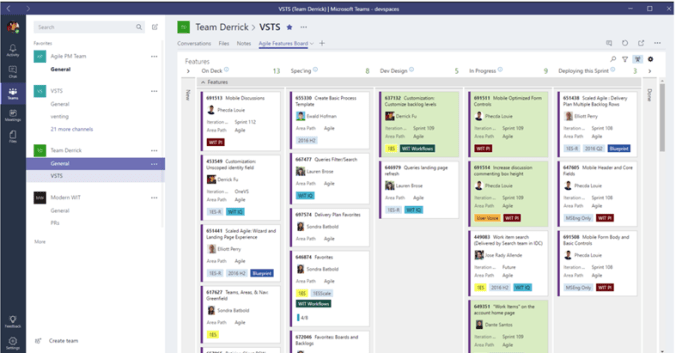
Informal communications are vital for any project. Tools like Skype for Business will take care of meetings and screen sharing, but Microsoft Teams gives flexible communication on all platforms and keep everyone in the loop. The users can see content and chat history anytime, including team chats with Skype that are visible to the whole team. Private group chats are available for smaller group conversations. The Microsoft teams can also function as the center point, with direct tabpages towards VSTS, Home Dynamics 365, LCS, Sharepoint etc. Since this September the Microsoft teams support guest users, and since these sites normally is on the customers tendents, we consultants are logging in with our company email addresses.

The VSTS Kanban board are easily accessible from the Microsoft teams.
Who uses it? Project participants involved in a project, that needs to have informal communication and the ability to work asynchrony with a discussion history.
When to use it? When more direct communication is needed, and especially for developers.
Pricing Teams normally included with Office 365 prices. No additional costs.

Microsoft SharePoint online: Documents and Archive

Even in a highly interactive and iterative environment, there is a need for documents. And then especially for deliverable documents. For this, SharePoint Online is used to store, track and develop the documentation. The internal folder structure is optimized for the sales process, and contains commercial binding documents. The SharePoint online site in mention here, is the SharePoint online site that is the customer property. The following document structure can be recommended.

After the project is delivered, the SharePoint site will remain as the documentation together with the VSTS site.

Who uses it? Project participants involved in a project, that needs to create or use formal documentation and deliverable.
When to use it? When having specific deliverable that.
Pricing SharePoint is included with recommended Office 365 E3 prices.

Microsoft Flow and PowerApps: Workflow and Apps

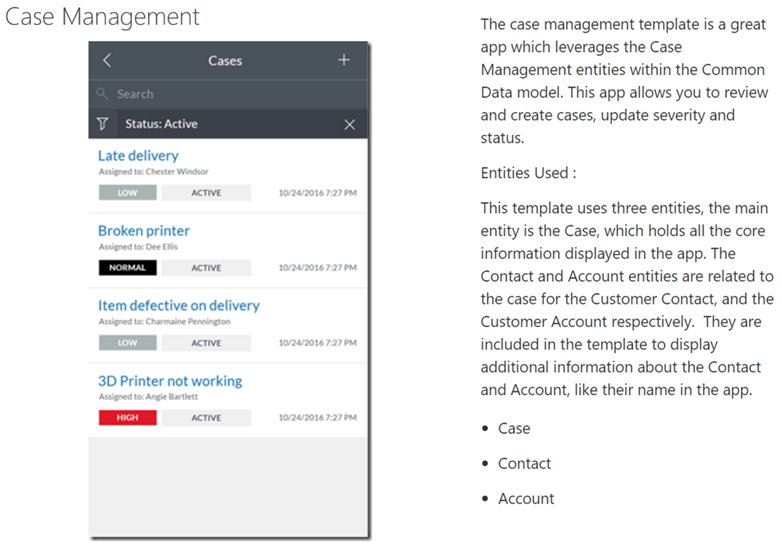
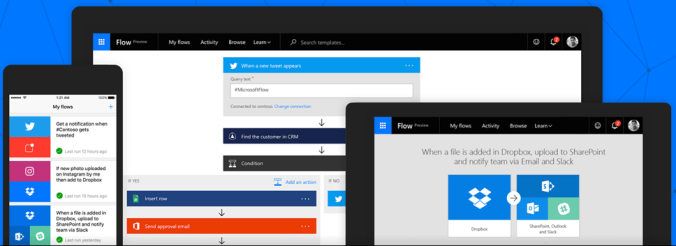
Microsoft Flow and PowerApps are quite new technologies in the Microsoft office family. The idea of bringing these tools into the scope, is to be able to have process and workflow automation in the implementations. PowerApps is also a great tool for data collection in testing and for getting feedback.

Some examples of Microsoft Flow:

Streamline approvals by sending files with approval requests

  • I’m sick button
    à Inform colleagues and block calendar.

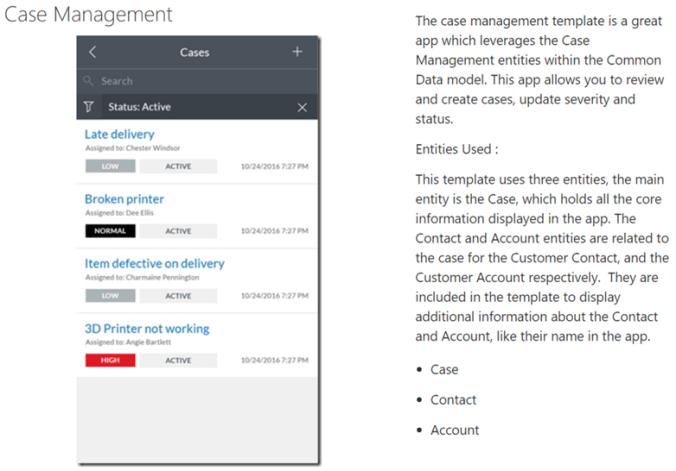
Some examples of powerApps:
Who uses it? Superusers and Architects
When to use it? Used for automating tasks and to create fast simple prototype apps that can assist in the implementation
Pricing Flow and PowerApps are included in a Dynamics 365 Plan 2 license.

I hope this blogpost gives an insight into the digitalization process partners now are using in Dynamics 365 implementations. The Microsoft sites contains tons of more information and I recommend to explore more of the Microsoft technology stack that is available for Dynamics implementations.

Disclaimer: The opinions and views expressed in this blog are those of the author and do not necessarily state or reflect those of Microsoft, my employer EG or other parties.
 

Dynamics 365, PowerApps, Flow and Common Data Model

This summer at WPC Microsoft unveiled the Dynamics cloud strategy by explaining their new initiative named Dynamics 365. Let me say it very short; IT ROCKS !

A good Q&A blog explaining it is this blog post from James Crowter. The essence is that the Dynamics 365 will be available in 2 editions; Business (cloud based NAV-edition) and Enterprise (new Dynamics AX, aka AX’7′). In addition, Microsoft have also launched the AppSource that can help finding the right business apps available from other ISV/VAR’s. This is a great offer to customers, where 3rd party apps and extensions can be previewed.

As the new name implies ‘Dynamics 365’, there will be a tight connection to the Office 365 package. Is there something Microsoft is good at, it is cross-selling and building strong dependency though the entire stack of Microsoft technology. This will further strengthen the offering. Some concerns are that the total offering could be regarded as an increase in costs. Very often we see customers comparing their offer based on the wrong assumptions, and where on-premises offers are compared with cloud and SaaS offerings. This will give the wrong perspective, because often in on-premises solutions don’t include all costs related to implementation and running the systems. What looks as cheap today may in the longer run actually result in higher costs and the build-up of a technological debt. When making the classic tradeoff decisions in technology, make sure you understand the implications.

Dynamics 365 is more than just a rebranding, and the introduction of the new Common Data Model(CDM) is the glue(database) that will stick all pieces/entities together. We can expect that in future, all the components will be working together across the ordinary product lines as we know it today. Customers will download a app, and don’t care if they have a business or enterprise edition of Dynamics.

CDM will over time make sure that Microsoft PowerApps enables users to create applications for Windows, iOS, and Android mobile devices. Using these apps, you can create connections to common SaaS services, including Twitter, Office 365, Dynamics 365, Dropbox, and Excel. Making all kinds of apps will easier, and in many cases not even involve any coding.

My Dynamics friends, please try out the Microsoft PowerApps because this a central element in the future of Dynamics 365, and also check out Microsoft Flow, to understand how the CDM in the future will enable the flow of data and processes between all components in the Dynamics 365 and Office 365 landscape.

Again we have a lot of learning, and I’m amazed how fast the transition to a cloud and mobile first business environment is going. This change will also make ripple effects on the entire ecosystem. New technologies require new organizational approaches and new workforce skills and knowledge. I assume that we again will see consolidations and mergers among the traditional ERP vendors, where the traditional WEB and .NET consultancy is being consolidated under the Dynamics 365 umbrella. We can also assume that smaller ERP vendors are just too small to master all these new technologies, and will slowly fade away. Soon, most of our business processes is handled on your mobile phone, backed by the cloud.

And remember, your best bet is to learn!

DAX 2012 end-to-end processes and APQC

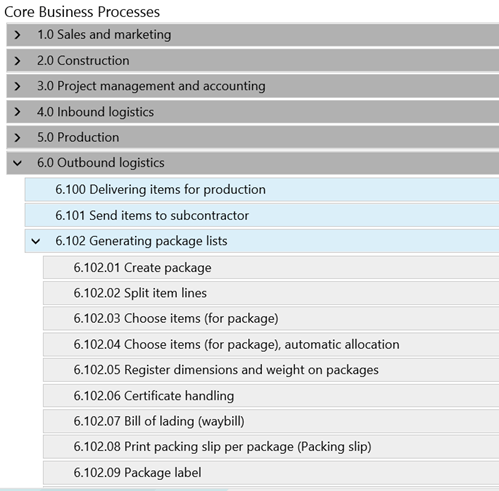
With LCS (Life cycle Services), Microsoft have taken steps to introduced the APQC (American Productivity & Quality Center) Process Classification Framework as one of the business modelers.

Microsoft have also created some flowcharts to visualize the APQC processes in dynamics AX.

In some Dynamics AX implementation projects it have been decided to use the APQC model, and the participants(including me) was struggling connecting the APQC model to actual tasks and activities performed in DAX. So I started on a small mental journey to better understand how to use APQC model, and to be able to connect the dots from the classification framework into dynamics AX swim lane process maps.

First I thought that is was possible to take some level 4 APQC try to draw them. It is possible to draw the small and simple activities, but I was struggling drawing an end-to-end processes. Like order-to-cash. I quickly realized that I cannot use the LCS-APQC model to explain end-to-end DAX processes, since end-to-end processes often will involve many different departments, functions and processes.

To visualize a complex processes in an end-to-end process like order-to-cash using APQC classification model I could imagine looking something like this.

Here we see the involved processes visualized with the APQC classification. And it makes sense. But it does not tell you how to use AX in in this process, because that is described using the level 4 (or 5) in APQC. Like in 8.2.2 Invoice customers, would be a specific process, that we can visualize in Dynamics AX/LCS.

The other thing I realized was that APQC is not about implementing a ERP system, like DAX, but it’s about improving the processes you have(regardless of what systems and applications you have). Some of the activities may be handled in DAX, but many is just how to improve the actual steps the company actually does. Very often it can be the working procedure, involving many systems and internal working processes. So you don’t ask “How does this APQC process look in DAX ?”. You should rather ask “What APQC processes is involved in the selected DAX processes (like order-to-pay).

The APQC model will therefore not tell you how to use and setup Dynamics AX. It will just help you to have a common language to classify your processes and to improve them. When it comes to visualizing Dynamics AX processes in swim lane flowcharts it can be a good idea to use the APQC identifiers as process identification.

My tip when using LCS, is to understand the APQC process identification model, and use it as a repository and building blocks when you create your own processes.

By referring to APQC on your own business model you can start on process improvement project for that specific process. You will can also evaluate to implement the benchmark indicators as APQC exemplifies.
My quick summary is therefore;

1. Do I like LCS, and will use it à Yes, and I will use it for implementation and DAX process visualizations.

2. Do I like APQC à Yes, and I will use it for classification, benchmarking and process improvements.

3. Do I think that the LCS APQC processes reflect what we see at customers à No

4. What would be nice to have in LCS business modeler à More end-to-end processes, where the APQC process identifiers is used would be nice.

Happy DAX’ing !!


DAX 2012 R3 – Kick-back, Bonus and marked support

We often see that vendor’s use loyalty marketing in hopes of nurturing customers to be even better customers. Introducing new products in a marked can be costly, and success is often rewarded based on performance.

We often encounter requirements where vendors is compensating with kick-back, bonuses and marked support on specific products. The agreements can be formulated like; If you sell more than 1000 units per quarter, we will give you a 10% discount on purchased products for that quarter. But the transactions and invoices then may be that the original invoice is on the exact amount, and each quarter a credit note with the bonus is received. The idea behind kick-backs can be controversial, but this is not the topic her.

Having the cost price on the products determined on the actual purchase price give a very good foundation for a healthy business model, and also gives a much better insight to revenues and margins . But this “delay” in the transactions and payments introduces some issues for customers that relies on using inventory models as FIFO, FEFO etc.

  • What is the actual cost price in a scenario with kickbacks?
  • How can we calculate the actual revenue and margins?
  • Does my system support this feature?

If you have Dynamics AX 2012 R3, then you are lucky. There is a very nice way to handle kickbacks effect on product cost prices, and making sure that the cost prices is affected accordingly.

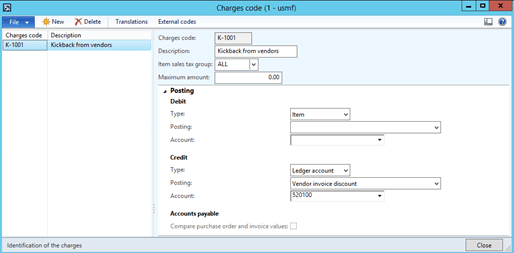
The name of the feature is charges. With charges we make adjustments of the cost prices on the right dates, and on the right transactions. The inventory closing will make sure that the cost prices are settled to the sales orders/issue inventory transactions.

The first step is to create a new charge, that will adjust the cost price on specific invoices, and also post on a selected ledger account.

Then let’s say the following received invoice from 2013 of 200 Surface Pro 128:

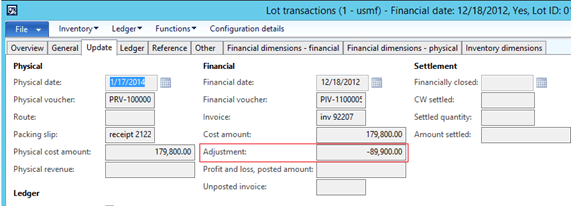
I see on the inventory transactions that the cost amount is 179.800 USD.

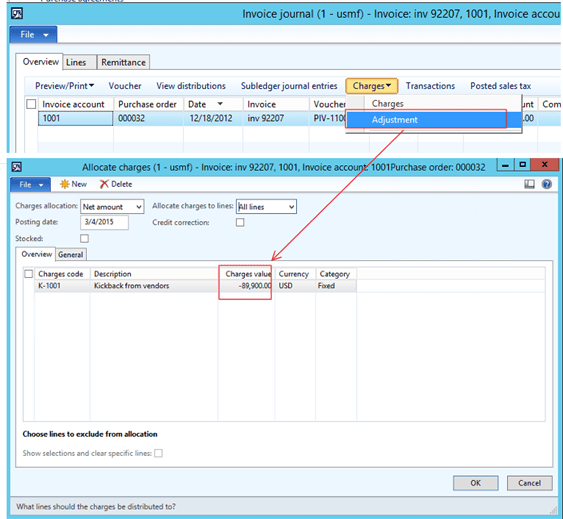
The vendor now want to give me a kick-back for my effort of managing to sell these old notepads. When they send us a credit note of 50% of the amount, and I want to post this so that the cost price changes on the inventory transactions.

When this is posted it will adjust the cost of the inventory transaction on the selected posting date:

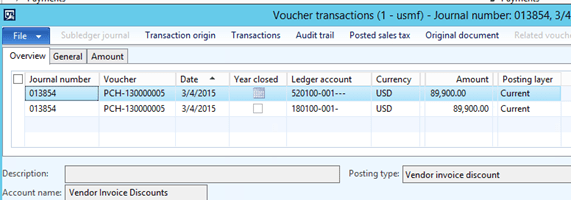
The voucher transactions looks like this.

In AX 2012 R3 the inventory transactions will make the necessary adjustments on the issue transaction.

The next step is to receive and post the invoice from the vendor post it against the selected ledger account on the charge code, and eventually also run the inventory closing procedure.

Conclusion;

There are no need to credit post the purchase order for adding kickbacks, bonuses and marked support etc. It is supported in Dynamics AX 2012 R3.

Happy DAX’ing


Sneak preview of the WMS E&E

Last week I had the first preview of some of the new features in WMS E&E.  The development is going forward and at current stage we are 30% finished.  We are currently 11 people working on the solution, so this is a major investment for us.  We have been so lucky to get 4 developers from Russia and Ukraine. We are using Skype and Live Meeting, together with Citrix/Terminal Server and I really works out. 

The Inventory II module from FSB-development is paying off, and secures that this new solution gets its performance and scalability.

The first clients have looked at the solution and are so far happy with the progress.   

Here is some pictures from the presentation:

Gantt Scheduling of Input port

Here is one of the cool features we are woring on.  A gantt based schedulingtool for inbound logistics.  This is the process of directing trucks and containers to spesific input ports.  The user interface is simple and allows for moving the containers between ports and in time.  The gantt will also include a scheduling program, so that the user can recalculate the real ETA-date/time.  When moving a container in thime, the expected deliverydate for that shipment will update the rest of the system and the receive process will be visible for the user.


 There is a requirement to schedule the receive of containers. Each container can be placed at a specific input port, and is also allocated a timeslot for emptying the container. 

Each port as attached a working calender and a capacity . The capacity can be expressed in cartons/hour. 

In the gantt view, there must be possible to reschedule containers and also to move them between ports.

The scheculing engine must first allocate a container to a free port, and then find the apropriate timeslot for the container. As soon as the container has been given a port, the receive can start.    
When dobble clicking on a container, the container form must be brought up to front.   
At the botton the planned capacity must be shown, displaying number of cartons expected per hour.

E&E WMS extended with licensepalate

Yesterday we extended the system with a new storage dimension, called LicenseplateID.  This is a unique ID of a carton, that is barcodeded, can can be used anyware in the warehosue system both on put-away and on picking.  The ID is also used in the integration with the conveyor and miniload systems.  The process for extending the system to include a new dimension was quite easy.  Just search in the AOT of the Dynamics AX for the macro "inventdimdevelop", and all places that needed to be extended came up.  The hole process was done in under 3 hours.  Now the tricky part is starting, and that is to build all the funtionallity on to.  I included a small picture to the license plate.
 

Module to be included in E&E WMS II

The original guys behind the inventory transactionsystem (FSB – Flemming, Søren and Benny) is now out with a new module called Inventory II.  This module eliminates the need for large periodic inventory closing timeslots, and will also introduce some new technology called Watermark and SnapShot.  The module also clams to have fixed one of the major drawbacks in the current system, and that is the reservation mechanism.  In Inventory II It is possible to do a reservation on a higher dimensionlevel.  Here you can reserve against the total warehouse, and still be able to move the goods around within the Warehouse.  The exact location or serialnumber can be specified at a latertime, lets say when the items arrives in the pickingarea.  Today I will take a close look on this new module, that I know Microsoft also have evaluated.  My plan is to have this module as the Backbone in the E&E WMS module.  Here is some details that FSB has officially announsed:

Watermark technology

The architecture of Inventory II is based on the new revolutionary Watermark database technology. This technology ensures that even large and complex inquiries can be addressed by the database without performance slow down, even on growing databases.
All database inquiries will target a very small amount of data, as transactions are divided into relevant and non-relevant data in a very effi cient way without use of complex index keys, resulting in a second to none performance.

What is the impact of this technology?

Having the Inventory II architecture built on this technology gives significant advantages in the daily operation. These include:
Cost prices are calculated real-time
Master scheduling during daily operation
True 24/7 capabilities
No traditional inventory closing

Real-time reliable cost prices

The Inventory II module is monitoring all inventory movements,resulting in immediate action upon arrival of new or changed cost prices. Cost prices are real-time calculated, adjusted and updated throughout item transfers and bills of materials.

No inventory closing function

Adjustment of item consumption is calculated and posted immediately, whenever identifi ed, eliminating the traditional inventory closing function.

Cost price deviation monitor

Cost price deviations are identifi ed and presented real-time in the deviation monitor, giving the finance department a unique tool to act on. Cost price deviation alerts can be defi ned, reducing the risk for simple errors, like key-in errors in the purchase department or from suppliers that may reside in the system for a longer period, resulting in complicated cleanup tasks.

Physical cost valuation

Inventory valuation can be fi xed on packing slip prices instead of on delayed invoice prices. Upon receipt of invoices, deviations are posted on dedicated General ledger accounts.

New model for weighted average cost

A new simplifi ed periodic average cost price model is introduced.  Average cost prices are always calculated as clean weighted average prices for individual periods. Issues related to uncontrollable number of settlements are eliminated, as settlements are not created anymore.

Intelligent reservation

Rule based reservation levels

With the introduction of reservation levels a new degree of fl exibility is applied to the inventory. This will allow for reservation at less detailed levels, e.g. reservation at a warehouse without determination of location or batch at the time of order intake. Reservation levels can automatically be further specified prior to the time of picking to include e.g. what specific location to pick from. The process of picking is now a matter of reporting what specific items were picked: e.g. batch number, serial number, etc.

Transferring reserved items
Reserved inventory items can now be transferred. The warehouse staff is now free to manage the warehouse in an efficient way not having to struggle with restrictions on reserved items.

FIFO/LIFO reservation and picking order

Inventory II allows for controlling and optimizing the order in which items are reserved. A FIFO or LIFO reservation order can ensure that the oldest or newest items are picked fi rst, while a location reservation order can ensure that the physical process of picking is more optimal according to physical locations.

Lot reservation

Reservations directly on specifi c incoming lots leading to full traceability and transparency on reserved items.

24/7 capability

Run your Master scheduling any time
The Master scheduling can be executed at any time in daily operation and still delivers a consistent profi le even though new transactions are created concurrently.

Open slots for Inventory closing not necessary

The traditional Inventory closing function is not relevant any more as cost prices are calculated real- time. Because of that there are no needs for allocating exclusive time slots for this task during weekends or nights.

No worries regarding blocking locks

Neither Inventory closing (which is now just a matter of changing a date) nor Master scheduling causes blocking locks preventing daily operation to take place.
Simply run your operation 24/7 if you prefer

Performance and scalability

The foundation and architecture of the Inventory II solution has been designed with specifi c regards to high performance and scalability. The unique design patterns such as the Watermark and Snapshot technologies have been chosen out of performance reasons.

The result of this architecture is revolutionary:
Blocking lock issues in inventory are nonexistent. The improved concurrency will set new standards for scalability.

Inventory inquiries execute incredibly fast, independent of transaction volume, even on historical data.

Real cost prices

are calculated real-time, but the individual users are not affected by this processing since it is handled by a smart background process.


Main components in E&E WMS

The WMS E&E will cover most major components, and here is a list/overview of what lies ahead of us. 

The solution will be wide and deep.  As some has commented, many of theese solutions already exists, but not with the extensions we plan to include. 

One of the major elements is integrations to coveyor and storage systems, like univeyor.

Evaluation of the new Rapid Configuration Tool

I have been using the RCT tool for Axapta 3.0, and it was not the time to look at the RCTY tool for Dynamics Ax 4.0.  That was a disepointment. Much has been removed from the tool.  To remove the checklist and the helpfile was a bad decision.  The checklist’s is very user-friendly and give a much easier overview of the progress.  Keep also in mind that not all will be using MS Project, or have it installed.  I know about the hard work in coding the checklists, but my guess is that without it, the use of the tool will be marginalized.  Trust me.  The concept of having a nice graphical view of the implementation is important.  My belief is that this tool will not be used without it, because the concept of a checklist gives an impression of a best practice way of implementing Dynamic AX.  The tool was also used, and nice to have in the background to follow the progress of an implementation.  People also returned to the checklists to double check the setup date, and to get access to video, powerpoint presentations and documents. 


Our clients said “WOW!” when they understood and saw the easy visual GUI of the RCT.  Now we only have the boring normal presentation with tree’s, grids, tabs and buttons.


I’m also missing the nice help file that was included and integrated into the RCT of Axapta 3.0.

I feel that the RCT in Ax 4.0 is only a shadow of the solution that was available in Ax 3.0.  Please include a decent Helpfile and a checklist.


Take a look at the following screens, and tell me which is the most user-friendly :

Sorting on the “Release sales order picking”

It seams that the sorting and filtering of the "release salesorder picking" doesn’t work.
Thats to sad, because often you want to filter and sort based on date/salesordernumber or customer.
 
When you now are trying to sort, nothing happens.  I think the reason for this is that there is a innerjoin between the salesline table an a temperary table.
 
I’ll digg into it an check if it’s easy to change.
.
.
.
Actually the sorting query are set when you open the window, and it cannot de resetted, before you go out and inn again.  I had great expectations to the new functionallity, but I see now that it’s too shallow.  More advanced companies can have 20.000 + different items, and more then 20.000 open orders.  Then it’s impossible to do a manual item allocation.  Even the form will be extreemly slow, because it will take very long time to traverse though the 20.000 orders, and placing them in the temporary table.  This means that it’s still need to create a lot of addons regarding the advanced distribution and picking. 
 
I also see that this form actually are working orderline by orderline, but often a customer primary wants to see the allocation order by order.  When a orderline is physical reserved on another warehouse then the need for allocation should be cleared.  
 
Often there is a need to create some kind of "Wave"-solution, where you also take into account the movement of items from a warehouse/location to another.  Often the picking area is to small to handle items for all the orders, so there is a need to create a limit.  Tehrefor often the customer desides for that they should be able to deliver 3000 orders the next day, and the system should create transfer orders to supply the right items.  It is important to remember that you need to more the right items, or you will get a large backlog of orders waiting for only a few items.
 
I personally would like to add a lot more functionality here.
 

My first located error in Ax 4.0

It’s isn’t my intension to talk negative about the new Ax 4.0 version, but I will use the blog to find and document bugs in Ax 4.0.   Later I will send in a Service Request to Microsoft, so that all can benefit to improved software quality.
 
Here is my first bug :
 
A new nive feature in Ax 4.0 is the price simulation in sales and project.  The tool aid sales personel in calculating and saving various scenarios for sales orders.  but if you choose to the the new contribution ration to 100, you will get a dived by Zero error, as follows :
 
Error:
Error executing code: Division by zero.
Stack trace
(C)\Forms\SalesQuotationPriceSimulation\Data Sources\SalesQuotationPriceSimTable\Fields\ContributionRatio\Methods\modified
(C)\Classes\FormRealControl\modified
(C)\Classes\FormRealControl\leave
(C)\Classes\FormRun\task
(C)\Classes\SysSetupFormRun\task – line 20
 
I expect that it’s an easy thing to correct in future versions.

First hands on Dynamics Ax 4.0

Well…..Finally I managed to get Ax 4.0 up and running on my windows XP portable.  Actually it was quite easy and strait forward.  Just run the installation and you are up and running.  The only thing that needs to be presence was a connection to AD (Active Directory).  After that, you can take the PC with you anywhere.  Now I will start digging into the application….