Mobile Access for Visual Studio

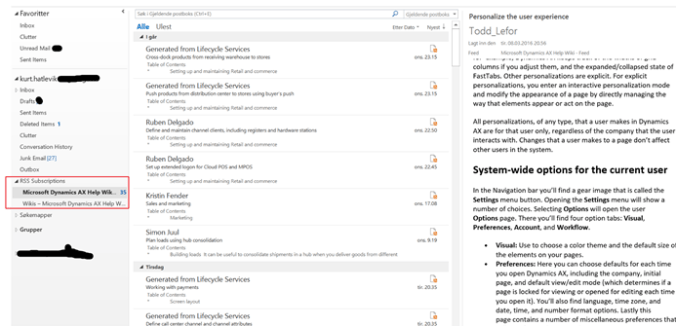
In the new AX the tool we use for work, development, test and build is Visual Studio Online(VSO). Now a mobile access to VSO is available in the Visual Studio Markedplace. It enables you to browse, monitor and engage in projects via your phone, It’s still in preview, but it looks very interesting.

Take a look at it here; https://marketplace.visualstudio.com/items?itemName=sprints-for-vsts.sprints-for-visualstudio

AX RTW Hack to enable unsupported countries

We have learned that today the RTW is officially released, but this is mainly for the “tier-1” countries. I’m a bit jealous on Denmark and Iceland that are in the first support release wave, and that Norway have to wait until H2 2016 to get country specific support. But when I dig into the AX RTW I will find much of the country specific elements already in place. They have been included in the transfer from AX 2012.

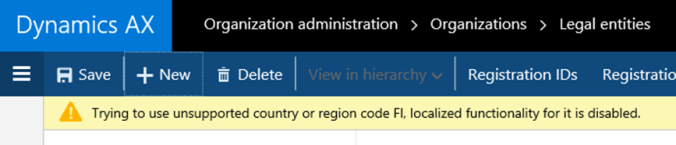
Only one small Issue. Microsoft have hardcoded that the unsupported features cannot be used. I guess (and hope) that it is for a reason. If you try to create an unsupported company for Finland, you get;

Many of the localized fields needed to run Finland is then hidden or disabled.

But there is a way to “Hack” this. Comment out your country from SysCountryRegionCode.onCountryRegionSupportedCheck():

Then compile and deploy. Then the fields related to Finland etc will open up.

I know I’m are moving into uncharted terrain, and this is disabled for a reason. But we start already now to promote and sell AX 7, and then we expect Microsoft to stick to the release schedule, and make the Dynamics AX ready for all countries as planned. We also have several customers that don’t need the localized company specific functionality, and they don’t want to be constantly reminded J.

Disclaimer; If you do this for a production environment you are on your own!

Hacking Dax’ing

AX RTW – My ODATA and JSON journey – Part I

Learn the word; ODATA. We will hear a lot of ODATA in the future, because it will change the way we integrate and how we exchange information between AX and other systems. A good starting point is the AX help wiki, that Kuntal Mehta created. I have decided to explore what the ODATA can do, and wanted to write a bit about my journey. Instead of trying to explain all technical details of data entities and how the architecture is, then let us rather just test something J

What you need to test what I’m doing is

  1. An AX RTW environment deployed from LCS
  2. Internet explorer
  3. Good old notepad

Step1: What services is available?

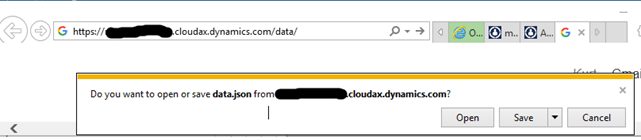
To get all entities available to you use your Site address, and add “/data” at the end.

Then save the file you receive, and open it in notepad. (I have associated *.json with notepad). The file you get looks like this:

Each line here represents a data entity service we can use. The format of this is the JSON format, but that is not important now.

Step2: Show me the customers

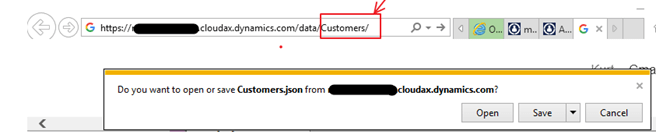
In the file you may find that there is an entity/schema named “Customers“. I can therefore just add the “/data/Customers” to my URL

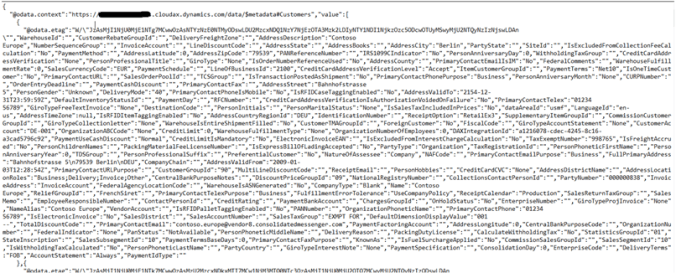
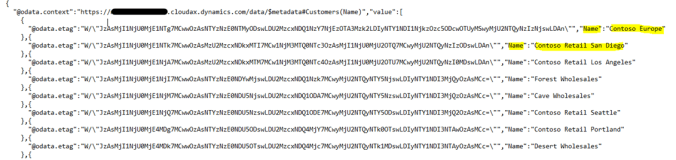
And then I get a JSON file of all the customers;

But this is a bit “cloudy” and I can further filer down what I want. Let’s say I just want to see all customer names. I can then add “/data/Customers/?$select=Name” to my URL

Now it returns a JSON file with only the Name.

If I wanted to add one more column, like the Payment terms, the syntax would look like “/data/Customers/?$select=Name,PaymentTerms“, but this would not work because the comma cannot be used on a URL. I therefore need to replace the comma with %2C, that is the URL representation of comma. For multiple columns I therefore add “/data/Customers/?$select=Name%2CPaymentTerms

You see some strange “@data.etag”, and here is an explanation. It is for caching.

Step3: Can I read this in Excel?

Yes. Excel can import OData, and format it like we would.

Then fill in the /data URL, select schema, and then select fields.

And then you may read directly into Excel all entities made available in AX RTW, even without the AX connector.

Step5: Show me all !

Sure. Try to add the “/data/$metadata“, and AX return All schemas, fields and relations. It take a long time, but nice to explore.

Step6: Can we use DIXF to import directly from OData feeds ?

This is what I would love to see. But I have not found it yet.

Happy DAX’ing πŸ˜‰

AX RTW – Hack to enable configuration mode

When downloading the AX RTW local VM from connect, you often want to disable some configuration keys. (Like catch weight etc). But now you will see the following warning;

“This form is read-only unless the system is in the maintenance mode. Maintenance mode can be enabled in this environment by running maintenance job from LCS, or using Deployment.Setup tool locally”

This warning is to prevent that configurations are enables/disabled, and that the system is set in maintenance mode. There are 2 ways of dealing with this.

  1. The proper way; Use the Microsoft.Dynamics.AX.Deployment.Setup.exe command; (Credits to Joris de Gruter)
    Run this from command line:

    \bin\Microsoft.Dynamics.AX.Deployment.Setup.exe –metadatadir –bindir –sqlserver . –sqldatabase axdbrain –sqluser –sqlpwd –setupmode maintenancemode –isinmaintenancemode true


    Here is an actual example J:\AosService\WebRoot\bin\Microsoft.Dynamics.AX.Deployment.Setup.exe –metadatadir J:\AosService\PackagesLocalDirectory\ –bindir J:\AosService\WebRoot\bin –sqlserver . –sqldatabase AxDB –sqluser axdbadmin –sqlpwd *******Β –setupmode maintenancemode –isinmaintenancemode true

    and then run the command with “false” at the end to turn if back off.

  2. The Hack way; Use the Microsoft SQL Server Management Studio, and edit the following record in the table dbo.SQLSystemvariables ; CONFIGURATIONMODE

After that, you can change configurations. But make sure you never
EVER do this in a production environment!

Hacking DAX’ing J

Master data concepts

In Dynamics AX, we have been blessed that we can have most of the data in one system, and in one single database. But I sense a shift, where systems are breaking up into more loosely best-of-breed components. We see the introduction of Omi-channels, SaaS, RESTful Web services and ODATA as accelerators into this area.

The generic topic of Master data management(MDM) is much less about technology and much more about understanding how business processes are supposed to work. The principle of MDM is applied whenever two or more business processes must view or share (master) data. This means that all companies have a need for the discipline of MDM, meaning that it must be driven by the business, a business case, and supported/enabled by IT. This includes governance and data quality, and MDM cannot be established without them.

In my profession, when working with our internal EG-Retail model we are covering the Master Data Management processes from life-cycle data management to data distribution to POS-systems. As you see, there are not much directly related to the functionality of Dynamics AX, but more against how to create work processes that maintains and secures a company’s master data.

Master data lifecycle

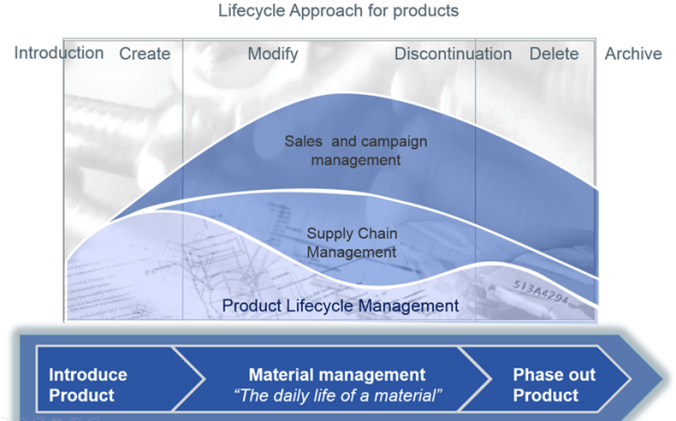
The most common area where life-cycle processes are used are on products. Products are introduced, created, maintained, discontinued and finally archived or deleted. A lifecycle also involved different roles and departments, and the responsibility and master data ownership is changed through the lifecycle. It could be visualized like this, where effort in the processes is shown.

In terms of responsibility I also see the benefit of separating the roles of Master Data owner and requester, and introducing clear formal processes.

Β 

Create master data

Master data are the critical nouns of a business and falls into four groupings: people, things, places, and concepts. Further categorizations within those groupings are called subject areas, domain areas, or entity types. For example, within people, there are customer, employee, and salesperson. Within things, there are product, part, store, and asset. Within concepts, there are things like contract, warrantee, and licenses. Finally, within places, there are office
locations and geographic divisions.

The process of identifying additional Master Data elements should be a formalized process and an ownership process must be in place.

Creating master data is the process of collecting the accurate and persistent data related to each master data element. It is not only important to just enter the data, but also to identify
the source of the master data. In a data maintenance scenario, the process and master data owner may return to the source to collect more details. When creating master data, the completeness must be defined. Define what Master Data elements are mandatory and optional. What related master data must be in place to correctly create the master data.

As described above, all Master Data will have a life cycle. When creating, often only a minimum set of mandatory data elements are required. The life cycle and status should reflect the completeness of the master data.

Master data may originate from many different resources, roles and process participants. Timing is also relevant, because different data elements may only be needed on a later stage. An example is that certain set of data elements is needed when purchasing a product. When selling the product another set of data needs to be in place before this process can start.

A more formal process of handling Master Data will ensure that the quality and relations are taken into consideration. The following process should include both a requester and the master data owner, so ensure the formality.

When the master data is complete enough to be used for selected processes, the master data must be released and available in the systems where it is used. Examples are the procurement process where only a small subset of information is needed to initiate the purchasing process. But in order to receive the product at the warehouse, the product must be released to the warehouse management system. This require additional information and timing. In integrations, the release process of master data must be controlled and tracked. Before release of master data, the required completeness and data quality must be decided and confirmed.

Maintain master data

As requirements is expanding and changing, the master data will also have the need to change. Maintaining completeness and quality of master data becomes a central part in the life cycle Master Data management. Typically new markets and countries will request the need for new prices, VAT/Tax compliance and translations. Establishing maintenance processes will not only be essential for growth and expansions, but also to support day-to-day processes. The key principle is to centralize master data update around specific roles and processes. The generic maintenance process is reflecting this.

Discontinuation of master data

Deleting Master Data is generally not recommended. The reason is that the master data often have been used and related to transactions, and often in other systems like WMS, eCommerce etc. A better approach is the discontinuation process. If master data still should be deleted, it is important to analyze the consequences, and to initiate clean-up processes.

The discontinuation phase begins when the maintenance phase ends. Master data discontinuation is often a planned process, where the date of the discontinuation is set in advance. The discontinuation can also be related to specific processes, like a product is discontinued for procurement, but not for sale.

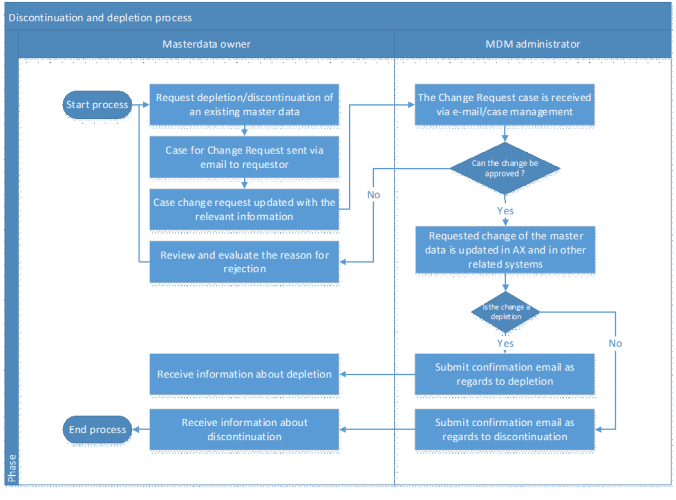
It is recommended must implement a structured life cycle process on master data, to control the situations where a master data record is discontinued or replaced with a new master data record. In this future process, we expect that the participants are the Master Data Owners and the MDM Administrator. The main purpose of the process is to support the actual discontinuation or depletion of Master Data Records in the AX system.

The input to the process is an online request or need for discontinuation or depletion of a Master Data Record. The output of the process is an updated Master Data Record in AX with the specified data from the request.

The process diagram below outlines an example of the future process for the discontinuation or depletion of existing Master Data Records in AX. In this process, we distinguish between discontinuation and depletion. In relation to products, the discontinuation only applies for specific SKU’s whereas depletion applies for all. (Like flushing out master data from an integrated system)

If it is expected that the growth of the data will accelerate as more partners and stores is connected to the installation, then archiving and purging will be important to keep an optimized performance of the Microsoft Dynamics AX installation. Before a master data record can be archived and deleted, other data (such as purchasing documents) that refer to the master data must themselves be archived. Both the purge and archive operations depend on a carefully determined hierarchical relationship of related tables based on both master data, settings and transactions. The archiving and purging process is too complex to be manually handled, because of the many relationships that exists to master data. It is therefore recommended to look into tools like the Microsoft Dynamics AX Intelligent Data Management Framework (IDMF) that can be used for this purpose.

IDMF have the following process.

Taking easy on master data processes can result and complete failure of your system and processes. When implementing Dynamics AX, make sure that enough time is invested to create a clear strategy, and good processes.

Happy DAX’ing J

AX7 – Cloud estimation sheet

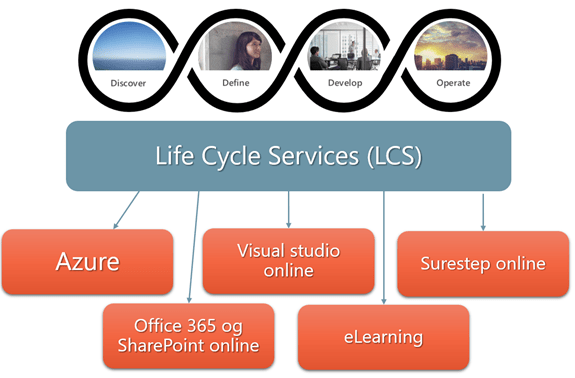
When working with new clients, I just love to show Life Cycle Services, and all the new tools and gadgets now available to us. Prices on licenses and Azure services are beginning to come into light, but there is one “unknown” factor. How much would it cost to in time to setup and implement all the tools and services?

I will not
give you the estimates, but I can give you the sequenced task list of what to do

Area

Sub Area

Task

Life Cycle Services

Installation

Create LCS site

Life Cycle Services

Installation

Add users to LCS

Office 365

Installation

Create Office 365 Azure AD

Office 365

Installation

Create SharePoint site

Visual Studio Online

Installation

Create VSO site

Visual Studio Online

Installation

Add users to VSO

Customer source

Installation

Add users to Customer source

Azure

Installation

Create Azure account

Azure

Installation

Setup administrators to Azure

Azure

Installation

Connect Azure subscription to CSP account

LCS

Setup

Create LCS projects

LCS

Setup

Connect Azure, VSO and SharePoint to LCS

LCS

Setup

Invite project users into LCS

LCS

Setup

Select and setup metology in LCS

LCS

Setup

Infra structure estimation tool in LCS

LCS

Setup

License sizing estimation tool in LCS

LCS

Deploy

Deploy Demo/CRP based on Contoso

LCS

Deploy

Deploy development environments (per developer)

LCS

Deploy

Deploy VSO Build/staging environment (one VM)

LCS

Deploy

Deploy Acceptance test environments (2-3 VM’s)

LCS

Deploy

Deploy Production environments (3-10 VM’s)

LCS

Monitor

Setup LCS System diagnostics

Visual Studio Online

Setup

Setup VSO projects and users rights

Visual Studio Online

Setup

Setup process for nightly builds and automated test

Visual Studio Online

Setup

Define product backlog

Visual Studio Online

Setup

Define sprints

Office 365

Setup

Setup Microsoft power BI

LCS

Setup

Setup Configuration Manager (data transfer)

Office 365/LCS

Setup

Add ODM templates to be used in the project

AX 7

Setup

Setup Data Entities for ODATA/Integrations

AX 7

Setup

Basic parameters and generic setup

Β 

..Ok… the number is 42… but what was the question ?

Β 

Access Dynamics AX (aka β€˜7’) performance counters with β€œ&debug=develop”.

The new Dynamics AX have some very powerful capabilities to show exactly where time is spent. You would like to explore more about what is happening behind the scene, try adding the “&debug=develop” to the URL. This will bring up a small timer that shows how much time was spent on opening and showing the current form.

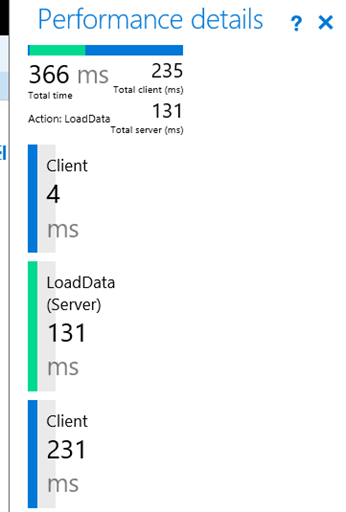
If you click on it, it will give more performance details. Like if I open the all customers in the Contoso form, my system gives me the following.

I see here that the loading the customers took 366 ms, where 131 ms was from the AOS loading the data. You also see a color coding (green/blue) that indicates at what sequence the time was spent.

There is also a section to show what the server is doing, and it also shows you the exact SQL call that was the longest running SQL statement.

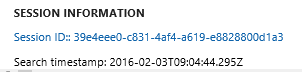
At the bottom of the performance screen we can also see something interesting;

And when I click on this Session ID, I get;

I have no clue what that is J, but could this be a tool for external monitoring ?

Β 

Β 

New AX (aka ’7’), limited navigation and the WHSWorkExecute

When opening the new Dynamics AX client, you see that we have a nice set of navigation menus and options in the top of the screen.


But if you would like to limit the navigation options for the user, try to add the “&limitednav=true” to the URL.


As you see, the menu-bar is then changed, and the user cannot see the menu buttons, search and settings any more. We have a limited navigation.

Let’s further extend this ability by also adding the “&mi=action:WHSWorkExecute. For those that have not heard what WHSWorkExecute is, it is the form used for simulating a Warehouse Mobile Device. The form existed in AX 2012, and it also exists in AX 7.

In the AX ‘7’ preview demo environment try the URL:
https://usnconeboxax1aos.cloud.onebox.dynamics.com/?cmp=usmf&mi=action:WHSWorkExecute&limitednav=true

You then have a quite nice RF device without the navigation options. Simple can often be the best J

Happy DAX’ing

New Microsoft Dynamics AX – A guide for using retail sales prices and discounts

This is a guide I have been looking forward to publish, but due to the NDA restrictions I needed to wait until the new Dynamics AX was made public preview, and today it is J This blogpost is not about AX licenses prices, or implementation costs, and if you were looking for that, you have to google again. It’s about what product sales price and discount options that exists MSDAX – “out-of-the-box”, and it’s not about product sales price tactics and strategies, but how to apply them into AX and most of the presented information here can also apply to earlier releases of Dynamics AX.

Summary

Pricing and discounts is a science, and the number of variations and combinations is amazing. When I talk to my customers I like to show the following overview of the most common used pricing strategies available in AX. Here I have tried to put “retail names”, and exemplify what they mean.

The Microsoft documentation on TechNet visualizes quite clearly the relationship between prices, discounts, channels and programs with the following many-to-many relationship diagram;

It basically means that you can combine and mix pricing elements to achieve the strategy you are aiming for. The combination of these gives us the functionality we are looking for, but we have also realized that not all combinations are practical or possible. Remember that much of the pricing possibilities became available with the introduction of Retail, Call- center and in some cases the lean-modules. Some pricing options will therefore not work in combination with each other, and also not across the Omni-channel.

Product prices and RRP (Recommended Retail price)

RRP, or Recommended Retail Price is a very common and known concept. It is very often used on, when the sales channels are more complex, and includes producers, distributors, partners and resellers. Often the ownership structure of the sales channel is fragmented and differentiated. The recommended retail price is therefore often specified based on geography, currency and channel. The RRP if very often just the baseline on which prices are built on, and as the name suggests, just a recommended price. In Dynamics AX either the standard (single currency) sales price on the released product or having a “All/Group” sales trade agreement (multiple currencies, dates, quantity) is sufficient to make this work. One restriction to make this work within AX, is that the product must be released, in order to do this. If a more “Global recommended retail price” is wanted, I suggest reading my blogpost on this subject, where prices are made global, and distributed to all legal entities.

Price/discount matrix’s (Trade agreements)

The price discount matrix has been available for AX users since the beginning, and handles most requirements in a B2B scenario. The setup is quite easy, and involves setting price or discounts on groups, or in relation to specific entities like product or customer accounts.

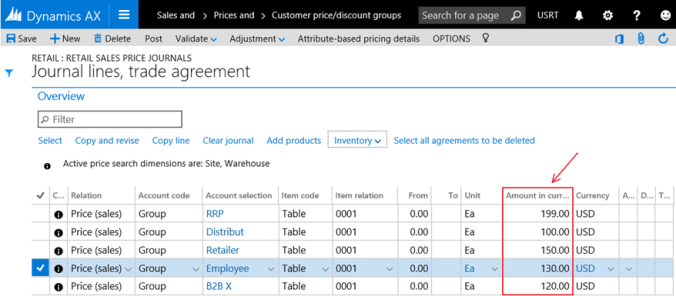
In the following example we have different sales price on a single item, but it differences per customer price/discount group.

In AX ‘7’, you will just create a trade agreement journal, and create the necessary lines to reflect the different prices.
Β 

Discount matrix

Maintaining sales prices on the item-level per customer group, or per specific customer can quickly be a maintenance nightmare. The different combinations quickly end up with so many price points, that oversight is lost. A customer of me had 4000 products, 6 currencies and 12 different account selection options. This would mean that they would maintain 288.000 price points. That was impossible! The option was to use discounts instead, and just maintain recommended retail prices per currency. This resulted in 24.012 price points to maintain. With the use of smart rounding, and generic currency we reduced the number further down to 4012 price points. A discount matrix would look like this, where the combination per item price group and customer price group resulted in a discount.

In AX ‘7’, you will just create a trade agreement journal, just like for prices, and create the necessary lines to reflect the different discounts.

If you want to test a sales price, with all the different combinations, you can use the “Find prices” feature. Here I have a specific customer belonging to the price group “Retailer”, The item belongs to “Apparel”, and the combination of this gives me a net amount of “127,5”.

Generic currency and smart rounding

As seen in the example above, I have specified prices for different account selections, but only in USD. If multiple currencies are used, and you don’t always want to maintain currency based pricelists, then the generic currency option is a nice feature. The first step is to specify what is the generic currency, and what exchange rates that should be used. Also if smart rounding should be applied after currency conversion. In the setup of smart rounding you also need to set up member currencies that belongs to the smart rounding.
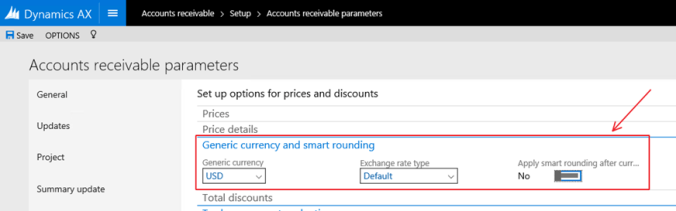
Enabling this, will open the “include generic currency” option on the trade agreements, and when creating sales orders in a different currency, the sales order. Here we have a sales order, converted from USD to €, and then the automatic smart rounding is applied.

Trade agreements and Retail/Call center in combination

As shown here we, the trade agreement matrix can solve quite a few price requirements, but in a retail scenario it would not solve the all requirements we see. We are missing elements like retail channel, categories and more advanced features. Going deeper into retail functionality shows that there are many additional possibilities that opens up. I have met quite a few companies, that have advanced price and discount requirements, but they have never thought about enabling the retail module. Many thinks the retail is for POS, but the retail module is for Omni-channel. This means that we can also use this in traditional sales orders (The “call center module” enabled retail functionality to be used in traditional sales.)

But there are some elements in AX, that you should be aware. I often see good old AX consultants getting confused when they start looking at retail discounts. Let’s say we have the following scenario; We have item 0001 with a recommended price of 150 USD.
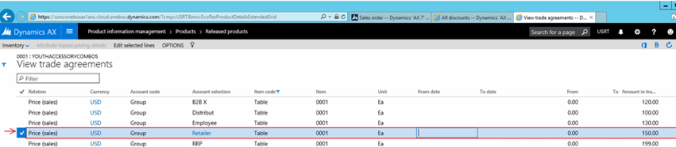
And then we have a 15% discount on the customer;

You would then expect that when using the retail module, it will just use these values. But it don’t ! It actually calculates the discount amount, and not the percentage. Keep this in mind, because it will confuse you later.
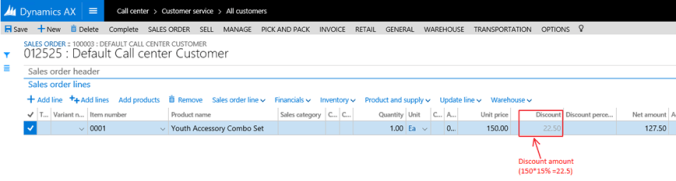
When using the retail discounts, they will work together with the traditional trade agreements, but not exactly as you would expect. To better understand the actual code executing, then take a look at the class\RetailOrderCalculator.saveSalesOrder(). The CRT (Commerce Run Time) engine returns quantity, price and total discount amount. Based on this, the unit discount amount is calculated. I’ll also show the actual source code on this, because when we are talking about discounts, we are most likely going to think in percentages, and the same are customers and users.

And one more thing. The CRT will not apply both the trade agreement discounts and the retail discount. It will select the best of them.

The use of Retail Discounts in Sales orders

Let’s take some scenarios, that is common in the retail industry, and I’ll try to link them to what you find in the standard Contoso demo dataset. In AX ‘7’, the retail module mainly has 4 discount types of discounts, and a price adjustment;

  1. Just an ordinary discount product

Let’s say you just want to have a discount on a single item.

First step is to use the retail discount rule.
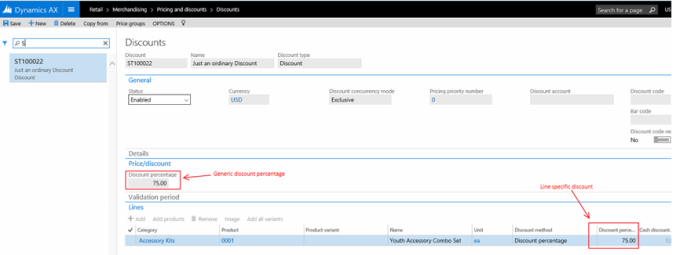
Β 

Periodic discounts on categories

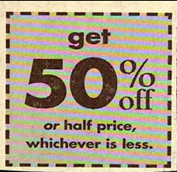
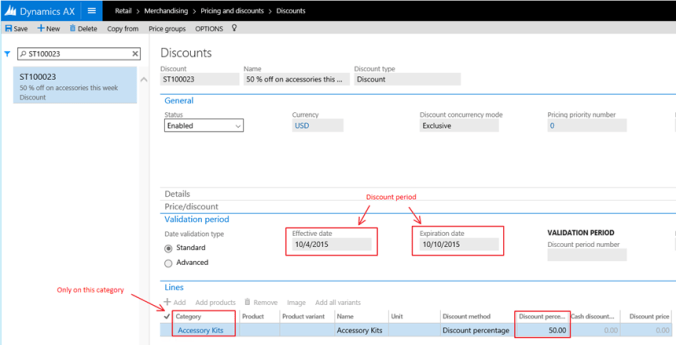
“50 % off on accessories this week” can be a strong trigger to make the customer open the wallet.
To create such discounts, we can use the same screen.
PS! The Retail discounts have a “discount code” field, but I have never managed to use it in the call-center sale order screen. But in POS, it works J

Β 

Happy hour J

Happy hours are an efficient way of attracting and breaking customer’s shopping routine. It’s also fun, and can give retailers a lot of attention. This feature is excellent also for Black Fridays.


The validation period has an advanced setting, that opens up the field “Discount period number”, and select a discount period. I have here created a happy hour between 12 AM and 1 AM for early birds.


We can further specify the valid periods here, so that more period based discounts can be given. Just remember that the valid period is current time +/- the offset time defined on the retail channel. In the AX ‘7’ CTP 7 version, the call-center channel details screen is not showing the time zone, like it does for retail stores, and this could have some implications on using “Happy hour” in an installation that works across time zones. A small service request to Microsoft have been created, and I’m sure they will fix this J

Coupon discounts (Call center)

Coupon discounts seems to be very popular in US, and we also see an increasing use of this in Europa. Especially in relation to mobile coupons.

In Dynamics AX 2012 there are two ways of working with Coupons. One solution for POS, and one solution for Call-Center. And these two don’t work in common. It is a bit sad, because it means we have a GAP in the Omni-Channel offering. But with enough push on Microsoft, I’m certain it will merge in future versions.

Call-Center Coupons, can be defined to be an amount or a percentage, and may have valid period. The coupon can be a unique, and a one-time use, and

It can have item rules attached, that specifies what products the coupon can be used with or excluded from.
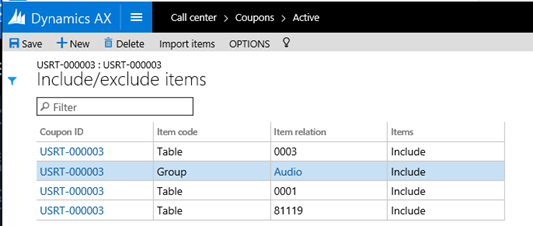
So solve Coupons for Retail/POS, you can see that all discounts have the option to apply a “Discount code”. I have not found a way to make this discount code to behave as a unique and on-time code. Even though AX-Sales orders not can use CRT as the price engine, there are no places, where the discount code can be applied to a sales order. It therefore only works on POS/eCommerce scenario’s It is a bit sad, because it means we have a GAP in the Omni-Channel offering.


Dynamics AX for retail have a GAP in relation to coupons to solve “One-Time” coupons, and in future versions I hope to see more features, like Store coupons, Manufacturer coupons, Mobile/Cell codes and promotion codes.

Trade discounts

Trade discounts is a most common way of creating discounts. 3 very common discounts are

  • Employee discounts

    This can be solved by using affiliations in Dynamics AX, and works for both POS and AX sales orders In order to leverage the Affiliation functionality at retail POS, the following must be setup:
    Price group(Retail)
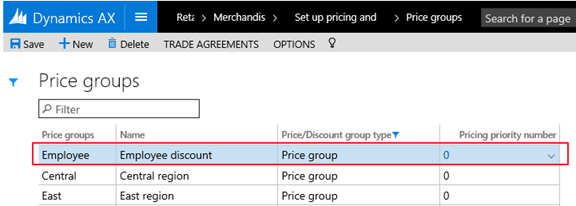
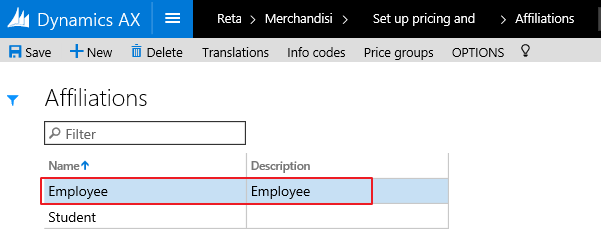
    Affiliations, and link the Affiliation to the Employee price group.
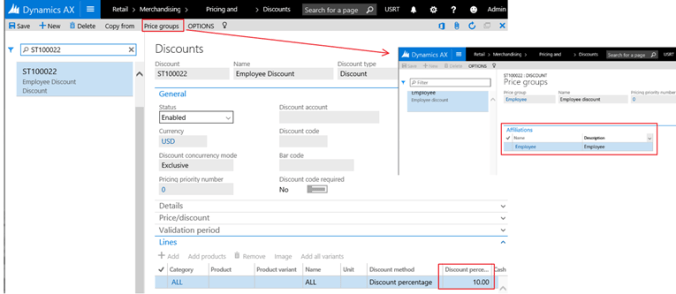
    Discounts, and link to the price group “employee
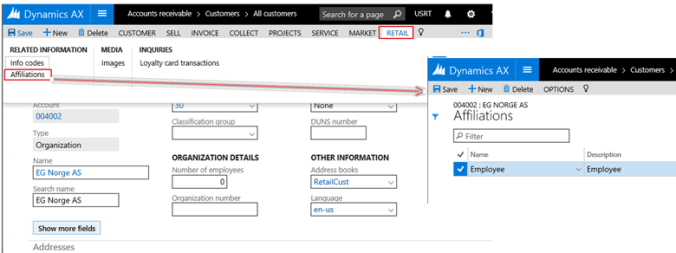
    Each employee must be a customer, that is linked to the Affiliation, and you mark the customer with the relevant affiliation. When this customer in POS or in AX creates a sales order, the discount will apply.
    Affiliations can also be used for senior, military or any other groups.

  • Discount category

    With discount category I mean that we can have a discount on an entire category of product. Let’s say “Digital SLR camera” sale, as is exemplified in the Contoso demo data. We then don’t have to assign a discount to a specific product, but just refer to the retail category. When adding products from the category the discounts will automatically apply (after running some periodic jobs, and distributing the prices to the channels.)
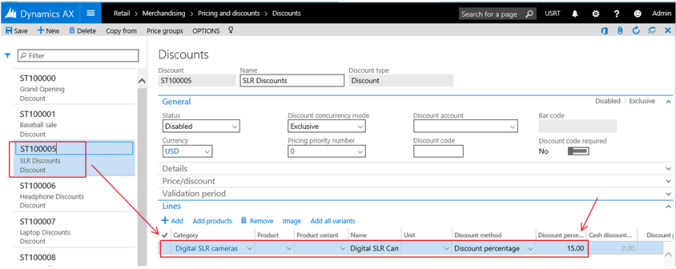
  • Loyalty discounts

    To use the loyalty features, then a lot needs to be setup. But in relation to prices, it just means that you need to assign a price group to the discount. If we take the example of the “SLR” discount, we can associate it with a price group called “LP-FabGold”, meaning that all loyalty customers in the “Gold” tier will get the discount.

Mix and Match discounts

  • Mix/Match

    A mix and match discount gives customers a discount when they purchase a specific combination of products. In the Contoso demo data, take a look at the “30% off 3” discount. Here a 30% discount is given, if you select 3 of the specified products. Here we use the “Mix and Match discount” form.
  • BOGO

    A BOGO price is basically “get 2 for the price of one”. We also use the “Mix and Match discount” form for this, but we use the “Least expensive” price option, and give a discount of 100%, and specify that 2 units are required for the price to “kick-in”. In this case, the lucky customer gets 2 camera’s for the price of one J

    Other options also exists, like a 50% discount when selecting 2 of an item, or use line Spec and Product category feature in Mix and Match discount

  • Buy 3 pay for 2 promo
    This can be solved just like BOGO, but where the number of products are increased to 3.
  • Free item A if item B
    For this, we can take a look at the “Water Bottle Promo” in the Contoso demo data. We use the Mix and match discount, but use the “line spec” discount type. Then we create a “Mix and match line group, to specify that we need to have at least one item in the selected category/product, for the price to be active.

Quantity discounts

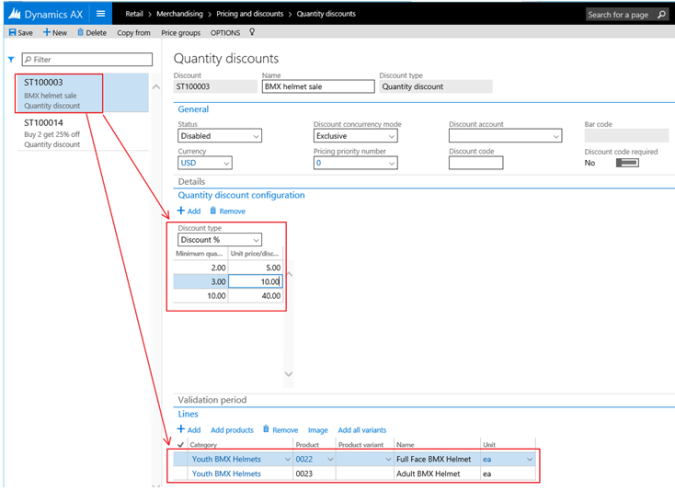
A quantity discount is a discount that is given to customers when they purchase a particular quantity of a product. For example, you can set up a 5 percent discount for the purchase of two products of a particular category or brand.

  • Buy 2 items get 5%, Buy 3 items get 10%, Buy 10 items get 40 %
Threshold discounts

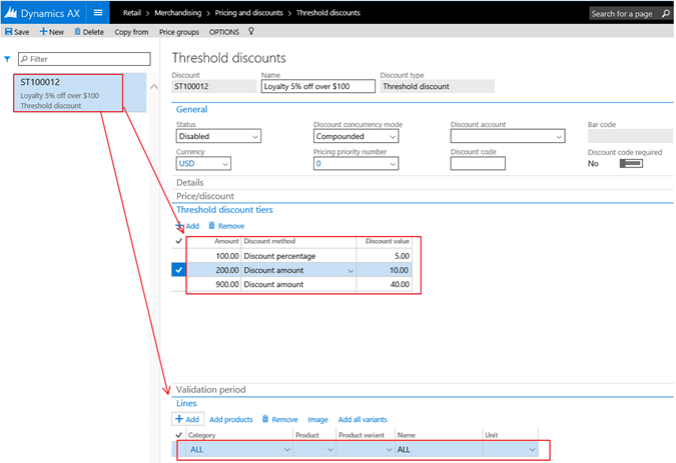
A threshold discount is a discount that is given to customers when the total for a transaction reaches one or more specified amounts. For example, you can create a discount that gives a 5 percent discount for purchases over 100.00 or you can specify a fixed discount amount.

Buy for 100 $ get 5%, Buy for 200 $ get 10%, Buy for 900 $ get 40%
Price adjustments per channel

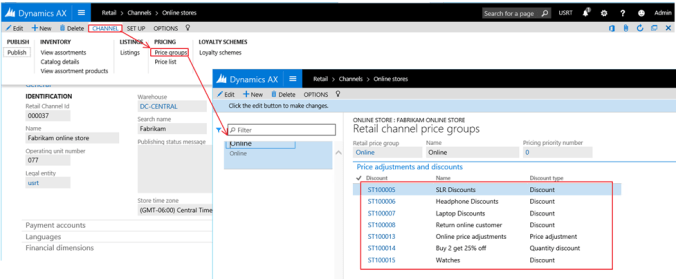
  • Online gives 5% discount, In Store gives 2% discount
    Channel based discounts are solved by assigning channel specific price groups to a channel, and then assign the different price adjustments to each price group.
Loyalty cards

The loyalty module in Dynamics AX is a large module with a lot to offer.

But there are some small GAPS you should be aware of, and that is to use loyalty points for payment in the call-center sales order. It could be I’m wrong, but I have not been able to efficiently use the Dynamics AX sales order screen efficiently with the loyalty module. A good blog for loyalty is available here.

Smart Rounding

Smart rounding is a feature that have no direct effect on retail pricing.

But it can adjust trade agreements, that indirectly works with retail. Also remember that it is not “automatic smart rounding”, and the smart rounding is applied to a price discount journal. A good blogpost on smart rounding is this one.

Recurrence and discounts

The ability of creating recurring sales is not directly related to Retail/POS. In AX there is a feature called continuity programs where delivery schedules can be setup.
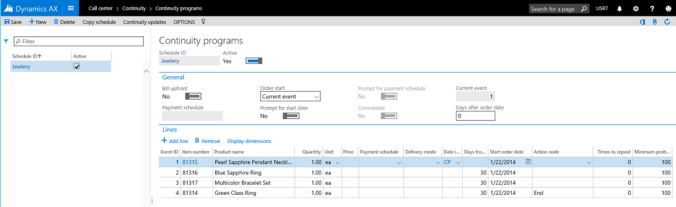

I don’t think this modules works very nicely with POS and eCommerce, and is mainly a tool for call-centers and selling recurring items. More information is available on TechNet.

B2B Discount agreement

Price agreements is not working with retail-POS, and is not very good supported through the CRT. It is mainly used for B2B orders, and features exists both for sales and for purchase.

  • Yearly agreement to buy 1200 pcs, and get them for 450 $ per pcs.
    In this example I have an agreement to buy 1200 units, and I get the price of 460, until 12/1/2016. In this case, it is a product quantity commitment.
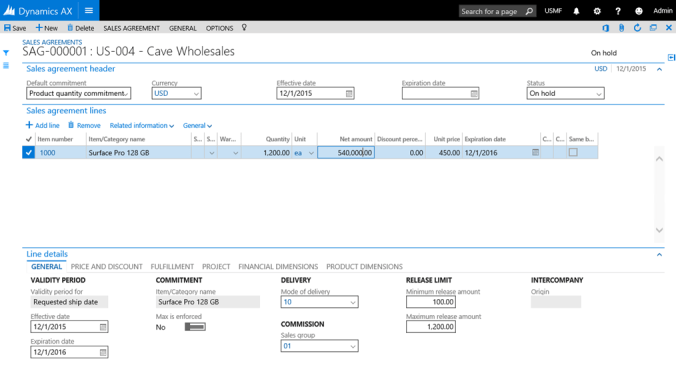
    Other types of commitment also exists like

    This makes it possible to create several different types and combinations. It features also contains Ok formletter that is confirming the agreements. Take a look at the following blog for additional information.
Β 

Β 

Β 

Synchronization problems in AX 2012 R3; Try disable track changes.

If you are installing a ISV solution into a Contoso environment, and you suddenly see that you cannot synchronize, and you cannot see why:

Here is a tip that works for me;

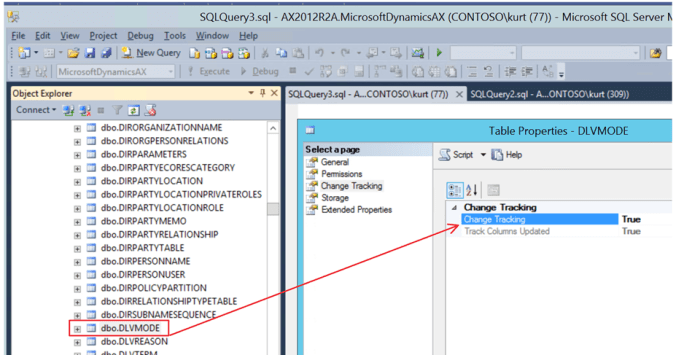
Disable the track changes in the specified tables;

Then the synchronization is able to perform. After synchronization you can enable it again.

If you want to switch on/off in SQL, then this is the script for Switching off;

Β 

To switch them on again;

Β 

Happy Daxing !

How to evaluate Dynamics AX ISV solutions

Dynamics AX 2012 R3 have truly evolved into an enterprise solution, and the functional width solves most requirements that any customer “really need”. But there is always the 80% / 20% rule that applies and there are requirements that is not solved by the standard Dynamics AX. We often see extended domain specific requirements in relation to finance, sales, procurement, logistics and production. To solve this, customers have the option to create customizations or to try to find VAR/ISV solutions that solves this. (VAR= Value Added Reseller. ISV =Independent software vendor) Creating your own large customizations can result in high risks, and the option to buy a “ready to use” ISV solution then becomes interesting.

What I wanted to give to the Dynamics Community is my list of how I evaluate ISV-solutions as a VAR. I basically just use a word document with a set of chapters, and the topics to evaluate here is from a consulting perspective. The idea is to have a formalized way of making evaluations, and also use the ISV/representatives to fill in the information for you.

1. Executive summary
{Yup. There is always someone to report to. }

2. Product Introduction
{Then I write a brief introduction to the product, describing the overall area that it solves.}

3. Background for evaluation
{Here I write why this product was evaluated in the first place.}

4. Vendor/Distributor information – general
{Then I record some general information about the company that offers the solution. Just to be sure that the company behind the solution will exists in the future. The following table can be used}

Comments
Company name
CEO
Sales manager
Turnover 2014
Results 2014
Number of employees
Number of customers
Number of references


5. Vendor/Distributor information – product

{The ISV-“mothership” may be large, but it is interesting also to check out the team that is organized around the product. I therefore have a secondary evaluation around the team developing and maintaining the ISV solution}

Comments
Product manager
Product turnover
Number of customers
Number of developers

100% dedicated

Part time dedicated

Number of consultants

100% dedicated

Part time dedicated

Support resources/routines


6. Pricing

{Describing product pricing, enhancement and also flexibility. Also include a case study with implementation. }

7. Marked/Cost savings potential
{ Describing the current marked potential, also reflect according to existing customer base. I also use a calculation sheet to show investment, potential, margins, number of sales each year, training costs, start up issues etc}

8. Known Competitors
{Describing any known competitors to the ISV solution and what the main advances this product have.}

9. Versions and language
{Describing supported versions and language of Dynamics AX. I also want to record how support is handled as new versions and upgrades go along}

10. Access to software
{Describing how the product is accessible from the ISV and how it is distributed}

11. Technical Installation guide

{Describing the quality of the installation guide, and I also try the installation to check how easy it is}

12. Application setup guide
{Describe the quality of the application guide, and I also try the application to check that it actually work}

13. Scenario testing
{In this chapter, we will test the different functional aspects of the product. The processes that is tested is the most common scenarios that we expect and have experienced in the field. Normally divided into a section per feature.}

14. Solution footprint
{The solution footprint is very important to evaluate, because this tells us how costly upgrades and applying hotfixes will be. We want to see high footprint on SYS elements for Dynamics AX. A way to easily evaluate this, is to count the number of SYS overlaying’s that exists and how many new elements that have been introduced. I therefore use a table like this}

{If there is a high number of SYS objects customized, I know that cumulative updates from Microsoft will be more costly.}

15. Best practice deviations
{To evaluate the coding quality, then evaluating all best practice deviations that can be found. Dynamics AX have building tools for this, and if there is a high amount is BP errors and warnings, it means that the code quality it not where it should be. }

Also get any documentation if the product have a CfMD certification (Certified for Microsoft Dynamics)

16. Support and training
{Describe how the product is supported from the vendor. There will always be questions and issues, so we need to know how this is handled. Often ISV solutions are purchased from VAR’s, and then it is good to know how this financially is handled. Also if there are any training included in the offering.}

17. Internal requirements
{Describe needed competence and needed training needed internally to implement, deliver and use this ISV-solution. }

18. Road map
{Show what plans there are for the product, what their priorities, what are their policies around upgrades, etc}

19. Marketing
{If you are a VAR, that want’s to include a ISV solution offering, it is important to understand how the ISV will support you in promoting the solution. Show what marketing material the ISV have and how you can use it. Do they have marketing insight they in the local market. Also find out how the ISV will support and drive market campaigns, participate in events, demos, etc with people and or marketing funds (money)}

ISV solutions play a big role in unlocking all of the possibilities that Dynamics harnesses. When analyzing your Dynamics ERP investment, it’s imperative that you also analyze your ISVs so that you can make the best decision for your business, both in the short and long-term. These topics will lead you toward making better evaluations while looking for an ISV solution. Feel free to use them, and extend them when needed.

AX7/AX 2012 Retail Omni-channel Hub-and-Spoke Architecture

The simplest definition of “hub and spoke” is that it is a model for integrating the ERP system used at a company’s headquarters with the systems used by its subsidiaries and branch offices. This blogpost discusses approaches on how to benefit from the fast innovation cycle that Dynamics AX have, without starting a new big-bang ERP implementation project.

Implementing any ERP system is a huge investment. It is not uncommon that thousands of hours is required before you can start to see the benefits. The cost of performing a large scale upgrade simply cannot be justified. It is therefore common to see companies implementing Dynamics AX, and then waits a few years before they take the effort to upgrade to newer releases. In my experience I see that it is most common to jump over a major release.

The innovation cycle that we see with Dynamics AX, new ground breaking technology is being released every year. Much of this new innovation is directly related to new possibilities in having true Omni-channels. The Dynamics AX Retail solution became mature in release AX 2012 R3. But there is a lot of companies still using AX 2009, any they have a well working systems for financials, procurement, supply chain and order management. They don’t want to upgrade, but they are still missing the ability to benefit from becoming a true Omni-channel retailer. The challenge is that the competition will be stronger and more mature.

I have met several customers that are implementing AX 2012/AX7 only for the Omni-channel, while keeping their AX 2009/legacy system taking care of the traditional ERP-processes. This approach focuses on limiting the implementation scope to only cover the Omni-Channel Retail vision. The idea is to only use AX 2012 on the retail channels. This means that retail stores, WEB, retail hierarchies, call-center is features that the AX 2012 (green) is covering. Then an integration between the legacy system (AX 2009) and AX 2012 is done using DIXF, that seamlessly connects the systems.

What I like about the Dynamics AX retail, is that what we currently have in AX 2012 is a very stable and is built for supporting a much faster implementation cycle. This means we can faster take advantage of new technologies. The AX for retail support the N-1 approach. This means that we can upgrade the AX 2012 parts to AX7, without making changes to the POS or the e-commerce systems. We can also in a timely fashion roll-out updated version to new channels, without being concerned of disrupting the existing channels.

I can share a personal experience with this approach. A customer came to us that had Dynamics NAV as their legacy system, and wanted to roll-out Dynamics AX POS to several countries. From the time we did the kick-off, and until the first store was up and running it took only 8 hardworking weeks. We used the Hub-and-Spoke approach, and it shows that it is a quick and achievable way to get return-on-investment fast.

So my advice is; Start your Omni-Channel journey today. Don’t wait until you have upgraded your legacy systems, because you can do that later.

Happy DAX’ing friends, and thanks for reading my blogposts!

AX suggestion: XML Columns and XML indexes

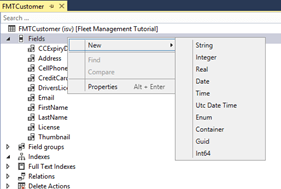
In AX we have the following datatypes we can use in table fields.

But in MS SQL server there is a XML data type. With the XML data type we can store XML documents in the SQL Server database. And we can create columns and variables of the xml type and store XML instances in them. we can also create XML-indexes that speeds up searching on the XML contents. As seen here, I have manually added a XML column, and a XML primary index.

The Xml datatype allows us to perform several operations on the xml data from within t-sql. Although this is not very fast, it’s often better than round-tripping and doing the xml parsing in an application like Dynamics AX. Take a look at the following blog-post for a sample SQL- Querying XML attributes from XML Columns.

Why would this be interesting for the Dynamics AX ?

Let’s say we want to have the possibility to dynamically add new fields and information to an item/customer/BOM, but we don’t want to make customizations. One possibility would then be to have a XML field or a related table that contains a XML datatype column. In this column new fields and values could be stored inside the XML. By having some generic code that is extracting the XML values into fields or computed columns, would mean that we could provide a generic way of letting the user interact with dynamic fields, and that the user could add the fields as wanted on the fly without customizations. And still have the search, sort and filter capabilities.

I would like to use it for storing metadata like searchable retail product attributes. Since the XML format is a bit generic additional actions and events could also be stored inside the XML document. This could be functional triggers and workflows to be executed. It could even be specified down to the lowest record level.

So what is the difference from having XML’s in an ordinary text field ? One difference is the ability to use XML indexes, and to have search, filter and sort capabilities on the values stored inside the XML, without parsing the entire XML. More information on this is available here. Then the user could work with dynamic fields as it was real fields.

The first step in exploring this possibility is to have XML columns and XML indexes available in AX.

So my question to Microsoft is “Can we get the XML datatype and the ability to create XML indexes in AX 7.X ?

At least I think it is an interesting idea for the future.

DAX2012R3CU9 – DIXF – Automate import/export without customizations

The Microsoft Dynamics AX 2012 Data Import/Export Framework(DIXF) is an AX module import and export data in Microsoft Dynamics AX. We often use it in data migration projects to load legacy data from old systems. I was wondering if I could use DIXF as an automated integration, without any customizations. I wanted to see if I could have a folder where new customers are dropped in a folder, and then the DIXF automatically picked up the file, and imported it.

My first step is to have a small and minimalistic Excel sheet, that users can paste in the new customer records. This is how my Excel sheet looks like:

Most of these customers exists from before, but the last record is a new customer that don’t exists in my database.

The recommended process of setting up an import/export process is described here.

The first step is to create a source data format:

I then determine what entity to use, and create a target entity

When I do this, the mapping is done automatically for me, and I don’t have to understand all the database related complexity.

My next step is to create the processing group

Β 

I then click on the Entities in the processing group, and I select my created entity and that I want to use my created Excel source data format. I also select a sample file to see if the mapping is OK.

I then just check the mapping from Excel to the staging format, and make the necessary corrections.

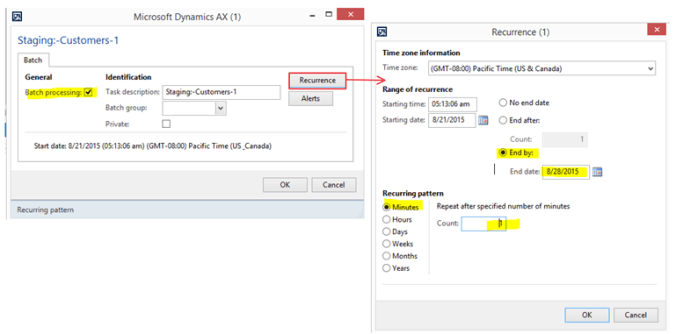
My next step is to go back to the processing group, and to make the necessary batch job for automatic processing.

As you see here, I set the “type” to Directory, that DIXF will scan for new files. I also specify directories for processing, completed and error. I have therefore created the following directory structure for each integration:

The other important thing is the “Execute target step”. This this used for also executing the step that transfers data from the staging table to the target tables.

I then want this to be work in batch, so I enable the batch processing.

And then I need to wait for an entire minute……… I then saw that the file was moved from the 1_new folder, and ended up in the Β€_Completed folder.

I also see in the execution history, that the files was imported into the staging tables, and then imported into the target tables.

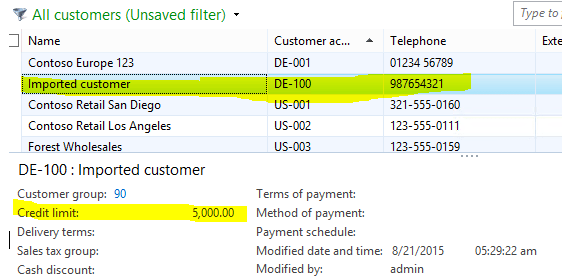
In my customer overview, I now see that I have a new customer, but is also made sure that other related data as addresses, and phone etc was created.

This concludes how you can use DIXF to automatically import data. What I can now do to import data, is just to create my Excel file, and then dump it into the right folder (.\1_New), and then the batch system take care of the test.

If you wonder all entities that are “out-of-the-box” supported from Microsoft, then take a look here. If still something is missing, you can always ask a developer to assist in creating the DIXF entities you need.

Happy DIXF’ing J

Β 

DAX 2012 R3 – Retail Channel POS reports

Both ePOS, mPOS and the upcoming AX7 CloudPOS have a built-in feature for showing small reports and KPI’s directly on the POS. These reports are not running against the Dynamics AX database, but against the retail channel database connected to that specific terminal.

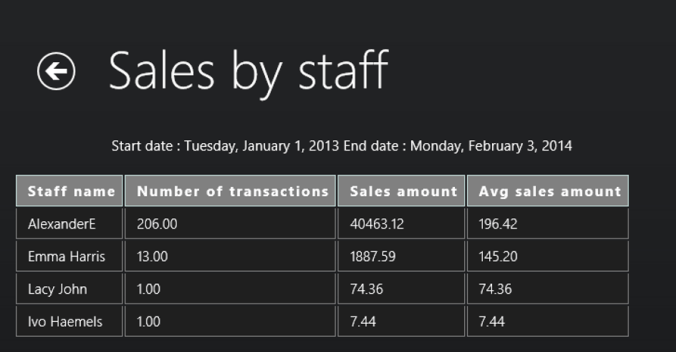
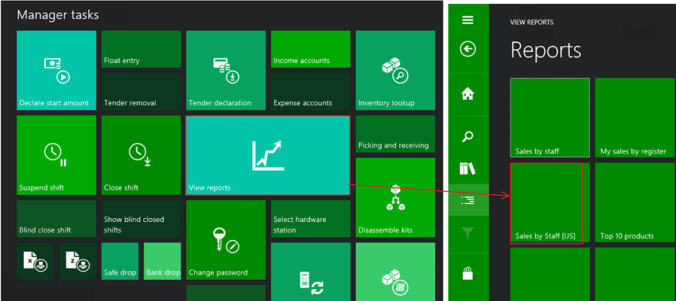
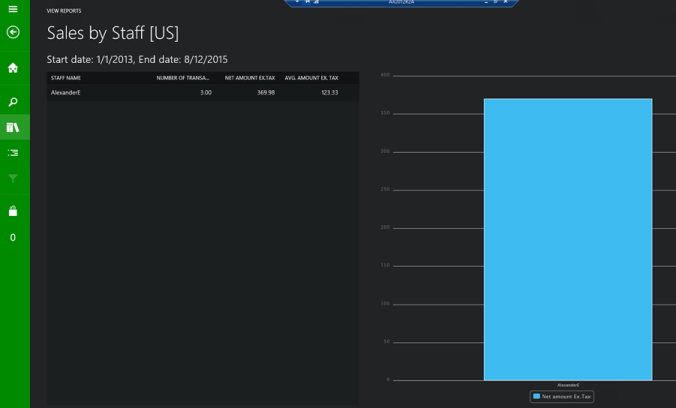
The great thing about these reports, is that it does not require any heavy development to define these reports. They are just XML report definitions, that queries the database for specific columns or stored procedures. This means that we easily can create new reports based on the direct reporting requirements. In the report, shown below a report called “Sales by staff” is shown. Here the staff name, number of transactions, sales amount and average sales amount is shown.

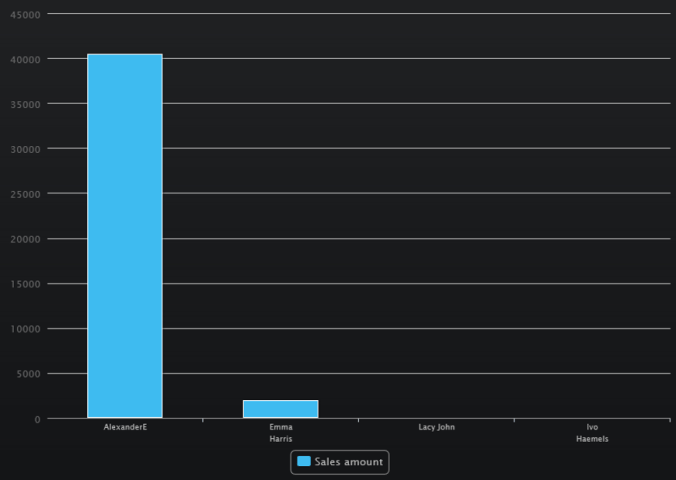
The report can also be shown as graphics.

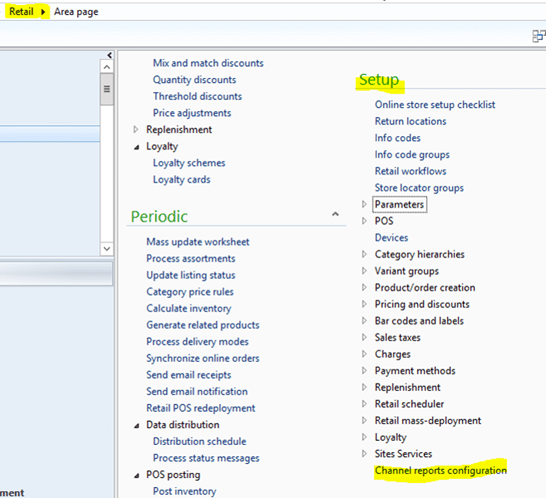
The report definitions are located in the RetailΓ SetupΓ Channel report configuration.

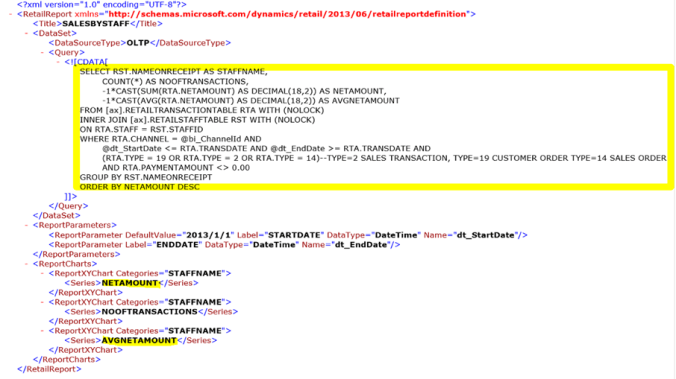
We see here the report definition, and it can look a bit cryptic. But let’s format the XML to better understand the definition. We here see that the retail report basically have 3 sections. The dataset, parameters and the reportcharts.

As we can see here, the dataset is referring to a stored procedure, with 3 parameters; Channel, start-date and end-date. If we open the SQL stored procedure we can see the exact implementation of it.

We see here that the actual source tables are an inner join between retailTransactionTable and retailStaffTable. We can also see that the amount is “retailTransactionTable.paymentAmount”. This amount is the amount of what the customer is actually paying inclusive taxes.

But a US-based customer of me asked if it is possible to make some minor changes, and just show the reporting exclusive taxes. To do this, it means that we must do some changes. We cannot use the existing standard stored procedure. We could surely create new stored procedures, but rolling this out to hundreds of terminals would take a lot of time. But we have the option to use an actual query in the report XML definition instead.

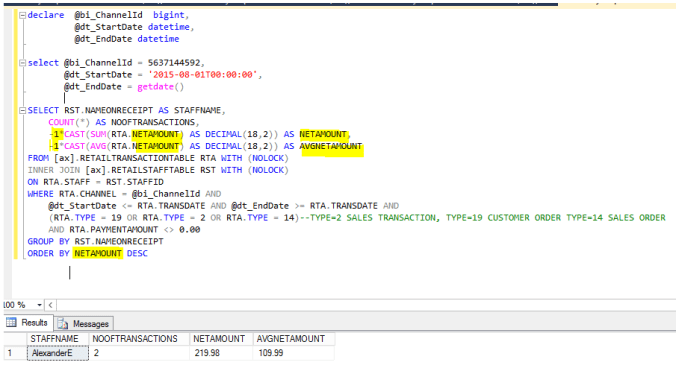
The first step is to try to create a SQL that retrieves the sales amount minus taxes. As far as I have interpreted the table retailTransactionTable, it seems that the field I can use is the -1*[NETAMOUNT]. Here is the query tested directly in SQL Manager, and I have “yellowed” out the differences compared to the script used in the stored procedure CRT. GETSALESBYSTAFFREPORT

It seems to be working, and the next step is to create a new XML report definition. I therefore took the report “101 Sales by staff”, and created a “101_US Sales by staff”, with the following XML report. Here I have colored the differenced to the original report in yellow. As you can see here, I use a query, instead of a stored procedure.

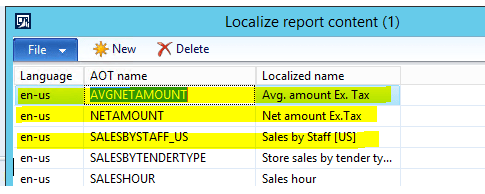
I also localize the labels in the report

To have the new report available to the users, I need to run the CDX Async job to send data to channels.

  1. In AX, go to Retail > Periodic > Data distribution > Distribution schedule


  1. Select job 1110, click Run now


  1. Wait couple of minutes for the job to finish

I then have the new retail report available.

Then I get my POS report, where the amounts is without taxes J

Happy DAX’ing !

DAX 2012 R3 CU9 Retail database version mismatch and GAC issues

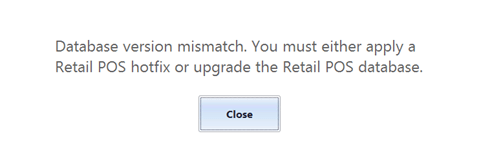
When upgrading the Contoso AX 2012 R3 CU8 to AX 2012 R3 CU9 and then trying to open the ePOS, you might get the following error. “Database version mismatch. You must either apply a Retail POS hotfix or upgrade the Retail POS database

In the event viewer you might see the following:

AΒ TechNet articleΒ gave me some indications that the issue was related to the CreateDatabase.dll in the Retail Channel Utility.

My trick to make this work again was to open the installation folder for CU9, and apply the retaildatabaseutility.msp

This upgraded the CreateDatabase.dll to include upgrade to version 6.3.105

When I then re-run the Retail Channel Configuration Utility on the channel database and on the offline database

After successfully upgraded the channel database, when trying to startup the POS, I get the following error; Could not load type ‘Microsoft.Dynamics.Retail.Notification.Contracts.SignatureCaptureConfirmation’ from assembly ‘Microsoft.Dynamics.Retail.Notification.Contracts, Version=6.3.0.0, Culture=neutral..

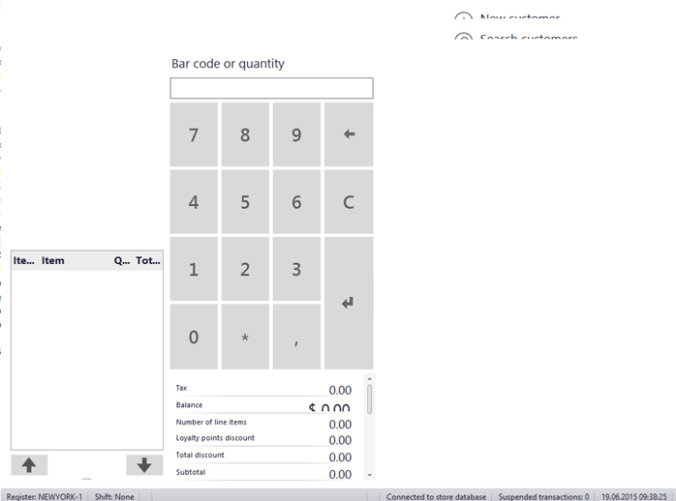
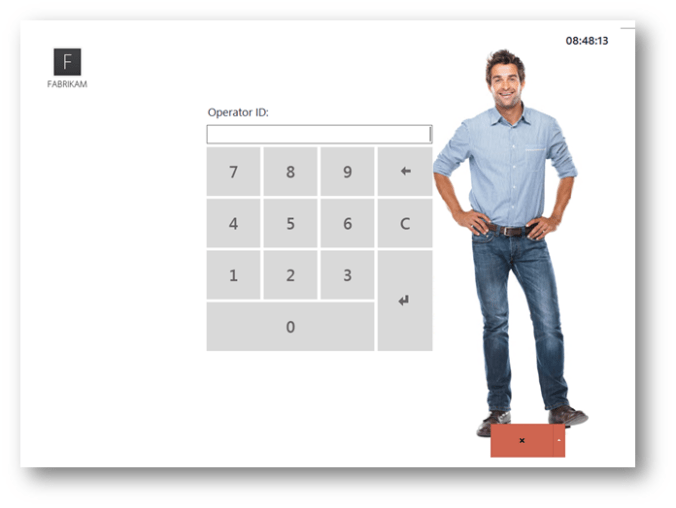
And the POS screen shows no login, just the following “corrupted” screen.

I raisted a service request to Microsoft, and I got my answer today. It is related to All .NET applications will check first if the required assembly is available in the Global Assembly Cache (GAC) before searchin in the AppBase folder.

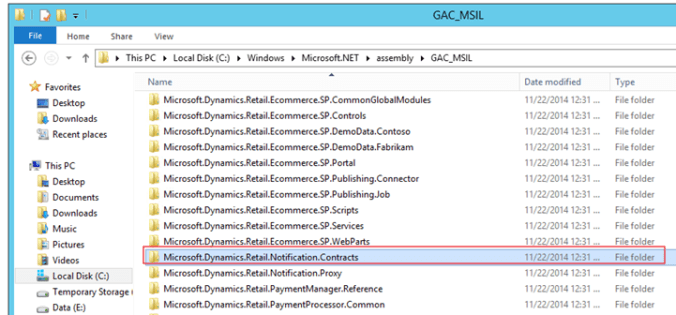
If we look at the C:\Windows\Microsoft.Net\assembly\GAC_MSIL we see the following

The date is older than the CU9. Microsoft explained me that this issue occures, because we have a “one-box” installation, and As we didn’t redeploy the Online Store after upgrading to CU9, the old assemblies were still in the GAC, causing the error. This would not come up in a real situation where all components are installed in separated server, but with this being an all in one environment we had this side effect.

The solution is therefore to uninstall the assembly from the GAC.

1. Check that GACUTIL is located at C:\Program Files (x86)\Microsoft SDKs\Windows\v8.1A\bin\NETFX 4.5.1 Tools in the VM-image

2. Run the command “gacutil /u Microsoft.dynamics.retail.notifocation.contracts”

You may need to do this for all Microsoft.dynamics.retail.* in the GAC_MIL folder

Then you can start the ePOS as expected J

Thank you Microsoft J

Dear AX 2009 customers. You are not forgotten, and Microsoft have support options available until year 2021 J. I wanted to write a blogpost to show that there still happens a lot of local innovation at the customers that are relying on this version of DAX.

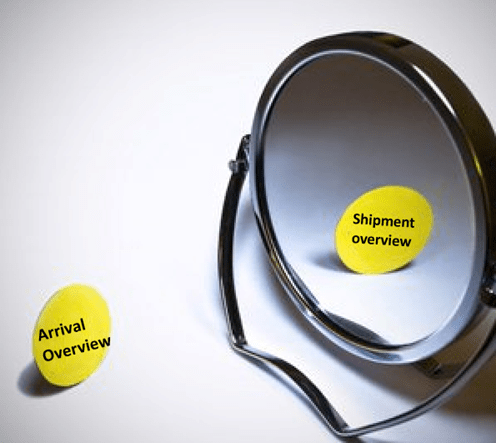
Often, when we talk about purchase orders and sales orders, we often refer to them as mirrors. On the transaction level Purchase and sales can be seen as mirror processes, with just the opposite sign. But in standard AX the processes to handle the supply chain can be quite different. The question was therefore if it was possible to also mirror the supply chain processes. Taking the ideas from arrival overview and mirroring it to a shipment overview.

For receiving many reply on the Arrival overview to group together expected receipts and to create arrival journals. The Arrival overview is actually a quite good tool when you learn to use it. For the more the more advanced outbound logistics shipments are used to handle the picking, staging and loading of the goods. A customer came up the suggestion to create a “shipment overview”, but based on the arrival overview. This way the warehouse operator can search across shipments, but also have some volumetric indication of the load that is being released to the warehouse floor.

The arrival overview differs from other screens, because it actually consists of temporary tables that is build based on a query. The same thing happens here. The shipments are loaded on the upper grid, while the picking lines is loaded on the lower grid. There are advanced queries to control the loading of the data. Since it is a temporary table, the fields like address, weights, pallet quantity is real fields on the temporary table. This means that after the result have been fetched, the user can perform additional search and filtering. Like sorting and filtering the shipments in a based on addresses, pallet quantity, weight etc. Also the ability to multi select shipments or lines to be able to move lines between shipments. The screen will mainly be used for inquiry and for activating shipments.

And in relation to performance.. It is acceptable J

DAX 2009 – Shipping overview, a mirror of arrival overview

DAX2012 R3 – Playing with Retail CRT

The Microsoft Dynamics AX commerce runtime (CRT) serves as the engine for a retail channel. It connects to a CRT database that stores business data for the channel.. Dynamics AX uses the CRT Architecture in the Retail ePOS, mPOS and in the Sharepoint based eCommerce solution. Also the SiteCore eCommerce solution uses the CRT as the integration to Dynamics AX.

Let’s look at some of the interesting things with CRT.

1. It is a well-documented framework supported by Microsoft. More details on it is available here.

2. It can make it easier to integrate business logics to other eCommerce solutions. Like Magento.

3. We can create CRT web-services that handles information like very advanced retail prices, on-hand shipment, check-outs etc.

4. And MUCH more. This CRT we will have almost everything we need to interact with external system. It Rocks !

Let’s take an example. I would like to utilize the CRT to calculate a sales price with discounts. Price/discounts in AX is very flexible and almost all options you can imagine. Here is a small example of the possibilities we get in Dynamics AX 2012 R3 CU 8.

Let’s say we would like to expose this price/discount structure as a web-service to external parties. Since the CRT is relying on it’s own channel database, it means that the much of the integration is actually not creating a heavy load on the Dynamics AX database. We also have the possibility to “scale out” on the architecture.

The CRT is developed in Visual Studio, and is basically just a bunch of dll’s. I have to admit, that Visual studio, Web-services and is not my strongest side. So I decided to see it I could access and use the CRT framework directly from Dynamics AX. The new call-center module in AX 2012 R3 CU8 is using this, and I wanted to create a very simple job that exemplifies how CRT operates and can be used. Basically I’m looking for this:

I use the standard AX 2012 R3 CU8 contoso demo data, but added the following quantity discount to the Houston store;

Since I know X++, I’ll use X++ job to try this. The infolog I got was the following:

Here we see that the CRT returned the sales price, discounted price, and also information like total amount. Surely it can give everything else, but I wanted to keep the example easy to understand.

I created the following job to play with the framework, and it gives you an idea of how to interact with the CRT from AX.

static void demo_CRT_GetSalesPrice(Args _args)
{
    //To test this code, use the AX 2012 R3 CU8, and use the USRT company
    Microsoft.Dynamics.Commerce.Runtime.Data.IPricingDataManagerV2                pricingManager;
    Microsoft.Dynamics.Commerce.Runtime.Services.PricingEngine.DiscountParameters priceParameters;
    Microsoft.Dynamics.Commerce.Runtime.DataModel.SalesLine                       crtSalesLine;
    Microsoft.Dynamics.Commerce.Runtime.DataModel.SalesTransaction                crtSalesTransaction;
    System.Object                                                                 roundingRule, currencyConverter;
    CLRObject                                                                     clrSalesLines, enumeratorSalesLine;
    CLRObject                                                                     clrObjectSalesLines;
    System.DateTimeOffset                                                         activeDateTimeOffset;
    System.String                                                                 lineIdString;
    System.String                                                                 customerPriceGroup = "";
    Price                                                                         price;
    Qty                                                                           qty;
    InventDim                                                                     inventdim;

    RetailStoreTable    storeTable = RetailStoreTable::find("HOUSTON");   //Lets use houston as an example here
    RetailChannelRecId  channelId = storeTable.RecId;                     //This is the recid for a retail channel. A retail store is an extension of a retail channel.
    CurrencyCode        currencyCode = storeTable.Currency;
    appl.setDefaultCompany(storeTable.company(), false);                  //Setting default company to houstons company

    //Creating a unique line ID
    lineIdString = System.Guid::NewGuid().toString();

    InventDim.InventLocationId = storeTable.inventLocation;
    InventDim.InventSiteId     = InventLocation::find(storeTable.inventLocation).InventSiteId;
    InventDim                  = InventDim::findOrCreate(InventDim);

    //Pricing manager : Encapsulates data access to pricing information.
    pricingManager          = Microsoft.Dynamics.Commerce.Headquarters.RetailProxy.AxPricingDataManager::BuildDataManager(channelId);

    //Price parameters : types of AX discounts (aka trade agreement discounts, aka not Retail Periodic Discounts) are currently activated and should be allowed on the transaction
    priceParameters         = Microsoft.Dynamics.Commerce.Runtime.Services.PricingEngine.DiscountParameters::CreateAndInitialize(pricingManager);
    roundingRule            = Microsoft.Dynamics.Commerce.Headquarters.RetailProxy.ServiceHelpers::GetRoundingMethod(currencyCode);
    currencyConverter       = Microsoft.Dynamics.Commerce.Headquarters.RetailProxy.ServiceHelpers::GetCurrencyConverter(currencyCode);
    activeDateTimeOffset    = RetailPricingEngineHelper::getSessionDateTimeInChannelTimeZone(channelId);

    //Next we create a crtSalesLine, that represents a channel agnostic sales line.
    crtSalesLine = new Microsoft.Dynamics.Commerce.Runtime.DataModel.SalesLine();

    crtSalesLine.set_ItemId("0001");        //Lets use product 0001 as our example
    crtSalesLine.set_InventoryDimensionId(InventDim.inventDimId);
    crtSalesLine.set_Quantity(10);          //Lets use quantity 10 as our example
    crtSalesLine.set_LineId(lineIdString);  //Let give this line a uniqe ID

    crtSalesLine.set_UnitOfMeasureSymbol("ea"); //Let use 'ea' as the unit

    //We then create a sales transaction, and add the salesline to this.
    crtSalesTransaction = new Microsoft.Dynamics.Commerce.Runtime.DataModel.SalesTransaction();
    clrObjectSalesLines = crtSalesTransaction.get_SalesLines();
    clrObjectSalesLines.Add(crtSalesLine);                      //This is where the we add the salesLine to the sales transaction

    //Lets calculate the prices
    Microsoft.Dynamics.Commerce.Runtime.Services.PricingEngine.PricingEngine::CalculatePricesForTransaction(
        crtSalesTransaction,
        pricingManager,
        roundingRule,
        currencyConverter,
        customerPriceGroup,
        currencyCode,
        false,
        activeDateTimeOffset);

    //Lets calculate the discounts
    Microsoft.Dynamics.Commerce.Runtime.Services.PricingEngine.PricingEngine::CalculateDiscountsForLines(
        pricingManager,
        crtSalesTransaction,
        roundingRule,
        currencyConverter,
        currencyCode,
        '',
        '',
        '',
        true,
        Microsoft.Dynamics.Commerce.Runtime.DataModel.DiscountCalculationMode::CalculateAll,
        activeDateTimeOffset);

    //And, let's show what the CRT can give us.
    qty   = crtSalesLine.get_Quantity();
    Price = crtSalesLine.get_Price();
    info(strFmt("Normal sales price is %1 when buying %2", price, qty ));

    Price = crtSalesLine.get_DiscountAmount();
    info(strFmt("Discount amount pr unit is %1, when buying %2", price/qty, qty ));

    Price = crtSalesLine.get_NetAmountPerUnit();
    info(strFmt("Net amount pr unit is %1, when buying %2", price, qty ));

    Price = crtSalesLine.get_TotalAmount();

    info(strFmt("Total amount is %1 when buying %2", price, qty ));

Maybe some of you can teach me how to expose the CRT in a web-service, so that we can easily


DAX 2012 end-to-end processes and APQC

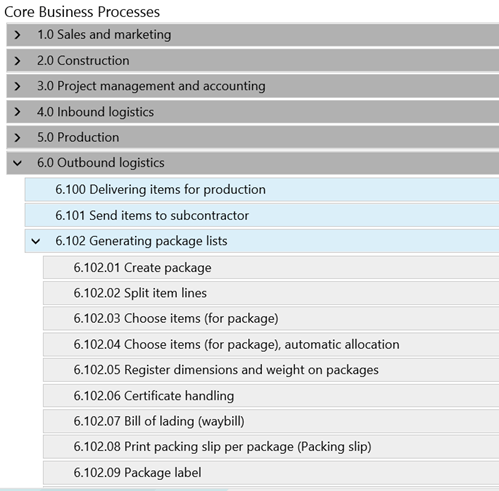
With LCS (Life cycle Services), Microsoft have taken steps to introduced the APQC (American Productivity & Quality Center) Process Classification Framework as one of the business modelers.

Microsoft have also created some flowcharts to visualize the APQC processes in dynamics AX.

In some Dynamics AX implementation projects it have been decided to use the APQC model, and the participants(including me) was struggling connecting the APQC model to actual tasks and activities performed in DAX. So I started on a small mental journey to better understand how to use APQC model, and to be able to connect the dots from the classification framework into dynamics AX swim lane process maps.

First I thought that is was possible to take some level 4 APQC try to draw them. It is possible to draw the small and simple activities, but I was struggling drawing an end-to-end processes. Like order-to-cash. I quickly realized that I cannot use the LCS-APQC model to explain end-to-end DAX processes, since end-to-end processes often will involve many different departments, functions and processes.

To visualize a complex processes in an end-to-end process like order-to-cash using APQC classification model I could imagine looking something like this.

Here we see the involved processes visualized with the APQC classification. And it makes sense. But it does not tell you how to use AX in in this process, because that is described using the level 4 (or 5) in APQC. Like in 8.2.2 Invoice customers, would be a specific process, that we can visualize in Dynamics AX/LCS.

The other thing I realized was that APQC is not about implementing a ERP system, like DAX, but it’s about improving the processes you have(regardless of what systems and applications you have). Some of the activities may be handled in DAX, but many is just how to improve the actual steps the company actually does. Very often it can be the working procedure, involving many systems and internal working processes. So you don’t ask “How does this APQC process look in DAX ?”. You should rather ask “What APQC processes is involved in the selected DAX processes (like order-to-pay).

The APQC model will therefore not tell you how to use and setup Dynamics AX. It will just help you to have a common language to classify your processes and to improve them. When it comes to visualizing Dynamics AX processes in swim lane flowcharts it can be a good idea to use the APQC identifiers as process identification.

My tip when using LCS, is to understand the APQC process identification model, and use it as a repository and building blocks when you create your own processes.

By referring to APQC on your own business model you can start on process improvement project for that specific process. You will can also evaluate to implement the benchmark indicators as APQC exemplifies.

My quick summary is therefore;

1. Do I like LCS, and will use it Γ  Yes, and I will use it for implementation and DAX process visualizations.

2. Do I like APQC Γ  Yes, and I will use it for classification, benchmarking and process improvements.

3. Do I think that the LCS APQC processes reflect what we see at customers Γ  No

4. What would be nice to have in LCS business modeler Γ  More end-to-end processes, where the APQC process identifiers is used would be nice.

Happy DAX’ing !!


Distribution orders in a cross company scenario.

Many retail enterprises have selected Dynamics AX as their main system to handle their processes for financials, procurement, logistics, merchandising and POS/retail. They have a presents globally and is true international enterprises. We also often see that they are organized through partnerships and francizing, and to be cost efficient a lot of processes like brand, assortment and logistics have been centralized.

Dynamics AX for Retail natively supports most scenarios by providing efficient processes for the retail industry. The flow of products by using intercompany trading simplifies transactions handling.

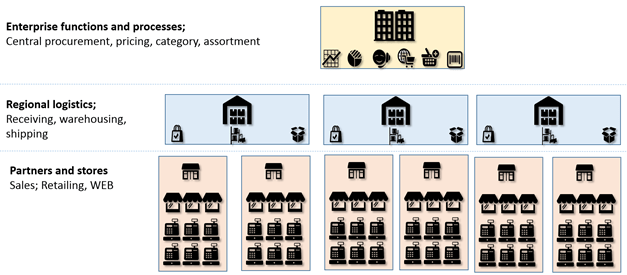
One question that arises is how clear boundaries between the legal entities should be ? What I would like to discuss in this blogpost is how to structure legal entities in Dynamics AX, and still be efficient. Let’s say we have the following 3 level structure of the enterprise.

Here we have a central enterprise legal entity, that have the responsibility of overall finance, reporting, products, recommended retail pricing, assortments and procurement.

The next tier is the regional logistics units. They can be own operated warehouses, or outsourced to third party logistics providers. The purpose is not only to serve stores and partners, but to perform logistics processes like receiving, quality control etc.

The tier at the bottom is where all the partners and stores are located. This can be based on a franchise model, partner or own stores. At least one legal entity per partner or country.

How to handle transactions between these entities?

Keeping a good track on processes and the transactions is vital. We need to know where costs occur, and how the transactions are handled. Here I would like to discuss a bit how the transactions can be handled. Let’s start with the partners and stores.

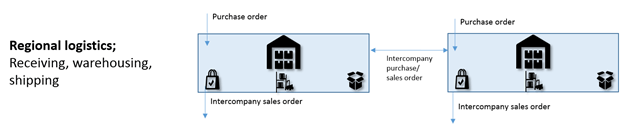
Products are purchased through a intercompany purchase order. If products needs to be internally moved, then transfer orders are used. When the stores sell products, then POS and sales orders are used. The transaction handling clean and easy with simple transactions. Some times there may be issues with costs that will arrive later, like transportation costs. This can be handled with misc. charges as described here.

In the figure above we see how inventory costs are originating from the vendor and the costs are propagated through the intercompany chain. Also how we can add additional charges like insurance, freight, and make sure that these costs flow through the intercompany chain.

The next tier, the regional logistics warehouses/distribution centers is also very simple. All goods are purchased from a vendor. This means that the vendor will have a matching sales invoice per regional logistics center.

All sales out of a regional logistics center is a intercompany sales order. If the center is a third party logistics provider, this means that the legal entity is mostly being handled by automated transactions and by integrations. What is important, is that it is an actual legal entity and is being handled as one. By doing this, it means that there are less need for customizations in handling financials and taxes.

Then we come to processes being handled in the headquarters; Enterprise processes and functions. This is the main topic of what I wanted to write about. The idea is to be able to control both the procurement/purchase and the distribution from a central perspective. It is fully possible to do this with standard AX, but it can be a bit resource intensive. I wanted to see if it was an easier way to deal with this, without making too many customizations. The concept is the “distribution order“.

Company wide distribution orders does not exists as a concept in standard AX. A distribution order is close to the “Buyer’s push” functionality that exists in Dynamics AX, but to be able to be handled in a global intercompany scenario. It means that you from a central perspective see and plan all the purchase orders and intercompany sales orders, regardless of whish legal entity that is performing the actual transactions.

The distribution order is not linked to a legal entity, but is created and controlled by HQ. The resources doing planning and procurement, and create a distribution, and add the lines/items they want to distribute. They can also add additional purchase order lines to the distribution. In the distribution lines the distribution quantity can be fetched directly from the purchase lines, or can be manually overridden.

It is also possible to “reverse” the creation process, where the planner starts with a set of manually created distribution lines, and then create the purchase orders created in each regional warehouse/legal entity.

It is also possible to create a distribution order of the type “On-hand” and “end-of-season”, that will base the quantity of the distribution lines on the available physical.

The planner can then run the process “create suggestion”, based on a distribution key. This will create a Distribution result. It will have one line per store. The planner can then choose to make manual changes. When the result is OK, then the planner can activate the distribution order. This will make the necessary intercompany sales orders from the regional logistics companies to the partner/stores.

Since the distribution order will have visibility across legal entities, the purchase lines and the intercompany sales orders can be additional linked through inventory marking. This can then enable the possibility for cross docking scenarios, and also to add the ability for direct delivery scenario’s.

We will then have the possibility to give the buyers and planes an overall view of all inbound and outbound logistics through all regional distribution centers. Also the ability to show current status and progress.

I have done this before in AX 2009 as you can read about here. And I would love to add this feature to the free Codeplex AX 2012 Global retail package. If this is interesting for you to have, please reach out to me, and we can have a discussion on an jointed cooperation.

Dynamics AX 2012: Warming up for presales demo

To really impress potential buyers of Dynamics AX, it is important that we are capable to show that AX 2012 responds fast. We normally use the Contoso hyper-v demo environment, and our laptops have limited resources. Starting a demo on a cold system, we often see that forms takes some time to operate in optimal performance. If you already have opened a form, it is much faster the second time you open it.

So how can we give the users a view of a fast system without manually opening all the forms prior to the demo?

We can warm them up J. I use the following job-script to open and close all the forms I’m planning to use. I just traverse through the AOT, and open the form, and then I close them again.

static void WarmupRF(Args _args)
{
    //This code is for "warming" up all RF* forms and code I have in the VAR-layer
    UtilElements e;
    TreeNode treeNode;
    FormRun formRun;
    Args args = new Args();

    while select e
        where e.utilLevel  == UtilEntryLevel::var    //<-- spesify layer here
        &&    e.recordType == UtilElementType::Form  //<-- and only forms
        &&    e.name like "RF*"                      //<-- I only want the forms that starts with the prefix RF*
        {
            try
            {
                treeNode = xUtilElements::getNodeInTree(xUtilElements::parentElement(e));
                args.name(treeNode.AOTname());
                formRun = ClassFactory.formRunClass(args);
                formRun.init();
                //formRun.run();   //<-- No need to run the form, but sometimes it can load the data
                formRun.close();
            }
            catch
            {
                Infolog.clear();
                continue;
            }
        }
}

The code must be modified to suit what you want to “warm-up”, but you get the idea.

This will make you demo go much more smooth, and you truly show the potential and performance of a warm Dynamics AX system.

Happy DAX’ing

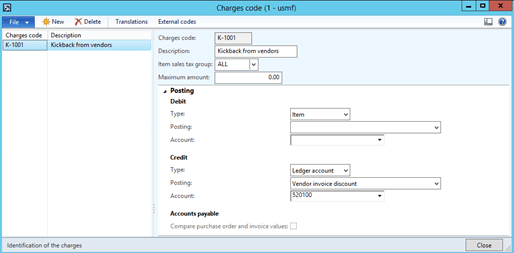
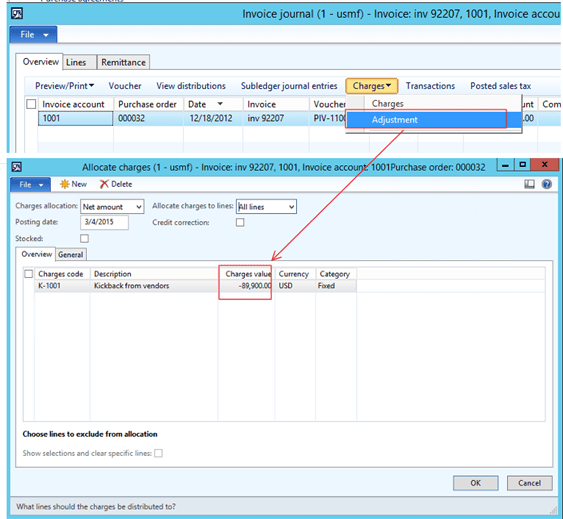
DAX 2012 R3 – Kick-back, Bonus and marked support

We often see that vendor’s use loyalty marketing in hopes of nurturing customers to be even better customers. Introducing new products in a marked can be costly, and success is often rewarded based on performance.

We often encounter requirements where vendors is compensating with kick-back, bonuses and marked support on specific products. The agreements can be formulated like; If you sell more than 1000 units per quarter, we will give you a 10% discount on purchased products for that quarter. But the transactions and invoices then may be that the original invoice is on the exact amount, and each quarter a credit note with the bonus is received. The idea behind kick-backs can be controversial, but this is not the topic her.

Having the cost price on the products determined on the actual purchase price give a very good foundation for a healthy business model, and also gives a much better insight to revenues and margins . But this “delay” in the transactions and payments introduces some issues for customers that relies on using inventory models as FIFO, FEFO etc.

  • What is the actual cost price in a scenario with kickbacks?
  • How can we calculate the actual revenue and margins?
  • Does my system support this feature?

If you have Dynamics AX 2012 R3, then you are lucky. There is a very nice way to handle kickbacks effect on product cost prices, and making sure that the cost prices is affected accordingly.

The name of the feature is charges. With charges we make adjustments of the cost prices on the right dates, and on the right transactions. The inventory closing will make sure that the cost prices are settled to the sales orders/issue inventory transactions.

The first step is to create a new charge, that will adjust the cost price on specific invoices, and also post on a selected ledger account.

Then let’s say the following received invoice from 2013 of 200 Surface Pro 128:

I see on the inventory transactions that the cost amount is 179.800 USD.

The vendor now want to give me a kick-back for my effort of managing to sell these old notepads. When they send us a credit note of 50% of the amount, and I want to post this so that the cost price changes on the inventory transactions.

When this is posted it will adjust the cost of the inventory transaction on the selected posting date:

The voucher transactions looks like this.

In AX 2012 R3 the inventory transactions will make the necessary adjustments on the issue transaction.

The next step is to receive and post the invoice from the vendor post it against the selected ledger account on the charge code, and eventually also run the inventory closing procedure.

Conclusion;

There are no need to credit post the purchase order for adding kickbacks, bonuses and marked support etc. It is supported in Dynamics AX 2012 R3.

Happy DAX’ing


DAX 2012 Remove reservations and markings from a sales order

Some friends of me have asked how to remove reservations and markings on a sales order. Going through line by line can be time consuming and they wanted to know how this could be solved by a single “click”.

Β 

static void Tutorial_UnreserveSalesTable(Args _args)
{
Β Β Β  InventTransΒ Β Β Β Β Β Β Β Β Β Β Β  inventTrans;
Β Β Β  InventTransOriginΒ Β Β Β Β Β  inventTransOrigin;
Β Β Β  SalesLineΒ Β Β Β Β Β Β Β Β Β Β Β Β Β  salesLine;
Β Β Β  InventMovementΒ Β Β Β Β Β Β Β Β  inventMovement;
Β Β Β  InventUpd_ReservationΒ Β  inventUpd_Reservation ;
Β Β Β  SalesIdΒ Β Β Β Β Β Β Β Β Β Β Β Β Β Β Β  SalesId = "001260";//<--- Send/get sales id here

Β Β Β  // Remove reservations and markings on a reserved salesorder
Β Β Β  while select inventTrans
Β Β Β Β Β Β Β  where inventTrans.StatusReceiptΒ Β Β Β Β Β Β Β Β Β Β Β Β Β Β  == StatusReceipt::None
Β Β Β Β Β Β Β Β Β Β  && (inventTrans.StatusIssueΒ Β Β Β Β Β Β Β Β Β Β Β Β Β Β Β  == StatusIssue::ReservPhysical 
Β Β Β Β Β Β Β Β Β Β  ||Β  inventTrans.StatusIssueΒ Β Β Β Β Β Β Β Β Β Β Β Β Β Β Β  == StatusIssue::ReservOrdered)
Β Β Β Β Β Β Β  exists join inventTransOrigin 
Β Β Β Β Β Β Β Β Β Β Β  whereΒ Β  inventTransOrigin.RecIdΒ Β Β Β Β Β Β Β Β Β Β  == inventTrans.InventTransOrigin
Β Β Β Β Β Β Β  exists join salesLine 
Β Β Β Β Β Β Β Β Β Β Β  whereΒ Β  salesLine.InventTransIdΒ Β Β Β Β Β Β Β Β Β Β  == inventTransOrigin.InventTransIdΒ Β Β Β Β Β Β Β Β Β Β Β Β Β Β Β Β Β Β  
Β Β Β Β Β Β Β Β Β Β Β Β Β Β Β  &&Β  SalesLine.SalesIdΒ Β Β Β Β Β Β Β Β Β Β Β Β Β Β Β Β  == SalesIdΒ Β Β  
Β Β Β  {
Β Β Β Β Β Β Β Β Β Β Β  if (inventTrans.MarkingRefInventTransOrigin)
Β Β Β Β Β Β Β Β Β Β Β  {
Β Β Β Β Β Β Β Β Β Β Β  Β Β Β Β InventTransOrigin::deleteMarking(inventTrans.MarkingRefInventTransOrigin, inventTrans.InventTransOrigin, -inventTrans.Qty, true);
Β Β Β Β Β Β Β Β Β Β Β Β Β Β Β  InventTransOrigin::deleteMarking(inventTrans.InventTransOrigin, inventTrans.MarkingRefInventTransOrigin, inventTrans.Qty, true);
Β Β Β Β Β Β Β Β Β Β Β  }

Β Β Β Β Β Β Β Β Β Β Β  if (inventTrans.StatusIssue == StatusIssue::ReservPhysical || inventTrans.StatusIssue == StatusIssue::ReservOrdered)
Β Β Β Β Β Β Β Β Β Β Β  {Β Β Β Β Β Β Β Β Β Β Β Β Β Β Β  
Β Β Β Β Β Β Β Β Β Β Β Β Β Β Β  Inventmovement = inventTrans.inventmovement(true); 
Β Β Β Β Β Β Β Β Β Β Β Β Β Β Β  inventUpd_Reservation = InventUpd_Reservation::newInventDim(inventmovement,inventTrans.inventDim(), -1 * inventTrans.Qty, false); 
Β Β Β Β Β Β Β Β Β Β Β Β Β Β Β  inventUpd_Reservation.updatenow(); 
Β Β Β Β Β Β Β Β Β Β Β  }
Β Β Β  }
}

The next step would be to create a class, so that it can be performed in CIL, and some code that refreshes the sales order for the end-user.

AX2012 – How to get Retail Store specific CUE’s

In Dynamics AX, the role center may contain a lot, but some times it is wanted to show more specific and isolated information. In this blog-post I would like to show you how to create a cue that only shows number of sales and amount related to a specific retail store. This blogpost is meant to show the pattern we can use, and is not only restricted to retail. We can use this technic almost everywhere in Dynamics AX.
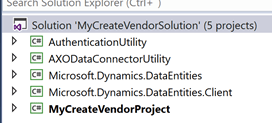
Here we see a CUE where I show the number of sales and the amount for a specific store. But the nice thing here, it that the values changes depending on what store the user is assigned to.

Do be able to do this we need a dynamic query, that changes the store, depending on the current user, and we need to have a place, where a user is assigned to a store. This is already available in Dynamics AX, and is a setting on the User profiles

So here, I’m assigning a user to a role, and to a store. The next thing I need to have is a way to sum up all the retail sales transactions, and for this I use the form Retail sales transactions.

I then create an advanced filter by using the CTRL-F3, and save as a CUE.

You see here that in the criteria for store number, I write (EGCurrentRetailStoreID()). This is a very nice trick in Dynamics AX. The ability to create dynamic queries. I have blogged about it before here.

The code needed to use dynamic query criteria is located in SysQueryRangeUtil is the following:

This code will return the store ID for the current user. The last step is to select the CUE in the shared role center.

Then you have a CUE, that shows the sales in your local retail store.

Β 

Happy DAX’ing

New DAX 2012 R3 CU8 Global Retail codeplex solution available

Hi friends.

I’m happy to announce the first release of a new free codeplex solution; Global Retail.

The solution covers:

  1. Global Product price templates – The ability to assign a price template to a product, that will quickly enable retail prices available in different countries and currencies.
  2. Global Product pricing – The ability to set recommended retail prices directly on products. Global prices are posted in price journals to price agreements in all legal entities.
  3. Global Product barcodes – Assign and maintain product barcodes, and it will automatically synchronize to all legal entities.
  4. Simplified Product translations and simplified local pricing screen. Multi dimensional retail hierarchies for filtering, search and availability. Full price log and the use of case management for price change processes.
  5. Simplified file import and export of products, retail hierarchies, barcodes, prices, translations, availability, counting journals. (Excel, csv, xml)

Take a look here > https://ax2012globalretail.codeplex.com/ (more documentation will come later)

PS! This is the real-deal !

Giving away your silver for a golden future


(Picture is borrowed from Robin Dickinson)

In the AX-Ecosystem we see that blogging, sharing and networking is strong and open. Colleagues and knowledge friends find each other across company borders and culture. Quite a lot business is actually created through this community. And those that is not here will struggle to get into position. Some people ask me: “Why are you doing this ?” This quick answer is: “Because I like to, and because it is fun”. But there are more to it than that. Here is the “secret two line” business model of sharing.

  • Give away some ideas, components/code, wisdom and experience – for free – and hope that the dynamics ecosystem (the crowd) will use it.
  • Then do our best to make sure that some of them want to buy more of our ideas, our know-how and our hard-earned wisdom and experience.

Some companies talk about the value of protecting their IP-rights, and they have IP-rights on everything. Down to the little small code samples. But an IP-based business model have some fundamental issues:

  • Revenue is often based on licenses and yearly support fee’s.
  • Requires substantial costs on sales, presales, support and R&D efforts to meet standards and expectations.
  • Keeping it on the “pricelist” have a cost.
  • Customers expect components to be compliant with new Microsoft versions and releases.
  • Bug and Issues are expected to be fixed free of charge.
  • Risks quickly becomes expensive

The assumption is that the revenue must be higher than the costs of maintain and keeping the components on the price list.

However, what we see is that Investments stops. No innovation. Very difficult to find for the customers. Knowledge is lost, and IP based components are often not profitable in long term.
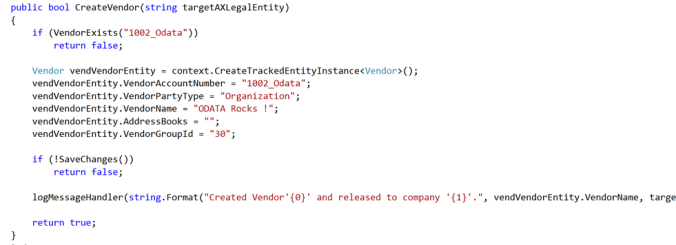
Β 

So, what kind of things are we talking about ?

  • Small ideas, that would never be a product.
  • Potential reusable components.
  • Customer financed customizations.
  • Basically things we cannot build an ordinary business model on.

One alternative is to use Codeplex as a business model.

  • The Dynamics ecosystem is small. Very easy to get high visibility.
  • Sharing is a very positive message. Can strengthen the your brand.
  • Can increase service revenue. New customers seek knowledge from the sources.
  • Triggers customers “Pull” behavior instead of “Push”.
  • Reach new potential employees that take a pride on sharing their knowledge and ideas.

A few days ago, I wanted to test this approach, so I blogged about a very small code piece I gave away, and wanted to measure the effectiveness, and here is the effect after 2 days.


How much would it cost in traditional marketing and brand building to achieve this reach ? Surely more then the small hour I used to publish it. I can also assure you that by giving away some of your work though sites like codeplex do build brand value and do generate a profitable and golden future.

Β 

(*From the Coca Cola dude)

Dynamics AX 2012 R3- To exist or not, that is the question!

The advanced filter and query in Dynamics AX is a very powerful tool. Here you can search on most fields, and also add relations to the query.

You can open this advanced query screen from almost any AX screen, and the short-cut is “CTRL-F3”.

But there is one area that the advanced query screen is not handling. That is “Not-exists-join”. Let’s say I want a list of all the purchase orders that DON’T have purchase lines. The standard AX will not help you here. Often a developer must come inn and create a smart query or script to find this. With the introduction of attributes and retail categories, I see the need for this “not-Exists-join” feature to be able to create advanced queries.

I don’t accept this, because I want to empower the end-user to perform such queries. So here is my gift to the Dynamics AX ecosystem; NotExistsJoin directly on the advanced query screen:

Then I can look at the filtered purchase list page, and I only see purchase orders that DON’T have any purchase lines J

This will work allover dynamics AX, even on cue’s and on other query based functionality.

So what’s the trick? A few changes to the following two classes:

Let’s take the changes “one-by-one”, or you can download the code here : https://dynamicsax2012r3notexists.codeplex.com/

Then here is the last change to get a icon on not-exists join:

Have fun DAX’ing πŸ˜‰

Dynamics AX 2012 R3: Global recommended retail price

Maintaining retail prices in a multi company and franchise scenario can be a challenge in Dynamics AX 2012 R3. Let say we have a retailer with stores in many countries. We often also see owner structures that makes us model the retail chain with many companies.

I’m currently in an implementation to an international retailer present in 22 countries, and it keeps growing every day. To model this we need to create one Dynamics AX company per country and per partner.

The ability to maintain and control prices in such a scenario is a challenge, because prices is a property of a released item. (PriceDiscTable)

So we decided to create very small customization so that we could keep track of prices and item barcodes on the product instead of the released product level.

By doing this, the product managers have one screen where they can create and maintain product prices. The prices can be specified per currency, country and company/partner. But this is not just a simple table, but a two-way frontend for populating the standard AX price tables.

We therefore have a shared table:


The code for publishing prices into standard AX, using the price journal posting looks like this:


void publishProductRetailPrices()
{
    #Admin
    #Zebra
    DataArea                            dataArea;
    PriceDiscTable                      priceDiscTable;
    PriceDiscAdmTable                   priceDiscAdmTable;
    PriceDiscAdmTrans                   priceDiscAdmTrans;
    PriceDiscAdmCheckPost               priceDiscAdmCheckPost;
    InventDimId                         inventDimId;
    Ledger                              ledger;
    CompanyInfo                         legalEntity;
    LogisticsAddressCountryRegionId     countryRegionId;
    #define.ImportPriceDiscJournalName("Prices")
    PriceDiscAdmName                    priceDiscAdmName;

    ttsbegin;
    while select Id from  dataArea where dataArea.Id != #DATCompany
    {
        changecompany(dataArea.Id)
        {
            legalEntity             = CompanyInfo::find();
            ledger                  = Ledger::findByLegalEntity(legalEntity.RecId);
            countryRegionId         = CompanyInfo::find().postalAddress().CountryRegionId;
            this.createOrUpdatePriceGroup();

            if (this.RefCompanyId       == dataArea.Id ||
                this.CountryRegionId    == countryRegionId ||
               (this.RefCompanyId == "" && this.CountryRegionId == "" && this.CurrencyCode == ledger.AccountingCurrency))
           {
                if (InventTable::exist(this.ProductNumber))
                {
                    priceDiscAdmName = this.findOrCreatePriceDiscAdmName(#ImportPriceDiscJournalName,"@SYS342509");

                    priceDiscAdmTable.clear();
                    priceDiscAdmTable.JournalName       = priceDiscAdmName.JournalName;
                    priceDiscAdmTable.Name              = priceDiscAdmName.Name;
                    priceDiscAdmTable.insert();

                    priceDiscAdmTrans.clear();
                    priceDiscAdmTrans.initValue();
                    inventDimId = InventDim::findOrCreateBlank().InventDimId;

                    while select firstonly priceDiscTable
                        where   priceDiscTable.Relation         == PriceType::PriceSales
                            &&  priceDiscTable.ItemCode         == TableGroupAll::Table
                            &&  priceDiscTable.ItemRelation     == this.ProductNumber
                            &&  priceDiscTable.AccountCode      == TableGroupAll::GroupId
                            &&  priceDiscTable.AccountRelation  == #RRP
                            &&  priceDiscTable.Currency         == this.CurrencyCode
                            &&  priceDiscTable.InventDimId      == inventDimId
                            &&  priceDiscTable.PriceUnit        == this.PriceUnit
                    {
                        priceDiscAdmTrans.initFromPriceDiscTable(priceDiscTable);
                    }
                    priceDiscAdmTrans.Relation         = PriceType::PriceSales;
                    priceDiscAdmTrans.ItemCode         = TableGroupAll::Table;
                    priceDiscAdmTrans.ItemRelation     = this.ProductNumber;
                    priceDiscAdmTrans.AccountCode      = TableGroupAll::GroupId;
                    priceDiscAdmTrans.AccountRelation  = #RRP;
                    priceDiscAdmTrans.Currency         = this.CurrencyCode;
                    priceDiscAdmTrans.InventDimId      = inventDimId;
                    priceDiscAdmTrans.PriceUnit        = this.PriceUnit;
                    priceDiscAdmTrans.JournalNum       = priceDiscAdmTable.JournalNum;
                    priceDiscAdmTrans.QuantityAmountFrom  = 0;
                    priceDiscAdmTrans.Amount           = this.Amount;
                    priceDiscAdmTrans.UnitId           = InventTable::find(this.ProductNumber).salesUnitId();
                    priceDiscAdmTrans.SearchAgain      = NoYes::Yes;
                    priceDiscAdmTrans.insert();
                    if(priceDiscAdmTable.RecId)
                    {
                        priceDiscAdmCheckPost = new PriceDiscAdmCheckPost(false);
                        priceDiscAdmCheckPost.initJournalNum(priceDiscAdmTable.JournalNum);
                        priceDiscAdmCheckPost.run();
                        infolog.clear();
                    }
                }
            }
        }
    }
    ttscommit;
}

Project Quotes

The fall is high season for Dynamics AX projects, and we can often feel the pressure to make sure we can go-live. We have tons of different tools and suggestions to help us reach our goal. Like SureStep, RapidValue, LiveCycleServices, InfoSource and all kinds of methods to be in control, agile and lean in our projects. There is one project tool that is underestimated for successful implementations; Having fun !

Here are some project statements that can help us through the milestones; Enjoy!

Nothing is impossible for the person who doesn’t have to do it.

Never put off until tomorrow what you can put off until the day after.

Warning: dates in the calendar are closer than you think.

The first 90% of a project takes 90% of the time the last 10% takes the other 90%.

To estimate a project, work out how long it would take one person to do it then multiply that by the number of people on the project.

There are no good project managers – only lucky ones.

Planning without action is futile, action without planning is fatal.

If you don’t attack the risks, the risks will attack you.

If project content is allowed to change freely the rate of change will exceed the rate of progress.

If it wasn’t for the ‘last minute’, nothing would get done.

If an IT project works the first time, it is wrong.

Schedule – cost – quality: you can have any two.

A verbal contract isn’t worth the paper it’s written on.

A project gets a year late one day at a time.

A project as not over until the fat cheque is cashed.

A problem shared is a buck passed.

A minute saved at the start is just as effective as one saved at the end.

Β 

And remember; Creativity is intelligence having fun (Albert Einstein)

Β 

Dynamics AX 2012 R3 > Retail Essentials

I have been looking into a concept called Dynamics AX “Retail Essentials”. Retail essentials is a retail-centric configuration option for Microsoft Dynamics AX. Retail essentials provides a simplified, streamlined user experience that is optimized for organizations that use only the retail management functions of Microsoft Dynamics AX. Retail essentials is ideal for companies that have less complex requirements, and that have to manage only brick-and-mortar stores. In this configuration, access to typical Microsoft Dynamics AX functions is limited. Additionally, omni-channel retail capabilities such as e-commerce are not available.

To enable the Retail essentials, there is a configuration key that must be disabled.


So the change is for all companies, and applies to the entire installation.

What then happens is that the menu structure and screens changes dramatically. Only the Β«Retail essentialsΒ» menus are available. No other menus!


Also forms like Sales order and Purchase order changes quite a bit. Here is an example of what happends with purchase orders:


In total the following forms is “retail essentials” enabled:

CustTable, EcoResProductCreate, EcoResProductDetails, HcmJob, HcmPosition, HCMWorker, LogisticsPostalAddress, PirceDiscAdm, PurchCreateorder, PurchTable, RetailParameters,Vendtable. And also the list pages related to this.

Personally I like the idea of having a reduced the complexity in the store. But I don’t like that this is an “on/off” feature for the entire Dynamics AX 2012 R3 application.

If you would like to differentiate this on/off feature based on user/company/access rights etc, there is a central class that controls this behavior : RETAILSMB.


There are surely many other pitfalls, but it may be worth a try. It can surely make our retail store implementations easier for the store end users.

Happy DAX’ing

Generic prices in Dynamics AX 2013 R3

In Dynamics AX 2012 R3 you can specify a sales price on a released item. You cannot specify a price on a set of products using the trade agreements.

I wanted to change this, so that AX 2012 R3 do have the possibility to have a price that is used by many released products. Here is what I did:

First I created a new field on the item master sales (InventTableModule):

Then I made it possible to create sales price groups, and to specify prices per currency for this price group:

Then when creating sales order it selects the generic price.

With this little change I can now control prices on thousands of released products, and rather to put individual prices on each item, I just classify each item to a price group. Let’s say I have 10.000 released products and prices in 6 currencies this would minimum have resulted in 60.000 records in the price agreement table. If I in addition have 10 companies where I also want to use the prices, this results in 600.000 records on prices.

If I have standardized my pricing levels to consumer oriented prices, and using the sales price group, I would only need to maintain 60 * number of price groups. Just a fraction J

To make this happen, the following objects needs to be modified:

If you come across a similar requirement or you need this, feel free to contact me on the blog J

Happy DAX’ing

AX 2012 R3 : Do not enable WMS-II and the new Warehouse and Transportation management in the same installation

In DAX 2012 R3 we have received a new module for Warehouse and Transportation, that Microsoft acquired from Blue Horseshoe. In time it is expected that this will replace the WMS-II module that have been existing in Dynamics AX since version 2.0.

But there are some limitations that you need to be aware of. You should not enable both WMS-II and the new Warehouse and Transportation management configuration key. If you do so, then the following “red” issue will appear:

I asked Microsoft if they could come with an official statement regarding this issue, and here it is:

Microsoft Dynamics AX 2012 R3 includes new Warehouse and Transportation Management modules that are enabled by a single configuration key, along with the previously released Warehouse Management II module. Users should enable the configuration key for ONLY ONE of these modules, but not both, in a single-instance, single-partition deployment. Although technically feasible, enabling the configuration keys for both of these modules in a single-instance, single-partition deployment is not supported by Microsoft. This combination may result in a serious loss of data or the creation of incorrect data, which could block or interrupt business processes, impair future upgrades, or cause other adverse effects to your system or business operations. Microsoft is not liable for damages that result from your use or enablement of both of these modules in a single-instance, single-partition deployment. If you use or enable, or attempt to use or enable, both of these modules in a single-instance, single-partition deployment, Microsoft’s maximum, aggregate liability for this unsupported configuration is limited to direct damages in an amount not to exceed US$1.00. By downloading, installing, using or attempting to download, install, or use Microsoft Dynamics AX 2012 R3, you have agreed to these terms, which are a supplement to the Software License Terms for Microsoft Dynamics AX 2012 R3. See License code and configuration key reference for more information about enabling the configuration keys for the new Warehouse and Transportation Management modules or the Warehouse Management II module. The Warehouse and Transportation management configuration key is enabled by the Trade and Logistics license code, and the Warehouse management II configuration key is enabled by the Warehouse management II license code”

What this means technically is that the two following configuration keys should not be enabled together:

Since the “Warehouse management II” is locked, it means that you need to remove the licensekey for Warehouse management II.

I have also been asked by customers, what is the WMS II, and what would we loose if we want to use the WAX/TRAX ? And here is a list of features that is depending on WMS-II.

  1. WMS-forklifts
  2. Picking locations on warehouse items
  3. Location blocking causes

  4. Shipping templates
  5. Outbound rules
  6. Shipment reservation sequences and reservation combinations
  7. Store zones

  8. Store area’s
  9. Pallets and pallet types
  10. Pallet transport handling
  11. In addition everything related to consolidated shipping will also be removed, and just order picking will remain.

If you want to be support compliant, you need to take a clear choice of WMS-II or WAX/TRAX before starting any implementation or upgrade.


Running Dynamics AX R3 on Azure

To install and use Dynamics AX R3 on Azure is easy to setup is ready within 15 minutes.

All you have to do is to log into https://lcs.dynamics.com/

Then create a project, and click on the “Cloud hosted environments(Beta)”

Then click on the “plus” to deploy the image, and give it a name.

Let it run for 15 minutes, and the image is now available in the Microsoft Azure portal.

Then Click on the “Connect” button, and you will receive a RDP-file you can use to log into the image.

PS!

Here is some small tips for improving performance:

  1. Change the power plan to High Performance
  2. Set performance options in the VM to “Best performance”
  3. Run index rebuild/re-organize on both data and model database, as described here.
  4. I also “pimped-up” my VM images with 8 CPU and 56 Gb Ram, to get the best possible performance.(But it cost!)


Congratulation you are now “certified” for deploying Azure demo images for Dynamics AX 2012 R3:


AX 2012 R2 – Cross docking for smaller warehouses

Based on some customer requirements, a simplified generic “Cross-docking” solution have been created. When items is received, it was wanted that Dynamics AX should try to suggest a crossdock – putaway location on those arrival lines that could be sent within a spesified horizon. Also to mark the receipt and issue inventory transactions.

To accomplish this a new query based cross-docking setup screen have been created.

Here as many cross-docking rules as needed can be set up.

The main fields are:

Warehouse – where the rule is effective
Priority – search sequence of the rules
Crossdocking location name – Name of the rule/description of the location
Crossdocking horizon – number of days to look forward
Enable crossdocking – On/off parameter to enable/disable this crossdocking rule.

Then there are two query criteria that is used:
Receipt criteria : Is used to select what receipts that could be cross-docked, and is based on purchase and arrival lines. Create additional critiera like vendors, projects, items and item groups.
Issue criteria : Is used find crossdocking candidates, and is based on sales lines.

The grid is a view only, and shows show the query selection. This is for simplyfing the readability of the query.

To change the query, click on the “select values”, to get up a standard AX query Screen.

Some criteria lines are gray, meaning that they have been locked, and cannot be changed to the user. Some of the criteria is also dynamic values, like the confirmed shipdate that also handles orders there only requested shippingdates have been filled.

The receive process can be drawn like this:

This will result in a arrival journal that looks like this:

The Cross-docking feature will also work the same in the DCS/PDA solution.


Solution study in a medium complex crossdocking scenario.

Here I will show the crossdocking solution in action, when having multiple salesorders and where also some goods are crossdocked, and some are put to the warehouse.

First, the Crossdocking rules. I decided to test the scenario with 2 rules. One for each customer.

The first rule Β«priority1Β», covers ONLY item 100, and customer no-001, and outbound dock Out_01

The secound rule, covers all items, but ONLY customer DMO-100, and outbound dock Out_02

Then I create a small purchase order with the items 100 and 101, with 10 each.

I then create 2 sales orders both with the items.

I then want to use the DCS to create the receive:

As seen in the last DCS screen, we see that 5 lines is remaining. This because the 2 purchase lines, have been split to one line per destination. If we look at the Arrival journal in AX, we can see this split. The Yellow lines is the “cross-docking” lines.

If we look down at the inventory transactions, and check out the inventory marking we see the transaction effect of the cross-docking.

As seen here, the purchase is correctly marked against two sales orders. We also see that the inventory transactions for the sales order is reserved ordered:

If we continue with the DCS receive process, the user will be informed that the receive line is a cross-docking, with the correct quantity and also suggest the cross-docking location specified in the cross-docking setup

When all lines have been received, then the user clicks Post, and can then also post the product receipt list:

If we also check out the sales orders, we see that the reservation has been changed to “reserved physical” towards the location that was selected as the put-away location.


Post to Codeplex ?

AX 2012 R2 – Zoneless pick customization

A customer of me wants to perform consolidated picking, but do want to control on the shipping template if the picking routes should be split per picking area.

image

So the solution was to create a boolean parameter for this on the shipping template:

image 

Then this can be controlled in the consolidated picking creation process:

image

That’s it.  Shipping template based Zoneless pick achieved in a consolidated picking scenario.

Happy DAX’ing

AX 2012 R2 – Where is the picking lines created ?

In R2 there are several steps and places that picking routes/Picking lines are created, depending if you have an order-based picking or consolidated picking.

The fundamental element for a picking route is output orders, that acts as the basis.

And Output orders are created through the class\WMSOrderCreate:

clip_image001

As soon as the WMSOrder is created, it can try to attach itself to a shipment (consolidated scenario)(Also WMSOrderCreate)

clip_image002

If you follow the trace in the wmsOrder.autoAddShipment() you will get to the code where the WMSOrderTrans is created.

WMSOrderTrans is created here

clip_image003

And here :

clip_image004

The final step is the creation of the WMSPickingRoute, that happens in the shipment reservation.  And inside this method you will also find the creation process for the picking route.

clip_image005

So the sequence and steps for creating a picking route is the following :

1. WMSOrder is created

2. WMSShipment is created

3. WMSOrderTrans is created

4. WMSPickingroute is created

Also remember that the structure of shipmentId, PickingrouteID’s is very loose entities, and is not strongly anchored to inventTrans. So it is possible to move wmsorderTrans transactions between pickingroute and shipments quite easily by using X++.


Happy DAX’ing

Output orders and lines

The following post, is a bit advanced, and I guess that 90% of all implementations never encounters any issues related to this. But if you struggle with open inventory orders that “locks” your sales orders, then this post can bring some lights to it. It is valid for both AX 2009 and AX 2012.

In Dynamics AX you can split up the picking of a sales order (or any other issue-based orders) by using output orders (WMSOrder) and picking lines (WmsOrderTrans). The picking line lines can be “split” into several lines, if the quantity needs to be picked from several locations. As seen in the example below, you see one output order with 2 picking lines.

The quantity of the output order that is included in a shipment can be seen as this:

If I open the shipment related, I can see the same lines:

When you manually delete one(or all) of theese from the shipment lines

Then we see in the output order that if changes:

But the inventory transaction (inventTrans) does not change.

I often see people struggle in such scenario’s, because they feel “locked” by this marking on the inventory transaction. Often warehouse workers wants to make the “deleted” lines free and available to be places on a new picking route.

There is a way out of this, but it requires a small code change.

This will reduce the quantity on the output order, and making the inventory transaction “available” again to be reserved, and even to create a new picking route on the deleted lines.

Happy DAX’ing.

Β 

All X++ source code for Dynamics AX R3 available

Rumors says that in the upcoming AX 2012 R3, the entire library of X++ code will be available for Partners and Customers. The Dynamics community embraces this approach and says that this makes it possible for new solutions and ideas to be built 100% integrated with the Dynamics AX platform. Microsoft have even make it possible for others to share, using the codeplex.

A business analyst describes what’s happing as:

“All too frequently, SMBs and enterprises deploy expensive closed ERP systems, not realizing that significant cost savings and flexibility can be realized through the use of openness of Dynamics AX. And coupled with a near-instant deployment using Azure will allow many more companies to realize the benefits of ERP-systems with an open and available source code.”, says Kurt Hatlevik, a Dynamics AX nerd.


Competitors has described this approach as a “cheap” way to build a DAX-community and ecosystem. They argue that their own approach for proprietary closed systems is the only way forward to maintain a high revenue stream and customer dependence.

This is not a April’s-fool, but a Aprils-fact J

Update: Dynamics AX has always had an open X++ source code.Β  This post was a April’s-joke.


Dynamics AX: Why simplicity always wins

The Dynamics ecosystem love to complicate things. And now with the AX 2012 R3 it can really get complex, with the biggest codebase ever. The more functionality we demand to get into Dynamics AX, the better it will become, and the more we can sell, right?

Wrong.

Simplicity wins. Every time. (iPod, anyone?)

As a Dynamics AX “expert”, I get to hang out with other Dynamics AX “experts” (and we act all clubby and hip and cool like it’s some secret club – but it really is). In those circles I get to see and hear a gajillion awesome features that allows us so solve ANY problem. (Basically because the solutions is sets of LEGO-bricks we are selling, and you can build anything with LEGO)

Oftentimes, many of the solutions is over-complicated complex. For the ones that isn’t, the difference between a winning or losing solution invariably comes down to simplicity and elegance.

The Fix

Look folks – if we want to win in the ERP-marketplace, we must focus more on simplicity (twitter’s 140 characters anyone?). A few things to think about:

– What EXACTLY is the problem we are trying to solve? Do a lot of people have it and want it to go away?

– What’s the CURRENT way our customers treating the problem? THAT’S our competition – it’s their next-best alternative relative to your proposed solution. THAT’S what your solution has to beat (both from a capability and cost standpoint including accounting for switching costs).
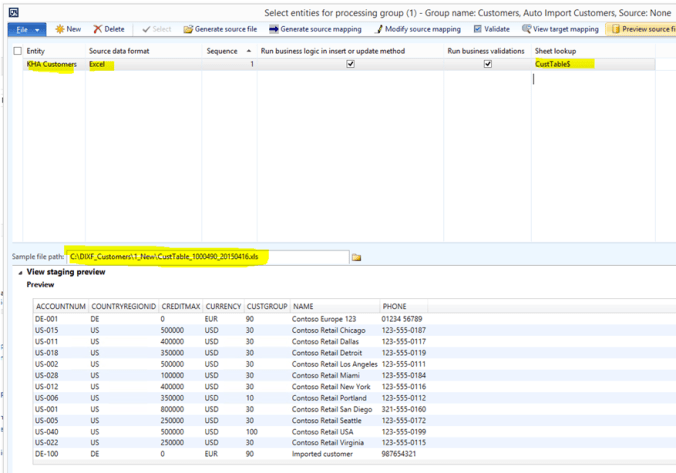
– What’s the ABSOLUTE MINIMUM solution you need to put on the market to solve the problem? BUILD THAT and validate you have a solution that works.

Stop making solutions so hard, complex, and confusing. We are wasting investment dollars that instead could be used for marketing and scaling our much simpler (and cheaper to build) alternative solutions.

Create solutions that only require a few weeks of implementation time, and that is so easy to use that it can be trained in minutes.

“Simplicity is the ultimate sophistication.”
Leonardo da Vinci

WMS and voice pick with Google Glasses (Sci-Fi)

With the WMS and voice pick for Google Glasses you can revolutionize your supply chain and warehouse processes. Google glasses will

  • You will have both hands free
  • Directly connected to your ERP system
  • Support real time transactions like receiving, picking, counting and shipping
  • Guide the warehouse worker in all the processes both by voice and by visual graphics
  • Voice pick, scan barcodes using the built-in camera or use Bluetooth connected barcode scanner
  • Connect directly with vendors and customers when working with issues or questions

The only problem is that such a solution does not exist. The google glasses are still in the experimental phase, and it will still be a while before it is available as a commercial consumer product. But Google Glasses has been opened for commercial actors to create such applications and possibilities.

Who have the willingness and the resources to create such a solution ?

Dynamics AX 2012: At your service!

Dynamics AX Service management can be used for service agreements and service subscriptions, handle service orders and customer inquiries, and to manage and analyze the delivery of services to customers. You can use service agreements to define the resources that are used in a typical service visit. You can also use service agreements to view how those resources are invoiced to the customer. A service agreement can also include a service level agreement that specifies standard response times, and offers tools to record the actual time.

What I wanted was to see how much we could simplify the registration of needed repair materials and service hours.

The Dynamics AX service orders is tightly integrated to the project module, and sometimes our customers react that they feel the registration of materials in a warehouse scenario is a bit confusing. The reason for this, is that there are two ways of registering used items on a service order.

  1. You can key in the material in the service order (As you can see in the picture above), and then post it. Then the items will be SOLD from the specified location using a project item journal. There are now way to implement proper warehouse processes in this scenario.
  2. You can create item requirements, that essential is a sales order line, and so support warehouse processes. The drawback, it that the lines posted in the item requirement isn’t visible on the service order screen.

So I decided to create a very easy to use Data Collection Studio application, that allows a more simpler en easy to use approach, and that it closed to the expected process flow.

In this service order I need some items that is not on the list, so I scan item 100, and I need 2 pcs

On the service order, the new line is added, but is marked as “posted” :

But this is “just-for-show” to create a better visibility for the service operator.

The real transaction is located on the item requirements:

The next stage is packingslip update or invoicing.

By this added functionality it means that we have a very simplified way for allowing service personnel into the warehouse, and still maintaining 100% inventory accuracy.

I end this blogpost with a picture from WMD warehouse:

AX 2012: Future item reservation requirements

Those of us that have completed large scale Dynamics AX warehouse implementations knows the importance of having a control of item reservation. Dynamics AX 2012 supports several algorithms for reserving the right goods to a sales order(or any other issue transaction).

We can mainly classify the reservations into the following reservation types :

  1. Reserved ordered
  2. Reserved physicalΒ Β Β Β 

We can also them into categories:

  1. Normal” reservation
  2. FEFO and batch expiry date reservation
  3. Shipment reservation

But if you start looking deeper into the algorithms in AX 2012 R2 that actually performs the reservation, it is more or less located in the class InventUpd_Reservation.

The reservation in AX 2012 is pretty much user based, meaning that either a user/batch runs a process, and the reservation is done. There are a few exceptions where Dynamics AX 2012 will physically reserve goods when they arrive. But this relates to transactions that is already reserved ordered, or does have an inventory marking.

The way Dynamics AX 2012 is reserving, works in most cases OK, but there are a bit more functionality we would love to have. And here is my “wish list”:

  1. Reservation hierarchy. This means that when you create the sales order/transaction you may reserve on site/warehouse level. The customers order is physically reserved, but the system has not yet decided from where it actually should be picked from. When the picking route is created, then the reservation is sharpened down to more a detailed reservation specifying like location. At the TECH2014 it was shown that this will be there in future releases for a one-level reservation hierarchy. What I would love to see, is more levels, like 2 or even 3 levels. Meaning that you may start with site level. Then maybe after master planning or some other process, the reservation is sharpened down to warehouse. When the picking route is created then it could further be sharpened down to location or batch. In short, we want more reservation levels, because this gives us control and flexibility.

    Β 

  2. Reservation period. The concept of reservation period means that you can control WHEN the reservation should happen. If you create a sales order with delivery date 6 months ahead, you don’t want to “lock the stock”, and waiting for the delivery date. If the items, let’s say only have 14 days lead time, why not have an engine that performs the reservation at the right time. And even more importantly, if a customer moves his requested delivery date, then the reservation engine should be able to “lift” the reservation back to “reserved ordered” or even back to “ordered”.

    Β 

    Β 

  3. Order Reservation sequence. We often know the concept of “first ordered – first served”. Some customers signals their demand and orders early to secure that they get the goods on their requested date. Then you have “bad” customers that needs the goods today, and just orders right when he needs it! The way Dynamics AX works, is that it does not give any customers any priority other than the delivery date. Meaning that you very easily could end up in a situation where the “good” customer could end up in a situation where the “bad” customer actually managed to physically reserve the limited goods. We need mechanism that would allow the “good customer” to be prioritized when limited goods should be reserved. A “ATP-sequence ID” should solve this issue, and making sure that customers that orders early and gives good visibility of their demand is more secure in getting their items on time.

    Β 

  4. Reservation Location sequence

    In a warehouse we can have inbound, buffer, picking and outbound locations. But we can also have fast and slow locations. Items can also exists in multiple locations to prevent hotspot areas, or certain area is for different sales channels (like one for retail stores, one for eCommerce etc) It would be lovely to have a better control from what location should be prioritized depending on some criteria. Also when building up the picking route I could decide from witch location would be best to take the goods out from. I know from TECH2014 that the concept of location directives will be introduced in future releases, and we are looking forward to learn more about this.

Looking forward to see what the future brings. I have a feeling that 50% of my wishes will come true in AX 2012 R3.

AX 2012 Consignor solution available on CodePlex

The tool can be downloaded at http://ax2012consignor.codeplex.com/

There are some additional information that needs to be addressed. So here is my “What does the FAQ’s say” ?

Question

Answer

What is the Consignor solution?

The Consignor integration tool made available for Dynamics AX is a multipurpose tool for creating, exporting and importing CSV-files, XML-files or Excel spreadsheets.

Is it a generic solution?

The tool should be regarded as a generic tool, but as the name suggest, it does have a ready to use integration to Consignor. CONSIGNOR is a system designed for easy and efficient printing of labels, to address and send goods which are to be handled and delivered by a range of carriers, for example Posten Norge, Bring, Schenker, Tollpost, DSV, DHL, Nor Lines, Ramberg, and many more who use EDI data. CONSIGNOR may also be used to print labels for carriers who are not set up to handle EDI data. For an updated list of EDI supported carriers, please see Consignors website http://www.edi-soft.com/.

Who can use the tool?

The tool has been specifically created to enable end-users and business consultants to perform data export and import, without knowing how do develop in Dynamics AX and X++. Creating an export/import definition can be done in a few minutes.

Can this replace my other integration solutions?

No. This tool has a specific purpose to easily extract data from Dynamics AX. It is not built to replace or compete with any other integration solution.

How much does it cost?

Nothing it’s free at CodePlex. But if you can add more functionality to it, it is expected that you share with the community.

Is it fast?

No. It’s is not very fast. When exporting to Excel it is capable of a 15-20 lines per second. Exporting to XML or CSV is a bit faster.

Can it import data?

Yes it can import data from. But this is a alfa release, meaning that more testing is required. The logics for evaluating the import must in many cases be developed in separate classes to perform as needed.

How can I get help?

On CodePlex there are some documentation. But you can also add questions and report issues.

Is it difficult to install?

No. For now, the solution is exported as a XPO with a Zero footprint in AX. Later we will add it as a model. The current build is done with AX 2012 R2 CU7. Please remember to check the “issue list” before you install.

Can I have a demo?

Yes. Nice people can have a demo. Just ask meJ

Β 

Happy DAX’ing J

Import/Export: Reinventing the wheel

I was suppose to create a small tool for simplifying integrations to freight forwarders, but I ended up with an easy to use and zero footprint import/export solution. I wanted to create a solution that was easy to use for end-customers and business consultants, enabling them to very easily create CSV, XML and Excel files.

The Consignor integration tool made available for Dynamics AX is a multipurpose tool for creating, exporting and importing CSV-files, XML-files or Excel spreadsheets. The tool has been specifically created to enable end-users and business consultants to perform data export and import, without knowing how do develop in Dynamics AX and X++. The feedback I have received colleagues is very good, and it works as a basis for the upcoming consignor integration.

  1. How to use the consignor integration

    For an end user it is very easy to use the tool. There are two approaches to start the export.

  2. Export file using short-cut

    In Dynamics AX it is possible to short-cuts. For the Consignor, this short-cut is CTRL-Z. Then the following menu will be visible, if there exists a defined consignor format.


    Here the user can select a predefined format. If a Excel format is selected, then Excel will be opened and filled in. Also if XML or CSV is selected, a file containing the defined format will be opened.


    Export file using Menu

    It is also possible to create menu buttons to start the export, and this require a small “drag-and-drop” of a menu item to the form you want to have the consignor integration activated on.


    How to setup an integration

    The consignor integration setup is located under system administrationΓ periodic, and consists of two menu items.

    Consignor menu

    In the consignor message types, the definition of the integration is setup.

    The consignor messages is all logged messages, when this are enabled for an integration.

    Consignor message types

    The consignor message types, it the form that is used to defines integrations. The form contains several settings, and in this chapter all fields are described.


    Message file details

    Field Description
    Message type Unique identifier of the integration. This is the name that the user will select, when selecting an integration type.
    Name Name of the integration type
    Note A small note can be added. Use this to log changes made to the integration.
    Approved Select if the integration is approved. Only approved integrations can be selected by the user. Also, when approved, the integration cannot be changed
    Include column names When exporting to a CSV file, the first line can contain the fieldnames. For Excel and XML this parameter have no effect.
    Log message To log all messages, enable this parameter.
    Open file After a file has been exported, the consignor integration can open the file. CSV files will normally be opened in Excel, and XML will be opened in internet explorer. But it’s the windows file association that decides when program to use when opening the file.
    Import/Export Define if the definition is an export, or an import. In the initial release, import is only supported using CSV files. But this will be changed in future releases.
    File type Select the file type of the export/import. The following format are available: Comma Separated File(CSV), XML and Excel.
    File path File path where the export files will be exported, and where files will be imported from.
    Archive file path When importing a file, from the “file path”, the file can be moved to the “Archive file path”. The reason for this, is because when importing files, the import batch-job can read a folder, and fetch all files that is dropped into this folder.

    Message datasource setup

    Field Description
    Source Class It is possible to select a predefined class, where all the fields have been setup. This simplifies creating integrations. The source class also provides support for more complex integrations that require coding to perform. When a source class is selected, the Main table is also automatically given. The field is not mandatory. For a detailed, list of available source classes se the appendix 1 for source classes.
    Main Table identifier All integration need to have a main table identifier. This is used to help the selection of what integrations that can be used, based on the data when the integration is started. If the user is on the customer form, then only integrations that have the customer table defined in the Main Table Identifier can be selected.
    Query setup The consignor integration supports quite complex data structures, where information is fetched from different tables, and display methods. The query will use available relations to present what can be associated with the main table. Right click on the data source to select what tables you want to add. Both n:1 and 1:n relations is supported, but in a 1:n relation, only the first record in the applied relation will be used in the integration
    Button:Criteria The criteria button is used to simplify the consignor message type selection. If the user have several integrations for different customers, then it is possible to define a selection query, so that the correct integration is presented to the user.
    Button:Reset Resets the query, leaving only the main table left.

    Message field setup

    Buttons Description
    Add a new field to the consignor integration definition
    Remove the selected fields from the integration
    This button will create all the fields for the integration, based on the source class.
    This button will create all the fields, based on the query that is associated with the integration.
    Renumber will renumber the fields, so that no fields have the same number. The field field will get the value 1, and so on.
    Multi select fields, and activate/deactivate the fields.
    Field Description
    Field ID This is the name of the field. When manually creating a integration, it will be the column name, or the XML tag identifier. If a source class is selected, normally the fieldname is automatically provided.
    Type The field type can be a database field, Class method, display method or a free text. Selecting Field means that the value is fetched from the associated table and field.
    Class method, means that the value is fetched/calculated in the associated source class. Display method, means that the value is fetched from a table display method.

    Free Text means that the values is defined in the default value field.

    Table Tables means the table where the value is selected from. Since the data source can be a query, there can be several tables to select data from.
    Field This is the field from the selected table. If the type is a display method, then the name of the display method can be selected here. For Class methods, it is not necessary to select a field. But when importing data, the data will always be placed in the field defined.
    Default value When exporting or importing data, and the source is missing a value, then the default text will be used.
    Description Just a textual description of the field. By default the text here is fetched from the help field in the extended data type.
    Active Only active fields will be imported/exported. Fields that is not active will be filtered away on approved messages.
    Field number The field number defines the sequence that the fields will be defined in a file. In a CSV file, field number 1 will be first, followed by 2. The field number can be defined manually, or automatically by using the “renumber” button. The field number can also be moved up/down by using the “up/Down” buttons.
    Unique index field This field indicates will this field should be regarded as a unique index field. When importing data, sometimes we want records to be updated instead of being inserted. To find the associated record to update, the Consignor integration will use all “unique index fields” to find the record to be updated.
    Mandatory Fields can be defined as mandatory. This means, that when importing, this field needs to be filled in.

    Export format setup

    The export format is used to defined if the “export dialog” should be presented to the user.

    Field Description
    Worker Name of the worker
    Show dialog Indicates if the “export dialog” should be presented to the user.

    Other menu items

    In the top of the form, there are some more buttons.

    Button Description
    Create a new integration
    Delete an integration
    Shows logged messages
    Manually export data, using a query window
    Import messages by selecting a file, or by selecting a path to fetch all the files from. The import can also be set in batch, and can periodically be executed to import the files.
    To improve performance, the consignor integration does a lot of caching of export/import definition. When changing on an existing integration, the cache should be reset, by clicking on this button.

    Consignor messages

    All consignor import/exports can be logged, so that the exported/imported values is documented. There is a small performance penalty on logging messages.

    Field Description
    Message A unique message ID
    Message type Type of the message
    Processing date Date the message was imported/exported
    Worker Name of the worker that performed the import/export
    Import/Export Import/export type
    Filename Name of the file that has been exported/imported.

    Field values

    In the field values, all the field values are presented.

    Field Description
    Field ID Name of the field. This is used on column name, or in a XML tag.
    Field number The field number that is used
    Field value Value of the field
    Description Description of the field
    Multi line Field value In the bottom there is also a field that shows a multiline version of the value. Fields like addresses is often multiline, and will be correctly represented here.

    I hope to release the tool to CodePlex in the beginning of 2014.

    Happy DAXing J